MockServer
Stop testing against fragile, unavailable dependencies. Mock, record and proxy any API so your tests are fast, isolated and deterministic.
HTTP/1.1, HTTP/2, HTTP/3, HTTPS & gRPC — with a built-in MCP server so AI assistants can drive it too.




Getting Started
MockServer is a single, self-hosted tool that mocks and proxies the services your application depends on, so you can develop and test against realistic, controllable behaviour instead of fragile real dependencies. It is free and open-source, runs anywhere, and needs no SaaS account.
Why use MockServer?
- Isolate the system-under-test — replace real dependencies so tests fail only on genuine bugs, not on network flakes or redeployed services.
- Build against APIs that don't exist yet — mock a service from its contract so teams can work in parallel before it is ready.
- Test resilience with chaos — inject latency, errors, dropped connections and malformed responses to prove your system survives failure.
- Record and debug live traffic — proxy real requests, replay them, and pause traffic at interactive breakpoints to inspect and modify it.
To get started see the guide for mocking, proxying, connecting an AI assistant via MCP, or the code examples. The fastest way to try it — run MockServer with a single command:
docker run -d --rm -p 1080:1080 mockserver/mockserverYour first mock in 30 seconds
Once MockServer is running, create an expectation and call it:
# 1. Create an expectation — return "Hello" for GET /hello
curl -s -X PUT http://localhost:1080/mockserver/expectation \
  -H "Content-Type: application/json" \
  -d '{
    "httpRequest":  { "method": "GET", "path": "/hello" },
    "httpResponse": { "statusCode": 200, "body": "Hello from MockServer!" }
  }'

# 2. Call the mock
curl http://localhost:1080/hello
# Hello from MockServer!
That's it. Read the Getting Started guide to learn how to match on headers, body, query parameters, and more, and how to verify what your code sent.
Quick links by use case
| I want to… | Start here |
|---|---|
| Write unit tests for a REST service | Getting Started |
| Write Java / JUnit tests with Testcontainers | MockServer & Testcontainers |
| Record and replay real traffic | Record and Replay |
| Generate mocks from an OpenAPI / Swagger spec | Using OpenAPI |
| Mock a GraphQL API | GraphQL Mocking |
| Serve HTTPS / TLS transparently | HTTPS & TLS |
| Test an AI application that calls an LLM | LLM Response Mocking |
| Cut my LLM / inference bill | AI Agent Optimisation |
| Inject chaos / test resilience | Chaos Testing |
| Run a load / performance test against an API | Load Injection |
| Assert which requests my code sent | Verification |
| Mock a gRPC service | gRPC Mocking |
| Debug live traffic with breakpoints | Interactive Breakpoints & Proxying |
| Model multi-step API flows | Stateful Scenarios |
| Import a Postman collection or HAR file | Importing Expectations |
What is MockServer
One tool plays three roles for any HTTP, HTTPS or gRPC service you depend on:
Mock
Return realistic, controllable responses for any request so your tests stay fast, isolated and deterministic.
Proxy
Sit in front of a real backend to record and replay traffic, inject chaos, or pause requests at breakpoints.
Verify
Assert exactly which requests your system-under-test sent, as part of a test, on mocked or proxied traffic.
For any system you integrate with via HTTP or HTTPS MockServer can be used as:
- a mock configured to return specific responses for different requests
- a proxy recording and optionally modifying requests and responses
- both a proxy for some requests and a mock for other requests at the same time
- an MCP server that lets AI coding assistants drive the mock and proxy in natural language
Beyond mocking and proxying, the same MockServer instance also lets you:
- verify that expected requests were (or were not) made — as test assertions
- record and replay real traffic to reproduce how a system behaves
- pause and modify requests or responses using breakpoints intercept a matched or proxied request in the dashboard to inspect and modify it (or its response) live, then continue, step, or fail it
- inject chaos and faults introduce chaos as latency, errors, dropped connections & malformed responses — HTTP, gRPC and TCP fault injection, plus Kubernetes and service-mesh chaos
- drive load and performance tests with built-in, declarative Load Scenarios — ramp virtual users or arrival rate, vary data across iterations, and assert SLO verdicts over the generated traffic, with no external load tool required
- template dynamic responses with Velocity, Mustache or JavaScript so a mock can react to the incoming request
- custom matching and response logic via WASM in any language that compiles to WebAssembly
- detect mock drift be warned when a mock no longer matches the real API
- mock LLM and AI-provider APIs including OpenAI, Anthropic, Bedrock & more with realistic token-by-token streaming
It mocks far more than REST, and can build mocks from the contracts you already have:
- mock gRPC services, AsyncAPI message brokers (Kafka, MQTT, AMQP), OAuth2 / OIDC providers, and AI protocols (MCP, A2A, SSE, WebSocket)
- generate mocks and validate traffic directly from an OpenAPI / Swagger specification
- bootstrap mocks by importing recorded traffic from a browser HAR or a Postman collection
- serve HTTP/1.1, HTTP/2 (h2 and h2c) and HTTPS / TLS on one port — auto-detected from each connection — plus SOCKS; experimental HTTP/3 (QUIC) runs on its own separate UDP port
And it is built to inspect, operate and scale:
- a built-in web dashboard to watch live logs, active expectations and recorded traffic, and to drive breakpoints and chaos
- Prometheus metrics and OpenTelemetry tracing for visibility in CI and shared environments
- run via Docker, an executable JAR, Helm / Kubernetes, Testcontainers, or a JVM-less binary — or scale to a shared, clustered centralised deployment for whole teams and CI pipelines
- drive it from clients for Java, JavaScript, Python, Ruby, Go, .NET, Rust and PHP, the command line, or a plain REST API
MockServer is also AI-native: every instance ships a built-in Model Context Protocol (MCP) server at /mockserver/mcp with no extra configuration, and the documentation is published in machine-readable form for LLMs. In practice this means:
- AI assistants (Claude Code, Cursor, Windsurf, Cline, OpenCode) can connect over MCP to create expectations, verify requests, retrieve recorded traffic, and debug mismatches — see MCP tools
- Tools that don't yet speak MCP can fall back to MockServer's OpenAPI spec
- LLMs can retrieve and cite the docs via llms.txt, llms-full.txt, and ai.txt
See AI & MCP Integration below for the full list of AI capabilities.
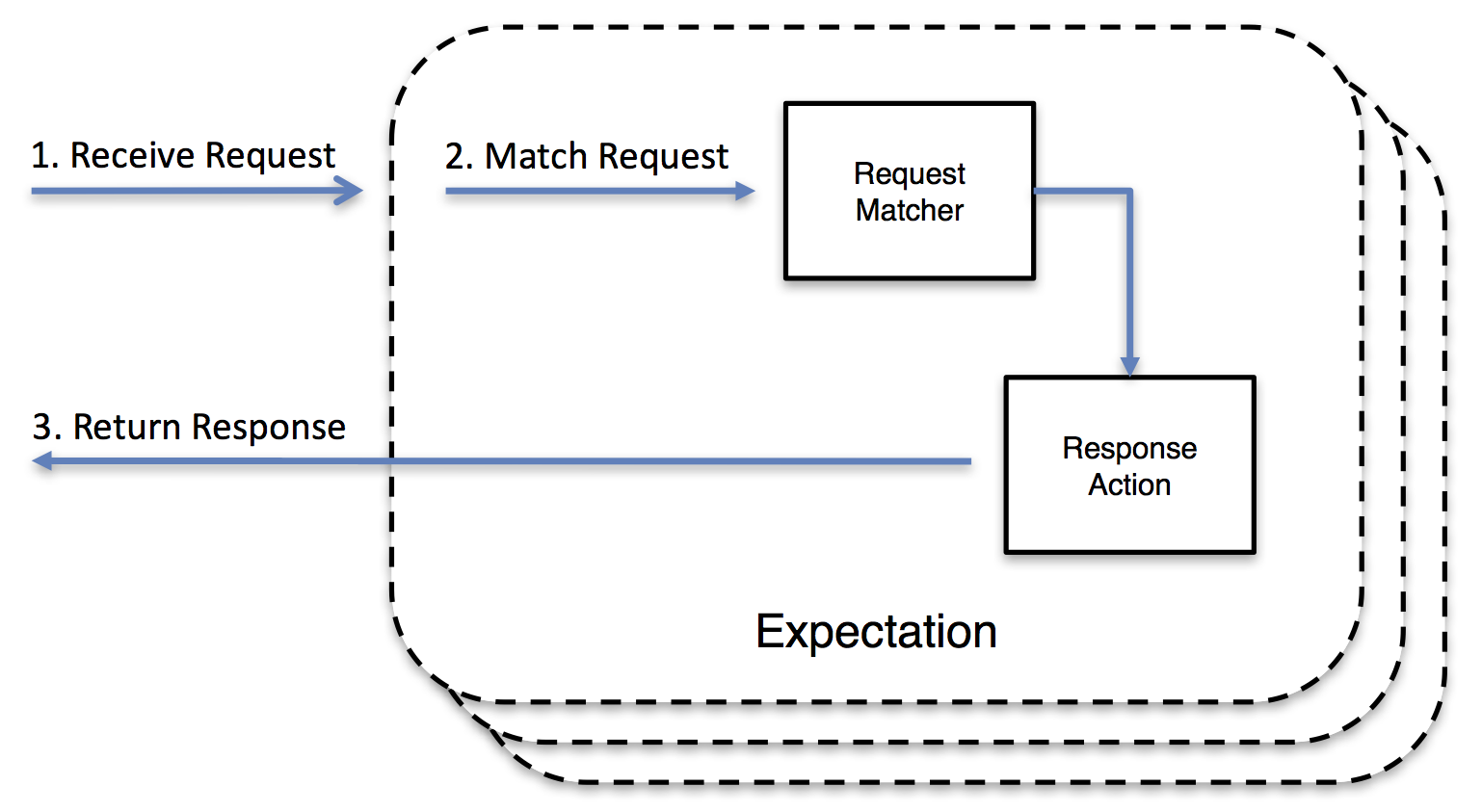
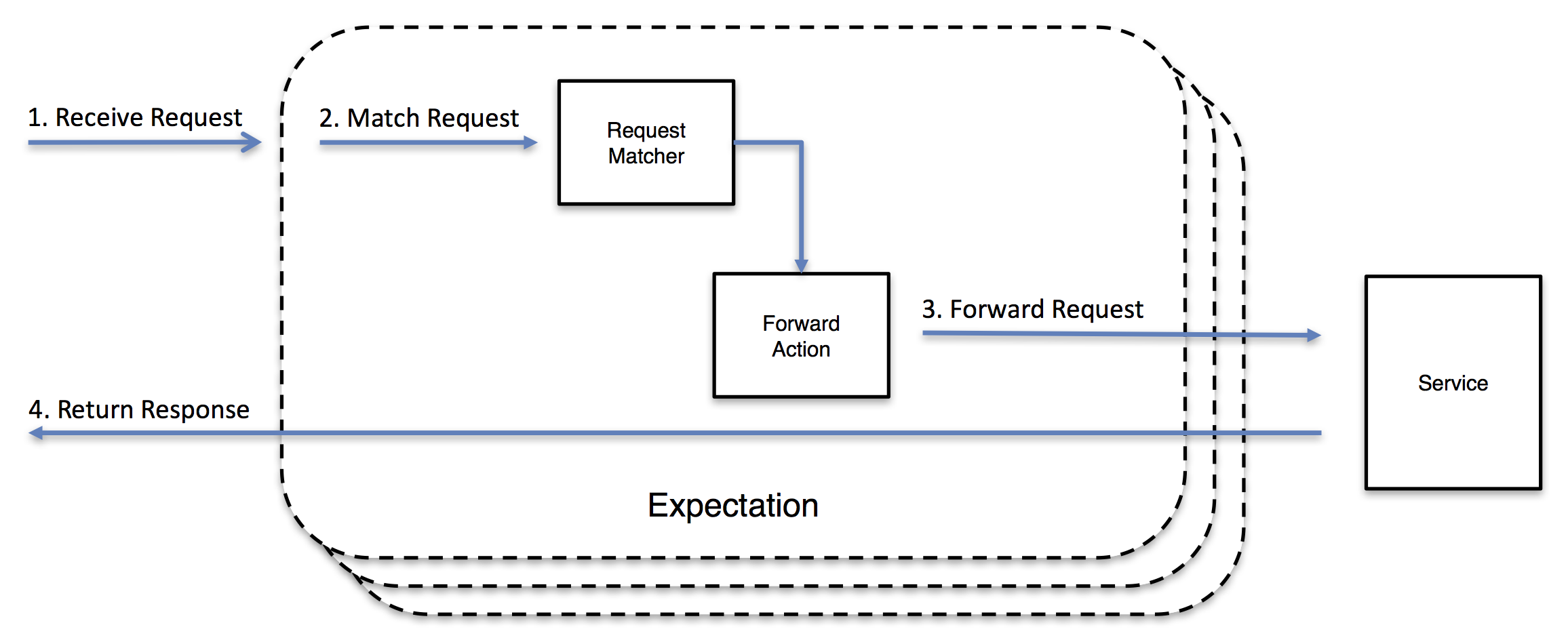
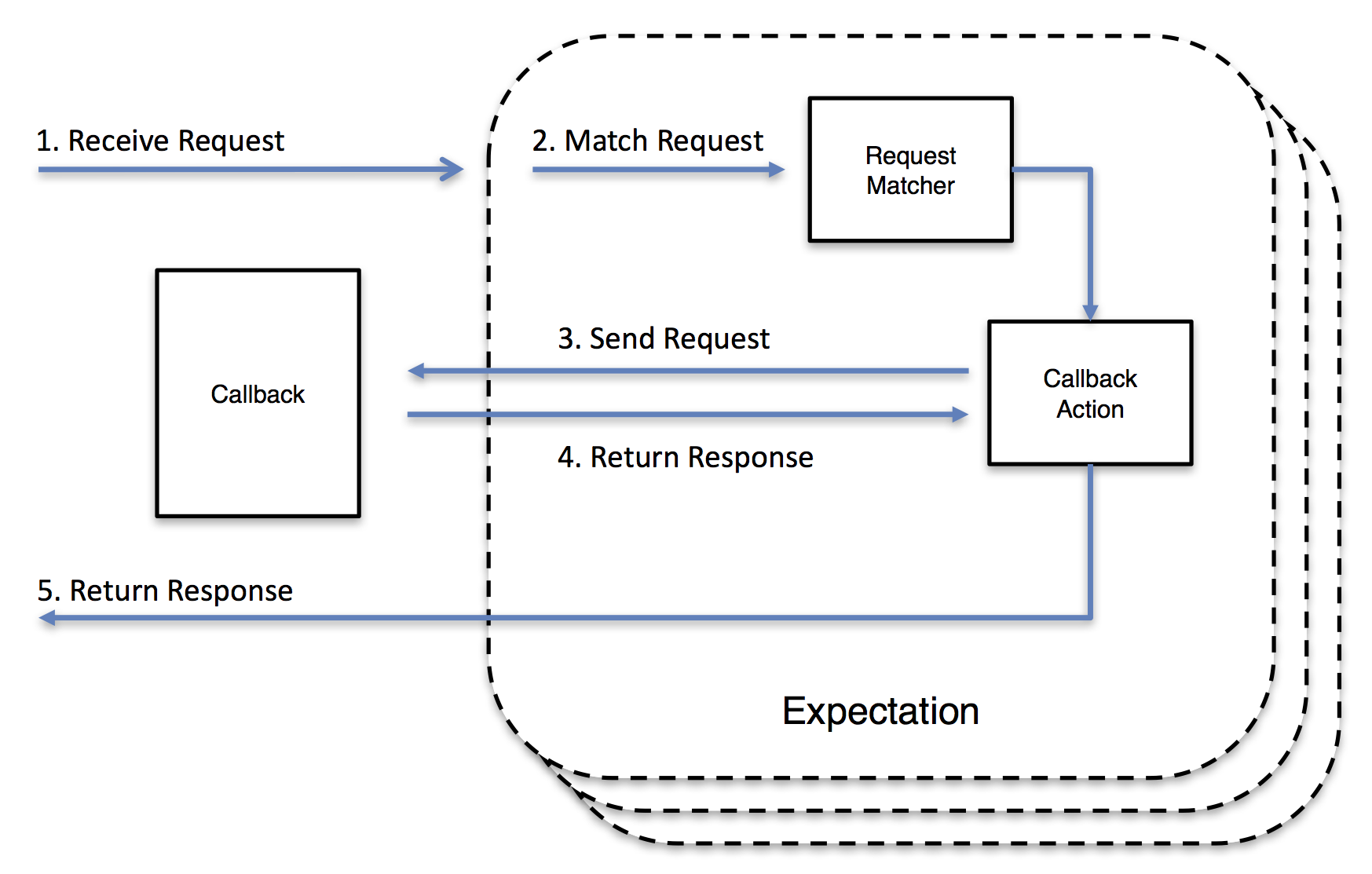
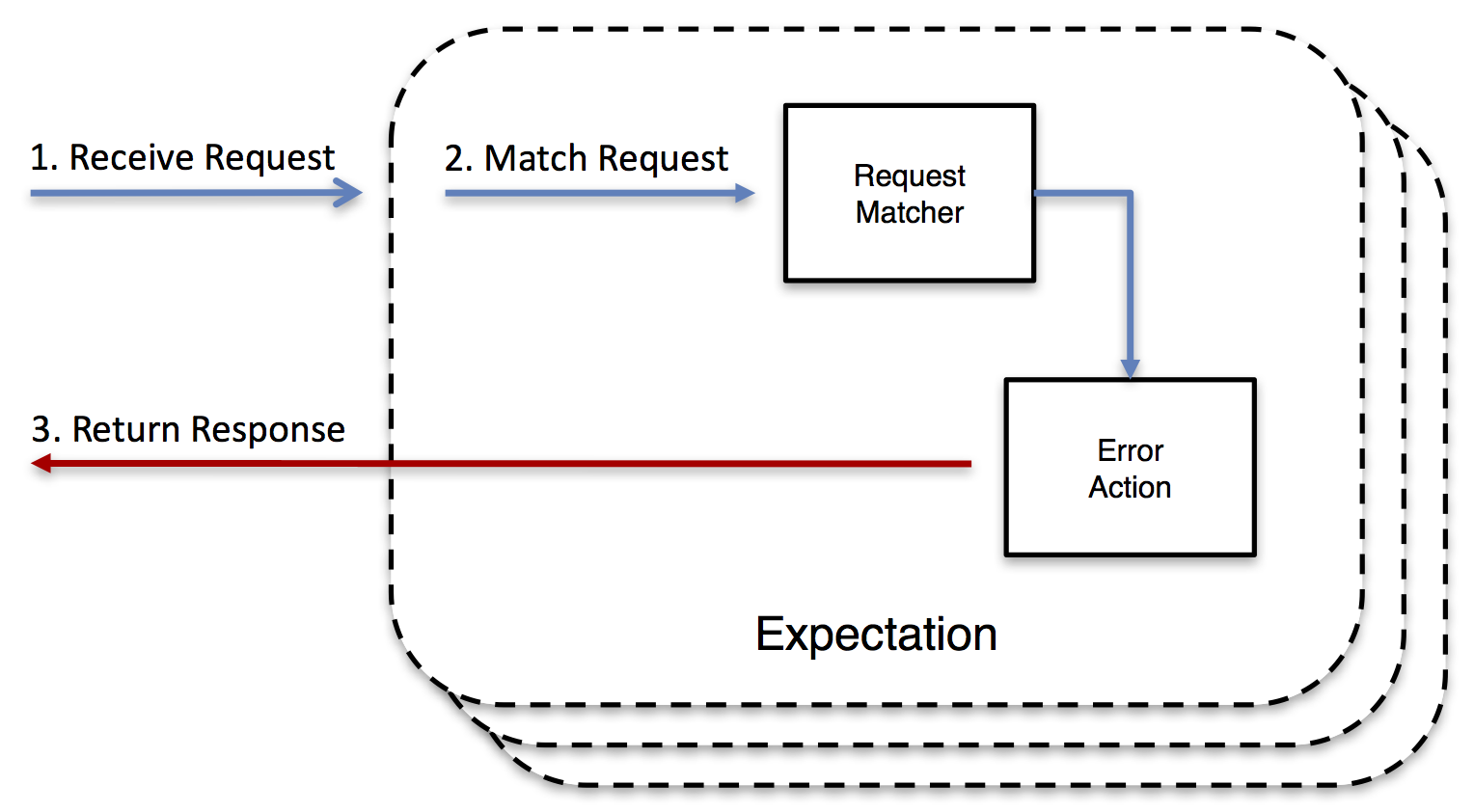
When MockServer receives a request it matches the request against active expectations that have been configured. Then, if no matches are found, it proxies the request if appropriate; otherwise a 404 is returned.
For each request received the following steps happen:
- find matching expectation and perform action
- if no matching expectation proxy request
- if not a proxy request return 404
An expectation defines the action that is taken, for example, a response could be returned.
MockServer supports the follow actions:
-
return a "mock" response when a request matches an expectation; including returning an LLM or AI-provider API (OpenAI, Anthropic, Bedrock, etc) realistic token-by-token streamed responses
-
forward a request when the request matches an expectation; including injecting chaos and faults — latency, error responses, dropped connections and malformed responses
-
execute a callback when a request matches an expectation, allowing the response to be created dynamically
-
return an invalid response or close the connection when a request matches an expectation
-
verify requests have been sent (i.e. as a test assertion)

-
retrieve logs, requests or expectations to help debug
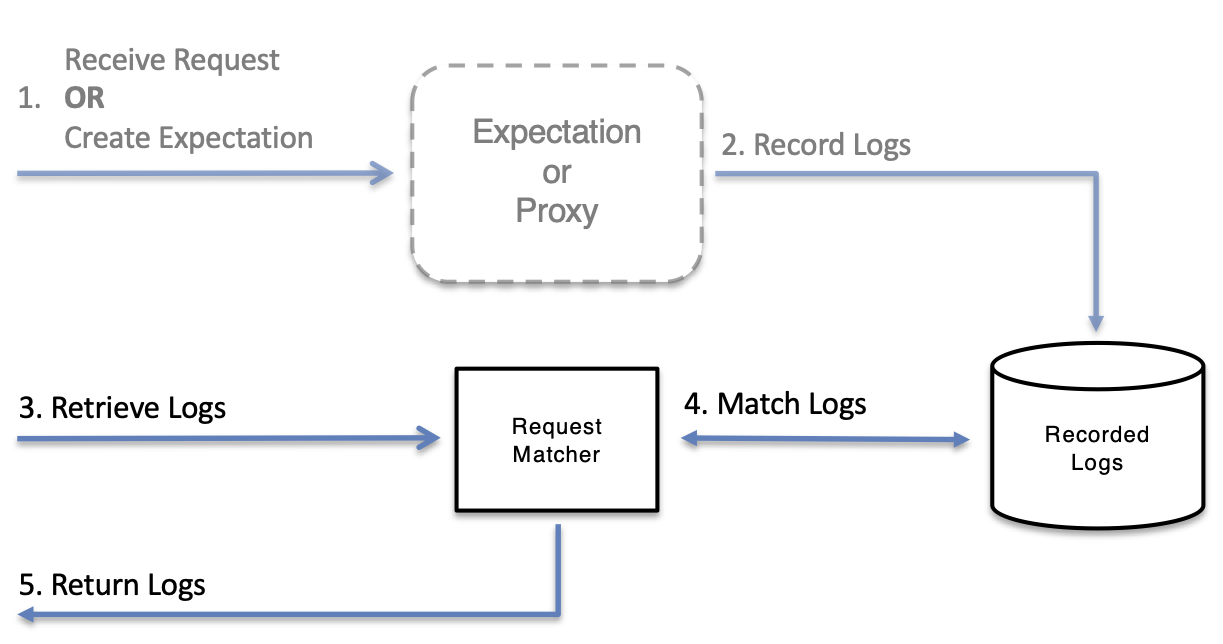
-
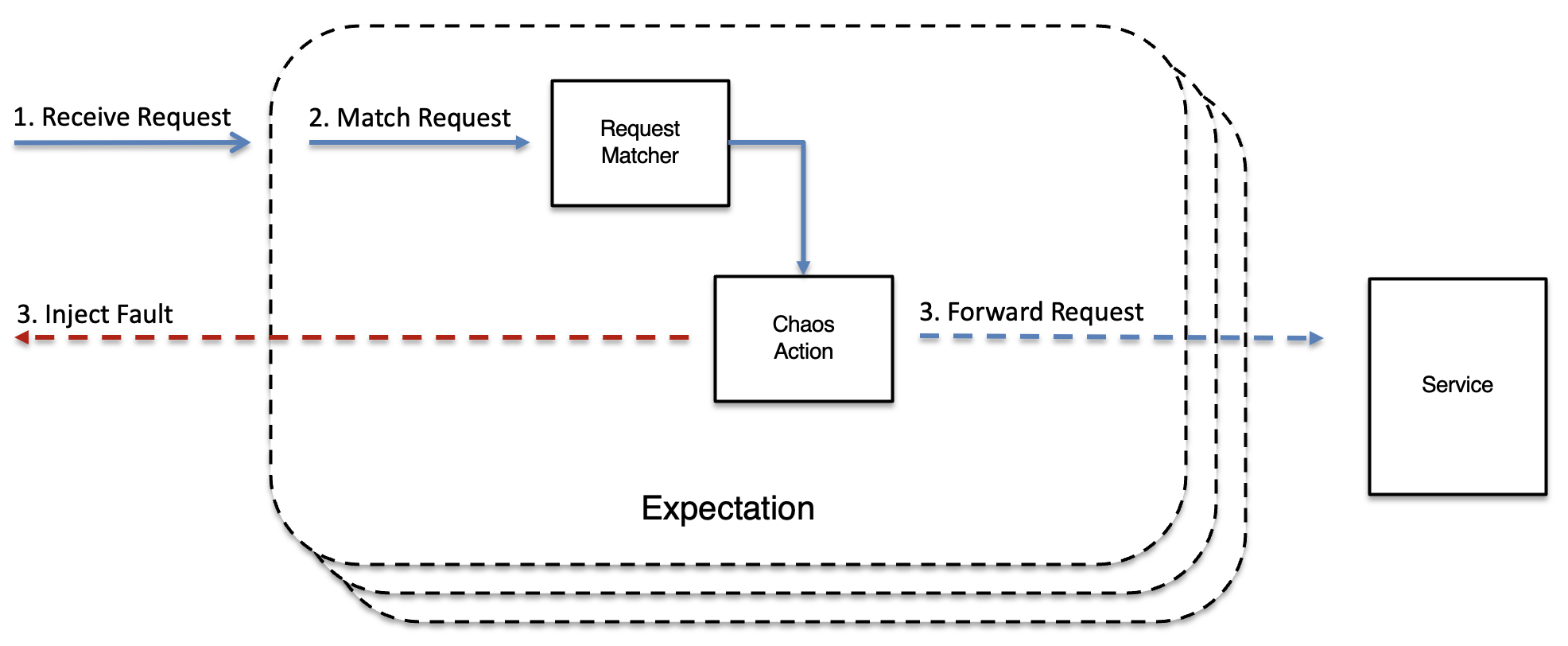
inject chaos and faults — latency, error responses, dropped connections and malformed responses — when a request matches an expectation or is proxied
Chaos engineering & resilience testing
Most testing proves a system works when its dependencies behave. MockServer also lets you prove it survives when they don't. Because the same instance is already in the path of your traffic — as a mock or a proxy — it can deliberately degrade that traffic so failure modes are tested on purpose rather than discovered in production.
MockServer can inject:
- latency — fixed or random delays before a response, to exercise timeouts, retries and back-pressure
- error responses — return 5xx (or any) status codes, or a configurable rate of errors across requests
- dropped & reset connections — close the socket before, during or after the response to simulate network faults
- malformed responses — truncated bodies, bad framing and protocol-level corruption
Faults work for HTTP, gRPC and TCP, on both mocked and proxied traffic, and can be applied per expectation or as a global chaos experiment — including scheduled experiments with an automatic dead-man's-switch halt, and fleet-wide chaos for Kubernetes and service meshes. Live experiments can be started, watched and stopped from the dashboard.
Injecting chaos into proxied / forwarded real traffic — MockServer can sit in front of a real backend and degrade the responses it relays. HTTP-level faults reach proxied traffic through three mechanisms:
- Forwarding expectation with a chaos clause — attach a
chaosblock to anhttpForwardexpectation. The expectation forwards to the real upstream; MockServer applies the chaos profile to the upstream response before returning it to the caller. A catch-all forward expectation (match everything, forward to the real backend, inject faults) is the canonical "misbehaving upstream" pattern. - Service-scoped chaos — register a chaos profile for an upstream host with a single
PUT /mockserver/serviceChaoscall. MockServer applies it to all matched forwards to that host without touching any expectation. An optionalttlMillisauto-reverts the fault after a fixed window. Useful for live-patching a running deployment. - TCP-layer chaos —
PUT /mockserver/tcpChaosregisters connection-level faults (drop, reset, bandwidth throttle, latency) that operate before HTTP is parsed, so they affect all traffic on a connection including proxied responses.
Note: the plain proxy fall-through (requests with no matching expectation) does not itself add HTTP-level chaos — HTTP faults on proxied traffic always flow through a forwarding expectation with a chaos clause or through service-scoped chaos. Connection-level faults flow through TCP chaos.
Proxying with MockServer
MockServer can:
- proxy all requests using any of the following proxying methods:
- Port Forwarding
- Web Proxying (i.e. HTTP proxy)
- HTTPS Tunneling Proxying (using HTTP CONNECT)
- SOCKS Proxying (i.e. dynamic port forwarding)
- verify proxied requests have been sent (i.e. in a test assertion)
- record proxied requests and responses to analyse how a system behaves
- pause proxied requests at breakpoints to inspect and modify the request or response in-flight, before it is forwarded upstream or returned to the client
- inject chaos and faults into proxied traffic — latency, errors, dropped connections — to test how your system copes with a misbehaving upstream
MockServer supports the following proxying techniques:
- Port Forwarding
- all requests are forwarded to a single hostname or IP and port
- to proxy requests the HTTP client should use the hostname and port of MockServer
- Web Proxying (i.e. HTTP proxy)
- each request is forwarded dynamically using its Host header
- to proxy requests the HTTP client should be configured to use an HTTP Proxy
- Secure Web Proxying (i.e. HTTPS tunneling proxying)
- requests are forwarded using a CONNECT request that sets up an HTTP tunnel
- an SSL certificate is auto-generated allowing encrypted HTTPS traffic to be recorded transparently
- to proxy requests the HTTP client should be configured to use an HTTP Proxy
- SOCKS Proxying (i.e. dynamic port forwarding)
- requests are forwarded using a SOCK CONNECT CMD request that established a socket tunnel
- if the traffic is encrypted an SSL certificate is auto-generated allowing SSL traffic to be recorded transparently
- to proxy requests the operating system (or JVM) should be configured to use an HTTP Proxy
- SSL & Certificates
- all SSL traffic is handled transparently by auto-generating an appropriate SSL certificate
- generated certificates use a single MockServer root CA certificate enabling the root certificate to be easily imported
- Port Unification
- to simplify configuration all protocols (i.e. HTTP, HTTPS / TLS, SOCKS, etc) are supported on the same port
- the protocol is detected dynamically by MockServer
- Simultaneous Proxying & Mocking
- if MockServer is being used as a proxy expectations can also be created
- when a request is received it is first matched against active expectations that have been configured
- if an expectation is matched its action will be performed instead of proxying the request
AI & MCP Integration
MockServer is built to be AI-native. A built-in Model Context Protocol (MCP) server lets AI coding assistants drive the mock server in natural language, and an OpenAPI spec provides a fallback for tools that don't yet speak MCP. All documentation, including llms.txt, llms-full.txt, and ai.txt, is structured for retrieval and citation by LLMs.
- MCP Setup — connect Claude Code, Cursor, Windsurf, Cline, or OpenCode to a running MockServer at
http://localhost:1080/mockserver/mcpover the MCP Streamable HTTP transport - MCP Tools Reference — every tool the AI assistant can invoke:
create_expectation,verify_request,retrieve_recorded_requests,retrieve_logs,retrieve_request_responses,debug_request_mismatch, and more - AI-Assisted Debugging — diagnose request mismatches and inspect recorded request/response pairs through an AI assistant
- AI-Assisted Verification — build test assertions using natural language
- AI Traffic Inspection — record outbound traffic and let an AI assistant explain what happened
- LLM Response Mocking — mock OpenAI, Anthropic, Bedrock and other LLM provider APIs, with realistic token-by-token streaming, for fast and deterministic AI-app tests
- AI Agent Optimisation — proxy real LLM traffic, then export a structured optimisation brief (Markdown or JSON) from the dashboard LLM Optimise screen covering both spend reduction and agent design: repeated tokens, deterministic tool calls, bloated tool surfaces, and retry patterns
- AI Protocol Mocking — mock MCP, A2A, SSE and WebSocket AI-protocol servers
- OpenAPI Fallback for AI — use MockServer's OpenAPI spec with AI tools that don't yet support MCP
For example, put MockServer in front of a real provider to record live traffic, then export a one-click optimisation brief:
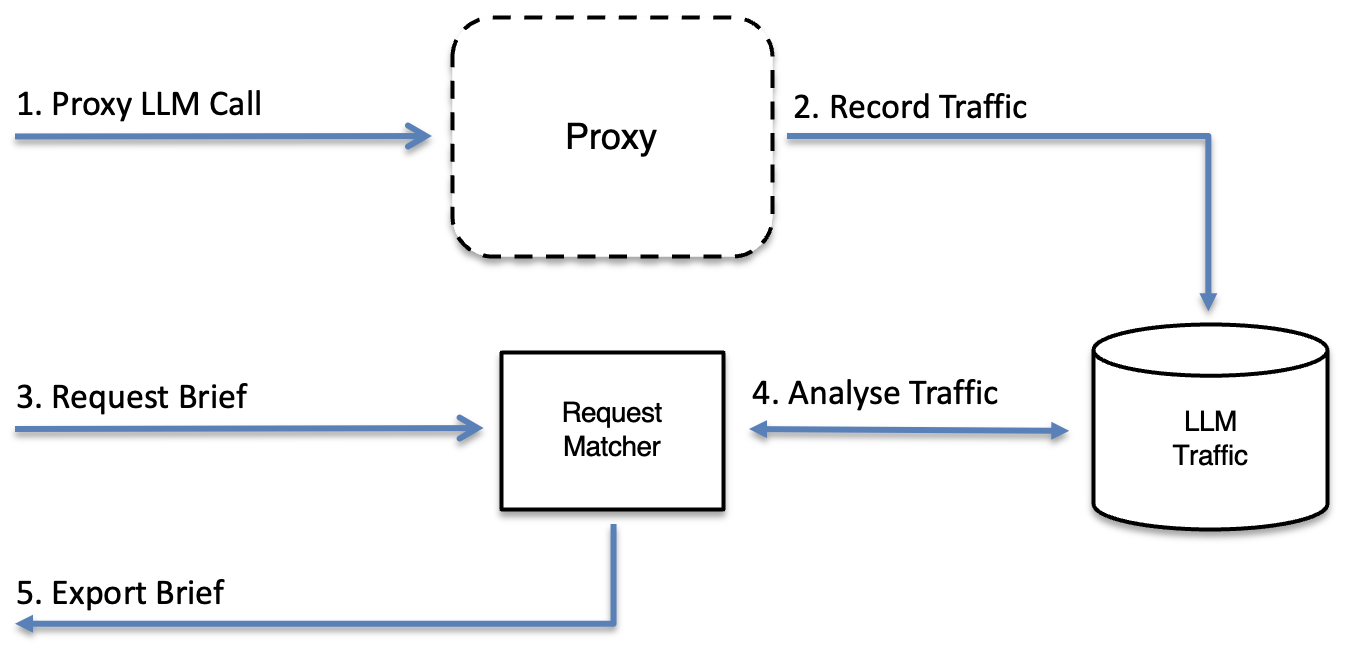
The MCP endpoint requires no extra configuration — start MockServer and the AI surface is on the same port:
docker run -d --rm -p 1080:1080 mockserver/mockserver
# MCP endpoint immediately available at http://localhost:1080/mockserver/mcp
Why use MockServer
MockServer allows you to mock any server or service via HTTP or HTTPS, such as a REST or RPC service.
This is useful in the following scenarios:
- testing
- easily recreate all types of responses for HTTP dependencies such as REST or RPC services to test applications easily and effectively
- isolate the system-under-test to ensure tests run reliably and only fail when there is a genuine bug. It is important only the system-under-test is tested and not its dependencies to avoid tests failing due to irrelevant external changes such as network failure or a server being rebooted / redeployed.
- easily set up mock responses independently for each test to ensure test data is encapsulated with each test. Avoid sharing data between tests that is difficult to manage and maintain and risks tests infecting each other
- create test assertions that verify the requests the system-under-test has sent
- de-coupling development
- start working against a service API before the service is available. If an API or service is not yet fully developed MockServer can mock the API allowing any team who is using the service to start work without being delayed
- isolate development teams during the initial development phases when the APIs / services may be extremely unstable and volatile. Using MockServer allows development work to continue even when an external service fails
- resilience & chaos testing
- verify your system copes when its dependencies misbehave by injecting chaos and faults — latency, errors, dropped connections and malformed responses (HTTP, gRPC and TCP) — so failure modes are tested deliberately rather than discovered in production
- interactive debugging
- set interactive breakpoints to pause a matched or proxied request in the dashboard, inspect and modify the request or response live, then continue — useful for reproducing edge cases and stepping through how the system-under-test reacts
- isolate single service
- during deployment and debugging it is helpful to run a single application or service, or handle a sub-set of requests, on a local machine in debug mode. Using MockServer it is easy to selectively forward requests to a local process running in debug mode, while all other requests are forwarded to the real services, for example running in a QA or UAT environment
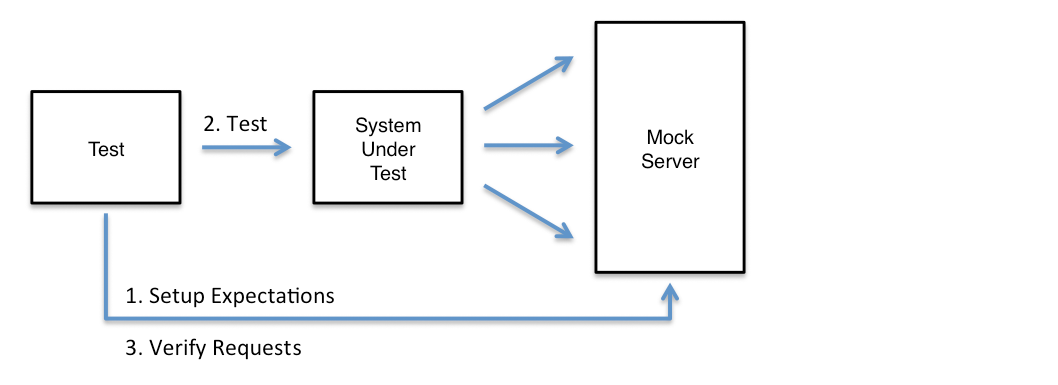
Mocking Dependencies & Verifying Request
Given a system with service dependencies, as follows:
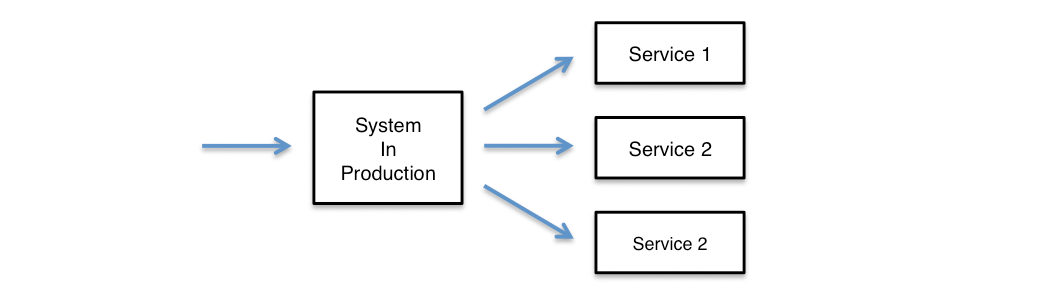
MockServer could be used to mock the service dependencies, as follows:
Isolating Single Service / Application
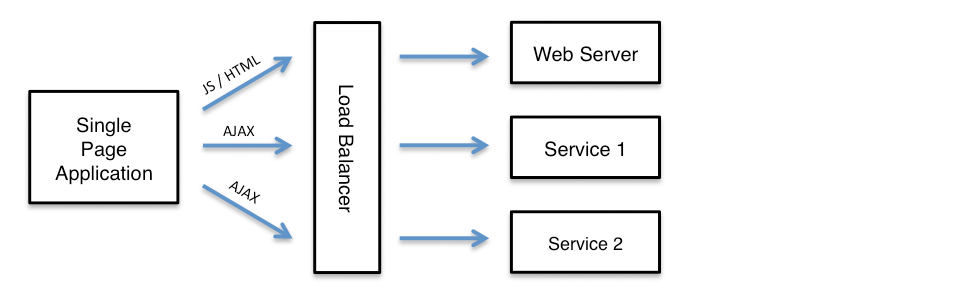
A single page application may load static resources such as HTML, CSS and JavaScript from a web server and also make AJAX calls to one or more separate services, as follows:
To isolate a single AJAX service, for development or debugging, the MockServer can selectively forward specific requests to local instance of the service:
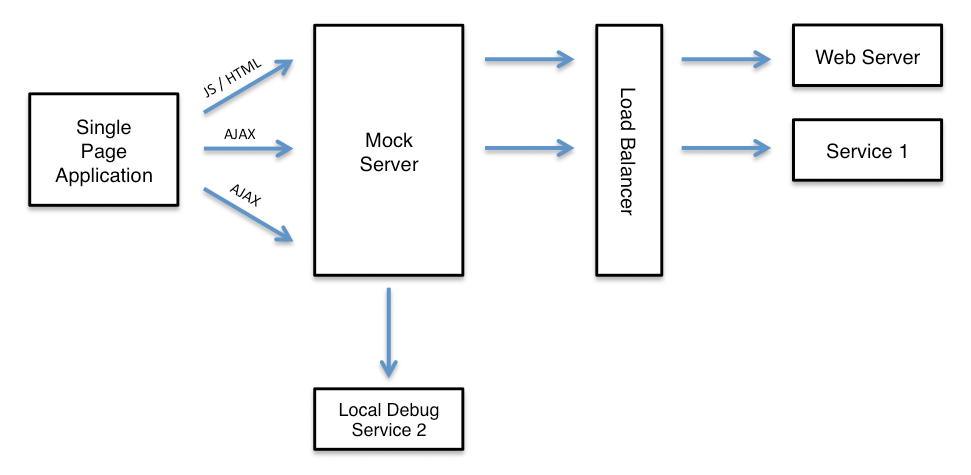
Using MockServer as a content routing load balancer is described in more detail in the section called Isolate Single Service.
Why use MockServer as a proxy
MockServer allows you to record requests from the system-under-test, or to analyse an existing system by recording its outbound requests.
This is useful in the following scenarios:
- testing
- create test assertions that verify the requests the system-under-test has been sent, without needing to mock any requests
- analyse existing system
- record all outbound requests so it is possible to analyse and understand what outbound requests an existing system is making
- debug HTTP interactions
- log all outbound requests so it is possible to visualise all interactions (for example from a browser) to external services. This is particularly important as network analysis tools in browsers such as Chrome do not accurately show all network interactions, such as, favicon.ico requests. In addition, many proxies do not handle encrypted HTTPS traffic, however, MockServer auto-generates certificates using a single MockServer root CA certificate enabling the root certificate to be easily imported
- record & replay
- all recorded requests can be converted into Java code or JSON expectations to simplify the creation of mocks for complex test scenarios
Recording Requests & Analysing Behaviour
MockServer can record all proxied requests, as follows:

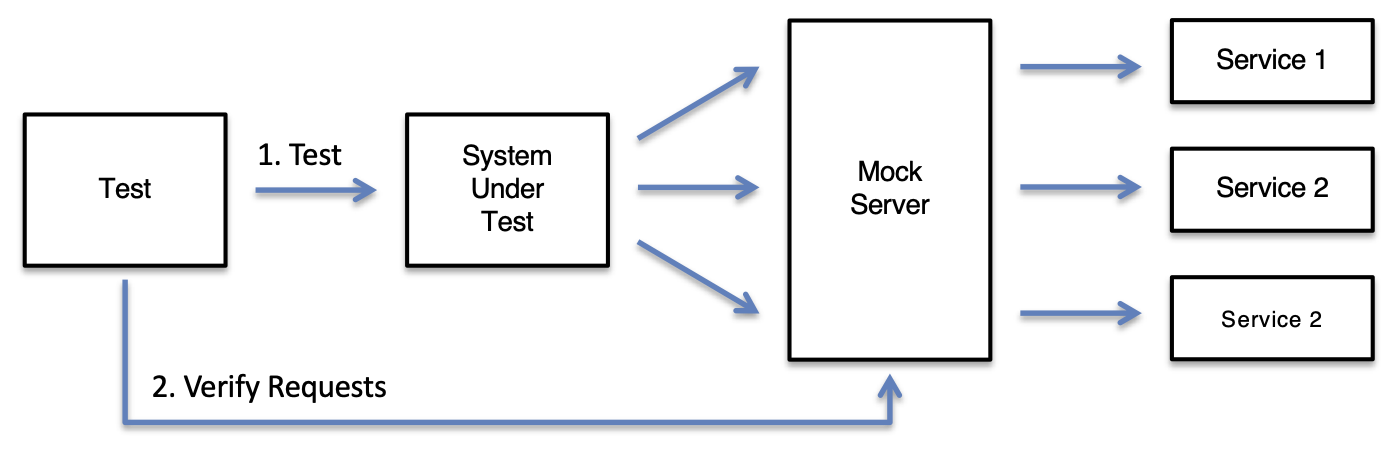
Verifying Requests
MockServer can verify proxied service requests, as follows:
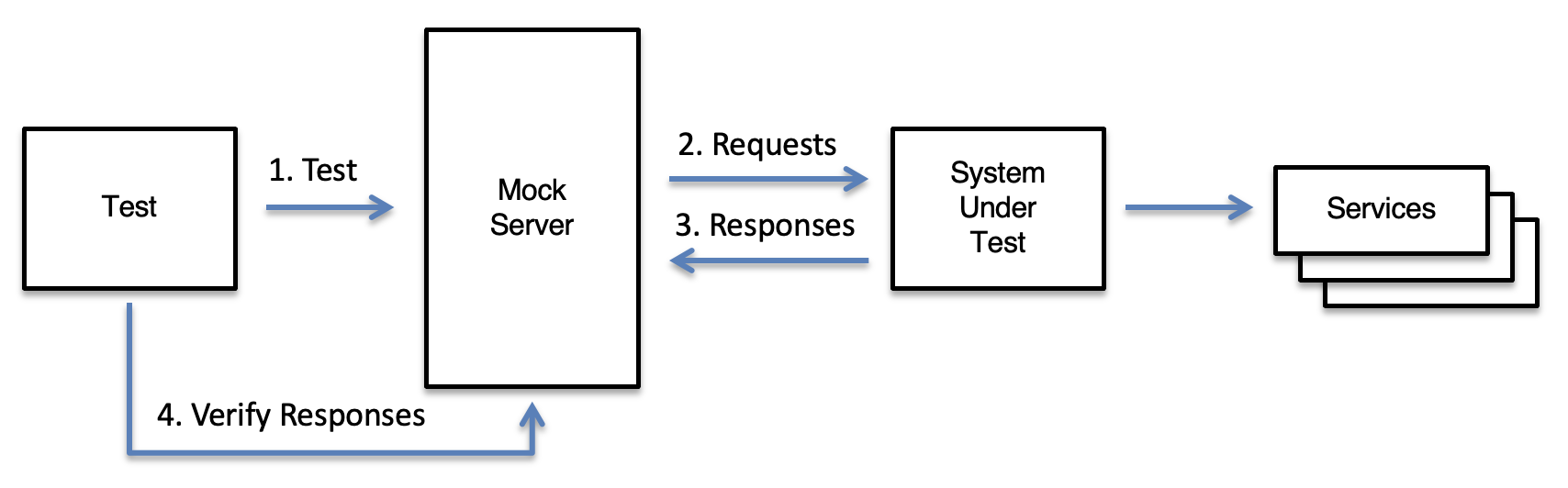
Verifying Responses
MockServer records the responses returned when it proxies requests, so a test can verify the responses received using request matchers:
Developer Documentation
For detailed information about MockServer's internal architecture, infrastructure, build system, and operations, see the Contributing page, which links to comprehensive technical documentation on GitHub.