Configuration
Upgrading to 9.2.0? Three defaults change in this release (templateFailureAsServerError, maxLoggedMatchFailures, matchBinaryExpectationsWhenProxying), each with an opt-out, plus stricter statusCode validation, which has no opt-out — see Upgrading to MockServer 9.2.0 for what changed and how to keep the old behaviour.
Common configurations
Copy-paste one of these blocks as a starting point. All values can be overridden by system properties or environment variables at runtime.
Local development
Low memory footprint, verbose logs, CORS enabled for browser-based testing:
# mockserver.properties — local dev
mockserver.devMode=true
mockserver.logLevel=DEBUG
mockserver.enableCORSForAPI=true
mockserver.enableCORSForAllResponses=true
Or with Docker:
docker run -d --rm -p 1080:1080 \
  -e MOCKSERVER_DEV_MODE=true \
  -e MOCKSERVER_LOG_LEVEL=DEBUG \
  -e MOCKSERVER_ENABLE_CORS_FOR_API=true \
  -e MOCKSERVER_ENABLE_CORS_FOR_ALL_RESPONSES=true \
  mockserver/mockserver
CI (shared, parallel test runs)
Cap memory so multiple MockServer instances can run on the same CI node, load expectations from a JSON file, and reduce log noise:
# mockserver.properties — CI
mockserver.logLevel=WARN
mockserver.maxExpectations=1024
mockserver.maxLogEntries=4096
mockserver.initializationJsonPath=/ci/expectations.json
Production / shared team instance
Higher limits, metrics enabled, CORS off, TLS enforced (supply your own certificates):
# mockserver.properties — production
mockserver.logLevel=INFO
mockserver.maxExpectations=16384
mockserver.maxLogEntries=65536
mockserver.metricsEnabled=true
mockserver.enableCORSForAPI=false
mockserver.enableCORSForAllResponses=false
Top 10 most-changed properties
| Property | Env variable | Default | Why you'd change it |
|---|---|---|---|
| devMode | MOCKSERVER_DEV_MODE | false (JUnit rule/extension: true) | Enable on your laptop to cap memory (1k expectations / 1k log entries) and avoid wasted heap. On by default under the JUnit 4 rule and JUnit 5 extension; set devMode=false or raise maxLogEntries/maxExpectations to override |
| logLevel | MOCKSERVER_LOG_LEVEL | INFO | Set to DEBUG while debugging a mismatch; set to WARN in CI to reduce noise |
| maxExpectations | MOCKSERVER_MAX_EXPECTATIONS | heap-based (up to 15,000) | Lower to reduce memory on constrained hosts; use a power-of-2 to avoid wasted ring-buffer slots |
| maxExpectationsSizeInBytes | MOCKSERVER_MAX_EXPECTATIONS_SIZE_IN_BYTES | 0 (off) | Optional byte budget on the memory stored expectations may hold — useful when you register many large expectations (a JSON request matcher, for example, is parsed into a tree many times the size of the raw JSON, which the maxExpectations count cannot see). Off by default and opt-in, because expectations are state you configured, not observational data; turn it on to add a hard ceiling and MockServer evicts the oldest, lowest-priority expectations once it is reached. A reasonable starting point is about an eighth of the JVM heap. Set back to 0 to disable |
| maxLogEntries | MOCKSERVER_MAX_LOG_ENTRIES | heap-based (up to 250,000) | How many log entries are retained in memory before the oldest are overwritten. Lower for high-throughput or large-body workloads; each HTTP request generates 2–3 log entries |
| maxEventLogSizeInBytes | MOCKSERVER_MAX_EVENT_LOG_SIZE_IN_BYTES | heap-based (a twentieth of the heap ceiling at INFO and WARN, a twelfth at DEBUG and TRACE; the whole log stays at about 1/4 of the heap or less) | Byte budget bounding the request/response body memory the log retains — protection that maxLogEntries cannot give, since a count cap ignores body size. On by default; raise it to keep more history for verify and the dashboard; set to 0 to bound by count only. Whichever bound is hit first evicts |
| ringBufferSize | MOCKSERVER_RING_BUFFER_SIZE | min(maxLogEntries, 16,384) | Size of the in-flight log event buffer (separate from maxLogEntries retention). You rarely need to change this — raising it absorbs short bursts of log events; for drops under sustained load, lower the log level instead, or keep INFO and set maxLoggedMatchFailures. Lower it to save memory on a high-retention, low-throughput workload. Rounded up to a power of 2 |
| maxSocketTimeout | MOCKSERVER_MAX_SOCKET_TIMEOUT | 20,000 ms | Maximum time to wait for the first response byte when forwarding/proxying. Increase when your system-under-test is slow to start responding — e.g. a reasoning LLM backend can take minutes to emit its first token, so a low value 502s a healthy call; decrease to fail fast in unit tests. Every forward is also capped by maxFutureTimeout (default 90 seconds), whatever this is set to, so to wait longer than 90 seconds raise both. Setting it to 0 disables this first-byte timeout; a stalled forward still returns a 502 Bad Gateway after maxFutureTimeout rather than hanging. The same limits apply when MockServer proxies a WebSocket upgrade: if the upstream server does not answer the upgrade in time, the client receives a 502 Bad Gateway and the upstream connection is closed. Also accepted as maxSocketTimeoutInMillis / MOCKSERVER_MAX_SOCKET_TIMEOUT_IN_MILLIS (the same setting under the name used by the Java API and the configuration JSON) |
| enableCORSForAPI | MOCKSERVER_ENABLE_CORS_FOR_API | false | Enable when calling the MockServer REST API from a browser-based test |
| enableCORSForAllResponses | MOCKSERVER_ENABLE_CORS_FOR_ALL_RESPONSES | false | Enable to allow browsers to receive mock responses from a different origin |
| initializationJsonPath | MOCKSERVER_INITIALIZATION_JSON_PATH | (none) | Load a set of expectations from a JSON file when MockServer starts — useful for shared or CI setups |
| metricsEnabled | MOCKSERVER_METRICS_ENABLED | false | Enable to expose Prometheus metrics at /mockserver/metrics |
| proxyRemotePort + proxyRemoteHost | MOCKSERVER_PROXY_REMOTE_PORT | (none) | Forward unmatched requests to a real upstream server, turning MockServer into a selective proxy |
Property Index
Filter the full list of configuration properties. Click a property name to jump to its detail — the accordion expands automatically.
Settings Properties
Note: configuration properties loaded from property files and environment variables are read once at startup and cached. Changes to property files or environment variables after MockServer has started will not take effect. To change configuration at runtime, use the REST API (PUT /mockserver/configuration) or programmatic ConfigurationProperties method calls. System property changes via ConfigurationProperties static methods are read dynamically for properties that support runtime changes (e.g., logLevel).
What you can rely on with PUT /mockserver/configuration: changes take effect for request handling immediately, however MockServer was started — command line, Docker, the Maven plugin, ClientAndServer, the JUnit integrations, or Spring. If the request changes authentication or TLS settings, those switch over all at once — there is no moment where part of the change has applied and part has not. If a request is rejected (for example an invalid certificate path, or a negative value for a setting that must not be negative), it answers 400 and leaves the configuration exactly as it was before the request.
See also: Chaos Testing & Fault Injection for injecting errors, latency, and outages into mocked and proxied responses using declarative chaos profiles.
Properties can be set by:
- java code (highest precedence)
@MockServerTestannotation (per-instanceConfigurationobject)- system property
- property file
- environment variable (lowest precedence)
Each level overrides the levels below it. For example, a system property overrides the same key in a property file, which in turn overrides an environment variable.
When using @MockServerTest, properties prefixed with mockserver. (e.g. mockserver.initializationClass=...) are applied to the per-instance Configuration object, not to global system properties. This makes them safe for parallel test execution.
Some properties need to be set before MockServer starts because they are only read at start-up, for example, nioEventLoopThreadCount.
Other values are read continuously and so can be changed at any time, for example, logLevel.
Programmatic Properties
There are two ways to set properties programmatically, as follows:
- org.mockserver.configuration.ConfigurationProperties
- is JVM global
- exposes static methods
- stores property values in system properties
- org.mockserver.configuration.Configuration
- is unique to each MockServer instance
- can be passed to ClientAndServer, MockServer and MockServerClient classes
- only supports instance methods
- defaults to ConfigurationProperties for unset values
Property File
The property file defaults to filename mockserver.properties in the current working directory of MockServer.
This location of the property file can be changed by setting the mockserver.propertyFile system property or MOCKSERVER_PROPERTY_FILE environment property, for example:
-Dmockserver.propertyFile=/config/mockserver.propertiesA full example / template properties file can be found in github
An limited properties file example is, as follows:
###############################
# MockServer & Proxy Settings #
###############################

# Socket & Port Settings

# socket timeout in milliseconds (default 20000)
mockserver.maxSocketTimeout=20000

# Certificate Generation

# dynamically generated CA key pair (if they don't already exist in specified directory)
mockserver.dynamicallyCreateCertificateAuthorityCertificate=true
# save dynamically generated CA key pair in working directory
mockserver.directoryToSaveDynamicSSLCertificate=.
# certificate domain name (default "localhost")
mockserver.sslCertificateDomainName=localhost
# comma separated list of ip addresses for Subject Alternative Name domain names (default empty list)
mockserver.sslSubjectAlternativeNameDomains=www.example.com,www.another.com
# comma separated list of ip addresses for Subject Alternative Name ips (default empty list)
mockserver.sslSubjectAlternativeNameIps=127.0.0.1
# maximum number of dynamically-discovered SANs the auto-generated certificate will accumulate (default 100)
mockserver.maxSubjectAlternativeNames=100
# number of days the auto-generated leaf certificate is valid for (default 397)
mockserver.sslCertificateLeafValidityInDays=397

# CORS (both default to false; set to true to enable)

# enable CORS for MockServer REST API
mockserver.enableCORSForAPI=true
# enable CORS for all responses
mockserver.enableCORSForAllResponses=true
JSON Configuration File
MockServer also supports configuration via a JSON file. To use a JSON configuration file, set the mockserver.propertyFile system property or MOCKSERVER_PROPERTY_FILE environment variable to a file path ending with .json, for example:
-Dmockserver.propertyFile=/config/mockserver.jsonThe JSON format uses camelCase property names without the mockserver. prefix. An example JSON configuration file:
{
  "logLevel": "INFO",
  "maxSocketTimeout": 120000,
  "dynamicallyCreateCertificateAuthorityCertificate": true,
  "directoryToSaveDynamicSSLCertificate": ".",
  "sslCertificateDomainName": "localhost",
  "sslSubjectAlternativeNameDomains": ["www.example.com", "www.another.com"],
  "sslSubjectAlternativeNameIps": ["127.0.0.1"],
  "maxSubjectAlternativeNames": 100,
  "sslCertificateLeafValidityInDays": 397,
  "enableCORSForAPI": true,
  "enableCORSForAllResponses": true
}
Note: enableCORSForAPI and enableCORSForAllResponses both default to false. The examples above set them to true to illustrate enabling CORS. They govern mocked and proxied responses. Whatever they are set to, MockServer's own API only answers web pages on localhost or served by MockServer itself, unless controlPlaneCorsAllowOrigin names another origin (see which web pages can use MockServer's own API).
The JSON property names are the camelCase equivalents of the mockserver.* property names listed below, with the mockserver. prefix removed. For example, mockserver.maxExpectations becomes maxExpectations in JSON. The complete list of supported JSON keys can be obtained by calling GET /mockserver/configuration, which returns all properties with their current values, except credentials (see below). This output can be saved as a JSON configuration file and reloaded at startup.
Credentials are never read back. Properties that hold a secret — passwords, bearer tokens, API keys, private keys, cloud access keys and connection strings, such as proxyAuthenticationPassword, dataPlaneBearerAuthenticationToken, clusterFanInPeerAuthToken, llmApiKey and blobStoreSecretAccessKey — are write-only: you can set them with PUT /mockserver/configuration, but GET /mockserver/configuration either omits them or returns ***REDACTED*** in their place, so anyone who can read the configuration cannot lift a credential from it. This means the saved output does not contain the credentials MockServer holds, and that taking the output of a GET and sending it straight back with a PUT leaves the credentials MockServer already holds untouched — but also that a configuration file produced this way needs its credentials supplied again (by property, environment variable or a later PUT) when used to configure a fresh instance.
Five properties come back masked rather than omitted, so you can read and edit the rest of the configuration around them. They fall into two groups, and the editing rule differs between them.
Whole-value credentials — replace the entire mask. llmApiKey, prometheusRemoteWriteBearerToken and prometheusRemoteWriteBasicAuthPassword come back as nothing but ***REDACTED***, because the whole value is the secret. To change one, type the new secret on its own in place of the entire ***REDACTED*** — do not type text next to the mask. A value that still contains ***REDACTED*** anywhere in it (for example sk-***REDACTED***) is not a credential MockServer can use, so it is ignored and a warning is logged, leaving the credential already in force unchanged. Sending the mask back untouched is the normal round trip: it changes nothing and logs nothing. Setting the value to an empty string still clears the credential.
Credentials inside a value — leave the masks you are not changing exactly as they came back. prometheusRemoteWriteHeaders is masked one header at a time and llmBackendsConfig one credential-named field at a time (apiKey, token, secret, password and similar), so the headers and backends around the secret stay readable. Sending such a value back containing ***REDACTED*** is the supported edit, not an error: MockServer puts the real secret back into each untouched mask and applies everything you did change. So to rename a header, add one, or change X-Scope-OrgID from tenant-a to tenant-b, edit just that part and leave Api-Key=***REDACTED*** as it is — never paste the real secret back in to work around the mask. To rotate a secret, type the new one on its own in place of that item's whole ***REDACTED***. A mask with text welded onto it (for example Api-Key=***REDACTED***-new, Authorization=Bearer ***REDACTED***) leaves MockServer unable to tell which secret you meant; it then applies none of that value and logs a warning saying so.
Do not copy a ***REDACTED*** out of GET /mockserver/config or --print-config into a PUT body. Those two outputs (and the dashboard's Server Info tab) mask every credential-named property, but most of those properties — proxyAuthenticationPassword, dataPlaneBearerAuthenticationToken, clusterFanInPeerAuthToken, blobStoreSecretAccessKey, privateKeyPath and the rest — are not returned masked by GET /mockserver/configuration at all, so a ***REDACTED*** arriving for one of them did not come from a round trip of the endpoint you are writing to. MockServer will not store it: it keeps the credential it already holds, logs a warning naming the property so a PUT that wrote nothing does not simply answer 200 OK in silence, and applies every other change in the same body normally. Set those properties to their real value, or to an empty value to remove one.
Checking The Configuration In Use
To see the value MockServer is using for every property, and where each value came from (a system property, the properties file, an environment variable, a value set in Java code, or the built-in default), run MockServer with --print-config, call GET /mockserver/config, ask an AI assistant to use the MCP diagnose_config tool, or open the dashboard's Server Info tab. A property at its built-in default shows that default's value; a default worked out from the JVM heap size (such as maxLogEntries) or from another property shows the value worked out now. A property you have changed also shows the built-in default it replaced: --print-config ends its line with (default: ...), GET /mockserver/config and diagnose_config add a default field, and the Server Info tab shows it beside the value. A credential's default is always shown as ***REDACTED***. Credentials (passwords, tokens, API keys, private keys and other secrets) are always shown as ***REDACTED***. To list only what differs from the built-in defaults — the settings you have actually changed — call GET /mockserver/config?nonDefault=true.
Misspelt properties. A mockserver.* system property or properties-file key, or a MOCKSERVER_* environment variable, that is not a known property is ignored. MockServer logs a warning at startup naming it and, when a known property is close enough to be what you meant, names that property in the same form you used, for example:
unrecognised MockServer configuration environment variable [MOCKSERVER_METRICS_ENABLE] - it is not a known configuration property and will be ignored (did you mean MOCKSERVER_METRICS_ENABLED?)A name that differs from a known property only in case or separators, such as mockserver.max_expectations or MOCKSERVER_MAXEXPECTATIONS, is matched too. The same keys appear at the end of --print-config, in GET /mockserver/config (with the source unrecognised), under unrecognised in the MCP diagnose_config tool's answer and under Unrecognised (ignored) in the Server Info tab. Only the name is ever shown, never the value it was set to, so a mistyped credential property does not reveal the credential. A setting MockServer reads only as a JVM system property, such as mockserver.jsonSchemaAllowRemoteRefs, is reported the same way when it is put in the properties file or set as an environment variable, where it has no effect, with the -D form to use instead.
Defaults that change in a future major release. Four groups of defaults are expected to change to safer values in a future major release: forwardProxyBlockPrivateNetworks (to true), localBoundIP (to 127.0.0.1), attemptToProxyIfNoMatchingExpectation (to false) and the HTTP parsing limits maxInitialLineLength, maxHeaderSize and maxChunkSize (to 8192, 16384 and 16384 bytes). While one of these is not set, MockServer logs a warning at startup (once, whichever server in the JVM starts first) saying what will change and how to keep the current behaviour. Set the property to the value you want (either value for the three switches, any value for the limits); that also removes its warning.
Configuration Properties
Logging & Metrics Configuration:
Quick Reference
| Property | Purpose | Default |
|---|---|---|
logLevel | Global minimum log level | INFO |
disableSystemOut | Suppress stdout output | false |
disableLogging | Silence all log output (entries are still recorded) | false |
compactLogFormat | One-line summaries instead of full JSON in stdout | false |
logLevelOverrides | Per-type/category log level overrides | {} |
detailedMatchFailures | Include per-field match failure reasons | true |
maxLoggedMatchFailures | Most "didn't match" log events per request | 50 |
detailedVerificationFailures | Include per-field diff in verification failures | true |
failVerificationOnEvictedLog | Fail never() / atMost verifications when the event log has discarded entries | true |
launchUIForLogLevelDebug | Auto-open UI when log level is DEBUG | false |
metricsEnabled | Prometheus metrics endpoint | false |
slowRequestThresholdMillis | Flag forwarded requests slower than this threshold | 0 (disabled) |
metricsRequestDurationRouteLabels | Add per-HTTP-method labels to the request duration histogram | false |
The the minimum level of logs to record in the event log and to output to system out (if system out log output is not disabled). The lower the log level the more log entries will be captured, particularly at TRACE level logging.
Type: string Default: INFO
Allowed values: TRACE, DEBUG, INFO, WARN, ERROR, OFF (also accepts java.util.logging equivalents: FINEST, FINE, WARNING, SEVERE)
Java Code:
ConfigurationProperties.logLevel(String level)System Property:
-Dmockserver.logLevel=...Environment Variable:
MOCKSERVER_LOG_LEVEL=...Property File:
mockserver.logLevel=...Example:
-Dmockserver.logLevel="DEBUG"Removes the java.util.logging stdout console handler that MockServer installs by default, so MockServer's log lines are no longer printed to the console. It has no effect if you route logging through a different SLF4J binding or your own java.util.logging.config.file, and start-up failures are still printed to stderr. Log entries are still recorded in the in-memory event log exactly as before — verify, retrieveLogMessages and the dashboard's log view are unaffected, and no memory is saved. Use this to quiet a noisy console, for example in CI or when running many tests.
Type: boolean Default: false
Java Code:
ConfigurationProperties.disableSystemOut(boolean disableSystemOut)System Property:
-Dmockserver.disableSystemOut=...Environment Variable:
MOCKSERVER_DISABLE_SYSTEM_OUT=...Property File:
mockserver.disableSystemOut=...Example:
-Dmockserver.disableSystemOut="true"Suppresses log output on every logging backend (the console, and any other appender your SLF4J provider sends to). Like disableSystemOut, this only stops log entries being printed — received-request/response entries are still recorded in the in-memory event log exactly as before, so verify, retrieveLogMessages and the dashboard's log view keep working, and no memory is saved. Use this to quiet all logging output, not to free heap — for that, lower maxLogEntries / maxEventLogSizeInBytes or raise the log level instead.
Type: boolean Default: false
Java Code:
ConfigurationProperties.disableLogging(boolean disableLogging)System Property:
-Dmockserver.disableLogging=...Environment Variable:
MOCKSERVER_DISABLE_LOGGING=...Property File:
mockserver.disableLogging=...Example:
-Dmockserver.disableLogging="true"When enabled, log messages written to stdout/SLF4J use a compact single-line format showing summary information (method, path, status code, expectation ID) instead of full JSON-serialized request and response details. This significantly reduces log noise, especially in CI/CD environments or when running many tests.
The dashboard UI, verification, and log retrieval APIs are not affected — they continue to show full details.
Type: boolean Default: false
Java Code:
ConfigurationProperties.compactLogFormat(boolean enable)System Property:
-Dmockserver.compactLogFormat=...Environment Variable:
MOCKSERVER_COMPACT_LOG_FORMAT=...Property File:
mockserver.compactLogFormat=...Example output comparison:
Verbose (default):
INFO - 50850 returning response:

  {
    "statusCode" : 200,
    "body" : "{\"accessToken\":{...}}"
  }

 for request:

  {
    "method" : "POST",
    "path" : "/oauth2/token",
    "headers" : { ... }
  }

 from expectation:

  a735b798-8aec-4c15-b264-c6d3c93fda1d
Compact:
INFO - 50850 returning response: 200 for request: POST /oauth2/token from expectation: a735b798-8aec-4c15-b264-c6d3c93fda1dExample:
-Dmockserver.compactLogFormat="true"Tip: combine with logLevelOverrides for maximum control. For example, enable compact format and suppress startup/shutdown noise:
-Dmockserver.compactLogFormat="true" -Dmockserver.logLevelOverrides='{"SERVER":"WARN"}'Override the log level for specific categories of log events or individual log message types. This allows fine-grained control over log verbosity without changing the global log level.
Keys can be category group names or individual log message type names. When both are specified, the individual type override takes precedence over the category group override, which takes precedence over the global logLevel.
This setting affects stdout/SLF4J output and the dashboard UI. The internal event log (used for verification) is not affected.
Note: Overrides can only suppress log events that are already captured at the global logLevel. For example, with logLevel=WARN, setting {"EXPECTATION_MATCHED":"INFO"} will not cause INFO-level match events to appear, because they are not generated when the global level is WARN. To see more verbose events for a specific category, first set the global logLevel low enough (e.g., INFO or DEBUG), then use overrides to suppress the noisy categories.
Type: map (JSON object) Default: {} (empty, global logLevel applies to all categories)
Category Groups:
MATCHING | EXPECTATION_MATCHED, EXPECTATION_NOT_MATCHED, NO_MATCH_RESPONSE |
REQUEST_LIFECYCLE | RECEIVED_REQUEST, FORWARDED_REQUEST, EXPECTATION_RESPONSE, TEMPLATE_GENERATED |
EXPECTATION_MANAGEMENT | CREATED_EXPECTATION, UPDATED_EXPECTATION, REMOVED_EXPECTATION, CLEARED |
VERIFICATION | VERIFICATION, VERIFICATION_FAILED, VERIFICATION_PASSED, RETRIEVED |
SERVER | SERVER_CONFIGURATION, AUTHENTICATION_FAILED, OPENAPI_RESPONSE_VALIDATION_FAILED |
GENERAL | TRACE, DEBUG, INFO, WARN, ERROR, EXCEPTION |
Java Code:
ConfigurationProperties.logLevelOverrides(Map<String, String> overrides)System Property:
-Dmockserver.logLevelOverrides=...Environment Variable:
MOCKSERVER_LOG_LEVEL_OVERRIDES=...Property File:
mockserver.logLevelOverrides=...REST API:
PUT /mockserver/configuration {"logLevelOverrides": {"MATCHING": "WARN", "EXPECTATION_MATCHED": "INFO"}}Example - suppress per-expectation match failure noise while keeping match successes:
-Dmockserver.logLevelOverrides='{"MATCHING":"WARN","EXPECTATION_MATCHED":"INFO"}'Example - suppress all matching and expectation management logs:
MOCKSERVER_LOG_LEVEL_OVERRIDES='{"MATCHING":"WARN","EXPECTATION_MANAGEMENT":"WARN"}'If true (the default) the log event recording that a request matcher did not match will include a detailed reason why each non matching field did not match. See Troubleshooting Matching for how to use this when debugging.
Type: boolean Default: true
Java Code:
ConfigurationProperties.detailedMatchFailures(boolean enable)System Property:
-Dmockserver.detailedMatchFailures=...Environment Variable:
MOCKSERVER_DETAILED_MATCH_FAILURES=...Property File:
mockserver.detailedMatchFailures=...Example:
-Dmockserver.detailedMatchFailures="false"At INFO, a request writes one "request didn't match expectation" log event for every expectation it was compared with, up to this limit. With many expectations stored and no limit, a flood of requests that match nothing spends most of its time writing those events: with 1,000 expectations each unmatched request writes 1,000 of them, and they quickly push older entries, such as the received requests that verification reads, out of the event log. The default of 50 keeps a request that matches nothing cheap and its log short.
This sets the most "didn't match" events written per request, in the order MockServer checks expectations (once 64 or more expectations are stored, those that can match the request's method and path come first). There is usually one event per expectation; an OpenAPI expectation writes one per operation. Every expectation is still compared, so which expectation matches, the closest-match event and the closest-match hint header do not change. For a request that matches nothing, the closest-match event ends with how many events were left out, for example 990 further did-not-match entries were not logged (maxLoggedMatchFailures). 50 is the default. -1 (or any negative value) writes all of them, which was the default before MockServer 9.0.0: set it if your tests or tools count these events or expect one for every expectation. 0 writes none.
Explain, Debug Mismatch and Explain Unmatched work out their answers again when asked, so they are not affected. The dashboard log shows only the events that were written.
Type: int Default: 50
Java Code:
ConfigurationProperties.maxLoggedMatchFailures(int maxLoggedMatchFailures)System Property:
-Dmockserver.maxLoggedMatchFailures=...Environment Variable:
MOCKSERVER_MAX_LOGGED_MATCH_FAILURES=...Property File:
mockserver.maxLoggedMatchFailures=...Example:
-Dmockserver.maxLoggedMatchFailures="-1"If true (the default) verification failure messages will include a detailed diff showing how each recorded request differed from the expected request. This makes it easier to identify why a verification failed by highlighting per-field mismatches between the expected and actual requests.
For a request verification it also adds a verification summary: block at the end of the message: how many times the request was expected and how many times it matched, the three recorded requests that came closest without matching (with every field that differed), and how many requests arrived after the verification started. That last figure tells you whether a waiting verification (one with a timeout) saw any traffic at all. A response verification gets the same block for its responses, and a verification sequence's block says which step failed and which recorded requests came closest to it. The block is always added after the existing text, so code that reads the start of the message keeps working.
Disable this if verification failure messages are too verbose or if you prefer concise failure output.
Type: boolean Default: true
Java Code:
ConfigurationProperties.detailedVerificationFailures(boolean enable)System Property:
-Dmockserver.detailedVerificationFailures=...Environment Variable:
MOCKSERVER_DETAILED_VERIFICATION_FAILURES=...Property File:
mockserver.detailedVerificationFailures=...Example:
-Dmockserver.detailedVerificationFailures="false"The event log holds at most maxLogEntries entries (and at most maxEventLogSizeInBytes of bodies). Once it is full, the oldest entries are discarded to make room for new ones. On a very busy server, log events can also be dropped before they are recorded at all. Either way those entries are gone — they can no longer be retrieved or verified.
This matters for verifications that assert something did not happen. If you call verify(request, never()) and the matching entries have been discarded, MockServer cannot tell the difference between "this request was never made" and "this request was made, but the record of it was thrown away". Previously it reported success, so a test asserting an endpoint was never called could quietly turn green simply because the log had filled up.
If true (the default) a verification that asserts an upper bound will fail, rather than pass, when the event log has discarded entries. The failure message lists what was lost since the event log was last reset, how many entries, and the fix for each cause. The dashboard shows the same on the verification's VERIFICATION_FAILED log entry.
| Verification | Affected? | Why |
|---|---|---|
| never() | Yes | Asserts at most 0 calls |
| atMost(n) | Yes | Asserts at most n calls |
| exactly(n) | Yes | Asserts at most n calls |
| once() | Yes | Asserts exactly one call, so a discarded second call would go unnoticed |
| between(a, b) | Yes | Asserts at most b calls |
| atLeast(n) | No | No upper bound to violate |
| verify(request) (no times) | No | Defaults to atLeast(1) |
once() is worth calling out: it is a very common way to verify a request, and although it reads like "this happened", it actually asserts "this happened exactly once" — an upper bound. Discarding entries can only ever make the observed count too low, never too high, which is why lower-bound verifications are safe and upper-bound ones are not.
If a verification starts failing for this reason, the message names one or more of these causes. Only the causes that happened since the last reset are listed:
| The message says | What happened | Fix |
|---|---|---|
| log events were DROPPED … because the ring buffer was full | Log events arrived faster than the single logging thread could record them | Set the log level to WARN or ERROR, which stops non-matching expectations logging at all, or keep the log level and set maxLoggedMatchFailures (for example to 10) to log fewer of them per request. A larger ringBufferSize only absorbs short bursts. |
| log events were DROPPED … exceeded the in-flight byte budget | The request and response bodies waiting to be logged went over their memory limit | Set the log level to WARN or ERROR, or, if you have heap to spare, raise maxEventLogSizeInBytes above the budget quoted in the message. maxLoggedBodyBytes does not help here. |
| recorded entries were EVICTED … maximum number of entries | The log reached maxLogEntries and discarded its oldest entries | Increase maxLogEntries, or set the log level to WARN or ERROR — each request can log one entry, at INFO, for each expectation that does not match (at most 50 by default), plus two. To keep the log level, set maxLoggedMatchFailures lower to log fewer of those entries per request. |
| recorded entries were EVICTED … maximum size in bytes | The log reached maxEventLogSizeInBytes and discarded its oldest entries | Increase maxEventLogSizeInBytes, or set maxLoggedBodyBytes so each recorded entry is smaller. |
Whatever the cause, clearing everything or resetting the event log between tests also clears this state, so each test starts with a complete log. Clearing only the entries that match a request does not.
Set to false to restore the previous behaviour, where these verifications could pass against an incomplete log.
Type: boolean Default: true
Java Code:
ConfigurationProperties.failVerificationOnEvictedLog(boolean enable)System Property:
-Dmockserver.failVerificationOnEvictedLog=...Environment Variable:
MOCKSERVER_FAIL_VERIFICATION_ON_EVICTED_LOG=...Property File:
mockserver.failVerificationOnEvictedLog=...Example:
-Dmockserver.failVerificationOnEvictedLog="false"If true (default false) the ClientAndServer constructor or static factory methods will open the UI in the default browser when the log level is set to DEBUG.
Type: boolean Default: false
Java Code:
ConfigurationProperties.launchUIForLogLevelDebug(boolean enable)System Property:
-Dmockserver.launchUIForLogLevelDebug=...Environment Variable:
MOCKSERVER_LAUNCH_UI_FOR_LOG_LEVEL_DEBUG=...Property File:
mockserver.launchUIForLogLevelDebug=...Example:
-Dmockserver.launchUIForLogLevelDebug="false"Enable the recording of metrics for different activities within MockServer, these are exposed via /mockserver/metrics in prometheus format
Type: boolean Default: false
Java Code:
ConfigurationProperties.metricsEnabled(boolean enable)System Property:
-Dmockserver.metricsEnabled=...Environment Variable:
MOCKSERVER_METRICS_ENABLED=...Property File:
mockserver.metricsEnabled=...Example:
-Dmockserver.metricsEnabled="true"Threshold in milliseconds for flagging slow forwarded requests. When a forwarded request's total round-trip time exceeds this value, MockServer emits a WARN-level log entry and increments the mock_server_slow_requests_total Prometheus counter (when metrics are enabled). This is useful for detecting intermittently slow upstream services without scanning every recorded request manually.
Set to 0 to disable slow-request detection. See Network Latency Debugging for usage examples.
Type: long Default: 0 (disabled)
Java Code:
ConfigurationProperties.slowRequestThresholdMillis(long milliseconds)System Property:
-Dmockserver.slowRequestThresholdMillis=...Environment Variable:
MOCKSERVER_SLOW_REQUEST_THRESHOLD_MILLIS=...Property File:
mockserver.slowRequestThresholdMillis=...Example:
-Dmockserver.slowRequestThresholdMillis="500"When enabled, MockServer registers an additional Prometheus histogram mock_server_request_duration_by_method_seconds with a method label for the HTTP method (GET, POST, PUT, etc.). This lets you compute per-method latency percentiles in your monitoring system. Cardinality is bounded to the set of standard HTTP methods.
Requires metricsEnabled to be true. See Network Latency Debugging for Prometheus query examples.
Type: boolean Default: false
Java Code:
ConfigurationProperties.metricsRequestDurationRouteLabels(boolean enable)System Property:
-Dmockserver.metricsRequestDurationRouteLabels=...Environment Variable:
MOCKSERVER_METRICS_REQUEST_DURATION_ROUTE_LABELS=...Property File:
mockserver.metricsRequestDurationRouteLabels=...Example:
-Dmockserver.metricsRequestDurationRouteLabels="true"Register a custom callback that receives every log event generated by MockServer. This is useful for integrating MockServer logging with external systems (e.g. forwarding events to a monitoring tool, custom test reporting, or capturing specific events programmatically during tests).
This feature is programmatic only — there is no system property or environment variable equivalent because the listener is a Java callback.
Java Code:
Configuration.logEventListener(Consumer<LogEntry> listener)ClientAndServer.setLogEventListener(Consumer<LogEntry> listener)Example:
ClientAndServer mockServer = ClientAndServer.startClientAndServer(1080);
mockServer.setLogEventListener(logEntry -> {
    System.out.println("Event: " + logEntry.getType() + " - " + logEntry.getTimestamp());
});
Developer Mode:
When enabled, applies a developer-friendly configuration profile that reduces memory usage for laptop and test-suite workloads. The following defaults are overridden (only for properties the user has not explicitly set via system property, environment variable, or properties file):
- maxLogEntries is set to 1,000 (instead of the heap-based default up to 250,000)
- maxExpectations is set to 1,000 (instead of the heap-based default up to 15,000)
This is useful when running MockServer locally during development, where retaining tens of thousands of log entries is unnecessary and wastes memory.
Enabled by default under the JUnit integrations. The JUnit 4 rule (MockServerRule) and the JUnit 5 extension (MockServerExtension) turn dev mode on by default, because a test suite that starts many short-lived MockServer instances in one JVM benefits most from the smaller, deterministic footprint (a measured ~117 MB down to ~52 MB across 32 in-JVM instances). The practical consequence is the 1,000-entry log cap: if a single test records more than 1,000 log entries against one MockServer instance, the oldest are overwritten, so a verify that reaches back past the most recent 1,000 entries can stop matching. When dev mode is in effect MockServer logs a one-time INFO line naming the effective sizes and how to change them. To keep the old behaviour under JUnit, either raise the caps explicitly (-Dmockserver.maxLogEntries=… / -Dmockserver.maxExpectations=…, which win over the dev-mode default) or turn dev mode off with -Dmockserver.devMode=false (or MOCKSERVER_DEV_MODE=false). An explicit setting always beats the default. The Spring test integration and a directly-constructed ClientAndServer do not turn dev mode on themselves — for those it stays off unless you enable it. One caveat if you mix them in the same JVM: enabling dev mode is global, so once a JUnit rule or extension has run in a test fork, a ClientAndServer constructed directly afterwards in that same fork inherits the dev-mode store sizes too (unless it sets its own).
Type: boolean Default: false (server default; the JUnit 4 rule and JUnit 5 extension default it to true)
Java Code:
ConfigurationProperties.devMode(boolean enable)System Property:
-Dmockserver.devMode=...Environment Variable:
MOCKSERVER_DEV_MODE=...Property File:
mockserver.devMode=...Command Line:
mockserver run -p 1080 --devMemory Usage Configuration:
Maximum number of expectations held in the in-memory ring buffer. Expectations are stored in a circular queue so once this limit is reached the oldest and lowest priority expectations are overwritten.
Type: int Default: minimum of (JVM heap size in KB / 10) and 15000
The default is calculated automatically from the JVM heap size (the -Xmx maximum), so it is the same for every MockServer instance in a JVM and does not depend on how much memory happens to be in use when the first instance starts. Each expectation typically uses 4-10 KB of heap for small response bodies. Expectations with large response bodies use significantly more: a 10 KB response body results in ~15-20 KB per expectation, a 50 KB response body results in ~55-75 KB per expectation. With a 256 MB heap, the default is approximately 15,000. You can override this if you need more or want to reduce memory usage. On JVMs that do not report a usable heap maximum (for example GraalVM native images), the default falls back to a floor of 1,000 — set the property explicitly to override.
Power-of-2 sizing: the ring buffer is implemented on top of the LMAX Disruptor, which rounds the configured size up to the next power of 2. Setting maxExpectations=10000 actually allocates 16,384 slots (a 63.8% overhead). To minimise wasted heap, pick a power-of-2 value yourself: 1,024 / 2,048 / 4,096 / 8,192 / 16,384 / 32,768 / 65,536.
Java Code:
ConfigurationProperties.maxExpectations(int count)System Property:
-Dmockserver.maxExpectations=...Environment Variable:
MOCKSERVER_MAX_EXPECTATIONS=...Property File:
mockserver.maxExpectations=...Example:
-Dmockserver.maxExpectations="2000"Maximum total estimated size in bytes of the expectations held in memory before the oldest, lowest-priority ones are evicted to stay within the budget. This bounds memory when individual expectations are large (big request-matcher or response bodies), which maxExpectations cannot, since a count cap treats a 10 MB expectation the same as a 10-byte one. A JSON request matcher is the heaviest case: it is parsed into a retained node tree many times the size of the raw JSON.
Off (0) by default, so expectations are bounded only by maxExpectations unless you set this. It is opt-in because expectations are state you configured, not observational data — evicting one silently removes a mock you added. Turn it on if you register many large expectations and want a hard memory ceiling; a reasonable starting point is about an eighth of the JVM heap (leaving room for the request log, Netty buffers and the working set). When set, whichever of maxExpectations or this is reached first evicts, and the eviction is announced once per server in the log.
Type: long Default: 0 (disabled)
Java Code:
ConfigurationProperties.maxExpectationsSizeInBytes(long bytes)System Property:
-Dmockserver.maxExpectationsSizeInBytes=...Environment Variable:
MOCKSERVER_MAX_EXPECTATIONS_SIZE_IN_BYTES=...Property File:
mockserver.maxExpectationsSizeInBytes=...Example:
-Dmockserver.maxExpectationsSizeInBytes="33554432"Maximum number of log entries to hold in memory, this includes recorded requests, expectation match failures and other log entries. Log entries are stored in a circular queue so once this limit is reached the oldest entries are overwritten. The lower the log level the more log entries will be captured, particularly at TRACE level logging.
Type: int Default: minimum of (JVM heap size in KB / 8) and 250000
The default is calculated automatically from the JVM heap size (the -Xmx maximum), so it is the same for every MockServer instance in a JVM and does not depend on how much memory happens to be in use when the first instance starts. Each log entry typically uses 4-10 KB of heap for small request/response bodies, but log entries for large responses are proportionally larger (e.g., a 100 KB response body produces log entries of ~100+ KB each). Each HTTP request generates 2-3 log entries (request recording, expectation match, and response) that are always stored regardless of log level. With a 256 MB heap the default of approximately 30,000 entries covers around 10,000-15,000 HTTP requests before the oldest entries are evicted. For high-throughput use cases or large response bodies, reduce this value to limit memory usage and GC pressure. On JVMs that do not report a usable heap maximum (for example GraalVM native images), the default falls back to a floor of 1,000 — set the property explicitly to override. See troubleshooting performance for detailed guidance.
Independent of the ring buffer: maxLogEntries controls how much history is retained, not the size of the in-flight log event ring buffer. The ring buffer is a separate, smaller buffer sized by ringBufferSize (default min(maxLogEntries, 16,384)), so raising maxLogEntries for more retention no longer inflates the ring buffer's fixed memory. You can set maxLogEntries to any value — it does not need to be a power of 2.
Java Code:
ConfigurationProperties.maxLogEntries(int count)System Property:
-Dmockserver.maxLogEntries=...Environment Variable:
MOCKSERVER_MAX_LOG_ENTRIES=...Property File:
mockserver.maxLogEntries=...Example:
-Dmockserver.maxLogEntries="20000"Number of slots in the in-memory log event ring buffer. This buffer holds log events briefly while they are passed from the threads handling requests to the single thread that writes them to the log — it is not the retained log history (that is controlled separately by maxLogEntries). The ring buffer only needs to absorb short bursts of log events, so it can be much smaller than the retained history.
Type: int Default: minimum of maxLogEntries and 16,384 (rounded up to the next power of 2)
Raising this absorbs a short burst of small log entries without dropping them — it gives the consumer thread more room to catch up once the burst ends. It does not help against sustained drops at a verbose log level, where entries arrive faster than one thread can ever drain them (see below); for that, lower the log level instead, or keep INFO and set maxLoggedMatchFailures. Lower ringBufferSize to save a little memory on a workload that retains a lot of history but receives requests slowly. The value is rounded up to the next power of 2 because the underlying LMAX Disruptor requires it.
At logLevel INFO, one thread renders every log entry, and on a busy server that thread is the more likely bottleneck, not this buffer's size. In our own load tests we estimate that thread falls behind and starts dropping entries from roughly 8,000–10,000 requests/second on a 6-core server with four expectations, where the request matches the last one (about six log entries per request). Each expectation checked before a match adds another entry, so with more expectations drops start at a lower rate — roughly half as many requests per second with ten (again matching the last one). Raising ringBufferSize delays this but does not remove it, because the entries still accumulate faster than one thread can render them. For a high-throughput workload that calls verify, prefer running at WARN or ERROR (see Log Level), which skips the per-expectation diagnostic entries that saturate this thread. To keep INFO, set maxLoggedMatchFailures (for example to 10) instead: it caps how many of those entries each request writes. A once-only WARN (“Log event ring buffer full — dropping log events…”) naming both remedies is logged the first time this happens after each reset regardless of metricsEnabled, unless logging or system-out is disabled. You can also watch for drops with metricsEnabled set to true — the mock_server_dropped_log_events counter, which counts these drops under the label reason="ring_full", and the dashboard's log-pressure banner, which says which kind of drop happened and what to change, both need it, and show nothing while it is off (the default).
Previously the ring buffer was sized from maxLogEntries, so a large retention setting (e.g. maxLogEntries=250000) forced a 262,144-slot ring (~29 MB of pre-allocated, mostly-empty slots). The default 16,384 ceiling caps that overhead while leaving small deployments unchanged.
Java Code:
ConfigurationProperties.ringBufferSize(int size)System Property:
-Dmockserver.ringBufferSize=...Environment Variable:
MOCKSERVER_RING_BUFFER_SIZE=...Property File:
mockserver.ringBufferSize=...Example:
-Dmockserver.ringBufferSize="8192"OOM guard for the in-memory event log. Entry count (maxLogEntries) alone cannot protect a memory-constrained server, because a count cap treats a 10 MB body the same as a 10-byte one — so a few thousand large request/response bodies (e.g. LLM tool schemas, growing conversation context, or accumulated SSE chunks) can exhaust the heap even when the entry count is low. This byte budget is a second, independent bound on the same log: once the retained bodies exceed it, the oldest entries are evicted (oldest-first) until they fit. Whichever bound — count or bytes — is reached first evicts.
On by default, with a log-level-aware divisor. The default is derived from the JVM heap ceiling and is constant for the JVM's life. At INFO /WARN /ERROR /OFF the budget is a twentieth of the ceiling budget (the heap ceiling less 20 MiB); at DEBUG /TRACE it is a twelfth. On a 1 GiB heap (-Xmx1g) that is about 50 MiB counted at INFO and WARN and 84 MiB at DEBUG; on a 2 GiB heap, about 101 MiB and 169 MiB.
Why the INFO and WARN default is small, and what it costs you. The heap could safely hold about three times more (a seventh of the ceiling), but under heavy load entries kept that long outlive the garbage collector's short-lived memory area, get copied to long-lived memory, and keep the collector busy; on a 2-core, 1 GiB container (about 460 MiB heap) a seventh capped healthy throughput (the highest load with a median response time under 1 ms) at about 31,000 requests per second, while budgets either side of a twentieth kept it at about 36,000–38,000 by the same measure (the twentieth itself is interpolated from those runs). The trade-off is history: by default the log keeps about a third as many past requests as it would at a seventh wherever this budget is what limits the log (on large heaps with small bodies the entry-count limit maxLogEntries may bind first, so fewer are lost — at a 4 GB heap with small requests, about two-thirds are kept), so verify(), retrieve and the dashboard see fewer of them, and an upper-bound verification fails sooner once the oldest are evicted. At INFO the default was a twelfth until this release; a twentieth keeps about 40% fewer past requests than that, in exchange for less of the same garbage-collector work and a lower worst-case response time when the server is close to the most traffic it can log (measured on 2-core containers with 1 GiB and 2 GiB). If you need more history and are not running near your throughput limit, set maxEventLogSizeInBytes higher, for example to a twelfth or a seventh of your heap.
Entries still waiting to be logged have their own cap. When the server receives more traffic than it can log, a backlog of entries waits to be recorded. That backlog is capped at the larger of maxEventLogSizeInBytes and a seventh of the ceiling (a twelfth at DEBUG /TRACE), so a small budget does not cause log events to be dropped during a burst. Setting maxEventLogSizeInBytes above that cap raises the backlog cap with it; setting it to 0 removes both. The defaults are chosen so that the real heap the whole log holds, kept entries and backlog together, stays at or below about a quarter of the ceiling at either log level even under overload, leaving room for expectations, network buffers and the rest of the server.
Why the two levels differ. The budget counts an estimate of each entry's size, and the heap actually holds a multiple of that estimate which depends on your traffic. Measured on live heaps in September 2026 under both the G1 and ZGC garbage collectors, the log's kept entries held 0.50–0.97× their counted size at WARN and 1.04–2.31× at INFO, and the entries waiting to be logged held up to another 0.72× of theirs. The highest figures came from a server sent more traffic than it could log. The difference is that at INFO /DEBUG /TRACE MockServer writes every entry to system-out and keeps the formatted message (which embeds the body as text) on the entry for its whole life; once the log has caught up, forwarded proxy traffic is the most expensive case, because its message includes the request, the response and a curl command. Entries still waiting are not rendered yet, so this does not make the backlog itself heavier. An entry that quotes a request or response no longer keeps its formatted message, and re-measured in October 2026 the kept entries held 0.70–1.00× their counted size at INFO on JSON and proxy traffic, so the backlog cap at INFO is now the same seventh of the ceiling as at WARN, and the whole log still stays under about a fifth of the heap on that traffic. DEBUG and TRACE were not re-measured and keep a twelfth. The kept-history budget at INFO is now the same twentieth as at WARN; it used to be a twelfth.
This default is new in this release. Previously maxEventLogSizeInBytes was off unless you set it, so the log was bounded by entry count alone — which cannot protect a memory-constrained server, because a count cap treats a 10 MB body the same as a 10-byte one. If you are upgrading, you are gaining a bound that did not exist before; with large bodies the log may now keep fewer entries than it used to, and it evicts the oldest rather than running out of memory. The divisors were set from live-heap and throughput measurement: the backlog cap (a seventh of the ceiling, a twelfth at DEBUG /TRACE) keeps the worst measured whole log, kept entries plus the waiting backlog, at or below about a quarter of the heap ceiling, and the smaller twentieth at INFO and WARN keeps kept entries from slowing the garbage collector under load. Changing the log level changes both bounds together. If you share the heap with other large workloads and want a tighter bound, set maxEventLogSizeInBytes explicitly — note that a value below the default limits only the kept entries, not the backlog waiting to be logged; to limit that too, lower ringBufferSize or the heap (-Xmx); raise it if you want more retained history and have the heap headroom, or set it to 0 to bound the log by entry count only.
The budget counts each entry's body bytes, header bytes and a fixed per-entry structural overhead (via LogEntry.estimatedHeapSize()). It deliberately does not count the rendered log message — that is why DEBUG and TRACE keep a tighter backlog cap; an entry that quotes a request or response no longer keeps its message, which is why INFO now has the same backlog cap as WARN. The message is materialised after an entry's weight is fixed, and counting it would break the invariant that an entry weighs the same when evicted as when added.
Eviction is not silent. The first time the log evicts, MockServer logs a single WARN naming which bound was hit (count or bytes), its current value, and how to keep more coverage (for the entry-count limit, that includes lowering the log level or setting maxLoggedMatchFailures to keep INFO); and with the default failVerificationOnEvictedLog=true an upper-bound verification (never(), atMost(n), exactly(n), once(), between(a,b)) fails rather than silently passing on discarded evidence. Only these size-based bounds evict; the received-request and response entries a verification reads are recorded regardless of log level.
See Proxying LLM / Large-Body Traffic Without OOM for the recommended combo with disk capture.
Type: long Default: heap-based — a twentieth of the ceiling budget at INFO/WARN/ERROR/OFF, a twelfth at DEBUG/TRACE; 0 disables the byte budget
Java Code:
ConfigurationProperties.maxEventLogSizeInBytes(long bytes)Configuration.maxEventLogSizeInBytes(Long bytes)System Property:
-Dmockserver.maxEventLogSizeInBytes=...Environment Variable:
MOCKSERVER_MAX_EVENT_LOG_SIZE_IN_BYTES=...Property File:
mockserver.maxEventLogSizeInBytes=...Example:
-Dmockserver.maxEventLogSizeInBytes="268435456"Secondary memory valve. When set to a value > 0, request and response bodies kept in memory in the event log are truncated beyond this many bytes. A x-mockserver-body-truncated: <originalLength> header is added to the in-memory copy so a reader can tell the body was clipped and how large it originally was. Log messages, on the console and in logs retrieved as text, quote the truncated copy too, and show its body as base64, because a truncated body is kept as bytes. The bodies of an expectation a log entry names or quotes (for example the closest match to a request that matched nothing, or a removed expectation) are truncated the same way, and so is a long explanation of why a request did not match, which ends with how many characters were left out; the expectations themselves are not changed.
This is symmetric with the existing maxStreamingCaptureBytes cap (default 256 KB) applied to SSE streams.
It also limits how much of each binary (non-HTTP) message MockServer proxies or mocks is shown in the log: each log entry shows the hex of the message's first bytes up to this limit, followed by the message's full length, for example ...(70000 bytes, only the first 4096 logged, maxLoggedBodyBytes). A binaryProxyListener still receives every byte.
Important: if disk capture (persistRecordedRequestsToDisk) is also enabled, the disk archive always records the full body — the disk write happens before truncation. For full-fidelity off-line processing, leave this at 0 and rely on the byte-budget eviction (maxEventLogSizeInBytes) to bound the in-memory window instead.
Verification impact: setting this to a positive value breaks verification against request or response body content — a verify that matches on body returns 406 against a truncated entry where the untruncated entry returns 202. Verification by path, method, and header is not affected. The truncation is visible rather than silent: the clipped copy carries a x-mockserver-body-truncated: <originalLength> header in the event log and dashboard.
When 0 (the default), bodies are kept in full in the event log (no truncation).
Type: int Default: 0 (unlimited)
Java Code:
ConfigurationProperties.maxLoggedBodyBytes(int bytes)Configuration.maxLoggedBodyBytes(Integer bytes)System Property:
-Dmockserver.maxLoggedBodyBytes=...Environment Variable:
MOCKSERVER_MAX_LOGGED_BODY_BYTES=...Property File:
mockserver.maxLoggedBodyBytes=...Example:
-Dmockserver.maxLoggedBodyBytes="262144"Maximum number of remote (not the same JVM) method callbacks (i.e. web sockets) registered for expectations. The web socket client registry entries are stored in a circular queue so once this limit is reach the oldest are overwritten.
Type: int Default: 1500
Java Code:
ConfigurationProperties.maxWebSocketExpectations(int count)System Property:
-Dmockserver.maxWebSocketExpectations=...Environment Variable:
MOCKSERVER_MAX_WEB_SOCKET_EXPECTATIONS=...Property File:
mockserver.maxWebSocketExpectations=...Example:
-Dmockserver.maxWebSocketExpectations="2000"Maximum number of WebSocket frames recorded per proxied (passthrough) WebSocket connection. When MockServer proxies a WebSocket upgrade to a real upstream server (no matching WebSocket expectation), the relayed frames (text, binary, ping, pong, close) are captured into a per-connection transcript that is written to the request log when the connection closes, so retrieveRecordedRequests and the dashboard show the WebSocket traffic. Once this limit is reached the remaining frames on that connection are still relayed but not recorded, which bounds memory on long-lived connections.
Type: int Default: 1000 (set to 0 to disable frame recording; the upgrade handshake is still recorded)
Java Code:
ConfigurationProperties.webSocketProxyMaxRecordedFrames(int count)System Property:
-Dmockserver.webSocketProxyMaxRecordedFrames=...Environment Variable:
MOCKSERVER_WEB_SOCKET_PROXY_MAX_RECORDED_FRAMES=...Property File:
mockserver.webSocketProxyMaxRecordedFrames=...Example:
-Dmockserver.webSocketProxyMaxRecordedFrames="500"Idle timeout, in seconds, for a proxied (passthrough) WebSocket connection. When set to a positive value, a relayed WebSocket connection whose two directions have both been idle (no message sent either way) for this many seconds is closed, reaping half-open or abandoned relays.
The default is 0, which disables idle reaping — long-lived WebSocket connections that are legitimately idle (for example waiting for server-pushed events) are left open and rely on TCP keep-alive. Raise it only if you need MockServer to bound how long an idle passthrough relay is held open.
Type: int Default: 0 (disabled)
Java Code:
ConfigurationProperties.webSocketProxyIdleTimeoutSeconds(int seconds)System Property:
-Dmockserver.webSocketProxyIdleTimeoutSeconds=...Environment Variable:
MOCKSERVER_WEB_SOCKET_PROXY_IDLE_TIMEOUT_SECONDS=...Property File:
mockserver.webSocketProxyIdleTimeoutSeconds=...Example:
-Dmockserver.webSocketProxyIdleTimeoutSeconds="300"Output JVM memory usage metrics to CSV file periodically called memoryUsage_<yyyy-MM-dd>.csv
Type: boolean Default: false
Java Code:
ConfigurationProperties.outputMemoryUsageCsv(boolean enable)System Property:
-Dmockserver.outputMemoryUsageCsv=...Environment Variable:
MOCKSERVER_OUTPUT_MEMORY_USAGE_CSV=...Property File:
mockserver.outputMemoryUsageCsv=...Example:
-Dmockserver.outputMemoryUsageCsv="true"Directory to output JVM memory usage metrics CSV files to when outputMemoryUsageCsv enabled
This setting is startup-only: set it before MockServer starts (system property, environment variable, property file or Configuration). A PUT /mockserver/configuration request cannot change it (a different value is ignored and a warning is logged), so a caller of the control plane cannot redirect where MockServer writes files.
Type: String Default: "."
Java Code:
ConfigurationProperties.memoryUsageCsvDirectory(String directory)System Property:
-Dmockserver.memoryUsageCsvDirectory=...Environment Variable:
MOCKSERVER_MEMORY_USAGE_CSV_DIRECTORY=...Property File:
mockserver.memoryUsageCsvDirectory=...Example:
-Dmockserver.memoryUsageCsvDirectory="."Memory Tuning Guide
MockServer stores expectations and log entries in memory using ring buffers. The two most important settings that affect memory usage are maxExpectations and maxLogEntries. Each HTTP request processed by MockServer generates 2-3 log entries (the request itself, the expectation match result, and the response). Because maxLogEntries caps the entry count and cannot see how large each entry is, a workload with large bodies is bounded instead by maxEventLogSizeInBytes — a byte budget that is on by default, and the defaults (this budget plus a separate cap on entries still waiting to be logged) keep the whole log at or below about a quarter of the heap ceiling, so a few large bodies cannot exhaust the heap through a count-only cap. At WARN and quieter the default keeps about a third as much as a seventh of the heap would, so that under heavy load kept entries do not slow the garbage collector; raise maxEventLogSizeInBytes if you need more request history for verify or the dashboard.
Both settings have automatic defaults derived from the JVM heap size (the -Xmx maximum, as the JVM reports it, whichever garbage collector you use), so the default is the same for every MockServer instance in a JVM regardless of how much memory is already in use. On larger heaps the default maxLogEntries scales up to 250,000 entries, so more request history is retained before the oldest entries are overwritten; the byte budget (maxEventLogSizeInBytes) still bounds total memory. The table below provides recommended values if you want to override the defaults for different heap sizes:
| JVM Heap Size | maxExpectations | maxLogEntries | Approx HTTP Requests Retained |
|---|---|---|---|
| 256 MB | 1,000 | 5,000 | ~1,500 - 2,500 |
| 512 MB | 2,000 | 15,000 | ~5,000 - 7,500 |
| 1 GB | 5,000 | 40,000 | ~13,000 - 20,000 |
These are conservative estimates assuming typical request/response sizes of 1-5 KB. Large request or response bodies will consume more memory per entry.
Tips for reducing memory usage:
- Reduce maxLogEntries to limit the number of stored request/response log entries
- Reduce maxExpectations if expectations contain large response bodies
- Increase JVM heap size (-Xmx) to give the garbage collector more headroom
- Use outputMemoryUsageCsv to monitor actual heap usage and tune values accordingly
Docker example with memory-constrained settings:
docker run -d --rm -p 1080:1080 \
  --env MOCKSERVER_MAX_EXPECTATIONS=1000 \
  --env MOCKSERVER_MAX_LOG_ENTRIES=5000 \
mockserver/mockserverIntroduces a delay (in milliseconds) before protocol detection on new TCP connections. This can be used to simulate slow connection establishment, such as when testing client timeout handling or connection pooling behaviour under latency.
Type: long Default: 0
Java Code:
ConfigurationProperties.connectionDelayMillis(long millis)Configuration.connectionDelay(Delay delay)System Property:
-Dmockserver.connectionDelayMillis=...Environment Variable:
MOCKSERVER_CONNECTION_DELAY_MILLIS=...Property File:
mockserver.connectionDelayMillis=...Example:
-Dmockserver.connectionDelayMillis="500"Troubleshooting: MockServer Becomes Slow or Unresponsive
If MockServer appears to freeze, hang, or become progressively slower under sustained load, the most likely cause is memory pressure from log entry accumulation. This section explains why it happens and how to fix it.
If instead connections are being refused or failing to open, this is not the section you want. Two errors in particular are operating-system limits rather than MockServer, and neither is fixed by any MockServer setting:
- Too many open files, or Netty's ChannelException: Unable to create Channel — the process has run out of file descriptors, one of which every connection needs. On macOS the JVM caps this at 10,240 however high you set ulimit -n, and the fix differs between macOS and Linux.
- Can't assign requested address / BindException — the client machine has run out of ephemeral source ports. This one is never the server.
See Concurrent connection limits are set by the OS and the JVM for the cause of each and what to change.
Why Does MockServer Slow Down?
MockServer keeps a record of every request it processes and every response it sends. This is a deliberate feature, not a side-effect of logging — it is what makes verify, retrieveRecordedRequests, and the dashboard work. Because these entries exist to support verification, they are stored regardless of the configured log level. Lowering the log level reduces the diagnostic output written to stdout and cuts per-matcher allocation on the matching hot path (see the note on log level below), but the request and response records themselves are always written to the in-memory store. Many users reach for the log level first when they notice slowness; that will not fix this cause.
The store is bounded: when it fills up, the oldest entries are evicted to make room for new ones. Under sustained load, entries are evicted and replaced continuously, and the JVM must reclaim the memory those evicted entries held. It does this by periodically stopping all application threads briefly — a garbage collection pause. Most requests land between pauses and see very low latency. But the small fraction of requests that arrive just as a collection starts must wait for it to finish. This is why a load test can show a comfortable median alongside an alarming p99: the median reflects the majority of requests that were never affected, while the tail captures the unlucky few that waited behind a pause.
Request rate, not response body size, is the primary driver. Even a response of just a few bytes creates a log entry dominated by request metadata, headers, and match context — each entry occupies roughly 4–10 KB of heap regardless of whether the body is 6 bytes or 6 kilobytes. At high request rates the ring buffer turns over quickly, triggering eviction and collection more and more often. Measured on a deliberately heap-constrained server to make collections visible: garbage collection consumed 6.6% of wall-clock time at around 48,000 requests per second, with pauses averaging around 56 ms each. The number of collections rose almost perfectly in step with request rate; each individual pause stayed roughly the same length. More load means more pauses, not longer ones — but as the rate climbs, more requests fall inside them and the tail grows. A workload returning a 6-byte response at 8,000 req/s showed a sub-millisecond median alongside a p99 in the tens of milliseconds. Response body size shifts the numbers but does not change the pattern. The constrained-heap figures here are from a test server sized to make collections frequent and visible; on a larger production heap the allocation volumes per minute are the same, but each collection comes less often against a bigger budget.
There is a further practical point. At around 40,000 req/s, the default store holds roughly one second of history — at 8,000 req/s the same store holds roughly five seconds. At high throughput, the store is costing latency tail to retain a window that most users could never query in time anyway. This is the sharpest argument for reducing maxLogEntries when running at high rates: the GC pressure drops, and the history window you give up is already far too short to be useful.
The table below shows log allocation throughput at a range of rates and body sizes. The high-rate figure is derived from the per-entry cost above at its lower bound (two entries of 4 KB per request) and is therefore a floor, not a ceiling — larger headers or a third entry per request push it higher. The high-rate row shows that at 8,000 req/s even a tiny response generates the better part of four gigabytes of allocation per minute — far more than any of the body-size comparisons.
| Request Rate | Response Body Size | Log Data Generated Per Minute |
|---|---|---|
| 1 req/s | 1 KB | ~1 MB |
| 10 req/s | 1 KB | ~12 MB |
| 10 req/s | 100 KB | ~120 MB |
| 1 req/s | 1 MB+ | ~120 MB |
| 8,000 req/s | ~10 bytes (body barely matters; metadata dominates) | ~3,750 MB or more |
Large response bodies increase the per-entry cost and make the problem worse at any given rate — a single expectation returning a very large response at even a modest rate can generate a significant volume of log allocation. But body size is a multiplier on a pattern that is already present at high request rates with tiny responses.
Note: Expectations with large response bodies also consume heap proportionally (e.g., a 50 KB response body results in ~55-75 KB per stored expectation). If you have many expectations with large bodies, reduce maxExpectations as well.
How To Fix It
Apply one or more of the following, depending on your use case:
| Fix | When To Use | Trade-off |
|---|---|---|
| Increase JVM heap size | Gives the GC more headroom so it collects less often — useful at high request rates and with large response bodies | Uses more container/host memory |
| Reduce maxLogEntries | The single most effective fix at high request rates — fewer entries to evict means less collection work. At high rates (thousands of req/s) the default store already holds only seconds of history, so you are giving up very little by bounding it tightly | Fewer requests available for verification |
| Reduce maxExpectations | When expectations contain large response bodies | Fewer expectations can be stored simultaneously |
| Switch to ZGC (-XX:+UseZGC) | Heap ≥ 4 GB and matcher latency matters — typically gives single-digit-millisecond GC pauses where G1 commonly sits in the 50–200 ms range under sustained allocation | Fixed memory overhead (less attractive below ~4 GB); set -Xms and -Xmx to the same value (e.g. -Xms4g -Xmx4g) so the heap is pre-committed |
Note on GC selection: the MockServer Docker images already run generational ZGC by default (from v8.x) — you get the lower tail latency below without setting anything, and can revert with JAVA_TOOL_OPTIONS=-XX:+UseG1GC. The guidance here applies mainly to the standalone JAR, where the JDK default collector (G1) is used unless you pass -XX:+UseZGC yourself. ZGC has been production-ready since Java 17, and -XX:+UseZGC can cut p99 matcher latency for deployments with deep ring buffers (high maxLogEntries) or large heaps, by holding stop-the-world pauses to the single-digit-millisecond range. Which ZGC you get depends on the Java version. From Java 23 onwards ZGC defaults to generational and -XX:+UseZGC alone selects it — that is what the MockServer Docker images give you, since they bundle Java 25 or later (the -clustered image bundles Java 21). On Java 22 and earlier, including Java 21, the same flag gives the older non-generational collector unless you add -XX:+ZGenerational; on Java 17 only the non-generational collector exists. Java 24 removed the non-generational mode altogether. Generational ZGC reaches noticeably shorter pauses than the 1–5 ms typical of the non-generational one. The separate -XX:+ZGenerational flag was removed in Java 24 — passing it there does no harm, but it is ignored with a warning, so drop it. For a standalone-JAR sidecar with a very small heap the JDK default collector is fine — ZGC carries a fixed memory overhead. On the Docker images, though, ZGC is the default even on small containers: testing showed it lower request tail latency on the default container heap without OOM-killing a 512 MB or 1 GB container (under load it grows to its full heap and keeps it while the load lasts, in memory the kernel cannot reclaim, and it holds roughly 60–80 MB more idle memory than the previous default; the images’ 45%-of-limit heap cap leaves room for that down to the 512 MB floor, or 768 MB for a -clustered node with the Infinispan backend), so the earlier “only worth it above ~4 GB” guidance does not apply to the way the images are configured. In containerised deployments using ZGC, size the container memory limit at ~1.5× your -Xmx value to leave headroom for JVM overhead (code cache, metaspace, thread stacks) and Netty’s direct buffer pool. Note that ZGC multi-maps the same physical pages for its coloured-pointer scheme; under some cgroup RSS-accounting modes those pages are counted multiple times against the container limit, so the process can be OOM-killed even though the actual physical footprint fits (e.g. -Xmx4g → --memory=6g). Shenandoah is not recommended — it is not available in every JDK distribution, so ZGC is the simpler choice.
Note on logLevel and disableLogging: the received-request and response log entries — the ones a verify reads — are always stored regardless of log level, so lowering the level never breaks verification. But the per-expectation match / did-not-match diagnostic entries are stored only at INFO or more verbose: at WARN they are neither produced nor retained. So on a workload with many expectations, running at WARN genuinely reduces the number of entries retained per request (a request that scans N expectations before matching can log up to N diagnostic entries at INFO), which lowers memory and the pressure on the entry-count limit (maxLogEntries) without affecting what verify can find — the default byte budget is the same at WARN as at INFO, though smaller than at DEBUG /TRACE, so coming from those levels on a workload where that budget is what evicts, raise maxEventLogSizeInBytes too — the cheapest safe lever when a memory-constrained server is under load. It does not reduce the memory held by large request/response bodies, which are on the always-retained entries; for those, the byte budget (maxEventLogSizeInBytes, on by default) bounds the kept entries, and entries still waiting to be logged are capped at the larger of that budget and a seventh of the heap ceiling (a twelfth at DEBUG /TRACE) — the server drops waiting entries rather than OOM-ing when that cap is reached (see the heap-sizing section below). WARN drains the waiting entries faster (and, from DEBUG or TRACE, widens their cap by about 70%), so it remains the cheapest lever against drops for large-body workloads; the default kept history is the same at INFO and WARN (a twentieth of the heap ceiling, against a twelfth at DEBUG /TRACE), so raise maxEventLogSizeInBytes if you need more of it. maxLoggedBodyBytes (per-entry body truncation) reduces the deque's steady-state body footprint — truncation runs in the consumer, after the ring, so it does not reduce the ring's in-flight byte contribution — and breaks verification against body content — a verify that matches on body will fail against a truncated entry; verification by path, method, and header is unaffected. disableLogging and disableSystemOut only silence log output — they do not stop requests being recorded, so neither reduces heap or GC pressure. Reaching for either when you see latency or memory pressure will not help; use the levers above (log level, maxLogEntries, maxEventLogSizeInBytes, maxLoggedBodyBytes) instead.
Note on logLevel and matching throughput: beyond the retained-entry saving above, running below INFO also cuts transient per-request allocation on the matching hot path. At INFO, every request that scans expectations builds and logs a diagnostic “matched”/“did not match because…” message per matcher; below INFO that work — the per-matcher log entry and the human-readable “because” string assembly — is skipped entirely. For a deployment with many expectations under sustained load this is the single largest matching-path allocation, so running at WARN noticeably cuts allocation churn and GC pressure (it does not change which requests match, only whether the diagnostic narrative is produced). Lowering the level therefore helps on two fronts — fewer retained diagnostic entries (memory) and less transient allocation (throughput/GC) — while leaving the received-request/response entries that verify depends on fully intact.
Note on logLevel and high request rates: logging at INFO is produced by a single background thread, and on a busy server that thread can fall behind the rate requests arrive — in our own load tests we estimate this starting roughly from 8,000–10,000 requests/second on a 6-core server with four expectations, where the request matches the last one (about six log entries per request: the match attempt against each of the first three, the match, and the recorded request/response). Each expectation checked before a match adds another log entry, so with more expectations the same server starts dropping at a lower request rate — roughly half as many requests per second with ten (again matching the last one). Past that point, log entries are dropped, which can mean a request is missing from retrieveRecordedRequests, from the dashboard, or from a verify — by default (failVerificationOnEvictedLog), an upper-bound verify (never(), atMost(n), exactly(n), once(), between(a,b)) fails rather than passes once this happens, naming the drop in its failure message, until the log is reset or cleared entirely. A once-only WARN (“Log event ring buffer full — dropping log events…”) naming the remedies below is logged the first time this happens after each reset regardless of metricsEnabled, unless logging or system-out is disabled. For high-throughput tests that call verify, run at WARN or ERROR instead of the INFO default — it keeps the entries verify needs while skipping the per-expectation diagnostics that saturate the logging thread. To keep INFO, set maxLoggedMatchFailures (for example to 10) instead: it caps how many of those diagnostics each request writes, and leaves which expectation matches and the closest-match entry unchanged. You can also watch this happening with metricsEnabled set to true: the mock_server_dropped_log_events Prometheus counter (these drops carry the label reason="ring_full") and the dashboard's log-pressure banner both need it, and show nothing while it is off (the default).
Recommended Configurations
High-throughput workloads (any response size — this applies regardless of body size; request rate is the driver):
docker run -d --rm -p 1080:1080 \
  -e MOCKSERVER_MAX_LOG_ENTRIES=5000 \
  mockserver/mockserver
Large response bodies (e.g., responses >100 KB):
docker run -d --rm -p 1080:1080 \
  -e JAVA_TOOL_OPTIONS="-XX:+UseZGC -Xmx1g" \
  -e MOCKSERVER_MAX_LOG_ENTRIES=1000 \
  -e MOCKSERVER_MAX_EXPECTATIONS=100 \
  mockserver/mockserver
Maximum throughput, minimal memory (verification limited to most recent requests):
docker run -d --rm -p 1080:1080 \
  -e JAVA_TOOL_OPTIONS="-XX:+UseZGC -Xmx512m" \
  -e MOCKSERVER_MAX_LOG_ENTRIES=100 \
  -e MOCKSERVER_LOG_LEVEL=WARN \
  mockserver/mockserver
MOCKSERVER_LOG_LEVEL=WARN drops the per-matcher diagnostic logging on the matching hot path (see the note above), which is the largest matching-path allocation when many expectations are registered. If your matchers rely heavily on regular expressions and your patterns and inputs are trusted, also add -e MOCKSERVER_REGEX_MATCHING_TIMEOUT_MILLIS=0 to evaluate regexes inline and skip the per-regex thread hand-off (this removes the catastrophic-backtracking guard — see Regex Matching Timeout).
Configuring JVM Heap Size
The MockServer Docker image caps the JVM heap at 45% of the container's memory limit (-XX:MaxRAMPercentage=45.0), so the in-memory ring buffers size off a bounded heap. Always run the container with an explicit memory limit of at least 512 MiB (768 MiB for a -clustered node with the Infinispan backend) (for example --memory=2g, or resources.limits.memory in Kubernetes) — without one the JVM sizes its heap off the host's total memory, and the default ring sizes (maxLogEntries and maxExpectations, which derive from available heap) scale up with it, so MockServer can be OOM-killed under load.
Sizing the container for your workload. The heap is only part of what the Java process occupies, and — this is the part that trips people up — the rest is not a fixed fraction of the heap. It is largely additive and driven by load, not by heap size. Under sustained load a 1,536 MiB heap was measured occupying 2,271 MiB of real memory; the 735 MiB difference breaks down as:
- class metadata (metaspace) and the JIT code cache — about 133 MiB, and roughly constant regardless of heap;
- one stack per thread — tens of MiB, set by the thread count (which tracks CPU cores), not the heap;
- the garbage collector's own bookkeeping — this part does scale with the heap;
- and the largest, most variable piece: the pool of direct (off-heap) network buffers Netty uses for request and response bodies, whose size is driven by concurrency and body size rather than by the heap, and which is capped at a quarter of the heap (see Off-heap buffer limit below).
None of that is counted by -Xmx, and most of it does not shrink when you shrink the heap. So the practical model is footprint ≈ heap + overhead, where the overhead is dominated by heap-independent, load-driven terms. A 75% cap could not fit — at 75% of a 2 GiB limit the heap alone (1,536 MiB) plus this overhead exceeded the limit and the kernel killed the process. 60% did not fit at the small end either: the Z garbage collector (the images' default) under load grows to its full heap and keeps it while the load lasts, in memory the kernel cannot reclaim, so at 512 MiB a 308 MiB heap plus about 150 MiB of other JVM memory and about 20 MiB of kernel socket buffers for ~4,800 connections left almost nothing, and the container was killed under load. That is why the default is 45%: at 50% the container survived, but in some runs peaked above 90% of its limit.
The convenient “budget about 1.5× the heap” shorthand is just what heap + overhead happened to work out to at around a 1.5 GiB heap under sustained load (1,536 + 735 ≈ 1.48×). It is a reasonable floor for heaps of roughly a gigabyte or more, but it gets progressively worse as the container gets smaller: the fixed overhead stays roughly the same while the heap shrinks, so the effective multiple climbs and a larger fraction of the container goes to memory the percentage cap cannot bound. Do not extrapolate 1.5× down to a small container — and note the 735 MiB itself is a conservative upper bound (the measurement run carried profiling instrumentation, which uses native memory) that rises further with more concurrent connections and larger bodies. The heap the 45% cap gives you, and what that leaves for the overhead, at common container sizes:
| Container memory limit | Heap at the 45% default | Left for non-heap + native | Realistic use |
|---|---|---|---|
| 256 MiB | ~126 MiB | ~130 MiB | Not supported with the defaults — the fixed overhead alone is larger than this. Only with a small explicit -Xmx and light load. |
| 512 MiB | ~232 MiB | ~280 MiB | The supported minimum (not for a -clustered node with the Infinispan backend, which needs 768 MiB). Survives sustained load on one core (tested at 16,000 req/s over ~4,500 connections with small bodies, peaking at 79–83% of the limit); keep bodies to a few KB. |
| 1 GiB | ~462 MiB | ~562 MiB | Moderate load and body sizes. |
| 2 GiB | ~922 MiB | ~1126 MiB | Comfortably above the ~735 MiB of overhead measured under sustained load — recommended for high request rates. |
| 4 GiB | ~1844 MiB | ~2252 MiB | High concurrency and/or large bodies. |
The “left for non-heap + native” column is simply limit − heap — the budget the percentage cap leaves for everything -Xmx does not count. Compare it against the overhead your traffic actually produces: the ~735 MiB measured is for one sustained-load profile and grows with concurrency and body size (the same effect that makes 1.5× a floor, not a constant). A container is safe when this column comfortably exceeds your measured overhead — which is why 2 GiB is recommended at high request rates and 512 MiB is a floor, not a target. To size for your own workload, watch container RSS or enable CSV memory tracking (see Monitoring Memory Usage below) under representative load rather than trusting a multiple of the heap; and when in doubt, give the non-heap side room, because it is the part the heap-percentage cap cannot bound.
If your container is killed with exit code 137. When the total footprint exceeds the container limit, the Linux kernel kills the process — the container exits with code 137 and OOMKilled: true, and there is no Java stack trace and no OutOfMemoryError in the logs, because the JVM did not fail — it was killed from outside. Confirm it with:
docker inspect --format '{{json .State}}' <container>
# "OOMKilled": true, "ExitCode": 137
The fix is a larger memory limit or a smaller heap percentage — not a bigger heap. Seeing 137 with plenty of -Xmx headroom is the classic trap: raising -Xmx makes it worse, because the heap was never the whole footprint. Either raise --memory to cover the heap plus the load-driven overhead above, or lower the cap.
Off-heap buffer limit. Whenever MockServer runs as its own process (the Docker images, the standalone jar, the forked Maven plugin and the launchers), the off-heap buffers Netty uses for request and response bodies are limited to a quarter of the maximum heap, and at least 64 MiB. At the images' default heap that is 64 MiB in a 512 MiB container and 115 MiB in a 1 GiB one. Without the limit these buffers could grow as large as the heap itself, and the container could be killed with exit code 137. What counts against it:
- Large downloads by slow clients count very little. MockServer sends a large response a slice at a time as the client reads it, so each such client holds about 64 KB.
- Forwarded and proxied responses are held in full while MockServer collects them, and so are request bodies while they are being uploaded. Several large forwards or uploads at once can reach the limit: at 64 MiB, one forwarded 49 MiB response succeeds, but two at the same time both fail.
- Responses through a CONNECT or SOCKS tunnel are also held in full on their way to the client.
When the limit is reached, whichever connection needs a buffer next is closed — which may be an unrelated request, not the one holding the memory — and MockServer keeps serving everything else. A client whose request was being forwarded gets a 502 response; a client whose own connection was the one closed sees the connection drop (for example a connection reset, or an incomplete upload). The log shows direct memory limit (io.netty.maxDirectMemory) reached. If your traffic needs more, raise the limit with -XX:MaxDirectMemorySize or -Dio.netty.maxDirectMemory=<bytes> — in Docker, through JAVA_TOOL_OPTIONS, keeping the image's -XX:+UseZGC, for example -e JAVA_TOOL_OPTIONS="-XX:+UseZGC -XX:MaxDirectMemorySize=256m". MockServer leaves either setting as you set it, and logs the limit in effect at start-up in a line beginning netty direct memory limit. Leave room for the limit in the container on top of the heap.
Overriding the default, and what you trade. The 45% cap only applies when you have not set an explicit heap. To change it you have two levers, and it is important not to confuse them:
- To use a different percentage of the container limit, rebuild or re-run so the JVM sees a different -XX:MaxRAMPercentage. Note the footgun: passing a different -XX:MaxRAMPercentage via JAVA_TOOL_OPTIONS does not work — the image's entrypoint applies its own value last, so it always wins.
- To pin an absolute heap size, set an explicit -Xmx via JAVA_TOOL_OPTIONS. Be aware that setting -Xmx (or any heap sizing via JAVA_TOOL_OPTIONS) disables MaxRAMPercentage entirely — the percentage cap no longer applies at all. A user who sets one thinking it tunes the other gets neither, so choose one mechanism, and still size the container against the heap plus the load-driven overhead above — not a fixed multiple of the heap:
docker run -d --rm -p 1080:1080 \
  -e JAVA_TOOL_OPTIONS="-XX:+UseZGC -Xmx512m" \
  mockserver/mockserver
When running with docker compose:
services:
  mockServer:
    image: mockserver/mockserver
    ports:
      - "1080:1080"
    environment:
      JAVA_TOOL_OPTIONS: "-XX:+UseZGC -Xmx512m"
      MOCKSERVER_MAX_LOG_ENTRIES: "5000"
When running as a standalone JAR:
java -Xmx512m -jar mockserver-netty.jar -serverPort 1080How large bodies affect this choice. Whether -Xmx512m is adequate depends entirely on the bodies your traffic carries. Under sustained load at the default INFO log level, a 512 MB heap handled 1 KB request bodies — 200,000 requests served with peak heap at 479 of 512 MB. With the ring buffer’s in-flight bytes now bounded by an in-flight cap (a seventh of the heap ceiling, a twelfth at DEBUG /TRACE), larger bodies survive too: at INFO with 256 KB bodies, all 200,000 requests completed (peak 443 MB); at INFO with 64 KB bodies, all 200,000 requests completed. These runs were measured on earlier September 2026 builds whose INFO budget was larger than today's default of a twentieth of the heap ceiling (a quarter for the 1 KB run, an eighth for the 64 KB and 256 KB runs), and before later fixes to how completely the budget counts each entry, so the log held more memory in those runs than the current default allows. They were measured with a single expectation — a best case that generates roughly three log entries per request. A suite with many expectations generates more log entries per request and will exhaust the ring sooner, so treat these as upper bounds, not floors.
Why it now survives, and what happens under extreme pressure. The previous failure path was the LMAX Disruptor ring: requests were published to it holding their full body, and the byte budget only applied after an entry was consumed into the deque. At INFO, the consumer is slow (it formats every entry to system-out), so the ring backed up with full bodies before the budget could apply — exhausting the heap before any eviction ran. The ring’s in-flight bytes are now bounded too, by the larger of maxEventLogSizeInBytes and a heap-derived cap (a seventh of the heap ceiling, a twelfth at DEBUG /TRACE): once body bytes waiting in the ring would exceed it, new entries are dropped rather than admitted. A second inflation source has also been eliminated: previously, each JSON-body entry was retaining a parsed Jackson node tree roughly five times its raw body size for its whole life in the deque, but the weigher counted only the raw bytes — so a server told to hold 256 MB of bodies could hold well over a gigabyte and die of heap exhaustion while the budget believed it had room. Those trees are now built transiently at render time only and are not retained on the entry: measured on 20,000 retained entries, actual heap dropped from 429 MB to 61 MB with bodies unchanged. The budget therefore now tracks retained memory far more closely. The weigher was also made honest about the memory each entry holds beyond its body: it now counts the header bytes and a fixed per-entry overhead for the log entry and each request/response object it retains, not the raw body bytes alone. Measured on live heaps, this brought real retention from about 2.6× the budget at WARN and 4.8× at INFO down to about 2× and 3×. Later fixes removed the remaining copies of each body that the budget could not see (the decoded string kept alongside the raw bytes, and extra copies held by forwarded and templated-echo entries). Re-measured in September 2026 under both the G1 and ZGC garbage collectors, real retention is now 0.50–0.80× the counted budget at WARN and 1.04–2.03× at INFO once the log has caught up, rising to 0.97× and 2.31× when the server receives more traffic than it can log. The entries still waiting to be logged, which hold up to another 0.72× of their cap, are capped separately, and the default divisors are set so both parts together stay at or below about a quarter of the heap ceiling. That INFO gap was the formatted log message, which embeds the body as text; an entry that quotes a request or response no longer keeps it, and re-measured in October 2026 kept entries at INFO held 0.70–1.00× their counted size on JSON and proxy traffic, so the waiting-entries cap at INFO is now the same seventh of the heap ceiling as at WARN; DEBUG and TRACE were not re-measured and keep a twelfth. Because the old accounting under-counted, the same maxEventLogSizeInBytes value now retains fewer entries — the budget evicts sooner, which is the bound doing what it claims; raise it if you relied on the previous, larger retention for a given budget. Size against the multiple, not the budget alone, and measure against your own workload — the multiple depends on how large your bodies and headers are. Under enough sustained pressure MockServer drops entries rather than dying — drops are not silent: a once-only WARN is logged on the first drop, the mock_server_dropped_log_events Prometheus counter increments under the label reason="in_flight_bytes" (drops because the logging thread fell behind are labelled reason="ring_full"), and the dashboard's log-pressure banner says which kind of drop happened and what to change. A dropped entry is a lost record: a verify with an upper bound (never(), atMost(n), exactly(n), once(), between(a,b)) will fail rather than pass once entries have been dropped — the same fail-closed treatment eviction already has. Resetting the log, or clearing it entirely (a filtered clear(request) does not reset the taint), rearms the warn-once latch and resets the drop taint. Running at WARN still helps against drops: the cap on entries waiting to be logged is heap/7 at WARN /ERROR /OFF and INFO and heap/12 at DEBUG /TRACE, and WARN drains it faster by skipping per-entry formatting. It is not a prerequisite for survival on a 512 MB heap, but it remains the cheapest lever. Note that the default kept history is smaller at WARN (heap/20, against heap/12 at INFO), because WARN is where throughput is high enough for long-lived entries to slow the garbage collector; an unrendered entry costs up to about 1× its counted bytes in the measured runs against up to about 2.3× rendered, so if you raise maxEventLogSizeInBytes at WARN you get more history for the same real heap than at INFO.
maxLoggedBodyBytes has a different, narrower role: it limits how many bytes of each body are stored in the deque, reducing the deque's steady-state footprint and what the dashboard displays. It pairs well with disk capture (persistRecordedRequestsToDisk), which writes the full body before truncation runs and keeps the complete record on disk. Important: setting maxLoggedBodyBytes breaks verification against request or response body content — a verify that matches on body returns a 406 against a truncated entry where the original body would return a 202. Verification by path, method, and header is not affected. The truncation is visible in the retrieved entry and in the dashboard via the x-mockserver-body-truncated: <originalLength> header on the stored copy. It does not prevent ring-backlog drops: maxLoggedBodyBytes truncation runs in the consumer, downstream of the ring, so the body is already in the ring at full size before truncation can run. Use it to manage the deque’s body footprint when disk capture holds the full record, not as a substitute for the byte budget.
Monitoring Memory Usage
To diagnose memory issues, enable CSV memory tracking:
docker run -d --rm -p 1080:1080 \
  -e MOCKSERVER_OUTPUT_MEMORY_USAGE_CSV=true \
  -e MOCKSERVER_MEMORY_USAGE_CSV_DIRECTORY=/config \
  -v $(pwd):/config \
  mockserver/mockserver
This creates a memoryUsage_<date>.csv file that records heap usage, log entry count, and expectation count over time. If you see heap usage consistently near the maximum, increase -Xmx or reduce maxLogEntries.
Ongoing Optimisation Work
We are actively investigating further options to reduce the latency tail under high request rates, including changes to garbage collector strategy and JVM runtime configuration. No specific outcomes or timelines are available yet. This section will be updated when measurements confirm an improvement that users should act on.
Proxying LLM / Large-Body Traffic Without OOM
TL;DR: enable disk capture so every exchange is durable, and set a byte budget so the in-memory log stays bounded. Memory never grows unbounded; disk holds the complete session history.
When MockServer proxies LLM traffic — tool schemas, growing conversation context, SSE chunk accumulation — individual request/response bodies can be hundreds of kilobytes each. The in-memory event log is normally bounded only by entry count (maxLogEntries), not by body size, so even a few thousand LLM exchanges can exhaust the heap.
Two complementary settings address this:
| Setting | What it does | When to use |
|---|---|---|
| maxEventLogSizeInBytes | Caps the total request+response body bytes held in memory. Once exceeded, the oldest entries are evicted (oldest-first), in addition to the entry-count bound. | Always, when proxying traffic with large bodies. Set it well under the JVM heap — for a 2 GB heap, 256 MB (268435456) is a good starting point. |
| persistRecordedRequestsToDisk | Appends every proxied exchange — full request and response — as a single NDJSON line to a file, written to disk in small batches as soon as MockServer catches up with its log. The file is the durable record: entries evicted from the in-memory window are never lost from disk (a hard kill can lose only the last few KB of recent lines). | Always paired with maxEventLogSizeInBytes. The disk write happens before any in-memory truncation, so the archive is always full-fidelity. |
Recommended combo for LLM / large-body capture:
java -Xmx2g \
  -Dmockserver.maxLogEntries=5000 \
  -Dmockserver.maxEventLogSizeInBytes=268435456 \
  -Dmockserver.persistRecordedRequestsToDisk=true \
  -Dmockserver.persistedRecordedRequestsPath=recordedRequests.ndjson \
  -jar mockserver-netty.jar -serverPort 1080
With this configuration:
- Every proxied exchange is written to recordedRequests.ndjson in full as it completes
- The in-memory log retains at most the most recent 256 MB of body bytes (plus up to 5,000 entries by count) — the dashboard shows this recent window
- Older entries evicted from memory are still on disk — nothing is lost
The mockserver-ui/scripts/launch-with-llm-capture.sh script uses exactly this combination by default (2 GB heap, 256 MB byte budget, NDJSON disk capture). Run it with a tool name to start MockServer as an HTTPS proxy capturing that tool's LLM traffic:
./mockserver-ui/scripts/launch-with-llm-capture.sh opencodeOptional secondary valve — maxLoggedBodyBytes: when set to a positive value, bodies are truncated in memory beyond that many bytes (the in-memory copy gets a x-mockserver-body-truncated: <originalLength> header). The disk write is not affected, so the NDJSON archive always holds the full body. Use this only when you want the dashboard to show abbreviated bodies — leave it at 0 (the default) when the byte-budget eviction (maxEventLogSizeInBytes) is sufficient. Be aware that enabling this setting breaks verification against request or response body content — a verify that matches on body will fail against a truncated entry (returning 406 where the full body would return 202). Verification by path, method, and header is not affected.
Security — data at rest: the recordedRequests.ndjson archive contains the full recorded request and response bodies on disk, which for proxied LLM and API traffic can include credentials (Authorization headers, API keys) and other sensitive data. The archive honours redactSecretsInLog — enable it to mask known secret headers and configured body fields in the file just as they are masked in the dashboard. Treat the file as sensitive regardless: store it on a protected volume and delete it when you are done. The capture launcher truncates it at the start of each session (unless you pass --keep-log).
Scalability Configuration:
When enabled (the default), MockServer uses the native Linux epoll transport for higher throughput and lower latency. This is also required for transparent-proxy SO_ORIGINAL_DST resolution, which needs epoll socket channels to read the original destination address from iptables REDIRECT rules. The official Docker images cannot yet use that lookup even on epoll, so there it falls back to the Linux connection-tracking table.
It also applies to the HTTP/3 port (http3Port): with epoll, MockServer reads and sends UDP packets in batches, which keeps large HTTP/3 downloads from stalling on a Linux host with a small UDP receive buffer. See HTTP/3.
On non-Linux platforms (macOS, Windows) this setting has no effect — MockServer transparently falls back to the Java NIO transport regardless. Set to false to force the NIO transport on all platforms, including Linux.
At start-up MockServer logs which transport it chose, for example using native epoll transport or using NIO transport (native epoll transport unavailable: ...). Check this line if you rely on epoll. Docker images published before this release ran NIO even on Linux, because their bundled epoll library could not be loaded.
This property is read at start-up only.
Type: boolean Default: true
Java Code:
ConfigurationProperties.useNativeTransport(boolean enable)System Property:
-Dmockserver.useNativeTransport=...Environment Variable:
MOCKSERVER_USE_NATIVE_TRANSPORT=...Property File:
mockserver.useNativeTransport=...Example:
-Dmockserver.useNativeTransport=trueHow many connections the kernel may hold after completing their TCP handshake, while they wait for MockServer to accept them.
This matters when many clients connect at once — a load test ramping up, a connection pool refilling, or a fleet of containers starting together. Steady traffic over existing keep-alive connections does not touch the accept queue at all.
What a full queue looks like. The kernel does not refuse the connection — it silently drops the handshake packet, and the client retransmits after its initial timeout, typically one second on Linux. So the symptom is a median latency that jumps to around a second with no errors at all, which reads like a slow server rather than a connection limit. If you see that shape, raise this before looking anywhere else.
The OS caps this value. Your setting is reduced to the operating system's limit, so raise both together:
- Linux:
sysctl -w net.core.somaxconn=16384(commonly 4096 by default) - Docker:
docker run --sysctl net.core.somaxconn=16384 ...— containers get their own value, so setting it on the host is not enough - macOS:
sysctl -w kern.ipc.somaxconn=16384
Type: int Default: 1024
Raise this deliberately, not routinely. A deeper queue lets the kernel admit connections your server may then be unable to serve, so the default acts as backpressure: the failure mode changes from slow to dead. Raise it when you have measured that connections are being dropped at the queue, and raise somaxconn with it.
Java Code:
ConfigurationProperties.soBacklog(int backlog)System Property:
-Dmockserver.soBacklog=...Environment Variable:
MOCKSERVER_SO_BACKLOG=...Property File:
mockserver.soBacklog=...Example:
-Dmockserver.soBacklog=16384How long, in milliseconds, a client connection may sit completely idle before MockServer closes it. Every open connection costs memory even when it carries no traffic (roughly 4 KB of kernel socket memory plus MockServer's own per-connection state), so clients that open keep-alive connections and never close them can slowly push a container towards its memory limit. This timeout releases them.
Only genuinely quiet connections are closed: nothing read or written for the whole timeout and nothing in progress. A connection is never closed by this timeout while it is:
- waiting for a response — a delayed response, a slow forward, or a request paused at a breakpoint
- streaming a response — Server-Sent Events, chunked or gRPC streaming, however long the gaps between messages
- carrying an open HTTP/2 stream
- a WebSocket or a raw (non-HTTP) proxied connection
A CONNECT or SOCKS proxy tunnel is treated like any other connection: it is closed, together with MockServer's own internal connection for it, once nothing has passed through it for the whole timeout and no request sent through it is waiting for its response. A tunnel with a request still being uploaded, a delayed or streamed response, or an open HTTP/2 stream is never closed by this timeout. Clients that pool proxy tunnels reconnect as they do for any idle connection closed by a server.
Exception: HTTP/1.1 requests pipelined behind a stuck response. With http1PipeliningInOrder on (the default), a request pipelined behind one MockServer is still answering is held, not counted as waiting for a response on its own account. If the response it is held behind makes no progress at all — no bytes written, no stream event — for this same timeout, MockServer closes the connection anyway, so a lost response does not hold pipelined requests open forever. Set the timeout to 0 and this exception stops closing connections too, but MockServer still logs one warning per connection after 5 minutes with no progress regardless of the timeout you set, so a stuck connection stays visible. A long deliberate delay (for example a breakpoint, or a response delayed longer than this timeout) with another request pipelined behind it is cut by this exception, and so is a streamed response whose gap between events is longer than this timeout, even though a stream on its own is never closed by this timeout (above); raise the timeout if you rely on delays or streaming gaps that long together with pipelining.
An error() action that keeps the connection open is not waiting for anything once it has sent its bytes, or if it sends none, so that connection counts as idle and is closed once the timeout passes. A CONNECT or SOCKS proxy tunnel that carried such a request is closed on the same terms.
The same goes for a response whose status code is 1xx (other than 101), such as 102 or 103: it is the whole of what the expectation sends, so nothing more is coming. Over HTTP/1.1 the connection stays open and is closed once the timeout passes. Over HTTP/2 MockServer sends the 1xx and then resets that request's stream (RST_STREAM with NO_ERROR), so the client's request fails at once instead of waiting for a final response, and the connection is closed once it has been idle for the timeout. Over HTTP/3 MockServer sends the 1xx (101 included, as HTTP/3 has no upgrade) without any body or trailers the expectation has, and then resets the stream with H3_NO_ERROR; the client may not see the 1xx before the reset. Over HTTP/2 and HTTP/3, MockServer logs one warning the first time each such expectation is used.
Mainstream HTTP clients (Java, OkHttp, Apache, Python, Node, Go) notice a server closing an idle pooled connection and open a new one, so the 5 minute default should go unnoticed by normal test suites. In rare cases a request sent at the exact moment a connection is closed may fail and need a retry, as with any server that closes idle keep-alive connections. Set it to 0 to never close idle connections, which was the behaviour before this setting existed. The value applies to connections accepted after it is changed.
Type: long Default: 300000 (5 minutes)
Java Code:
ConfigurationProperties.inboundConnectionIdleTimeoutMillis(long millis)System Property:
-Dmockserver.inboundConnectionIdleTimeoutMillis=...Environment Variable:
MOCKSERVER_INBOUND_CONNECTION_IDLE_TIMEOUT_MILLIS=...Property File:
mockserver.inboundConnectionIdleTimeoutMillis=...Example:
-Dmockserver.inboundConnectionIdleTimeoutMillis=60000The most client connections MockServer will hold open at once. When the limit is reached, a new connection is closed immediately (the client sees a connection reset straight away rather than hanging), a warning is logged at most every 10 seconds, and mock_server_inbound_connections_rejected_total is incremented. As soon as a connection closes, new ones are accepted again.
Use it to put a hard ceiling on connection memory in a memory-limited container, for example when many load-test clients each hold a pool of keep-alive connections. Watch mock_server_inbound_connections_open to choose a value. Each CONNECT or SOCKS proxy tunnel uses two connections (the client's plus MockServer's own internal connection to itself); if the second is refused the client receives a 502.
HTTP/3 (QUIC) connections are not counted. MockServer's own start-up warm-up request (see startupWarmup) holds one connection for a few seconds after start, so allow for it with a very small limit. The value is read for each new connection, so it can be changed while MockServer is running.
Type: int Default: 0 (no limit)
Java Code:
ConfigurationProperties.maxInboundConnections(int maxConnections)System Property:
-Dmockserver.maxInboundConnections=...Environment Variable:
MOCKSERVER_MAX_INBOUND_CONNECTIONS=...Property File:
mockserver.maxInboundConnections=...Example:
-Dmockserver.maxInboundConnections=5000How long, in milliseconds, a response may wait for a client that has stopped reading it before MockServer gives up on it. A client that stops reading (a hung test, a paused debugger, a consumer that stops taking a stream) would otherwise keep what is waiting for it for as long as its connection stays open: an aggregated response up to its full size, and for a streamed response up to maxResponseBodySize plus an open connection to the upstream it is forwarded from.
When bytes of a response have been waiting for the whole timeout and the client has taken none of them, the response ends incomplete, is logged as a warning and is counted by the mock_server_response_write_stalls_total metric:
- HTTP/1.1: the connection is closed (for a CONNECT or SOCKS tunnel, the tunnel is closed)
- HTTP/2 (including HTTP/2 inside a CONNECT or SOCKS tunnel) and HTTP/3: only that stream is reset; other streams on the connection carry on (an HTTP/2 client that stops reading the connection altogether has the connection closed). An HTTP/2 stream that was waiting only for flow-control window held by the stalled stream is not reset before it, and gets another timeout period to receive that window once the stalled stream is reset. An HTTP/2 client counts as reading a stream only while the stream's data is actually being sent to it: flow-control frames that let no data be sent (a WINDOW_UPDATE while the connection's window is used up, or a changed initial window size) do not keep a stalled stream open. An HTTP/3 stream that has been sent little or nothing because stalled streams hold the connection's flow-control credit also gets another timeout period once such a stream is reset
- a streamed (forwarded) response: its upstream connection is closed too
A client that keeps taking some of the response at least once per timeout period is not affected, and neither is a client waiting for a delayed or slow response, because nothing is waiting for it to read. The same applies to a WebSocket whose client stops reading the messages sent to it. The operating system sends data to a slow reader in bursts, sometimes seconds apart, so keep the timeout well above a few seconds; the 1 minute default leaves plenty of room. Set it to 0 to never cut off a stalled client, which was the behaviour before this setting existed. The value applies to connections accepted after it is changed.
Type: long Default: 60000 (1 minute)
Java Code:
ConfigurationProperties.responseWriteStallTimeoutMillis(long millis)System Property:
-Dmockserver.responseWriteStallTimeoutMillis=...Environment Variable:
MOCKSERVER_RESPONSE_WRITE_STALL_TIMEOUT_MILLIS=...Property File:
mockserver.responseWriteStallTimeoutMillis=...Example:
-Dmockserver.responseWriteStallTimeoutMillis=120000Number of threads for main event loop
These threads are used for fast non-blocking activities such as:
- reading and de-serialise all requests
- serialising and writing control plane responses
- adding, updating or removing expectations
- verifying requests or request sequences
- retrieving logs
Expectation actions are handled in a separate thread pool to ensure slow object or class callbacks and response / forward delays do not impact the main event loop.
Type: int Default: 5
Java Code:
ConfigurationProperties.nioEventLoopThreadCount(int count)System Property:
-Dmockserver.nioEventLoopThreadCount=...Environment Variable:
MOCKSERVER_NIO_EVENT_LOOP_THREAD_COUNT=...Property File:
mockserver.nioEventLoopThreadCount=...Example:
-Dmockserver.nioEventLoopThreadCount="5"Number of threads for the action handler thread pool
These threads are used for handling actions such as:
- serialising and writing expectation or proxied responses
- handling response delays in a non-blocking way (i.e. using a scheduler)
- executing class callbacks
- handling method / closure callbacks (using web sockets)
Type: int Default: maximum of 5 or available processors count
Java Code:
ConfigurationProperties.actionHandlerThreadCount(int count)System Property:
-Dmockserver.actionHandlerThreadCount=...Environment Variable:
MOCKSERVER_ACTION_HANDLER_THREAD_COUNT=...Property File:
mockserver.actionHandlerThreadCount=...Example:
-Dmockserver.actionHandlerThreadCount="5"Maximum number of matched requests that can be waiting at the same time for a configured delay before their response is sent. This covers a response or forward delay, globalResponseDelayMillis and chaos latency.
Each waiting request is held in memory until its delay ends, so a high request rate against a slow expectation (for example 1,000 requests per second with a 10 second delay keeps 10,000 requests waiting) can use a lot of heap. When the limit is reached, further requests are answered straight away with 503 Service Unavailable and a Retry-After: 1 header instead of being held, so the server stays healthy.
A request answered this way has still matched its expectation: it counts towards the expectation's times (so a once() expectation is used up), may have used a rate-limit allowance, and has no response entry in the request log. A forwarded response that is waiting only for chaos latency is sent immediately without the latency instead of being refused, because the upstream has already been called.
Delayed side actions (after-actions, secondary actions and step side effects) have a separate allowance of the same size. When it is full further ones are skipped and logged, so they never cause a 503.
Delayed replies of a two-way (bidirectional) WebSocket mock have a third allowance of the same size, counted in reply messages. A reply to one incoming message is always sent completely or not at all: when the allowance is full, the WebSocket is closed with status 1013 (Try Again Later) and none of that reply is sent. Before that point, a single connection with more than 128 delayed replies still waiting simply stops being read until they drain, which slows a fast client down instead of failing it.
Rejections are reported in a WARN log line at most every 10 seconds and, when metrics are enabled (metricsEnabled), counted by the mock_server_overload_rejections metric (with reason delayed_responses, delay_skipped, side_actions or websocket_replies); the mock_server_pending_delayed_tasks metric shows how many are currently waiting.
Raise this if you deliberately run many slow requests at once and have the heap for them; set it to 0 to restore the previous unlimited behaviour (not recommended).
Type: int Default: maximum heap divided by 64 KB (an estimate of the memory each waiting request holds), up to 100,000 (about 8,000 for a 512 MB heap; 1,000 if the JVM reports no heap limit)
Java Code:
ConfigurationProperties.maxPendingDelayedResponses(int maxPendingDelayedResponses)System Property:
-Dmockserver.maxPendingDelayedResponses=...Environment Variable:
MOCKSERVER_MAX_PENDING_DELAYED_RESPONSES=...Property File:
mockserver.maxPendingDelayedResponses=...Example:
-Dmockserver.maxPendingDelayedResponses="20000"Maximum number of response or forward templates (Velocity, Mustache or JavaScript) that can be queued waiting to be rendered.
Templates are rendered on a dedicated pool of threads (as many as actionHandlerThreadCount). If requests arrive faster than templates can be rendered they queue, and each queued request is held in memory. When the limit is reached, further templated requests are answered straight away with 503 Service Unavailable and a Retry-After: 1 header. As with delayed responses, the request still counts as a match for its expectation and has no response entry in the request log. Rejections are reported in a WARN log line at most every 10 seconds and, when metrics are enabled, counted by the mock_server_overload_rejections metric (with reason="template_actions"); the mock_server_template_action_queued_tasks metric shows the current queue length.
If you see these rejections at a load you expect to handle, simplify the template or raise actionHandlerThreadCount before raising this limit; set it to 0 to restore the previous unlimited behaviour (not recommended).
Type: int Default: maximum heap divided by 64 KB, up to 100,000 (about 8,000 for a 512 MB heap; 1,000 if the JVM reports no heap limit)
Java Code:
ConfigurationProperties.maxQueuedTemplateActions(int maxQueuedTemplateActions)System Property:
-Dmockserver.maxQueuedTemplateActions=...Environment Variable:
MOCKSERVER_MAX_QUEUED_TEMPLATE_ACTIONS=...Property File:
mockserver.maxQueuedTemplateActions=...Example:
-Dmockserver.maxQueuedTemplateActions="20000"Number of threads for client event loop when calling downstream
These threads are used for fast non-blocking activities such as, reading and de-serialise all requests and responses
Type: int Default: 5
Java Code:
ConfigurationProperties.clientNioEventLoopThreadCount(int count)System Property:
-Dmockserver.clientNioEventLoopThreadCount=...Environment Variable:
MOCKSERVER_CLIENT_NIO_EVENT_LOOP_THREAD_COUNT=...Property File:
mockserver.clientNioEventLoopThreadCount=...Example:
-Dmockserver.clientNioEventLoopThreadCount="5"Number of threads for each expectation with a method / closure callback (i.e. web socket client) in the org.mockserver.client.MockServerClient
This setting only effects the Java client and how requests each method / closure callbacks it can handle, the default is 5 which should be suitable except in extreme cases.
Type: int Default: 5
Java Code:
ConfigurationProperties.webSocketClientEventLoopThreadCount(int count)System Property:
-Dmockserver.webSocketClientEventLoopThreadCount=...Environment Variable:
MOCKSERVER_WEB_SOCKET_CLIENT_EVENT_LOOP_THREAD_COUNT=...Property File:
mockserver.webSocketClientEventLoopThreadCount=...Example:
-Dmockserver.webSocketClientEventLoopThreadCount="5"Maximum time allowed in milliseconds for any future to wait — for example when waiting for a response over a method / closure callback (web socket), and as the outer cap on every forward/proxy wait (including maxSocketTimeoutInMillis and socketConnectionTimeoutInMillis): whichever of this value or the more specific timeout is reached first ends the wait. Raise it if you also raise those timeouts past 90 seconds, otherwise the forward still times out at this value regardless.
Type: long Default: 90000
Java Code:
ConfigurationProperties.maxFutureTimeout(long milliseconds)System Property:
-Dmockserver.maxFutureTimeout=...Environment Variable:
MOCKSERVER_MAX_FUTURE_TIMEOUT=...Property File:
mockserver.maxFutureTimeout=...Example:
-Dmockserver.maxFutureTimeout="90000"Also accepted under the unit-bearing name maxFutureTimeoutInMillis / MOCKSERVER_MAX_FUTURE_TIMEOUT_IN_MILLIS, which matches the Java API (Configuration.maxFutureTimeoutInMillis()) and the value reported in the configuration JSON. The two names are the same setting; set whichever you prefer.
If true (the default) request matchers will fail on the first non-matching field, if false request matchers will compare all fields.
Set to false when debugging matching issues to see all mismatching fields in a single log entry. See Troubleshooting Matching for a step-by-step guide.
Type: boolean Default: true
Java Code:
ConfigurationProperties.matchersFailFast(boolean enable)System Property:
-Dmockserver.matchersFailFast=...Environment Variable:
MOCKSERVER_MATCHERS_FAIL_FAST=...Property File:
mockserver.matchersFailFast=...Example:
-Dmockserver.matchersFailFast="false"Internal performance tuning knob, not part of the standard configuration set. Below this many registered expectations, request matching always runs the plain linear scan; at or above it, MockServer engages an internal candidate index that narrows the scan for literal method+path expectation sets. The default of 64 keeps small/common expectation sets on the unchanged linear scan while large ones get the speed-up. You should not normally need to change this; it exists for benchmarking and for tuning very large expectation sets.
Values below 2 are raised to 2 (a store of 0 or 1 expectations can never benefit from the index). This is a JVM system property only — it has no environment-variable or properties-file form, and setting it in either of those is reported as ignored, with the correct -D form suggested. It is also read once per request-matcher construction, so changing it on a running server has no effect.
Type: int Default: 64 (JVM system property only; no Java API)
System Property:
-Dmockserver.candidateIndexThreshold=...Example:
-Dmockserver.candidateIndexThreshold="100"Maximum request body size in bytes that conversation-aware LLM matchers will parse. LLM conversation matchers (whenLatestMessageContains, whenContainsToolResultFor, etc.) parse the inbound request body as JSON to extract the message history. For deep conversation histories or large tool results, this parse step is proportional to body size.
Requests whose body exceeds this cap skip conversation-aware matching and are treated as a no-match for conversation predicates (the scenario state machine is unaffected). Increase this value only when your LLM conversations regularly include very large tool results or long message histories. Reduce it in memory-constrained environments to bound the maximum allocation per matching attempt. Values outside the supported range are clamped to the nearest limit whenever the setting is read, and an INFO log entry names the clamped value.
Type: int Default: 1048576 (1 MiB) Range: 16384 (16 KiB) — 67108864 (64 MiB)
Java Code:
ConfigurationProperties.maxLlmConversationBodySize(int size)Configuration.maxLlmConversationBodySize(Integer size)System Property:
-Dmockserver.maxLlmConversationBodySize=...Environment Variable:
MOCKSERVER_MAX_LLM_CONVERSATION_BODY_SIZE=...Property File:
mockserver.maxLlmConversationBodySize=...Example:
-Dmockserver.maxLlmConversationBodySize="4194304"Allowlist of custom load-scenario label names (comma-separated) that are added as extra, fixed Prometheus labels on the mock_server_load_* metrics. Prometheus requires a fixed label-name set at registration time, so only the keys named here are exposed as Prometheus labels on those metrics — any custom label a scenario or step sets via withLabels(...) that is not listed here is silently dropped from Prometheus output, though every custom label is always attached as an OpenTelemetry attribute regardless of this setting.
When empty (the default), the Prometheus load metrics carry only the fixed structured labels (scenario, run_id, step, route, method, status_class). Set it once at startup to the label keys your load scenarios use (e.g. env,region,team) so they appear as Prometheus labels; it cannot be changed per-scenario because Prometheus label sets are fixed per metric. See Observability & Metrics for the full load-testing metrics reference.
Type: string (comma-separated) Default: "" (empty — no extra Prometheus labels)
Java Code:
ConfigurationProperties.loadGenerationMetricLabels(String labels)System Property:
-Dmockserver.loadGenerationMetricLabels=...Environment Variable:
MOCKSERVER_LOAD_GENERATION_METRIC_LABELS=...Property File:
mockserver.loadGenerationMetricLabels=...Example:
-Dmockserver.loadGenerationMetricLabels="env,region,team"Socket Configuration:
The port (or comma-separated list of ports) MockServer listens on for incoming requests. Port unification means the same port serves HTTP, HTTPS, and proxying (forward, transparent, and binary) traffic simultaneously — there is no separate proxy port to configure. Each port given starts its own listener; set several to bind more than one port, for example to run a mock on one port and a transparent proxy on another.
Set it when starting the server (CLI argument, system property, environment variable, properties file, or the port arguments passed to ClientAndServer.startClientAndServer(...) / the ClientAndServer and MockServer constructors). See Running MockServer for every way to start it.
Type: int (or comma-separated list) Default: required for the command line, Docker, and the Maven plugin — the official Docker image sets it to 1080
CLI Argument:
-p 1080System Property:
-Dmockserver.serverPort=...Environment Variable:
MOCKSERVER_SERVER_PORT=...Property File:
mockserver.serverPort=...Docker:
docker run -d --rm -p 1080:1080 -e MOCKSERVER_SERVER_PORT=1080 mockserver/mockserverExample (multiple ports):
-p 1080,1081Experimental. UDP port for the experimental HTTP/3 (QUIC) listener. When set to a non-zero value MockServer starts an HTTP/3 server on this port in addition to the normal HTTP port(s); leave unset or 0 to disable (the default). When enabled, MockServer also advertises the HTTP/3 endpoint via an Alt-Svc header on all TCP (HTTP/1.1 and HTTP/2) responses so HTTP/3-capable clients automatically upgrade to QUIC (see http3AdvertiseAltSvc and http3AltSvcMaxAge). Requires the BoringSSL/QUIC native library, which is not included in the default standalone jar — the Docker image mockserver/mockserver:<version> includes it (the -http3 tags and Helm image.variant=http3 are deprecated aliases of it), otherwise use the jar-with-dependencies-http3 jar or the no-dependencies jar (which include it), or add io.netty:netty-codec-native-quic for your platform. If this property is set and that library is missing, MockServer fails to start with a message naming the fixes for your version and platform (earlier versions logged a warning and started without the HTTP/3 listener). MockServer also fails to start if the HTTP/3 listener cannot be started on this port, most often because the UDP port is already in use: it reports one line naming the port and the cause, where earlier versions logged a warning and served only HTTP/1.1 and HTTP/2. The usual holder is another MockServer given the same value (two embedded servers in one JVM, parallel test forks sharing one mockserver.http3Port, several instances on one host from one properties file): give each its own port, or set it only where HTTP/3 is needed (see HTTP/3 lifecycle). See HTTP/3 (QUIC) Support for details and current limitations.
The HTTP/3 port listens on the address set by Local Bound IP, as the HTTP(S) ports do, or on every address when that is not set.
Type: int Default: 0 (disabled)
Java Code:
ConfigurationProperties.http3Port(int port)System Property:
-Dmockserver.http3Port=...Environment Variable:
MOCKSERVER_HTTP3_PORT=...Property File:
mockserver.http3Port=...Example:
-Dmockserver.http3Port="1080"Experimental. Maximum idle timeout in milliseconds for QUIC connections. After this period of inactivity, the QUIC connection is closed. Increase this value if clients need to keep long-lived idle HTTP/3 connections open (e.g. for SSE or streaming scenarios).
Type: long Default: 5000
Java Code:
ConfigurationProperties.http3MaxIdleTimeout(long millis)System Property:
-Dmockserver.http3MaxIdleTimeout=...Environment Variable:
MOCKSERVER_HTTP3_MAX_IDLE_TIMEOUT=...Property File:
mockserver.http3MaxIdleTimeout=...Example:
-Dmockserver.http3MaxIdleTimeout="30000"Experimental. Connection-level flow control limit in bytes for QUIC. This is the maximum amount of data the peer can send across all streams combined before receiving a flow-control update. The default (10 MB) is generous for testing. Reduce this if you want to simulate a constrained connection or increase it for very large request/response bodies.
Type: long Default: 10000000
Java Code:
ConfigurationProperties.http3InitialMaxData(long bytes)System Property:
-Dmockserver.http3InitialMaxData=...Environment Variable:
MOCKSERVER_HTTP3_INITIAL_MAX_DATA=...Property File:
mockserver.http3InitialMaxData=...Example:
-Dmockserver.http3InitialMaxData="50000000"Experimental. Per-stream flow control limit in bytes for bidirectional QUIC streams. Applied to both local and remote bidirectional streams. Each HTTP/3 request uses one bidirectional stream, so this controls how much request/response data can be in flight per request before flow-control kicks in.
Type: long Default: 1000000
Java Code:
ConfigurationProperties.http3InitialMaxStreamDataBidirectional(long bytes)System Property:
-Dmockserver.http3InitialMaxStreamDataBidirectional=...Environment Variable:
MOCKSERVER_HTTP3_INITIAL_MAX_STREAM_DATA_BIDIRECTIONAL=...Property File:
mockserver.http3InitialMaxStreamDataBidirectional=...Example:
-Dmockserver.http3InitialMaxStreamDataBidirectional="5000000"Experimental. Maximum number of concurrent bidirectional streams per QUIC connection. Each HTTP/3 request uses one bidirectional stream. The default (100) allows 100 concurrent requests per connection. Increase this if you need more parallelism per connection.
Type: long Default: 100
Java Code:
ConfigurationProperties.http3InitialMaxStreamsBidirectional(long maxStreams)System Property:
-Dmockserver.http3InitialMaxStreamsBidirectional=...Environment Variable:
MOCKSERVER_HTTP3_INITIAL_MAX_STREAMS_BIDIRECTIONAL=...Property File:
mockserver.http3InitialMaxStreamsBidirectional=...Example:
-Dmockserver.http3InitialMaxStreamsBidirectional="200"Experimental. Maximum capacity in bytes of the QPACK dynamic table used for HTTP/3 header compression. QPACK uses a dynamic table to compress frequently repeated headers (similar to HPACK in HTTP/2). Set to 0 (the default) to disable the dynamic table entirely and use only the static table. Enable and increase this when you want HTTP/3 header compression to be more efficient for repeated headers at the cost of additional memory per connection.
Type: long Default: 0 (dynamic table disabled)
Java Code:
ConfigurationProperties.http3QpackMaxTableCapacity(long bytes)System Property:
-Dmockserver.http3QpackMaxTableCapacity=...Environment Variable:
MOCKSERVER_HTTP3_QPACK_MAX_TABLE_CAPACITY=...Property File:
mockserver.http3QpackMaxTableCapacity=...Example:
-Dmockserver.http3QpackMaxTableCapacity="4096"Experimental. Max-age in seconds for the Alt-Svc header that MockServer adds to TCP (HTTP/1.1 and HTTP/2) responses when http3Port is set. This tells HTTP/3-capable clients how long to cache the Alt-Svc advertisement. After the max-age expires, clients will re-discover via the next response. Only relevant when http3Port > 0 and http3AdvertiseAltSvc is true.
Type: long Default: 86400 (24 hours)
Java Code:
ConfigurationProperties.http3AltSvcMaxAge(long seconds)System Property:
-Dmockserver.http3AltSvcMaxAge=...Environment Variable:
MOCKSERVER_HTTP3_ALT_SVC_MAX_AGE=...Property File:
mockserver.http3AltSvcMaxAge=...Example:
-Dmockserver.http3AltSvcMaxAge="3600"Experimental. Whether to add an Alt-Svc header advertising HTTP/3 to responses served over the TCP (HTTP/1.1 and HTTP/2) paths when http3Port is set. When true (the default), HTTP/3-capable clients will automatically upgrade to QUIC on subsequent requests and fall back to HTTP/2 or HTTP/1.1 if QUIC is unavailable. Set to false to keep HTTP/3 enabled for direct QUIC clients without advertising it to TCP clients.
Type: boolean Default: true
Java Code:
ConfigurationProperties.http3AdvertiseAltSvc(boolean advertise)System Property:
-Dmockserver.http3AdvertiseAltSvc=...Environment Variable:
MOCKSERVER_HTTP3_ADVERTISE_ALT_SVC=...Property File:
mockserver.http3AdvertiseAltSvc=...Example:
-Dmockserver.http3AdvertiseAltSvc="false"Experimental. Enable the CONNECT-UDP (MASQUE, RFC 9298) forward proxy on the HTTP/3 server. When enabled, the server advertises SETTINGS_ENABLE_CONNECT_PROTOCOL (RFC 9220) and extended-CONNECT requests with :protocol=connect-udp are relayed: MockServer opens a UDP socket to the target authority and forwards datagrams in both directions, so an HTTP/3 client can tunnel UDP through MockServer. Normal (non-CONNECT) HTTP/3 requests are unaffected regardless of this setting.
Security — restrict the relay target. By default the relay can reach any UDP host:port reachable from MockServer (including private networks, loopback, and cloud metadata endpoints such as 169.254.169.254), so it is intended for controlled test environments only. To constrain it, set http3ConnectUdpAllowedTargets (an allowlist) and/or enable forwardProxyBlockPrivateNetworks (which now also blocks private/loopback/metadata CONNECT-UDP targets, exactly as it does for forwarded requests). Even so, leave CONNECT-UDP disabled (the default) unless needed and do not expose a CONNECT-UDP–enabled HTTP/3 port to untrusted clients.
Type: boolean Default: false
Java Code:
ConfigurationProperties.http3ConnectUdpEnabled(boolean enabled)System Property:
-Dmockserver.http3ConnectUdpEnabled=...Environment Variable:
MOCKSERVER_HTTP3_CONNECT_UDP_ENABLED=...Property File:
mockserver.http3ConnectUdpEnabled=...Example:
-Dmockserver.http3ConnectUdpEnabled="true"Experimental. Restrict which targets the HTTP/3 CONNECT-UDP (MASQUE) relay may reach, as a comma-separated allowlist of host or host:port entries (bracket IPv6 literals, e.g. [::1]:53). Matching is exact and case-insensitive; an entry without a port permits the host on any port. Only relevant when http3ConnectUdpEnabled is true.
When empty (the default) the allowlist is not enforced and the relay may reach any target (still subject to forwardProxyBlockPrivateNetworks). When set, a CONNECT-UDP request to a target that does not match any entry is refused with 403 and no datagrams are relayed — use this to limit the relay's SSRF exposure to a known set of destinations.
Type: string Default: "" (not enforced)
Java Code:
ConfigurationProperties.http3ConnectUdpAllowedTargets(String allowedTargets)System Property:
-Dmockserver.http3ConnectUdpAllowedTargets=...Environment Variable:
MOCKSERVER_HTTP3_CONNECT_UDP_ALLOWED_TARGETS=...Property File:
mockserver.http3ConnectUdpAllowedTargets=...Example:
-Dmockserver.http3ConnectUdpAllowedTargets="dns.example.com:53,[::1]:9090"Maximum time in milliseconds to wait for the first response byte when forwarding/proxying. It also limits how long a proxied WebSocket upgrade waits for the upstream server's handshake response; a client whose upstream does not answer in time receives a 502 Bad Gateway. Each wait is also capped by maxFutureTimeout.
Type: long Default: 20000
Java Code:
ConfigurationProperties.maxSocketTimeout(long milliseconds)System Property:
-Dmockserver.maxSocketTimeout=...Environment Variable:
MOCKSERVER_MAX_SOCKET_TIMEOUT=...Property File:
mockserver.maxSocketTimeout=...Example:
-Dmockserver.maxSocketTimeout="10000"Also accepted under the unit-bearing name maxSocketTimeoutInMillis / MOCKSERVER_MAX_SOCKET_TIMEOUT_IN_MILLIS, which matches the Java API and the value reported in the configuration JSON. The two names are the same setting; set whichever you prefer.
Maximum time in milliseconds allowed to connect to a socket. When a TLS (HTTPS) connection is established this also bounds the TLS handshake — both inbound handshakes MockServer terminates (direct HTTPS and CONNECT tunnels) and outbound handshakes to a TLS upstream when forwarding or proxying, for HTTP, binary (non-HTTP) and proxied WebSocket (wss) traffic alike — so it covers the whole connect-and-handshake window rather than the TCP connection alone. For an inbound TLS connection it applies twice: once to receiving the client's first handshake message (the ClientHello) and generating a certificate for it, and again to the rest of the handshake, so a client can hold a handshake open for at most twice this value. Lower it to stop a slow or malicious client holding a handshake open; the default is more lenient than Netty's built-in 10,000ms handshake timeout. For an inbound handshake a value of 0 or less keeps Netty's 10,000ms.
Type: long Default: 20000
Java Code:
ConfigurationProperties.socketConnectionTimeout(long milliseconds)System Property:
-Dmockserver.socketConnectionTimeout=...Environment Variable:
MOCKSERVER_SOCKET_CONNECTION_TIMEOUT=...Property File:
mockserver.socketConnectionTimeout=...Example:
-Dmockserver.socketConnectionTimeout="10000"Also accepted under the unit-bearing name socketConnectionTimeoutInMillis / MOCKSERVER_SOCKET_CONNECTION_TIMEOUT_IN_MILLIS, which matches the Java API and the value reported in the configuration JSON. The two names are the same setting; set whichever you prefer.
If true socket connections will always be closed after a response is returned, if false connection is only closed if request header indicate connection should be closed.
Type: boolean Default: false
Java Code:
ConfigurationProperties.alwaysCloseSocketConnections(boolean alwaysClose)System Property:
-Dmockserver.alwaysCloseSocketConnections=...Environment Variable:
MOCKSERVER_ALWAYS_CLOSE_SOCKET_CONNECTIONS=...Property File:
mockserver.alwaysCloseSocketConnections=...Example:
-Dmockserver.alwaysCloseSocketConnections="true"An HTTP/1.1 client can send several requests on one connection without waiting for each response (pipelining). The responses must come back in the order the requests were sent, because the client pairs each response with a request by its position.
When true, MockServer handles one request on a connection at a time: a pipelined request waits until the response to the request ahead of it has been written. Responses therefore always come back in order, but pipelined requests on one connection are no longer handled at the same time, so the total time is the sum of their delays rather than the longest one. A request waiting behind a paused breakpoint or a streamed response is not recorded until its turn. Clients that do not pipeline (browsers, curl and most HTTP libraries by default) see no difference. A connection holding requests behind a response that makes no progress at all is closed after the idle connection timeout, so a lost response cannot hold them open forever.
When false, each pipelined request is handled as soon as it arrives, as in earlier versions, and a fast response can be written before a slower one sent ahead of it, which the client then pairs with the wrong request.
The setting is read when a connection is opened, so a change affects new connections only. HTTP/2 and HTTP/3 are not affected: each request has its own stream. This property is a temporary rollback switch and will be removed in the next minor release.
Type: boolean Default: true
Java Code:
ConfigurationProperties.http1PipeliningInOrder(boolean inOrder)System Property:
-Dmockserver.http1PipeliningInOrder=...Environment Variable:
MOCKSERVER_HTTP1_PIPELINING_IN_ORDER=...Property File:
mockserver.http1PipeliningInOrder=...Example:
-Dmockserver.http1PipeliningInOrder="false"The local IP address MockServer listens on. It applies to every listener: the HTTP(S) ports, the DNS port and the HTTP/3 port. Set it to 127.0.0.1 to keep MockServer off the network, so that only programs on the same host can reach it.
Earlier versions applied it to the HTTP(S) ports only: the DNS and HTTP/3 ports, which use UDP, listened on every address even when it was set.
Type: string Default: "" (empty string; binds to all interfaces, equivalent to 0.0.0.0)
Default changing in a future major release. The default is expected to become 127.0.0.1, so MockServer is reachable only from the same machine unless you choose otherwise. In a container, or wherever other machines must reach MockServer, set MOCKSERVER_LOCAL_BOUND_IP=0.0.0.0. While this property is not set, MockServer logs a warning at startup saying so; set it to either value to keep the behaviour you want and remove the warning.
Java Code:
ConfigurationProperties.localBoundIP(String localBoundIP)System Property:
-Dmockserver.localBoundIP=...Environment Variable:
MOCKSERVER_LOCAL_BOUND_IP=...Property File:
mockserver.localBoundIP=...Example:
-Dmockserver.localBoundIP="0.0.0.0"Http Request Parsing Configuration:
By default MockServer matches the request method, path and regex body case-insensitively, so an expectation for path /Path also matches a request to /path. Enable this setting to make matching of those fields case-sensitive (exact case), so /Path only matches /Path. (Exact string bodies are already matched case-sensitively, so they are unaffected by this setting.)
This also affects response verification: when enabled, the response reason-phrase matcher in a verification (httpResponse.reasonPhrase) is also compared case-sensitively.
This only affects the request method, path, string/regex body, and response reason-phrase. Header names and values, cookie names and values, and query string parameters are always matched case-insensitively regardless of this setting (HTTP header names in particular are case-insensitive by specification, and some web containers normalise their case).
Type: boolean Default: false
Java Code:
ConfigurationProperties.matchExactCase(boolean enable)System Property:
-Dmockserver.matchExactCase=...Environment Variable:
MOCKSERVER_MATCH_EXACT_CASE=...Property File:
mockserver.matchExactCase=...Example:
-Dmockserver.matchExactCase="true"Maximum size in bytes of the first line of an HTTP/1.1 request (the method, the URL with its query string, and the protocol version)
A longer request line is answered with 414 Request-URI Too Long and the connection is closed; the request is not matched against any expectation. The default, 64 KB, is well above what web servers and load balancers usually accept (8 KB to 16 KB). Raise it if you deliberately send longer URLs; set 2147483647 to remove the limit, which lets a client that never ends its request line make MockServer hold it in memory. Zero or a negative value is read as 1.
This also limits each chunk-size line of a chunked HTTP/1.1 request body (the chunk size and any chunk extensions). Whatever value is set, MockServer rejects a chunk-size line once more than 8 KiB of it is waiting to be read, with a 400 response, and closes the connection.
HTTP/2 and HTTP/3 requests have no request line: their URL is counted with their headers, against the maximum header size.
Type: int Default: 65536
Default changing in a future major release. The default is expected to become 8192 (8 KB), the value most web servers and load balancers use. While this property is not set, MockServer logs a warning at startup saying so; set it to any value to keep the behaviour you want and remove the warning.
Java Code:
ConfigurationProperties.maxInitialLineLength(int length)System Property:
-Dmockserver.maxInitialLineLength=...Environment Variable:
MOCKSERVER_MAX_INITIAL_LINE_LENGTH=...Property File:
mockserver.maxInitialLineLength=...Example:
-Dmockserver.maxInitialLineLength="8192"Maximum size in bytes of the headers of a request, all headers counted together, over HTTP/1.1, HTTP/2 and HTTP/3; also the most MockServer reads of an upstream server's response headers when it forwards or proxies
A request with larger headers is refused and is not matched against any expectation. The default, 256 KB, is well above what web servers and load balancers usually accept (8 KB to 64 KB) and fits large cookies and authentication tokens. Raise it if you deliberately send larger headers; set 2147483647 to remove the limit, which lets a client that keeps sending headers make MockServer hold them in memory. Zero or a negative value is read as 1.
How an over-limit request is refused depends on the protocol:
- HTTP/1.1: 431 Request Header Fields Too Large, and the connection is closed.
- HTTP/2: 431 on that request's stream, which is then reset; other requests on the connection carry on. If the headers as sent (compressed) are more than a quarter over the limit, the connection is closed instead.
- HTTP/3: the connection is closed with the error H3_EXCESSIVE_LOAD; no 431 is sent.
Over HTTP/2 and HTTP/3 the size is counted the way those protocols define it: the name and value of every header plus 32 bytes each, including the method, host and URL (which are headers in those protocols), after decompression. A request with a long URL or a great many small headers therefore reaches the limit sooner over HTTP/2 or HTTP/3 than over HTTP/1.1. MockServer tells HTTP/2 and HTTP/3 clients the limit when they connect, and some clients will not send a larger request at all.
The same limit applies to the responses MockServer reads when it forwards or proxies a request: the headers of the upstream server's response, and its trailers, can be up to this size, over HTTP/1.1 and HTTP/2, so large Set-Cookie, Content-Security-Policy or token headers pass through. A response with larger headers is not passed on: the client is answered 502 with the reason as the body (for example upstream response headers are larger than maxHeaderSize (262144 bytes)), and it is logged once at WARN. When requests are sent through an upstream proxy (forwardHttpsProxy), the proxy's reply to CONNECT is limited the same way. So is an upstream server's reply to a WebSocket handshake that MockServer proxies: with larger headers the WebSocket is not opened and the client is answered 502. Before this, MockServer read at most 8 KB of an upstream's response headers whatever this was set to; if you have set it lower than 8192, upstream response headers are now limited to that lower value too. Mocked responses are not limited.
A request MockServer accepts can still be larger than the server it is forwarded to allows. MockServer sends it and passes on that server's answer, usually 431. Before, when forwarding over HTTP/2 on a connection where the server had already announced a smaller limit, MockServer did not send the request and answered 502.
Before this setting applied to HTTP/2 and HTTP/3, their headers were limited to 8 KB whatever it was set to. To restore that, set maxHeaderSize to 8192, which limits HTTP/1.1 headers to 8 KB too.
The trailers of an HTTP/2 or HTTP/3 request are limited like its headers, and a request with larger trailers is not matched either. Over HTTP/2 that request's stream is reset and other requests on the connection carry on; through a CONNECT or SOCKS tunnel a 431 is sent first if no response has started. Over HTTP/3 the connection is closed with H3_EXCESSIVE_LOAD.
This also limits the trailers that can follow a chunked HTTP/1.1 request body. Whatever value is set, MockServer rejects trailers once more than 8 KiB of them is waiting to be read, with a 400 response, and closes the connection.
Type: int Default: 262144
Default changing in a future major release. The default is expected to become 16384 (16 KB). Requests with very large cookies or tokens may need more: set this property to keep a higher limit. While this property is not set, MockServer logs a warning at startup saying so; set it to any value to keep the behaviour you want and remove the warning.
Java Code:
ConfigurationProperties.maxHeaderSize(int size)System Property:
-Dmockserver.maxHeaderSize=...Environment Variable:
MOCKSERVER_MAX_HEADER_SIZE=...Property File:
mockserver.maxHeaderSize=...Example:
-Dmockserver.maxHeaderSize="16384"Maximum size of HTTP chunks in request or responses
Type: int Default: Integer.MAX_VALUE
Default changing in a future major release. The default is expected to become 16384 (16 KB). While this property is not set, MockServer logs a warning at startup saying so; set it to any value to keep the behaviour you want and remove the warning.
Java Code:
ConfigurationProperties.maxChunkSize(int size)System Property:
-Dmockserver.maxChunkSize=...Environment Variable:
MOCKSERVER_MAX_CHUNK_SIZE=...Property File:
mockserver.maxChunkSize=...Example:
-Dmockserver.maxChunkSize="16384"Maximum aggregated body size (in bytes) accepted on inbound HTTP/1.1 and HTTP/2 requests. Requests larger than this are rejected — HTTP/1.1 clients typically receive a 413 Payload Too Large response, while HTTP/2 streams are reset. When an HTTP/1.1 connection closes after the 413 (the request asked for Connection: close, or its body had already started arriving), MockServer keeps reading and discarding the rest of the body until the client closes, or for up to 5 seconds, so a client that sends its whole body before reading still receives the 413 instead of a connection reset. Bounding the inbound body protects MockServer from memory exhaustion when a misbehaving or malicious client uploads an extremely large payload.
Type: int Default: 10485760 (10 MiB)
Raise this only if you intentionally mock large uploads. Very large limits make MockServer susceptible to OOM when many concurrent uploads arrive.
Through a CONNECT tunnel this also limits how much of a streamed response (for example Server-Sent Events) may wait to be written to the client once decompressed; past it the stream is stopped and the client receives an incomplete response.
With binaryMessageFraming set to a protocol, it is also the largest binary message MockServer holds while waiting for the rest of it: a connection that declares a longer message is closed.
The smallest limit is 1 byte. Zero or a negative value is treated as 1, so only requests with an empty or one-byte body are accepted; it never means "no limit".
Java Code:
ConfigurationProperties.maxRequestBodySize(int size)System Property:
-Dmockserver.maxRequestBodySize=...Environment Variable:
MOCKSERVER_MAX_REQUEST_BODY_SIZE=...Property File:
mockserver.maxRequestBodySize=...Example:
-Dmockserver.maxRequestBodySize="52428800"Maximum size (in bytes) of a single decoded gRPC message. A request message larger than this is rejected with grpc-status: 8 (RESOURCE_EXHAUSTED) — the status the gRPC specification uses for exceeding the receive-message-size limit, so your client can tell "message too big" apart from "the server broke".
Type: int Default: 4194304 (4 MiB)
The default matches gRPC-Java and gRPC-Go, so a message MockServer accepts is one a real gRPC server would accept too. The limit is also applied while decompressing, so a small compressed message cannot expand past it.
This is separate from maxRequestBodySize, which bounds the whole HTTP body: one HTTP body can carry several gRPC messages (client streaming), and this limit applies to each message. Raise it only if you intentionally mock large gRPC messages — it is what stops a declared message length from allocating unbounded memory.
Java Code:
ConfigurationProperties.maxGrpcMessageSize(int size)System Property:
-Dmockserver.maxGrpcMessageSize=...Environment Variable:
MOCKSERVER_MAX_GRPC_MESSAGE_SIZE=...Property File:
mockserver.maxGrpcMessageSize=...Example:
-Dmockserver.maxGrpcMessageSize="16777216"Maximum aggregated body size (in bytes) accepted on responses received from upstream servers when MockServer is acting as a proxy or forwarder.
A streamed response (for example Server-Sent Events, text/event-stream) is passed to the client as it arrives, so its total size is not limited; instead this limits how much of it, once decompressed, may wait to be written to a client that reads more slowly than the upstream sends. Past it MockServer stops the stream and the client receives an incomplete response. MockServer reads more of the upstream only once the client has taken nearly all of what is waiting, so a slow client holds the upstream back rather than filling memory; only a response that decompresses to nearly this limit or more from a single network read, such as a compression bomb, is stopped. Waiting for a slow client does not count towards the streaming response idle timeout. A streamed response in a Content-Encoding MockServer does not decompress (for example br without the Brotli4j library, or a list of codings) is passed on still encoded, with its Content-Encoding.
The smallest limit is 1 byte. Zero or a negative value is treated as 1, so only responses with an empty or one-byte body are passed on; it never means "no limit".
Type: int Default: 52428800 (50 MiB)
Java Code:
ConfigurationProperties.maxResponseBodySize(int size)System Property:
-Dmockserver.maxResponseBodySize=...Environment Variable:
MOCKSERVER_MAX_RESPONSE_BODY_SIZE=...Property File:
mockserver.maxResponseBodySize=...Example:
-Dmockserver.maxResponseBodySize="104857600"Maximum time (in milliseconds) allowed for evaluating a single regular expression during request matching. A pathological pattern (e.g. (a+)+b) that exceeds this budget is treated as a non-match and a WARN log entry is written, so the server cannot be wedged by exponential regex backtracking from a malicious expectation or input. Set to 0 or a negative value to disable the timeout.
Performance note: the timeout is enforced by evaluating each regular expression on a shared executor and waiting for the result, which adds a thread hand-off per regex, per matcher, per request. Setting this to 0 runs regex evaluation inline on the request thread, removing that hand-off — a measurable speed-up for matchers that evaluate many regular expressions per request. Only do this when your expectations and request inputs use trusted, non-pathological patterns, because it also removes the backtracking guard (a single catastrophic pattern can then block a worker thread). This is a global switch; there is intentionally no per-pattern “inline this one” option, as even a short pattern can backtrack catastrophically.
Type: long Default: 5000
Java Code:
ConfigurationProperties.regexMatchingTimeoutMillis(long milliseconds)System Property:
-Dmockserver.regexMatchingTimeoutMillis=...Environment Variable:
MOCKSERVER_REGEX_MATCHING_TIMEOUT_MILLIS=...Property File:
mockserver.regexMatchingTimeoutMillis=...Example:
-Dmockserver.regexMatchingTimeoutMillis="2000"Maximum time (in milliseconds) allowed for evaluating a single XPath expression against an XML document during request matching. Exceeding this budget is treated as a non-match and a WARN log entry is written, protecting MockServer from XPath-based denial-of-service. Set to 0 or a negative value to disable the timeout.
Type: long Default: 5000
Java Code:
ConfigurationProperties.xpathMatchingTimeoutMillis(long milliseconds)System Property:
-Dmockserver.xpathMatchingTimeoutMillis=...Environment Variable:
MOCKSERVER_XPATH_MATCHING_TIMEOUT_MILLIS=...Property File:
mockserver.xpathMatchingTimeoutMillis=...Example:
-Dmockserver.xpathMatchingTimeoutMillis="2000"Fully qualified name of a class that registers custom json-unit matchers, so JSON body expectations can validate dynamic values (e.g. "price must be greater than 100") with the ${json-unit.matches:name} placeholder.
The class must have a public no-arg constructor and implement org.mockserver.matchers.CustomJsonUnitMatcherProvider, returning a Map<String, org.hamcrest.Matcher<?>> keyed by the placeholder name. If the class cannot be loaded, does not implement the interface, or its constructor throws, MockServer logs a WARN and JSON matching falls back to its built-in behaviour.
Type: string Default: "" (no custom matchers)
Example provider:
public class MyJsonUnitMatchers implements CustomJsonUnitMatcherProvider {
    public Map<String, Matcher<?>> jsonUnitMatchers() {
        Map<String, Matcher<?>> matchers = new HashMap<>();
        matchers.put("largerThan", new BaseMatcher<Object>() {
            public boolean matches(Object actual) {
                return new BigDecimal(actual.toString()).compareTo(BigDecimal.valueOf(100)) > 0;
            }
            public void describeTo(Description d) { d.appendText("a number larger than 100"); }
        });
        return matchers;
    }
}
Then reference the matcher from the JSON body of an expectation:
{ "price": "${json-unit.matches:largerThan}" }Java Code:
ConfigurationProperties.customJsonUnitMatchersClass(String className)System Property:
-Dmockserver.customJsonUnitMatchersClass=...Environment Variable:
MOCKSERVER_CUSTOM_JSON_UNIT_MATCHERS_CLASS=...Property File:
mockserver.customJsonUnitMatchersClass=...Example:
-Dmockserver.customJsonUnitMatchersClass="com.example.MyJsonUnitMatchers"Controls whether JSON Schema body matchers are permitted to fetch remote $ref URIs (http, https, file, jar). By default MockServer blocks remote resolution to prevent server-side request forgery (SSRF): a schema body that contains "$ref": "https://attacker.example/evil.json" would otherwise cause MockServer to make an outbound HTTP request when matching any incoming request against that expectation. Schemas that use only inline definitions or internal anchors (#/...) are unaffected by this setting.
Set to true only when you control all schema $ref URIs and genuinely need cross-document resolution.
Note: this property is read from the JVM system property at schema-build time via System.getProperty; it is not available as an environment variable or in a properties file.
Type: boolean Default: false
System Property:
-Dmockserver.jsonSchemaAllowRemoteRefs=...Example:
-Dmockserver.jsonSchemaAllowRemoteRefs="true"When enabled, if no expectation matches an incoming request the 404 response carries the verbose closest-match diagnostic: an x-mockserver-closest-match header plus a JSON body describing which expectation came closest to matching and which fields differed. This lets you see why a mock did not match directly from the response, without checking the MockServer logs or dashboard.
Useful when debugging in test environments. Leave it disabled (the default) for any production-facing use, as the diagnostic exposes expectation internals in the response body.
This is the verbose, opt-in counterpart of closestMatchHintEnabled (a compact, header-only hint that is on by default). The two use different header names and are independent: if both are enabled an unmatched 404 carries both headers (x-mockserver-closest-match with the JSON body, and x-mockserver-closest-match-hint with the one-line summary).
Type: boolean Default: false
Java Code:
ConfigurationProperties.attachMismatchDiagnosticToResponse(boolean enable)System Property:
-Dmockserver.attachMismatchDiagnosticToResponse=...Environment Variable:
MOCKSERVER_ATTACH_MISMATCH_DIAGNOSTIC_TO_RESPONSE=...Property File:
mockserver.attachMismatchDiagnosticToResponse=...Example:
-Dmockserver.attachMismatchDiagnosticToResponse="true"When enabled (the default), if no expectation matches an incoming request the 404 response carries a single concise x-mockserver-closest-match-hint header naming the closest expectation and the first field that differed (for example expectation 1a2b: method did not match (expected POST but was GET)). This answers “why didn’t my mock match?” straight from the response, without opening the MockServer logs or dashboard.
The hint is header-only and length-bounded — it never adds a response body, so it cannot leak large or sensitive expectation contents. That is what makes it safe to enable by default. Its verbose counterpart, attachMismatchDiagnosticToResponse (off by default), additionally writes a full JSON diff body under a different header (x-mockserver-closest-match); the two are independent, so enabling both yields both headers on an unmatched 404.
Finding the closest expectation is bounded so that a flood of unmatched requests stays cheap: MockServer checks at most the first 1,000 expectations, in the order it would serve them, and remembers the result for each method and path until the expectations change. With more than 1,000 expectations the hint names the closest of those 1,000 and ends with ; only the first 1000 expectations were checked, because a closer expectation further down may have been skipped. The attachMismatchDiagnosticToResponse body then carries "truncated": true and expectationsChecked.
Type: boolean Default: true
Set this to false if you need unmatched 404 responses to be byte-for-byte free of the extra header (for example a test that asserts the exact response).
Java Code:
ConfigurationProperties.closestMatchHintEnabled(boolean enable)System Property:
-Dmockserver.closestMatchHintEnabled=...Environment Variable:
MOCKSERVER_CLOSEST_MATCH_HINT_ENABLED=...Property File:
mockserver.closestMatchHintEnabled=...Example:
-Dmockserver.closestMatchHintEnabled="true"A directory of files MockServer serves when a GET or HEAD request matches no expectation and is not proxied, like WireMock's __files directory. A request for /assets/site.css is answered with the file assets/site.css inside the directory, with a Content-Type chosen from the file extension (application/octet-stream when the extension is not recognised). A path ending in / serves that folder's index.html. A HEAD request gets the headers and the file's Content-Length without the body.
Expectations always win: a file is only served when nothing matched. Anything that is not served — a missing file, a folder, another method, a control plane path under /mockserver/, or a file larger than 50 MiB — still gets the normal 404. Files are read by a small pool of their own (shared with FILE response bodies), so slow reads never hold up other responses; if more than 1,000 file reads are waiting, the rest get 503 Service Unavailable with a Retry-After: 1 header until it catches up; this is logged at most every 10 seconds and, when metrics are enabled, counted by mock_server_overload_rejections with reason="static_files". When MockServer runs as a WAR, files are read on the servlet container's request thread instead, and this limit does not apply.
Because the request chooses the file, only plain paths inside the directory are served. Paths containing .., encoded or double-encoded separators, backslashes, drive letters or control characters are refused, as are hidden files and folders (any name starting with ., such as .env or .git) and symbolic links that lead outside the directory. Folders are never listed. Still, point it only at a directory whose files anyone who can reach MockServer may read.
This is off by default. It can only be set before MockServer starts (system property, environment variable, properties file or startup configuration); PUT /mockserver/configuration ignores it with a warning. If the directory does not exist when MockServer starts, a warning is logged and unmatched requests get a 404 as usual.
Type: string Default: ""
Java Code:
ConfigurationProperties.staticFilesDirectory(String directory)System Property:
-Dmockserver.staticFilesDirectory=...Environment Variable:
MOCKSERVER_STATIC_FILES_DIRECTORY=...Property File:
mockserver.staticFilesDirectory=...Example:
-Dmockserver.staticFilesDirectory="/var/mockserver/__files"When enabled, MockServer rejects forward and proxy targets that resolve to loopback, link-local, RFC 1918 private, IPv6 unique-local, carrier-grade NAT (100.64.0.0/10, which Tailscale also uses), or cloud metadata addresses (such as 169.254.169.254). This blocks server-side request forgery (SSRF) attacks where a malicious expectation would otherwise forward through MockServer to internal infrastructure.
The check applies to every way MockServer forwards or proxies a request: every forward action (httpForward, forward templates, forwards with a fallback, validating forwards, overridden forwarded requests, and class and object forward callbacks), requests that match no expectation and are proxied on (to the destination the client named, to proxyRemoteHost, or to a proxyPassMappings target), binary forwarding and WebSocket proxying. A refused HTTP request gets a 502 Bad Gateway response, a refused binary or WebSocket connection is closed, and a warning saying which address was blocked is logged. Targets you set in configuration, such as proxyRemoteHost, are checked too, so do not enable this if MockServer must proxy to a private address itself.
The check also applies to requests MockServer sends itself:
- before-action, after-action and step webhooks: a refused webhook is not sent and a warning is logged; a blocking webhook with the FAIL_FAST failure policy makes the response a 502 Bad Gateway, and with BEST_EFFORT the response goes ahead;
- load scenario requests: a refused request is not sent and is counted as a failed request (error kind blocked), and a warning is logged once for the run;
- drift alert webhooks (driftAlertWebhookUrl): a refused alert is not sent and a warning is logged;
- the MCP tools that send requests to a service you name (run_contract_test, run_resiliency_test and run_mcp_contract_test): a refused target is sent nothing, the tool returns an error saying which address was blocked, and a warning is logged; with this enabled these tools do not follow redirects.
The upstream proxies MockServer sends through (forwardHttpProxy, forwardHttpsProxy, forwardSocksProxy) are not checked, because they are how MockServer reaches a destination; the destination itself is checked.
The check also applies when MockServer fetches an OpenAPI spec from a URL, to every remote $ref in a spec, and to every redirect followed while fetching them. A refused fetch makes the spec fail to load, with a message saying which address was blocked. To see these fetches, MockServer wraps the JVM's default java.net.ProxySelector the first time it loads a spec with this enabled: other connections are passed on unchanged, but the wrapper stays for the life of the JVM, a redeployed MockServer WAR adds another one, and if your own code sets the default ProxySelector at the same moment, one of the two settings can be lost. If your code sets its own default ProxySelector, set it before MockServer loads a spec.
When several MockServer instances run in one JVM with different values of this setting (for example, each started with its own Configuration), each instance applies its own value to every spec it loads, including the specs it loads to show expectations in the dashboard and to turn an OpenAPI expectation into expectations. A spec that one instance loaded with the check off is fetched again, with the check, by an instance that has it on.
When MockServer forwards, proxies or sends a request without an upstream proxy, it connects to the exact address it checked, so a host name whose DNS answer changes between the check and the connection (DNS rebinding) cannot be used to reach a blocked address.
A request that matches no expectation and whose Host header names MockServer itself by a name it does not recognise as its own, such as a Docker Compose or Kubernetes service name, is treated as a request to proxy. With this enabled such a request gets a 502 Bad Gateway and a warning, because that name resolves to a private address; before this check applied to proxied requests it got a 404 Not Found. To get the 404 back, add that name to noProxyHosts, or set attemptToProxyIfNoMatchingExpectation to false if MockServer is not used as a proxy.
With an upstream proxy (forwardHttpsProxy or forwardSocksProxy) the check still looks the target's name up where MockServer runs, although the proxy resolves the name itself to connect. A name MockServer cannot resolve is refused, so with this enabled, forwarding by name works only where MockServer can resolve the name too. With forwardHttpProxy the request's Host header, which that proxy is sent as the address to go to, is checked as well.
This setting is fixed at startup: a PUT /mockserver/configuration request cannot change it (a different value is ignored and a warning is logged), so a caller of the control plane cannot switch the protection off. Set it with a system property, environment variable, property file or Configuration before the server starts.
Type: boolean Default: false
The default is false because MockServer is most commonly used to mock services running on localhost, Docker bridge networks, or Kubernetes service IPs — blocking those by default would break the common case. Enable this in hardened or multi-tenant deployments where untrusted callers can register expectations.
Default changing in a future major release. The default is expected to become true. If you forward or proxy to localhost, a Docker network or Kubernetes service addresses, set it to false. While this property is not set, MockServer logs a warning at startup saying so; set it to either value to keep the behaviour you want and remove the warning.
Java Code:
ConfigurationProperties.forwardProxyBlockPrivateNetworks(boolean block)System Property:
-Dmockserver.forwardProxyBlockPrivateNetworks=...Environment Variable:
MOCKSERVER_FORWARD_PROXY_BLOCK_PRIVATE_NETWORKS=...Property File:
mockserver.forwardProxyBlockPrivateNetworks=...Example:
-Dmockserver.forwardProxyBlockPrivateNetworks="true"The only hosts MockServer may send requests to. When set, a forward, a proxied request, a replayed request or a webhook to any other host is refused, exactly as forwardProxyBlockPrivateNetworks refuses one: a refused HTTP request gets a 502 Bad Gateway response, a refused webhook is not sent, a refused binary or WebSocket connection is closed, and a warning saying which host was refused is logged. It applies everywhere that setting does, including fetching an OpenAPI spec from a URL (and its remote $refs and redirects); a spec read from a file or the classpath is not affected.
A comma-separated list in which each entry is one of:
- a host name, such as api.example.com, matched exactly (case and a trailing dot are ignored);
- a domain, such as *.example.com (or .example.com), which matches example.com and every name under it;
- an IP address, such as 203.0.113.7, or a CIDR block, such as 10.0.0.0/8 or fd00::/8.
IP addresses and CIDR blocks are matched against the address a host name resolves to as well as against a target given as an address. An IPv4 address written as IPv6 (::ffff:10.1.2.3 or ::10.1.2.3) is matched as the IPv4 address. When MockServer connects to the target itself (forwards, proxied requests, webhooks, binary and WebSocket proxying, HTTP/3 CONNECT-UDP) it connects to the address it checked, so a name whose DNS answer changes after the check (DNS rebinding) cannot reach an address outside the list. That does not hold in three cases: through an upstream proxy (forwardHttpProxy, forwardHttpsProxy, forwardSocksProxy), which resolves the name itself; for the MCP tools and OpenAPI spec fetches, which look the name up again to connect (normally answered by the JVM's DNS cache with the address checked); and when the lists hold only names, because MockServer then does not look names up to check them.
If forwardProxyDeniedHosts is also set, a host on both lists is refused: the deny list wins. Both lists and forwardProxyBlockPrivateNetworks are applied together, so a host must pass all three.
This setting is fixed at startup: a PUT /mockserver/configuration request cannot change it (a different value is ignored and a warning is logged), so a caller of the control plane cannot widen where MockServer sends requests. An entry that is not a host name, domain, IP address or CIDR block is rejected when it is set; if one reaches MockServer another way, every target is refused until it is fixed.
Type: string Default: "" (any host)
Java Code:
ConfigurationProperties.forwardProxyAllowedHosts(String forwardProxyAllowedHosts)System Property:
-Dmockserver.forwardProxyAllowedHosts=...Environment Variable:
MOCKSERVER_FORWARD_PROXY_ALLOWED_HOSTS=...Property File:
mockserver.forwardProxyAllowedHosts=...Example:
-Dmockserver.forwardProxyAllowedHosts="api.example.com,*.partner.example,203.0.113.0/24"Hosts MockServer must not send requests to, in the same form as forwardProxyAllowedHosts: host names, domains (*.example.com), IP addresses and CIDR blocks. A forward, proxied request, replayed request or webhook to a listed host is refused in the same way, even when forwardProxyAllowedHosts allows it.
A CIDR block also refuses a host name that resolves into it, which is how to keep names that point at internal addresses out: for example 10.0.0.0/8,169.254.169.254. Listing a name refuses only that name; the same server reached by its address is refused only if the address is listed too. A list that holds any loopback address (such as 127.0.0.0/8 or ::1) refuses every address that reaches MockServer's own machine: all of 127.0.0.0/8, ::1 and the wildcard addresses 0.0.0.0 and ::. To refuse every private and metadata address at once, use forwardProxyBlockPrivateNetworks.
This setting is fixed at startup: a PUT /mockserver/configuration request cannot change it.
Type: string Default: "" (no host)
Java Code:
ConfigurationProperties.forwardProxyDeniedHosts(String forwardProxyDeniedHosts)System Property:
-Dmockserver.forwardProxyDeniedHosts=...Environment Variable:
MOCKSERVER_FORWARD_PROXY_DENIED_HOSTS=...Property File:
mockserver.forwardProxyDeniedHosts=...Example:
-Dmockserver.forwardProxyDeniedHosts="admin.example.com,10.0.0.0/8"If true semicolons are treated as a separator for a query parameter string, if false the semicolon is treated as a normal character that is part of a query parameter value.
Type: boolean Default: true
Java Code:
ConfigurationProperties.useSemicolonAsQueryParameterSeparator(boolean useSemicolonAsQueryParameterSeparator)System Property:
-Dmockserver.useSemicolonAsQueryParameterSeparator=...Environment Variable:
MOCKSERVER_USE_SEMICOLON_AS_QUERY_PARAMETER_SEPARATOR=...Property File:
mockserver.useSemicolonAsQueryParameterSeparator=...Example:
-Dmockserver.useSemicolonAsQueryParameterSeparator="false"If true (the default) MockServer sends itself a single warm-up request in the background immediately after it starts listening.
The very first request handled by a freshly started MockServer is noticeably slower than every request after it (typically a few hundred milliseconds) because the code that handles requests is only loaded and initialised the first time it is used. The warm-up request pays that one-off cost in the background so the first request from your test or application — including a readiness poll such as Testcontainers — is fast.
The warm-up runs on a background thread and never delays start up. Leave it enabled unless you want to avoid the single extra loopback request during start up, for example in a tightly locked-down environment where MockServer must not connect to itself.
Type: boolean Default: true
Java Code:
ConfigurationProperties.startupWarmup(boolean enable)System Property:
-Dmockserver.startupWarmup=...Environment Variable:
MOCKSERVER_STARTUP_WARMUP=...Property File:
mockserver.startupWarmup=...Example:
-Dmockserver.startupWarmup="false"If false requests are assumed as binary if the method isn't one of "GET", "POST", "PUT", "HEAD", "OPTIONS", "PATCH", "DELETE", "TRACE" or "CONNECT"
MockServer decides from the first bytes of each connection. Bytes that cannot be the start of HTTP, TLS, SOCKS or HTTP/2 are decided straight away, however few they are. Bytes that could still be the start of one of those (for example GET with nothing after it) are held for up to one second in case the rest follows. Either way, what is not recognised is treated as binary, or as HTTP if this property is true.
When MockServer is proxying a binary connection to a remote host, a message that matches a binary expectation is answered by MockServer and every other message is forwarded as it is (see matchBinaryExpectationsWhenProxying, which you can turn off to forward every message). Otherwise it is matched against binary expectations, and if none matches MockServer replies with the text unknown message format, only HTTP requests are supported for mocking or HTTP & binary requests for proxying, but request is not being proxied and request is not valid HTTP and closes the connection.
Once a connection is binary, everything sent on it afterwards is treated as binary, with one exception: a TLS handshake. A protocol that starts in the clear and switches to TLS on the same connection is supported when mocking with binary expectations. For example, to mock a PostgreSQL server that accepts TLS: add a binary expectation that answers the 8-byte SSLRequest (00 00 00 08 04 d2 16 2f) with the single byte S, and binary expectations for the messages that follow. When the client then starts its TLS handshake, MockServer answers it with its own certificate, exactly as for a connection that starts with TLS (the same certificates, TLS protocols and client-certificate settings apply), and matches what it decrypts against the binary expectations, replying over TLS. Answer the SSLRequest with N instead and the connection carries on in the clear.
Unless binaryMessageFraming names the protocol (PostgreSQL, MySQL, Redis, or a length prefix you describe), MockServer does not know where a binary protocol's messages begin and end. It treats everything it can read from a binary connection in one go, up to 256 KiB, as one message, however many network reads or TLS records that takes. So a message is matched whole when all of it has arrived by the time MockServer reads it: a session of many small messages followed by a larger one (a query or a result of some kilobytes, for example) is matched message by message, in the clear and over TLS, and so is a connection's first message. Over TLS a message of one TLS record (up to about 16 KiB) is always matched whole, however the network delivers the record. What MockServer matches is still not always what the client meant as one message:
- A message that reaches MockServer over time is matched as two or more messages, none of which has an expectation. That happens to a message larger than 256 KiB; to a message of more than one TLS record (about 16 KiB or more) when the records do not arrive together; and, in the clear, to a message that the client writes in several steps or that the network delivers in several packets with a gap between them. With the client on the same host, messages of up to 16,000 bytes over TLS and 40,000 bytes in the clear were always matched whole in measurements, and larger ones often were not; across a network, a message in the clear larger than one packet (about 1,400 bytes) can arrive in pieces.
- Messages that the client sends one after another without waiting for a reply are matched as one message when they arrive together, which they do when the client writes them in one go. Give one expectation the bytes of all of them, and reply with the bytes of all their replies. This applies to TLS as well: two messages sent as two TLS records are one message when MockServer reads them together.
To mock a message that has no reply, give it a binary expectation whose response has no data: binaryResponse() or binaryResponse(new byte[0]) in Java, or "binaryResponse": {} in JSON (an empty binaryData means the same, and is returned without binaryData when the expectation is retrieved). MockServer then writes nothing and keeps the connection open. A message with no expectation at all gets the "unknown message format" text and the connection is closed, which is harmless for a message such as PostgreSQL's Terminate that ends the session anyway. If the client sends a message that has no reply together with the next message, the two arrive as one message, as described above.
A binary response can have a delay, as an HTTP response can: MockServer then writes the reply that long after the message arrived. Replies on one connection keep the order of the messages they answer, so a reply waits for any earlier reply on the same connection that is still delayed, even if its own delay is shorter or it has none. A message that matches no expectation is answered, and its connection closed, only after the delayed replies before it have been written. A response with no data has nothing to delay.
A client that sends messages but does not read the replies is not read either: once the replies MockServer has not yet been able to write to it pass 32 KiB, MockServer stops reading that client until it has read them, as it does when forwarding. The replies MockServer holds for one client are therefore limited, however much the client sends. Nothing is dropped; a client that writes much more than it reads sees its writes stall, as it would against any server.
The handshake is recognised by its first six bytes. A binary message sent in the clear that begins exactly like a TLS ClientHello is therefore taken for one, and a message of one to five bytes that could be the start of one (most plausibly the single byte 0x16) is held for up to one second before it is delivered. When MockServer is proxying binary messages rather than mocking them, it still answers the handshake itself and forwards each decrypted message on a new TLS connection to the remote host, so a remote server that expects the upgrade request on every connection will not accept them.
Type: boolean Default: false
Java Code:
ConfigurationProperties.assumeAllRequestsAreHttp(boolean assumeAllRequestsAreHttp)System Property:
-Dmockserver.assumeAllRequestsAreHttp=...Environment Variable:
MOCKSERVER_ASSUME_ALL_REQUESTS_ARE_HTTP=...Property File:
mockserver.assumeAllRequestsAreHttp=...Example:
-Dmockserver.assumeAllRequestsAreHttp="true"How MockServer cuts a binary (non-HTTP) connection into messages before it matches each one against your binary expectations, forwards it or logs it. With RAW, the default, MockServer does not know the protocol and treats what it reads in one go as one message (see Assume All Requests Are HTTP), so a message that arrives over time can be split and messages sent together are joined.
Name the protocol instead and MockServer reads where each message ends from the message itself:
- POSTGRESQL: the length that each PostgreSQL message carries (the start-up message, SSLRequest, GSSENCRequest and CancelRequest have no type byte; every message after the start-up message has one).
- MYSQL: the 3-byte length at the start of each MySQL packet. A packet is one message, except that a payload of 16 MiB or more, which MySQL sends as several full packets and a shorter last one, is one message made of all of them (headers included), as it is one command. A MySQL server speaks first, with its greeting, so to proxy MySQL also set forwardBinaryServerFirstWaitMillis (for example to 250) on a connection that has a forward target (port forwarding, transparent proxy or PROXY protocol): MockServer then opens the upstream connection and relays the server's greeting, and frames the client's packets, so with matchBinaryExpectationsWhenProxying (on by default) each packet can be answered by an expectation or forwarded. Mocking MySQL with no upstream server is not possible, as MockServer cannot send the greeting.
- REDIS: one complete RESP2 or RESP3 value, with everything nested in it (a command is an array of bulk strings), or one inline command line such as PING. Values may nest at most 64 deep.
- LENGTH_PREFIX: a length field you describe with binaryMessageLengthPrefixBytes, binaryMessageLengthPrefixByteOrder, binaryMessageLengthPrefixOffset and binaryMessageLengthIncludesPrefix, for a protocol that starts each message with its length (Thrift's framed transport, MongoDB's wire protocol, DNS over TCP, and many in-house protocols).
With any of them:
- a message is matched as one message however it reaches MockServer: written in several steps, delivered in several packets, spread over several TLS records, or larger than 256 KiB;
- messages sent together, such as an extended-query batch of Parse, Bind, Execute and Sync, or pipelined Redis commands, are matched one by one, so each needs an expectation of its own (one whose binary response has no data for a message with no reply), and their replies are written in the order of the messages;
- it works in the clear and over TLS from the first byte. A TLS handshake part way through is recognised only where a new message would start: for PostgreSQL after an SSLRequest, for MySQL only straight after an SSLRequest packet (a MySQL packet can start with the same bytes as a handshake), and for Redis and length-prefixed messages at any message boundary. Bytes in the middle of a message are never taken for the start of a handshake;
- it applies to proxied connections too, so with matchBinaryExpectationsWhenProxying (on by default) each message is matched or forwarded on its own. What the server sends back is relayed as it arrives; with POSTGRESQL, MockServer follows its messages only to know where each reply ends, for a binary response's upstream (see matchBinaryExpectationsWhenProxying). If the server sends a message whose length PostgreSQL does not allow, MockServer logs a warning and relays everything from then on unchanged.
A message may be at most maxRequestBodySize bytes (10 MiB by default), so a client cannot make MockServer hold more than that for one connection. A connection that declares a longer message, or sends bytes the protocol does not allow (a PostgreSQL length below the minimum, MySQL continuation packets out of sequence, a Redis value without its type byte or CRLF, or nested too deeply, a length prefix shorter than the bytes it must count), is closed at once and a warning is logged. MockServer holds a message until all of it has arrived; the bytes of a message that is not complete when the connection closes are discarded.
The setting applies to every binary connection on every port, so use it on a MockServer that mocks or proxies one protocol only. It is read when a connection is found to be binary, so changing it affects new connections only.
Type: string (RAW, POSTGRESQL, MYSQL, REDIS or LENGTH_PREFIX, in any case; an unrecognised value is logged once and read as RAW) Default: RAW
Java Code:
ConfigurationProperties.binaryMessageFraming(BinaryMessageFraming binaryMessageFraming)System Property:
-Dmockserver.binaryMessageFraming=...Environment Variable:
MOCKSERVER_BINARY_MESSAGE_FRAMING=...Property File:
mockserver.binaryMessageFraming=...Example:
-Dmockserver.binaryMessageFraming="POSTGRESQL"With binaryMessageFraming set to LENGTH_PREFIX, how many bytes each message's length field has: 1, 2, 4 or 8. The length is read as an unsigned number.
Type: int (1, 2, 4 or 8; any other value is logged once and read as 4) Default: 4
Java Code:
ConfigurationProperties.binaryMessageLengthPrefixBytes(int binaryMessageLengthPrefixBytes)System Property:
-Dmockserver.binaryMessageLengthPrefixBytes=...Environment Variable:
MOCKSERVER_BINARY_MESSAGE_LENGTH_PREFIX_BYTES=...Property File:
mockserver.binaryMessageLengthPrefixBytes=...Example:
-Dmockserver.binaryMessageLengthPrefixBytes="2"With binaryMessageFraming set to LENGTH_PREFIX, the byte order of the length field: BIG_ENDIAN (network byte order, most significant byte first) or LITTLE_ENDIAN.
Type: string (BIG_ENDIAN or LITTLE_ENDIAN, in any case; any other value is logged once and read as BIG_ENDIAN) Default: BIG_ENDIAN
Java Code:
ConfigurationProperties.binaryMessageLengthPrefixByteOrder(java.nio.ByteOrder binaryMessageLengthPrefixByteOrder)System Property:
-Dmockserver.binaryMessageLengthPrefixByteOrder=...Environment Variable:
MOCKSERVER_BINARY_MESSAGE_LENGTH_PREFIX_BYTE_ORDER=...Property File:
mockserver.binaryMessageLengthPrefixByteOrder=...Example:
-Dmockserver.binaryMessageLengthPrefixByteOrder="LITTLE_ENDIAN"With binaryMessageFraming set to LENGTH_PREFIX, how many bytes of each message come before its length field, such as a type byte or a magic number. They are part of the message that is matched.
Type: int (zero or more; a negative or non-numeric value is logged once and read as 0) Default: 0
Java Code:
ConfigurationProperties.binaryMessageLengthPrefixOffset(int binaryMessageLengthPrefixOffset)System Property:
-Dmockserver.binaryMessageLengthPrefixOffset=...Environment Variable:
MOCKSERVER_BINARY_MESSAGE_LENGTH_PREFIX_OFFSET=...Property File:
mockserver.binaryMessageLengthPrefixOffset=...Example:
-Dmockserver.binaryMessageLengthPrefixOffset="1"With binaryMessageFraming set to LENGTH_PREFIX, whether the length counts the whole message, the bytes before the length field and the field itself included (true, as in MongoDB's wire protocol), or only the bytes after the field (false, as in Thrift's framed transport and DNS over TCP). A connection that declares a whole-message length shorter than the bytes before the body is closed.
Type: boolean Default: false
Java Code:
ConfigurationProperties.binaryMessageLengthIncludesPrefix(boolean binaryMessageLengthIncludesPrefix)System Property:
-Dmockserver.binaryMessageLengthIncludesPrefix=...Environment Variable:
MOCKSERVER_BINARY_MESSAGE_LENGTH_INCLUDES_PREFIX=...Property File:
mockserver.binaryMessageLengthIncludesPrefix=...Example:
-Dmockserver.binaryMessageLengthIncludesPrefix="true"If false HTTP/2 is disabled so MockServer no longer advertises h2 during TLS ALPN negotiation (and does not detect the HTTP/2 cleartext h2c upgrade). HTTP/2 capable clients then fall back to HTTP/1.1, which is useful for testing how a client behaves over HTTP/1.1 without changing the client itself.
Type: boolean Default: true
Java Code:
ConfigurationProperties.http2Enabled(boolean http2Enabled)System Property:
-Dmockserver.http2Enabled=...Environment Variable:
MOCKSERVER_HTTP2_ENABLED=...Property File:
mockserver.http2Enabled=...Example:
-Dmockserver.http2Enabled="false"If true, MockServer uses a per-stream HTTP/2 multiplex pipeline (Http2FrameCodec + Http2MultiplexHandler) instead of the connection-level adapter for HTTP/2 connections where gRPC descriptors are loaded. This is a prerequisite for true client-streaming and bidirectional-streaming gRPC support (to be enabled in a future release). When enabled, the pipeline re-aggregates stream frames so existing unary and server-streaming gRPC behaviour is unchanged.
Requires gRPC to be enabled with descriptors loaded. When false (the default) or when no gRPC descriptors are loaded, the existing connection-level HTTP/2 adapter is used.
Type: boolean Default: false
Java Code:
ConfigurationProperties.grpcBidiStreamingEnabled(boolean enable)System Property:
-Dmockserver.grpcBidiStreamingEnabled=...Environment Variable:
MOCKSERVER_GRPC_BIDI_STREAMING_ENABLED=...Property File:
mockserver.grpcBidiStreamingEnabled=...Example:
-Dmockserver.grpcBidiStreamingEnabled="true"CORS Configuration:
Which web pages can use MockServer's own API. MockServer's own API (every /mockserver/... path, including MCP and metrics), the dashboard's live log and the callback WebSocket only answer browser pages they trust. This is set by controlPlaneCorsAllowOrigin. Left blank (the default), a page is trusted when it is:
- on localhost, 127.0.0.1 or [::1], on any port, over http or https (for example a front-end dev server on http://localhost:3000 or a browser test), or
- served by the same MockServer, at the same host and port, such as the dashboard, when you reach MockServer by localhost, an IP address, a single-word name such as a Docker, Compose or Kubernetes short service name (http://mockserver:1080), a Kubernetes service name ending in .svc or .svc.cluster.local, or a name ending in .internal (such as host.docker.internal or an AWS ec2.internal name).
A page MockServer serves at any other name, for example https://mockserver.example.com, is not trusted unless you list it in controlPlaneCorsAllowOrigin, or its name ends in a suffix listed in controlPlaneTrustedHostSuffixes. This is so even when controlPlaneCorsAllowOrigin already lists other origins. This is what stops a DNS-rebinding attack from an ordinary malicious web site, which points its own name at MockServer so that its page looks like one MockServer served.
A request to MockServer's own API, or a WebSocket connection, from any other page is refused with 403, whatever its method, before MockServer handles it and before any expectation can answer it; its preflight gets no Access-Control-Allow-* headers. That includes Origin: null, which sandboxed iframes and pages opened from a file send. Tools that are not browsers (curl, the client libraries, your tests' HTTP clients) send no Origin and are not affected.
If a page on another host needs to call MockServer's API, for example a front-end served from https://app.example.com, or the dashboard pointed at a MockServer on another host, set controlPlaneCorsAllowOrigin on that MockServer to the page's origin. The same applies when MockServer sits behind a reverse proxy or Kubernetes ingress that changes the Host header: the dashboard then looks like a page on another host, so set it to the address you open the dashboard at, for example https://mockserver.example.com.
Mocked and proxied responses are separate: they only get CORS headers when enableCORSForAllResponses is on, and then follow corsAllowOrigin, which no longer affects MockServer's own API. A CORS preflight for a request MockServer's own API serves (any /mockserver/... path, or a legacy path such as /reset or /graphql with a method the API serves there) is answered by MockServer under its own rule, not by an expectation. An unmatched preflight for another method on such a legacy path, for example POST /graphql to a mocked GraphQL API, allows only the requested method.
This check stops other web sites using MockServer's API or WebSockets through a visitor's browser, including through DNS rebinding. It does not stop:
- an attacker who controls how your machine looks up names (a hostile Wi-Fi network, a spoofing machine on the same local network, or someone who can change your cluster's DNS), who can still rebind any trusted name except an IP address or localhost;
- a rebinding attack on a public name you have chosen to trust;
- a site visited in a browser that uses MockServer as its proxy, because the page is then same-origin with MockServer.
If any of these applies, for example when you run MockServer on a laptop on public Wi-Fi, or untrusted pages may run in a browser that can reach MockServer, also turn on control-plane authentication.
Answer CORS preflight (OPTIONS) requests that no expectation matches, for every path, using the corsAllowOrigin policy. In practice it is always on once a preflight has been received: the first CORS preflight MockServer answers itself turns it on. MockServer's own API answers preflights under its own rule (see which web pages can use MockServer's own API) whatever this is set to.
Type: boolean Default: false
Java Code:
ConfigurationProperties.enableCORSForAPI(boolean enableCORSForAPI)System Property:
-Dmockserver.enableCORSForAPI=...Environment Variable:
MOCKSERVER_ENABLE_CORS_FOR_API=...Property File:
mockserver.enableCORSForAPI=...Example:
-Dmockserver.enableCORSForAPI="true"Enable CORS for mocked and proxied responses, using the corsAllowOrigin policy. MockServer's own API always answers trusted pages, whatever this is set to.
Type: boolean Default: false
Java Code:
ConfigurationProperties.enableCORSForAllResponses(boolean enableCORSForAllResponses)System Property:
-Dmockserver.enableCORSForAllResponses=...Environment Variable:
MOCKSERVER_ENABLE_CORS_FOR_ALL_RESPONSES=...Property File:
mockserver.enableCORSForAllResponses=...Example:
-Dmockserver.enableCORSForAllResponses="true"The value used for CORS in the access-control-allow-origin header of mocked and proxied responses (when enableCORSForAllResponses is on). When blank, the request's origin is sent back. It does not affect MockServer's own API, the dashboard or the callback WebSocket; use controlPlaneCorsAllowOrigin for those.
Note: To ensure access-control-allow-credentials works correctly, when corsAllowCredentials is true the CORS header access-control-allow-origin will set its value using the origin header on requests instead of corsAllowOrigin property.
Type: string Default: ""
Java Code:
ConfigurationProperties.corsAllowOrigin(String corsAllowOrigin)System Property:
-Dmockserver.corsAllowOrigin=...Environment Variable:
MOCKSERVER_CORS_ALLOW_ORIGIN=...Property File:
mockserver.corsAllowOrigin=...Example:
-Dmockserver.corsAllowOrigin="*"The browser origins allowed to use MockServer's own API (every /mockserver/... path), the dashboard's live log and the callback WebSocket, as a comma-separated list such as https://app.example.com, http://ci-browser:8080. An allowed page gets its origin sent back in access-control-allow-origin; any other page's requests and WebSocket connections are refused with 403, and its preflights get no CORS headers.
When blank (the default), pages on localhost, 127.0.0.1 or [::1] (http or https, any port) are allowed. Pages MockServer serves itself, such as the dashboard, are also allowed when MockServer is reached by localhost, an IP address, a single-word name, a name ending in .svc, .svc.cluster.local or .internal, or a controlPlaneTrustedHostSuffixes entry, whatever this is set to (see controlPlaneTrustedHostSuffixes); to open the dashboard at any other name, list its origin here, for example https://mockserver.example.com. * allows every web site to read from and change MockServer through a visitor's browser, so only use it when nothing sensitive can be reached. See which web pages can use MockServer's own API.
It can only be set when MockServer starts: PUT /mockserver/configuration ignores it and logs a warning, so a request to the control plane cannot widen it.
Type: string Default: ""
Java Code:
ConfigurationProperties.controlPlaneCorsAllowOrigin(String controlPlaneCorsAllowOrigin)System Property:
-Dmockserver.controlPlaneCorsAllowOrigin=...Environment Variable:
MOCKSERVER_CONTROL_PLANE_CORS_ALLOW_ORIGIN=...Property File:
mockserver.controlPlaneCorsAllowOrigin=...Example:
-Dmockserver.controlPlaneCorsAllowOrigin="https://app.example.com"Extra host-name endings, as a comma-separated list such as corp.example, k8s.example, at which a page MockServer serves itself, such as the dashboard, may use MockServer's own API and WebSockets. Use it when your Kubernetes cluster uses a custom domain instead of cluster.local, or when you reach MockServer by a private name such as mockserver.corp.example.
Without it, a page MockServer serves is trusted only when MockServer is reached by localhost, an IP address, a single-word name (a Docker, Compose or Kubernetes short service name) or a name ending in .svc, .svc.cluster.local or .internal. A suffix covers names below it (mockserver.corp.example), not the suffix itself; corp.example, .corp.example and *.corp.example mean the same. A public suffix, under which anyone can register a name, such as com, co.uk or github.io, is rejected: it trusts nothing and MockServer logs an error at startup. MockServer also logs a warning for an entry it cannot use. Only list names public DNS cannot resolve: a malicious site that can make a listed name point at MockServer can use MockServer's API through a visitor's browser (DNS rebinding). Even a private name can be rebound by someone who controls your network's name lookups, so use control-plane authentication where that matters.
It can only be set when MockServer starts: PUT /mockserver/configuration ignores it and logs a warning.
Type: string Default: ""
Java Code:
ConfigurationProperties.controlPlaneTrustedHostSuffixes(String controlPlaneTrustedHostSuffixes)System Property:
-Dmockserver.controlPlaneTrustedHostSuffixes=...Environment Variable:
MOCKSERVER_CONTROL_PLANE_TRUSTED_HOST_SUFFIXES=...Property File:
mockserver.controlPlaneTrustedHostSuffixes=...Example:
-Dmockserver.controlPlaneTrustedHostSuffixes="corp.example"The value used for CORS in the access-control-allow-methods header.
The property default is blank. When blank, MockServer does not send an empty header; it applies a built-in fallback of CONNECT, DELETE, GET, HEAD, OPTIONS, POST, PUT, PATCH, TRACE so the control-plane API and dashboard work cross-origin out of the box. Set this property only if you need a narrower method list.
Type: string Default: "" (effective default: CONNECT, DELETE, GET, HEAD, OPTIONS, POST, PUT, PATCH, TRACE)
Java Code:
ConfigurationProperties.corsAllowMethods(String corsAllowMethods)System Property:
-Dmockserver.corsAllowMethods=...Environment Variable:
MOCKSERVER_CORS_ALLOW_METHODS=...Property File:
mockserver.corsAllowMethods=...Example:
-Dmockserver.corsAllowMethods="CONNECT, DELETE, GET, HEAD, OPTIONS, POST, PUT, PATCH, TRACE"Default value used for CORS in the access-control-allow-headers and access-control-expose-headers headers.
In addition to this default value any headers specified in the request header access-control-request-headers also get added to access-control-allow-headers and access-control-expose-headers headers in a CORS response.
The property default is blank. When blank and the preflight request carries no access-control-request-headers header, MockServer applies a built-in fallback of Allow, Content-Encoding, Content-Length, Content-Type, ETag, Expires, Last-Modified, Location, Server, Vary, Authorization rather than sending an empty header. When blank and the preflight does carry access-control-request-headers, MockServer instead echoes back exactly the headers the browser asked to send. Setting it makes the listed headers always allowed; any headers a preflight requests are still added to them.
Type: string Default: "" (effective default: Allow, Content-Encoding, Content-Length, Content-Type, ETag, Expires, Last-Modified, Location, Server, Vary, Authorization)
Java Code:
ConfigurationProperties.corsAllowHeaders(String corsAllowHeaders)System Property:
-Dmockserver.corsAllowHeaders=...Environment Variable:
MOCKSERVER_CORS_ALLOW_HEADERS=...Property File:
mockserver.corsAllowHeaders=...Example:
-Dmockserver.corsAllowHeaders="Allow, Content-Encoding, Content-Length, Content-Type, ETag, Expires, Last-Modified, Location, Server, Vary, Authorization"The value used for CORS in the access-control-allow-credentials header.
Note: To ensure access-control-allow-credentials works correctly, when corsAllowCredentials is true the CORS header access-control-allow-origin will set its value using the origin header on requests instead of corsAllowOrigin property.
Type: boolean Default: false
Java Code:
ConfigurationProperties.corsAllowCredentials(boolean allow)System Property:
-Dmockserver.corsAllowCredentials=...Environment Variable:
MOCKSERVER_CORS_ALLOW_CREDENTIALS=...Property File:
mockserver.corsAllowCredentials=...Example:
-Dmockserver.corsAllowCredentials="true"The value, in seconds, used for CORS in the access-control-max-age header, which tells the browser how long it may cache a CORS preflight (OPTIONS) response before sending another one. Raise it to reduce the number of preflight requests a browser-based client sends against a long-running MockServer instance; the default of 0 tells the browser not to cache preflights at all.
Type: int Default: 0
Java Code:
ConfigurationProperties.corsMaxAgeInSeconds(int maxAgeInSeconds)System Property:
-Dmockserver.corsMaxAgeInSeconds=...Environment Variable:
MOCKSERVER_CORS_MAX_AGE_IN_SECONDS=...Property File:
mockserver.corsMaxAgeInSeconds=...Example:
-Dmockserver.corsMaxAgeInSeconds=300Default Response Headers Configuration:
Headers that MockServer stamps onto every response it returns — mock responses, the control‑plane / dashboard responses, and forwarded / proxied responses. Use this to add organisation‑wide headers (for example a Server header, a build or trace id, or custom org headers) without repeating them on every individual expectation.
Add‑if‑absent: a default header is only added when the response does not already contain a header with that name (matched case‑insensitively), so a header explicitly set on the matched expectation / response always wins.
Format: a pipe (|) separated list of name=value pairs, for example Server=MockServer|X-Trace-Id=abc123. A header value may itself contain commas (for example Cache-Control=no-cache, no-store) — only | separates headers and only the first = in each pair separates the name from the value. Leading / trailing whitespace around each name and value is trimmed.
Type: string Default: "" (no default response headers are added, so behaviour is unchanged)
Java Code:
ConfigurationProperties.defaultResponseHeaders(String defaultResponseHeaders)System Property:
-Dmockserver.defaultResponseHeaders=...Environment Variable:
MOCKSERVER_DEFAULT_RESPONSE_HEADERS=...Property File:
mockserver.defaultResponseHeaders=...Example:
-Dmockserver.defaultResponseHeaders="Server=MockServer|X-Trace-Id=abc123"Template Restriction Configuration:
Set comma separated list of the only classes javascript templates are allowed to use via Java.type(...).
By default javascript templates cannot use any Java class at all. Everything else in a template still works — the full modern JavaScript standard library is available — but Java.type(...) and the java.* globals resolve nothing until you list the classes you want here. This is deliberate: a template that can reach java.lang.Runtime can run OS commands inside the MockServer process, so anyone able to register an expectation could run code on your machine.
If one of your templates needs a Java class, add just that class (or its package). Setting this to * lets templates resolve any class again — only do that when every template you render comes from a source you fully trust.
When set, this takes precedence over javascriptDisallowedClasses. Entries match a class name exactly, or match a whole package when they end in .* (for example java.util.*).
Type: string Default: "" (no Java classes can be used)
Java Code:
ConfigurationProperties.javascriptAllowedClasses(String javascriptAllowedClasses)System Property:
-Dmockserver.javascriptAllowedClasses=...Environment Variable:
MOCKSERVER_JAVASCRIPT_ALLOWED_CLASSES=...Property File:
mockserver.javascriptAllowedClasses=...Example:
-Dmockserver.javascriptAllowedClasses="java.util.*,java.time.Instant"Set comma separate list of classes not allowed to be used by javascript templates
Setting this widens the default: instead of "no Java class can be used", templates may then use every class except the ones you list here. That is weaker protection, because a list of banned classes can never be complete — banning java.lang.Runtime still leaves java.lang.ProcessBuilder, and a template can reach other classes indirectly. Prefer javascriptAllowedClasses above, or leave both unset.
Type: string Default: ""
Java Code:
ConfigurationProperties.javascriptDisallowedClasses(String javascriptDisallowedClasses)System Property:
-Dmockserver.javascriptDisallowedClasses=...Environment Variable:
MOCKSERVER_JAVASCRIPT_DISALLOWED_CLASSES=...Property File:
mockserver.javascriptDisallowedClasses=...Example:
-Dmockserver.javascriptDisallowedClasses="java.lang.Runtime,java.lang.Class"Comma-separated list of literal substrings that must not appear in a JavaScript response template's source. Each entry is checked with a plain substring (contains) match against the template text, not a regular expression, so matching is exact and case-sensitive. If any listed string is found anywhere in the template, MockServer refuses to run it and throws before evaluating any JavaScript, rather than running a partially-trusted template — use this as a defence-in-depth denylist (for example blocking getRuntime().exec, ProcessBuilder, or filesystem access patterns) alongside class allow/deny-listing, not instead of it.
Type: string Default: "" (no restriction)
Java Code:
ConfigurationProperties.javascriptDisallowedText(String javascriptDisallowedText)System Property:
-Dmockserver.javascriptDisallowedText=...Environment Variable:
MOCKSERVER_JAVASCRIPT_DISALLOWED_TEXT=...Property File:
mockserver.javascriptDisallowedText=...Example:
-Dmockserver.javascriptDisallowedText="getRuntime().exec"Maximum time in milliseconds a JavaScript response template is allowed to run before it is cancelled. A runaway or malicious template (for example one containing an infinite loop) would otherwise pin the worker thread handling that request indefinitely; this cap aborts the evaluation with a clear timeout error instead, so the request fails fast and the thread is freed.
The default of 5000 (5 seconds) is far longer than any legitimate template needs — a normal template evaluates in well under a second — so it will not affect real templates. Increase it only if you run unusually heavy templates, or set it to 0 (or a negative value) to disable the timeout entirely and restore the previous unbounded behaviour.
Type: long Default: 5000
Java Code:
ConfigurationProperties.javascriptTemplateExecutionTimeout(long millis)System Property:
-Dmockserver.javascriptTemplateExecutionTimeout=...Environment Variable:
MOCKSERVER_JAVASCRIPT_TEMPLATE_EXECUTION_TIMEOUT=...Property File:
mockserver.javascriptTemplateExecutionTimeout=...Example:
-Dmockserver.javascriptTemplateExecutionTimeout="2000"Maximum time in milliseconds a Velocity template is allowed to run. When the time is up, the template is stopped with a clear timeout error at its next #foreach iteration, macro call, #parse, #evaluate or use of a #define block, so a loop that never ends (for example over [1..2147483647], or loops nested inside each other), a recursive macro or a chain of blocks cannot keep a template thread busy until MockServer is restarted. A single slow Java call made by the template, such as a regular expression that backtracks heavily or a method that walks a very large range, cannot be stopped part-way, and the limit is on time, not memory.
The default of 5000 (5 seconds) is far longer than a normal template needs, so it will not affect real templates. Increase it only if you run unusually heavy templates, or set it to 0 (or a negative value) to remove the limit.
Type: long Default: 5000
Java Code:
ConfigurationProperties.velocityTemplateExecutionTimeout(long millis)System Property:
-Dmockserver.velocityTemplateExecutionTimeout=...Environment Variable:
MOCKSERVER_VELOCITY_TEMPLATE_EXECUTION_TIMEOUT=...Property File:
mockserver.velocityTemplateExecutionTimeout=...Example:
-Dmockserver.velocityTemplateExecutionTimeout="2000"If true (the default since 9.0.0), a response or forward template that fails (it throws an error, does not parse, hits its execution timeout, or produces output that is not a valid response or request) answers the request with 500 Internal Server Error, an x-mockserver-template-error: true header and the template error as a plain-text body, with the template line, column and a hint when the engine reports them; for output that is not valid, the body lists what is wrong with it. The same applies to the response template of a forward with overrides. If false (the default before 9.0.0) a response or forward template that throws answers 404 Not Found, which looks the same as a request that matched no expectation, a response template whose output is not a valid response also answers 404 Not Found, a forward template whose output is not a valid request answers 502 Bad Gateway, a forward's response template that fails answers 502 Bad Gateway, and a forward's response template whose output is not valid leaves the upstream response unchanged; the template error is in the log either way.
The 500 makes a template bug obvious. The body carries the template engine's error message or the validation errors, which can quote part of the template or its output, so set it to false if the callers of your mock should not see template details, or if your tests expect the 404 that MockServer answered before 9.0.0.
Type: boolean Default: true
Java Code:
ConfigurationProperties.templateFailureAsServerError(boolean enable)System Property:
-Dmockserver.templateFailureAsServerError=...Environment Variable:
MOCKSERVER_TEMPLATE_FAILURE_AS_SERVER_ERROR=...Property File:
mockserver.templateFailureAsServerError=...Example:
-Dmockserver.templateFailureAsServerError="false"If true class loading is not allowed in velocity templates
This is on by default, so a velocity template cannot load Java classes (for example through $request.class.classLoader.loadClass(...)). That matters because a template that can load java.lang.Runtime can run OS commands inside the MockServer process, so anyone able to register an expectation could run code on your machine. Ordinary templates — values from the request, the built-in $uuid/$now/$faker helpers, the $json/$xml/$math tools — are unaffected.
Set it to false only if one of your templates genuinely needs to load classes, and only when every template you render comes from a source you fully trust.
Type: boolean Default: true
Java Code:
ConfigurationProperties.velocityDisallowClassLoading(boolean velocityDisallowClassLoading)System Property:
-Dmockserver.velocityDisallowClassLoading=...Environment Variable:
MOCKSERVER_VELOCITY_DISALLOW_CLASS_LOADING=...Property File:
mockserver.velocityDisallowClassLoading=...Example:
-Dmockserver.velocityDisallowClassLoading="true"Comma-separated list of literal substrings that must not appear in a Velocity response template's source. Each entry is checked with a plain substring (contains) match, not a regular expression, so matching is exact and case-sensitive. If any listed string is found anywhere in the template, MockServer refuses to run it and throws before evaluating the template — use this as a defence-in-depth denylist (for example blocking request.class or other reflection-style access) alongside class loading restrictions, not instead of them.
Type: string Default: "" (no restriction)
Java Code:
ConfigurationProperties.velocityDisallowedText(String velocityDisallowedText)System Property:
-Dmockserver.velocityDisallowedText=...Environment Variable:
MOCKSERVER_VELOCITY_DISALLOWED_TEXT=...Property File:
mockserver.velocityDisallowedText=...Example:
-Dmockserver.velocityDisallowedText="request.class"Comma-separated list of literal substrings that must not appear in a Mustache response template's source. Each entry is checked with a plain substring (contains) match, not a regular expression, so matching is exact and case-sensitive. If any listed string is found anywhere in the template, MockServer refuses to run it and throws before evaluating the template — use this as a defence-in-depth denylist, for example {{{,{{& to block both Mustache forms that render a value unescaped (triple braces and {{&name}}), if your templates should never emit raw, unescaped output.
Type: string Default: "" (no restriction)
Java Code:
ConfigurationProperties.mustacheDisallowedText(String mustacheDisallowedText)System Property:
-Dmockserver.mustacheDisallowedText=...Environment Variable:
MOCKSERVER_MUSTACHE_DISALLOWED_TEXT=...Property File:
mockserver.mustacheDisallowedText=...Example:
-Dmockserver.mustacheDisallowedText="{{{"Seed for the template faker sample-data helper (Velocity $faker, Mustache {{faker.*}}, JavaScript faker). By default faker is unseeded, so faker-driven templates produce different, random values on every render.
Set a non-zero value to seed faker deterministically so faker-driven templates generate reproducible fixtures across runs — useful when you want your generated test data to be stable from one run to the next. The seed produces a deterministic sequence of values for a given order of renders; determinism is strongest when fixtures are generated sequentially.
The default of 0 leaves faker unseeded, so existing templates are unaffected.
Type: long Default: 0
Java Code:
ConfigurationProperties.templateFakerSeed(long seed)System Property:
-Dmockserver.templateFakerSeed=...Environment Variable:
MOCKSERVER_TEMPLATE_FAKER_SEED=...Property File:
mockserver.templateFakerSeed=...Example:
-Dmockserver.templateFakerSeed="42"The environment variables and system properties that templates can read with the systemValue helper (Velocity $systemValue.env('APP_REGION'), JavaScript systemValue.env('APP_REGION'), Mustache {{#systemValue.env}}APP_REGION{{/systemValue.env}}, and property in place of env for a system property). This is the equivalent of WireMock's --permitted-system-keys.
Give a comma-separated list of exact names, such as APP_REGION, or prefixes ending in *, such as APP_*, which allows every name that starts with APP_. Names are case-sensitive and one list covers both environment variables and system properties. A * anywhere other than at the end, or on its own, is ignored with a warning, so you cannot allow every name.
One list covers both environment variables and system properties, so an entry such as app.* also allows an environment variable with that name (and on Windows, where environment variable names ignore case, one that differs only in case). Whatever the list says, templates can never read MockServer's own settings, which can hold passwords and keys: system properties and environment variables whose names start with mockserver. or MOCKSERVER_ (in any case), and the javax.net.ssl.keyStorePassword and javax.net.ssl.trustStorePassword system properties. An entry that names or covers them is reported with a warning when MockServer starts.
The default is empty, so systemValue returns an empty value for every name. A name that is not on the list also returns an empty value, exactly like a name that is not set, so a template cannot tell whether it exists, and a warning naming it is logged once (not on every request). There is no way for a template to list names or values.
Security: anyone who can create expectations can write a template that returns these values, so anyone who can create expectations, call them, or read the MockServer log or dashboard can read the value of every name on this list. Never list secrets such as passwords, tokens or keys, avoid broad prefixes such as java.* or javax.net.ssl.*, and prefer exact names. Each time MockServer starts with a list that is not empty, it logs a warning naming what templates can read.
This can only be set before MockServer starts (system property, environment variable, properties file or startup configuration); PUT /mockserver/configuration ignores it with a warning, so a request to the control plane cannot widen it.
Type: string Default: "" (templates read nothing)
Java Code:
ConfigurationProperties.templateSystemValueAllowList(String allowList)System Property:
-Dmockserver.templateSystemValueAllowList=...Environment Variable:
MOCKSERVER_TEMPLATE_SYSTEM_VALUE_ALLOW_LIST=...Property File:
mockserver.templateSystemValueAllowList=...Example:
-Dmockserver.templateSystemValueAllowList="APP_*,HOSTNAME,app.version"Initialization & Persistence Configuration:
The class (and package) used to initialize expectations in MockServer at startup, if set MockServer will load and call this class to initialise expectations when is starts.
Type: string Default: null
Java Code:
ConfigurationProperties.initializationClass(String initializationClass)System Property:
-Dmockserver.initializationClass=...Environment Variable:
MOCKSERVER_INITIALIZATION_CLASS=...Property File:
mockserver.initializationClass=...Spring @MockServerTest:
@MockServerTest("mockserver.initializationClass=org.mockserver.server.initialize.ExpectationInitializerExample")Example:
-Dmockserver.initializationClass="org.mockserver.server.initialize.ExpectationInitializerExample"The path to the json file used to initialize expectations in MockServer at startup, if set MockServer will load this file and initialise expectations for each item in the file when is starts.
The expected format of the file is a JSON array of expectations, as per the REST API format
Type: string Default: null
Java Code:
ConfigurationProperties.initializationJsonPath(String initializationJsonPath)System Property:
-Dmockserver.initializationJsonPath=...Environment Variable:
MOCKSERVER_INITIALIZATION_JSON_PATH=...Property File:
mockserver.initializationJsonPath=...Example:
-Dmockserver.initializationJsonPath="org/mockserver/server/initialize/initializerJson.json"The path to the OpenAPI spec file used to initialize expectations in MockServer at startup, if set MockServer will load this file and create expectations for each operation when it starts.
The file can be a YAML (.yaml, .yml) or JSON (.json) OpenAPI v3 specification. MockServer will generate an expectation for each operation defined in the spec, with example responses derived from the schema.
To watch multiple files use file globs as documented here: glob patterns
Type: string Default: null
Java Code:
ConfigurationProperties.initializationOpenAPIPath(String initializationOpenAPIPath)System Property:
-Dmockserver.initializationOpenAPIPath=...Environment Variable:
MOCKSERVER_INITIALIZATION_OPENAPI_PATH=...Property File:
mockserver.initializationOpenAPIPath=...Example:
-Dmockserver.initializationOpenAPIPath="/config/petstore.yaml"If enabled the initialization JSON file and OpenAPI file will be watched for changes, any changes found will result in expectations being created, removed or updated by matching against their key.
If two expectations have the same id, in one file or in several files, the last one is kept and is matched in the place of the first one. mockserver lint reports each replaced expectation as DUPLICATE_ID.
The order of expectations in the file is the order in which they are created if they are new, however, re-ordering existing expectations does not change the order they are matched against incoming requests.
Type: boolean Default: false
Java Code:
ConfigurationProperties.watchInitializationJson(boolean enable)System Property:
-Dmockserver.watchInitializationJson=...Environment Variable:
MOCKSERVER_WATCH_INITIALIZATION_JSON=...Property File:
mockserver.watchInitializationJson=...Example:
-Dmockserver.watchInitializationJson="false"The interval, in milliseconds, at which a watched initialization JSON / OpenAPI file is polled for changes. Only has an effect when watchInitializationJson is enabled.
Lower it for faster live reloads at the cost of more frequent file reads; raise it to reduce polling overhead. A non-positive value is treated as 1 millisecond.
Type: long Default: 5000 (5 seconds)
Java Code:
ConfigurationProperties.watchInitializationJsonPollPeriodMillis(long milliseconds)System Property:
-Dmockserver.watchInitializationJsonPollPeriodMillis=...Environment Variable:
MOCKSERVER_WATCH_INITIALIZATION_JSON_POLL_PERIOD_MILLIS=...Property File:
mockserver.watchInitializationJsonPollPeriodMillis=...Example:
-Dmockserver.watchInitializationJsonPollPeriodMillis="1000"If enabled a failure to load any expectation initializer (a malformed initialization JSON or OpenAPI file, or a broken initialization class) will fail server startup with an exception, instead of logging a warning and continuing with zero expectations from that source.
By default (false) a broken initializer is logged once at WARN and MockServer still starts — which can silently leave you with missing mocks in CI or Kubernetes. Enable this when a half-initialized server is worse than a crash, so the failure is loud and visible.
An invalid expectation inside an otherwise valid initialization JSON file (for example a statusCode outside 100 to 999) is skipped with a WARN that names it — its position, id and path — and the rest of the file still loads. With this setting enabled, any skipped expectation also fails startup.
For slow (but valid) initializers, use the readiness probe at GET /mockserver/ready instead, which returns 503 until initialization completes and 200 thereafter.
Type: boolean Default: false
Java Code:
ConfigurationProperties.failOnInitializationError(boolean enable)System Property:
-Dmockserver.failOnInitializationError=...Environment Variable:
MOCKSERVER_FAIL_ON_INITIALIZATION_ERROR=...Property File:
mockserver.failOnInitializationError=...Example:
-Dmockserver.failOnInitializationError="true"Enable the persisting of expectations as json, which is updated whenever the expectation state is updated (i.e. add, clear, expires, etc)
When the persisted file is also the file the expectations are loaded from (initializationJsonPath set to the same path, or a cloud blob store restoring it), an expectation in it that could not be loaded would disappear the first time MockServer saves. So before that first save MockServer copies the original file, once, to <file>.invalid-entries-<timestamp>.bak next to it and logs a WARN naming the copy; fix the expectations there and copy them back. If the copy cannot be written, MockServer logs an error and does not save over the file, and tries the copy again on the next save.
Type: boolean Default: false
Java Code:
ConfigurationProperties.persistExpectations(boolean persistExpectations)System Property:
-Dmockserver.persistExpectations=...Environment Variable:
MOCKSERVER_PERSIST_EXPECTATIONS=...Property File:
mockserver.persistExpectations=...Example:
-Dmockserver.persistExpectations="true"The file path used to save persisted expectations as json, which is updated whenever the expectation state is updated (i.e. add, clear, expires, etc)
This setting is startup-only: set it before MockServer starts (system property, environment variable, property file or Configuration). A PUT /mockserver/configuration request cannot change it (a different value is ignored and a warning is logged), so a caller of the control plane cannot redirect where MockServer writes files.
Type: string Default: persistedExpectations.json
Java Code:
ConfigurationProperties.persistedExpectationsPath(String persistedExpectationsPath)System Property:
-Dmockserver.persistedExpectationsPath=...Environment Variable:
MOCKSERVER_PERSISTED_EXPECTATIONS_PATH=...Property File:
mockserver.persistedExpectationsPath=...Example:
-Dmockserver.persistedExpectationsPath="org/mockserver/server/initialize/initializerJson.json"Enable the persisting of recorded expectations (proxy traffic) as json, which is updated whenever a new request is forwarded through the proxy.
The persisted file can be loaded on restart using initializationJsonPath to replay recorded traffic as mock expectations.
Type: boolean Default: false
Java Code:
ConfigurationProperties.persistRecordedExpectations(boolean enable)System Property:
-Dmockserver.persistRecordedExpectations=...Environment Variable:
MOCKSERVER_PERSIST_RECORDED_EXPECTATIONS=...Property File:
mockserver.persistRecordedExpectations=...Example:
-Dmockserver.persistRecordedExpectations="true"The file path used to save persisted recorded expectations as json, which is updated whenever a new request is forwarded through the proxy.
This setting is startup-only: set it before MockServer starts (system property, environment variable, property file or Configuration). A PUT /mockserver/configuration request cannot change it (a different value is ignored and a warning is logged), so a caller of the control plane cannot redirect where MockServer writes files.
Type: string Default: persistedRecordedExpectations.json
Java Code:
ConfigurationProperties.persistedRecordedExpectationsPath(String persistedRecordedExpectationsPath)System Property:
-Dmockserver.persistedRecordedExpectationsPath=...Environment Variable:
MOCKSERVER_PERSISTED_RECORDED_EXPECTATIONS_PATH=...Property File:
mockserver.persistedRecordedExpectationsPath=...Example:
-Dmockserver.persistedRecordedExpectationsPath="recordedExpectations.json"When enabled, every recorded exchange — both proxied (FORWARDED_REQUEST log event) and mocked (EXPECTATION_RESPONSE log event) — is appended to an NDJSON file as it completes — one compact JSON object per line (request + response). Lines reach the disk in small batches: as soon as MockServer has caught up with recording, before an import from disk reads the file, and on shutdown. A hard kill loses at most the last few KB of recent lines. The file is opened in append mode, so it survives process restarts and captures the complete session history even as the in-memory event log window evicts old entries under a byte budget.
This is the recommended pairing with maxEventLogSizeInBytes for proxying LLM traffic or any workload with large bodies: disk holds everything durably; memory stays bounded. See Proxying LLM / Large-Body Traffic Without OOM for the full worked example.
Note: disk capture writes the full body before any in-memory truncation (maxLoggedBodyBytes) is applied, so the archive is always complete even when the dashboard shows truncated bodies.
Type: boolean Default: false
Java Code:
ConfigurationProperties.persistRecordedRequestsToDisk(boolean enable)Configuration.persistRecordedRequestsToDisk(Boolean enable)System Property:
-Dmockserver.persistRecordedRequestsToDisk=...Environment Variable:
MOCKSERVER_PERSIST_RECORDED_REQUESTS_TO_DISK=...Property File:
mockserver.persistRecordedRequestsToDisk=...Example:
-Dmockserver.persistRecordedRequestsToDisk="true"The file path for the NDJSON archive written when persistRecordedRequestsToDisk is enabled. The file is opened in append mode on startup, so a fresh session extends the same file. Truncate it manually between sessions, or use --keep-log / omit to start fresh (the launch-with-llm-capture.sh script truncates it automatically unless --keep-log is passed).
This setting is startup-only: set it before MockServer starts (system property, environment variable, property file or Configuration). A PUT /mockserver/configuration request cannot change it (a different value is ignored and a warning is logged), so a caller of the control plane cannot redirect where MockServer writes files.
Type: string Default: recordedRequests.ndjson
Java Code:
ConfigurationProperties.persistedRecordedRequestsPath(String path)Configuration.persistedRecordedRequestsPath(String path)System Property:
-Dmockserver.persistedRecordedRequestsPath=...Environment Variable:
MOCKSERVER_PERSISTED_RECORDED_REQUESTS_PATH=...Property File:
mockserver.persistedRecordedRequestsPath=...Example:
-Dmockserver.persistedRecordedRequestsPath="recordedRequests.ndjson"Verification Configuration:
The maximum number of requests to return in verification failure result, if more expectations are found the failure result does not list them separately
Type: int Default: 10
Java Code:
ConfigurationProperties.maximumNumberOfRequestToReturnInVerificationFailure(Integer maximumNumberOfRequestToReturnInVerificationFailure)System Property:
-Dmockserver.maximumNumberOfRequestToReturnInVerificationFailure=...Environment Variable:
MOCKSERVER_MAXIMUM_NUMBER_OF_REQUESTS_TO_RETURN_IN_VERIFICATION_FAILURE=...Property File:
mockserver.maximumNumberOfRequestToReturnInVerificationFailure=...Example:
-Dmockserver.maximumNumberOfRequestToReturnInVerificationFailure="20"Proxying Configuration:
Note: HTTP/2 proxying has limitations. When MockServer forwards requests to downstream services, HTTP/2 requests are downgraded to HTTP/1.1. MockServer can accept HTTP/2 connections and serve mock responses over HTTP/2, but forwarded/proxied requests are always sent as HTTP/1.1. See HTTP/2 proxy limitations for details.
When set to true, MockServer generates a unique Certificate Authority (CA) key pair on first startup and saves it to directoryToSaveDynamicSSLCertificate (default: the working directory). This is equivalent to enabling dynamicallyCreateCertificateAuthorityCertificate but is exposed as a single, easy-to-remember flag for proxy setups.
Use this flag for any shared, persistent, or team-facing setup. Without it, MockServer uses the built-in default CA whose private key is published in the MockServer git repository — safe only for isolated local development.
For standalone launches (JAR, Docker, CLI), the startup "Proxy Setup" log block and the mockserver-ca.pem file are written automatically. The CA certificate and proxy configuration are always available on demand from GET /mockserver/proxyConfiguration, regardless of how MockServer was started.
Type: boolean Default: false
Java Code:
ConfigurationProperties.proxySetup(boolean enable)System Property:
-Dmockserver.proxySetup=...Environment Variable:
MOCKSERVER_PROXY_SETUP=...Property File:
mockserver.proxySetup=...Example:
-Dmockserver.proxySetup="true"Controls whether MockServer prints a "Proxy Setup" block to the log at startup. The block contains the absolute path to the CA certificate file and the environment variable exports to set (HTTPS_PROXY, NODE_EXTRA_CA_CERTS, SSL_CERT_FILE, REQUESTS_CA_BUNDLE) in both Unix export and Windows PowerShell $env: forms, ready to paste into a terminal.
The default is false, but the standalone launcher (the executable JAR, Docker image, and mockserver CLI) automatically enables this at startup, so anyone running MockServer as a proxy sees the block without any extra configuration. Embedded usage (new ClientAndServer(...) inside a test suite) stays silent by default to avoid polluting test output on every JUnit run; set this to true explicitly if the block is needed in embedded mode.
When this setting is enabled, MockServer writes the CA certificate to mockserver-ca.pem in the dynamic-SSL directory at startup and prints the "Proxy Setup" log block. When this setting is disabled (e.g. embedded usage), the CA file is instead written on the first call to GET /mockserver/proxyConfiguration. The endpoint itself is always available regardless of this setting.
Type: boolean Default: false (auto-enabled by the standalone launcher)
Java Code:
ConfigurationProperties.proxySetupLogging(boolean enable)System Property:
-Dmockserver.proxySetupLogging=...Environment Variable:
MOCKSERVER_PROXY_SETUP_LOGGING=...Property File:
mockserver.proxySetupLogging=...Example:
-Dmockserver.proxySetupLogging="true"If true (the default) when no matching expectation is found, and the host header of the request does not match MockServer's host, then MockServer attempts to proxy the request. If the upstream server is unreachable (connection refused, TLS error, timeout, etc.) a 502 Bad Gateway is returned. If no matching expectation is found and the request is not eligible for proxying, a 404 is returned.
If false when no matching expectation is found, and MockServer is not being used as a proxy, then MockServer always returns a 404 immediately.
Note: this property only triggers proxy behaviour when the Host header in the request differs from MockServer's own local addresses (e.g., localhost, 127.0.0.1, or the machine's hostname). If the Host header matches MockServer's address, the request is not forwarded regardless of this setting. In Docker, set this via environment variable: MOCKSERVER_ATTEMPT_TO_PROXY_IF_NO_MATCHING_EXPECTATION=true.
Type: boolean Default: true
Default changing in a future major release. The default is expected to become false, so a request that matches no expectation gets a 404 instead of being proxied. If you use MockServer as a proxy, set it to true. While this property is not set, MockServer logs a warning at startup saying so; set it to either value to keep the behaviour you want and remove the warning.
Java Code:
ConfigurationProperties.attemptToProxyIfNoMatchingExpectation(boolean enable)System Property:
-Dmockserver.attemptToProxyIfNoMatchingExpectation=...Environment Variable:
MOCKSERVER_ATTEMPT_TO_PROXY_IF_NO_MATCHING_EXPECTATION=...Property File:
mockserver.attemptToProxyIfNoMatchingExpectation=...Example:
-Dmockserver.attemptToProxyIfNoMatchingExpectation="false"This is how MockServer proxies a binary (non-HTTP) connection; it is not a setting. Each client connection is given one connection to the upstream server, kept for as long as the client's connection lasts, and bytes are passed on in both directions as they arrive. This is what a protocol needs when the server expects a whole session on one connection, for example a database protocol where a client logs in and then sends queries, or when the server sends data the client did not ask for.
Changed in 9.0.0. Until 8.0.0 each message was forwarded on an upstream connection of its own. The settings forwardBinaryRequestsUseSingleConnection and forwardBinaryRequestsWithoutWaitingForResponse were removed in 9.0.0, together with that way of forwarding. A value still set for either, as a system property, environment variable or property-file key, is ignored, and MockServer logs one warning for it at start-up saying it was removed; in a JSON configuration it is ignored without a warning. Remove them from your configuration. A protocol in which every message stands alone works the same on one upstream connection.
What is different from 8.0.0:
- The upstream server sees one connection for each client connection, not one for each message, and that connection stays open for as long as the client's does, even while nothing is sent.
- There is no time limit on the upstream server answering: a client whose upstream never answers stays connected until one side closes. In 8.0.0 the client's connection was closed when no response arrived within maxFutureTimeout. TCP keep-alive (forwardSocketKeepAlive) still detects an upstream server that has gone away.
- The event log has one "returning binary response" entry for each read from the upstream server, including reads that answer no message. In 8.0.0 it had one for each message.
- Everything the upstream server sends is passed to the client, whether or not it answers a message. In 8.0.0 only the first bytes received on each per-message connection were passed on.
- When the upstream server closes its connection, MockServer closes the client's connection, after passing on what the upstream sent, and does not treat that as an error. In 8.0.0 an upstream that closed after answering left the client's connection open, and the client's next message opened a new upstream connection.
- When the client closes its connection, MockServer delivers what the client had already sent and then closes the upstream connection. An upstream server that has stopped reading has its connection closed 5 seconds after the client's close, whether or not it has taken everything.
- A binaryProxyListener is called once for each message read from the client, as soon as it is read, in order, on a thread of its own. In 8.0.0 (without forwardBinaryRequestsWithoutWaitingForResponse) it was called once the response had arrived. The response it is given completes with the first bytes the upstream sends after that message, or with null if the client's next message arrives first or the connection closes. Bytes from the upstream that are not the response to a message (sent unprompted, or after the first bytes of a response) are passed to the listener's onUpstreamMessage method, if it overrides it; a listener that does not is not called for them.
- A client or upstream server that is slower than the other is not buffered in memory: MockServer stops reading from the faster side until the slower side catches up, so a client that sends messages but does not read the replies is not read either. It does the same when more than 64 messages are waiting to be reported to the listener (for onUpstreamMessage it stops reading the upstream server, except while a message is waiting for its response). Nothing is dropped. If the upstream server takes none of the bytes waiting for it for responseWriteStallTimeoutMillis, both connections are closed.
- If forwardProxyBlockPrivateNetworks is on, an upstream address it blocks is refused: the client's connection is closed and a warning is logged. Until 8.0.0 binary forwarding did not make this check.
- If the upstream server cannot be reached, the client's connection is closed and a warning is logged, as before.
- A client that turns TLS on part way through a connection, as a PostgreSQL client does with sslmode=require, can be proxied. What it sends before (PostgreSQL's SSLRequest) goes to the upstream server in the clear and the server's answer comes back; when the client starts TLS, MockServer answers it with its own certificate and starts TLS with the upstream server on the same connection, checking the server's certificate as for any forwarded TLS (forwardProxyTLSX509CertificatesTrustManagerType, forwardProxyTLSCustomTrustX509Certificates, forwardProxyTLSHostnameVerificationEnabled; the default trust type, ANY, accepts any certificate, so set it to JVM or CUSTOM to verify the server's certificate) and presenting forwardProxyPrivateKey / forwardProxyCertificateChain if the server asks for a client certificate. If that handshake fails or takes longer than socketConnectionTimeoutInMillis, both connections are closed and a warning is logged. In 8.0.0 each message the client sent over TLS went on a new upstream connection that started with TLS, which such a server does not accept.
- A client that starts with TLS, from its very first byte, also gets one upstream connection for its whole connection, and that connection starts with TLS too: MockServer answers the client's handshake with its own certificate and makes its own handshake with the upstream server before sending anything, with the same certificate checks, client certificate and time limit as above. If that handshake fails, both connections are closed and a warning is logged. Until 8.0.0 each message went on a new TLS connection of its own, so a server that keeps a session (a database, a message broker) could not be proxied over TLS.
- Through an upstream proxy. If the upstream server is reached through an upstream proxy, the one upstream connection is a tunnel through it, for clear connections and TLS alike, so a session protocol can be proxied through it: SOCKS5 for forwardSocksProxy, and HTTP CONNECT for forwardHttpsProxy or forwardHttpProxy (when both HTTP proxies are set, forwardHttpsProxy is used). If forwardProxyAuthenticationUsername and forwardProxyAuthenticationPassword are set, they are sent with the CONNECT. A server listed in noProxyHosts is connected to directly, and one forwardProxyBlockPrivateNetworks blocks is refused before anything is sent to the proxy. If the proxy refuses the tunnel (for example with 407 Proxy Authentication Required) or cannot be reached, the client's connection is closed and a warning is logged that names the proxy, the setting it came from and the status it answered with. In 8.0.0 a connection whose only upstream proxy was forwardHttpProxy had its bytes sent to the proxy as if it were the server, and a TLS connection, or a clear one with only forwardHttpsProxy set, went to the server directly, around the proxy; an HTTP proxy that does not allow CONNECT to the server's port now refuses the connection instead.
- The name MockServer gives the upstream server over TLS (sent as SNI, and checked against the server's certificate when forwardProxyTLSHostnameVerificationEnabled is on) is the upstream's host name. When the upstream is known only by its IP address (a PROXY protocol header, transparent proxying, or proxyRemoteHost set to an address), it is the name the client sent MockServer, if the client sent one; otherwise no name is sent.
PostgreSQL through MockServer. Clients using sslmode=require work. Because the client sees MockServer's certificate, not the server's, two things behave differently from connecting directly:
- SCRAM channel binding (SCRAM-SHA-256-PLUS, used by default by recent clients when the server offers it over TLS) fails, because it checks the certificate the client sees. Either turn it off in the client (channelBinding=disable for the JDBC driver, channel_binding=disable for libpq and psql), or, if you have the server's certificate and private key, give them to MockServer so it presents the same certificate: set privateKeyPath and x509CertificatePath to them, and certificateAuthorityCertificate to the certificate authority that signed the server's certificate.
- Client certificates cannot be passed through: a server using cert authentication sees MockServer's client certificate.
PostgreSQL 17's direct TLS (sslnegotiation=direct) is not supported.
What is not supported:
- Protocols in which the server speaks first (for example MySQL or SMTP), unless forwardBinaryServerFirstWaitMillis is set. MockServer only knows a connection is binary once the client has sent something, so by default it has not connected upstream before then.
- Binary connections inside a CONNECT or SOCKS tunnel through MockServer. Binary proxying applies where the upstream is fixed: port forwarding (proxyRemotePort), a PROXY protocol header, or transparent proxying.
If true (the default), MockServer answers some messages of a proxied binary connection itself and forwards the rest. Each message the client sends is matched against your binary expectations. A message whose bytes equal an expectation's is answered with that expectation's binary response and is not sent to the upstream server; every other message is forwarded as usual. With no binary expectations, every message is forwarded. Set it to false to forward every message without consulting binary expectations.
Changed in 9.0.0: in 8.0.0 binary expectations were never matched on a proxied connection. If you proxy binary connections and keep binary expectations registered that you do not want to answer proxied messages, set matchBinaryExpectationsWhenProxying to false.
This lets a test use a real server for most of a session and fake one part of it. For example, with a PostgreSQL client in simple query mode and autocommit, you can return a canned result for one SELECT, or an error for one INSERT (with Times.once(), so the client's retry reaches the real server), or give a query no reply at all to test the client's time-out (an expectation whose binary response has no data).
It applies to every proxied binary connection, which is relayed on one upstream connection, directly or through a tunnel of an upstream proxy, forwardHttpProxy included (see Binary Proxying).
What happens upstream to a matched message is chosen per expectation, with the binary response's upstream:
- ANSWER_ONLY (the default): MockServer writes the binary response and does not forward the message.
- ANSWER_AND_FORWARD: MockServer writes the binary response and also forwards the message, so the server still sees it (an INSERT is really made, a PREPARE really exists); the server's reply to that message is dropped.
- FORWARD_AND_REPLACE: MockServer forwards the message and, once the server's reply to it has ended, writes the binary response in its place. The client waits for the real server, so a reply to replace can fake a result while the server keeps its real state. With a delay, the replacement is written no sooner than that long after the message arrived, and the server's later replies wait behind it, so the client gets them in order.
The last two need binaryMessageFraming set to POSTGRESQL, because MockServer must know where the server's reply to one message ends. A reply ends where PostgreSQL says the server waits for the client again: at ReadyForQuery for a simple Query; for an extended-query batch (Parse, Bind, Describe, Execute up to Sync) the whole batch has one reply, ending at the ReadyForQuery after the Sync, so an expectation on the batch's Parse drops or replaces the reply to the whole batch (give the replacement every message the client expects, ParseComplete through ReadyForQuery; a client that sends Flush and waits for an answer before it sends Sync would wait forever for a replacement, so use ANSWER_AND_FORWARD for it); CopyData, Terminate and other messages without a reply have nothing to drop, and a replacement for one is written once the replies before it have ended. Without that framing an expectation that asks for either is answered as ANSWER_ONLY and MockServer logs one warning for the connection. A message matched without an upstream (plain mocking) is always answered as ANSWER_ONLY.
For example, in Java:
mockServerClient
    .when(binaryRequest(queryBytes))
    .respondWithBinary(binaryResponse(cannedRowsBytes).withUpstream(BinaryResponse.Upstream.FORWARD_AND_REPLACE));
or as JSON: "binaryResponse": { "binaryData": "...", "upstream": "FORWARD_AND_REPLACE" }.
Things to know before you rely on it:
- The upstream server never sees a message answered with ANSWER_ONLY. Your canned reply must be true for the state the server is really in. For PostgreSQL that means: reply with the transaction status the session really has (ReadyForQuery with I outside a transaction); do not answer statements whose effect later statements depend on (BEGIN, SET, PREPARE, a Parse for a named statement); do not answer the start-up, authentication or SSLRequest messages.
- A message must arrive exactly as the expectation's bytes. Unless binaryMessageFraming names the protocol, MockServer does not know where a binary protocol's messages begin and end: what it reads in one go is one message (see Assume All Requests Are HTTP). Two messages sent together are one message, and a large message can arrive as several. When the bytes differ in any way there is no match and the bytes are forwarded unchanged, so the session is not broken, but the real server answers. Check in your test that the expectation was matched, not only that the client got an answer. The easiest way to get the exact bytes is to run the client once through MockServer and copy the message from its log.
- Order between MockServer's replies and the server's. Replies from the server reach the client in the order the server sent them, and MockServer's replies in the order of the messages they answer, but nothing orders the two against each other. A client that waits for each reply before sending its next message is not affected. If MockServer writes a reply while a forwarded message has had no response yet, it logs a warning saying the two may reach the client out of order.
- An expectation whose action is not a binary response (for example an HTTP response) does not answer a proxied message: the message is forwarded and a warning is logged.
- An expectation with an empty binary request, or with not, matches every message (or every other message), so nothing (or almost nothing) is forwarded.
- An answered message is logged as it is when mocking without an upstream, and is not reported to a binaryProxyListener, which sees only what was sent to the upstream server. A connection whose messages are all answered opens no upstream connection.
- Cost. A message on a relayed connection is matched against the expectations only when one could match it: when a binary expectation has exactly its bytes, or while a binary expectation without bytes or with not, or a conditional expectation, exists. Every other message is forwarded without being matched, and adds no match or no-match entries to the log; the log still shows each message MockServer received and forwarded. With no binary expectation registered, no message is matched.
- A binary response's delay holds back MockServer's reply as it does without an upstream (see Assume All Requests Are HTTP). Replies from the server are not held behind it, so one can reach the client first; only a FORWARD_AND_REPLACE replacement, which takes the place of a server reply, holds back the server's replies after it.
- A message forwarded with ANSWER_AND_FORWARD or FORWARD_AND_REPLACE is reported to a binaryProxyListener like any forwarded message, with what the server sent. A server message that arrives while a reply is being dropped, such as a notice, is dropped with it.
Type: boolean Default: true
Java Code:
ConfigurationProperties.matchBinaryExpectationsWhenProxying(boolean matchBinaryExpectationsWhenProxying)System Property:
-Dmockserver.matchBinaryExpectationsWhenProxying=...Environment Variable:
MOCKSERVER_MATCH_BINARY_EXPECTATIONS_WHEN_PROXYING=...Property File:
mockserver.matchBinaryExpectationsWhenProxying=...Example:
-Dmockserver.matchBinaryExpectationsWhenProxying="false"How long, in milliseconds, MockServer waits for a client to send its first byte before it treats the connection as binary and connects to the upstream server. Set it to proxy a protocol in which the server speaks first, such as MySQL, SMTP or FTP: the client waits for the server's greeting, so without this setting nothing ever happens on the connection. With it, once the client has sent nothing for this long, MockServer opens the upstream connection and passes the greeting, and everything after it, to the client as it arrives. A few hundred milliseconds is usually enough.
It applies only to a connection that has a fixed upstream: port forwarding (proxyRemotePort), a PROXY protocol header, or transparent proxying, through an upstream proxy too (see Binary Proxying). It has no effect when assumeAllRequestsAreHttp is on.
Trade-off: a client that opens a connection and sends HTTP only after this wait (for example a connection pool that opens connections ahead of use) has its connection relayed to the upstream as binary, so its requests are not matched against your expectations. Leave it at 0 on a port that also serves HTTP clients like that.
Type: long Default: 0 (never: a connection waits for its client)
Java Code:
ConfigurationProperties.forwardBinaryServerFirstWaitMillis(long millis)System Property:
-Dmockserver.forwardBinaryServerFirstWaitMillis=...Environment Variable:
MOCKSERVER_FORWARD_BINARY_SERVER_FIRST_WAIT_MILLIS=...Property File:
mockserver.forwardBinaryServerFirstWaitMillis=...Example:
-Dmockserver.forwardBinaryServerFirstWaitMillis="250"By default (true) MockServer pools idle keep-alive HTTP/1.1 upstream connections (keyed by host, port and scheme) and reuses them for subsequent requests to the same upstream. Reusing the upstream's keep-alive connections eliminates repeated TCP and TLS handshakes, significantly improves throughput for proxy-heavy workloads that repeatedly call the same upstream, and avoids ephemeral-port exhaustion under sustained forward load (where opening a fresh connection per request can exhaust the operating system's available local ports and cause request failures). Set this to false to open a fresh upstream connection per request that is closed once the response is received (the historical behaviour) — useful only for unusual upstreams.
Pooling is safe to leave on: a connection is only returned to the pool when it is genuinely clean — its HTTP client codec must have no leftover undecoded bytes after the response, and any uncertainty closes the connection instead of pooling it. MockServer's error() action (which deliberately returns raw, non-HTTP bytes and/or drops the connection) — or any malformed upstream reply — is therefore never pooled, so a later request can never reuse a corrupted connection.
HTTP/1.1 keep-alive connections and HTTP/2 connections are pooled (an HTTP/2 connection is reused with a fresh stream per request), so a proxy whose client negotiated HTTP/2 in an HTTPS CONNECT tunnel no longer opens a new upstream connection for every request. HTTP/3, binary forwarding, streaming (Server-Sent Events) responses, and proxy-tunnelled connections are never pooled. A connection the upstream closed, that returned Connection: close, or that returned a reply which did not parse as valid HTTP is never reused and falls back to a fresh connection.
Type: boolean Default: true
Java Code:
ConfigurationProperties.forwardConnectionPoolEnabled(boolean enable)System Property:
-Dmockserver.forwardConnectionPoolEnabled=...Environment Variable:
MOCKSERVER_FORWARD_CONNECTION_POOL_ENABLED=...Property File:
mockserver.forwardConnectionPoolEnabled=...Example:
-Dmockserver.forwardConnectionPoolEnabled="false"The maximum number of idle keep-alive upstream connections retained per upstream (host, port and scheme) when connection pooling is enabled. When this limit is reached, surplus connections are closed rather than pooled, so the pool degrades gracefully under load and never blocks. Values below 1 are treated as 1. Only relevant when forwardConnectionPoolEnabled is true.
Type: int Default: 8
Java Code:
ConfigurationProperties.forwardConnectionPoolMaxIdlePerKey(int maxIdlePerKey)System Property:
-Dmockserver.forwardConnectionPoolMaxIdlePerKey=...Environment Variable:
MOCKSERVER_FORWARD_CONNECTION_POOL_MAX_IDLE_PER_KEY=...Property File:
mockserver.forwardConnectionPoolMaxIdlePerKey=...Example:
-Dmockserver.forwardConnectionPoolMaxIdlePerKey="16"How long in milliseconds an idle pooled upstream connection is retained before it is closed and evicted when connection pooling is enabled. Set to 0 to disable idle eviction (connections are still discarded when the upstream closes them). Only relevant when forwardConnectionPoolEnabled is true.
Type: long Default: 30000
Java Code:
ConfigurationProperties.forwardConnectionPoolIdleTimeoutMillis(long idleTimeoutMillis)System Property:
-Dmockserver.forwardConnectionPoolIdleTimeoutMillis=...Environment Variable:
MOCKSERVER_FORWARD_CONNECTION_POOL_IDLE_TIMEOUT_MILLIS=...Property File:
mockserver.forwardConnectionPoolIdleTimeoutMillis=...Example:
-Dmockserver.forwardConnectionPoolIdleTimeoutMillis="60000"By default, when a burst of forwarded or proxied requests finishes, the pool keeps only up to forwardConnectionPoolMaxIdlePerKey idle connections per upstream and closes the rest. Under very high request rates against a fast upstream (responses returning in well under a millisecond) this can cause connection churn: requests are dispatched faster than earlier connections are returned to the pool, so each opens a fresh connection and the surplus is then closed — capping throughput on connection setup rather than on real work.
Enable this setting to keep those connections warm instead of closing them: idle keep-alive connections are retained on release up to forwardConnectionPoolMaxTotalPerKey per upstream, so the warm pool grows to match the offered concurrency and is then reused, eliminating the churn. Warm connections are still closed and evicted once they have been idle for forwardConnectionPoolIdleTimeoutMillis, so the pool drains back down when load stops.
The default (off) leaves the pool's behaviour exactly as before. Enable it for sustained high-throughput forwarding or load injection against a fast upstream. Only relevant when forwardConnectionPoolEnabled is true.
Type: boolean Default: false
Java Code:
ConfigurationProperties.forwardConnectionPoolKeepAlive(boolean enable)System Property:
-Dmockserver.forwardConnectionPoolKeepAlive=...Environment Variable:
MOCKSERVER_FORWARD_CONNECTION_POOL_KEEP_ALIVE=...Property File:
mockserver.forwardConnectionPoolKeepAlive=...Example:
-Dmockserver.forwardConnectionPoolKeepAlive="true"The maximum number of warm (idle) keep-alive upstream connections retained per upstream (host, port and scheme) when forwardConnectionPoolKeepAlive is enabled. This bounds the warm pool so it cannot grow without limit; connections offered beyond this ceiling are closed. The effective ceiling is never below forwardConnectionPoolMaxIdlePerKey (keeping connections warm only ever raises retention, never lowers it). Has no effect unless both forwardConnectionPoolEnabled and forwardConnectionPoolKeepAlive are true.
Type: int Default: 2000
Java Code:
ConfigurationProperties.forwardConnectionPoolMaxTotalPerKey(int maxTotalPerKey)System Property:
-Dmockserver.forwardConnectionPoolMaxTotalPerKey=...Environment Variable:
MOCKSERVER_FORWARD_CONNECTION_POOL_MAX_TOTAL_PER_KEY=...Property File:
mockserver.forwardConnectionPoolMaxTotalPerKey=...Example:
-Dmockserver.forwardConnectionPoolMaxTotalPerKey="4000"Enables TCP keepalive (SO_KEEPALIVE) on the connections the forward / proxy client opens to upstream servers. Keepalive lets the operating system detect dead or half-open upstream connections faster (most useful during long-lived or streaming requests) and keeps NAT and firewall connection mappings warm so they are not silently dropped while a pooled connection sits idle. It complements — it does not replace — the connection pool's own liveness checks and idle eviction.
On Linux with the native epoll transport the keepalive timers are tuned (see the idle / interval / count settings below) so a dead peer is detected in about a minute or two rather than the operating-system default of around two hours. On other platforms (macOS, Windows) or when native transport is disabled, only SO_KEEPALIVE is enabled and the operating-system default timers apply.
This is on by default. It is a small, benign change from older versions (which set no keepalive): it is standard for production HTTP clients, costs only an occasional probe packet on otherwise-idle connections, and improves detection of broken upstream connections. Set to false to restore the previous behaviour of no socket keepalive. If you enable keep-warm pooling against a real upstream, also keep forwardConnectionPoolIdleTimeoutMillis below the upstream/NAT idle window so idle connections are reaped before they are silently dropped; keepalive helps detect any that slip through as half-open.
Type: boolean Default: true
Java Code:
ConfigurationProperties.forwardSocketKeepAlive(boolean enable)System Property:
-Dmockserver.forwardSocketKeepAlive=...Environment Variable:
MOCKSERVER_FORWARD_SOCKET_KEEP_ALIVE=...Property File:
mockserver.forwardSocketKeepAlive=...Example:
-Dmockserver.forwardSocketKeepAlive="false"How long (in seconds) an upstream connection may sit idle before the first TCP keepalive probe is sent. Only applied on the native epoll transport (Linux) when forwardSocketKeepAlive is enabled. Values below 1 are treated as 1.
Type: int Default: 60
Java Code:
ConfigurationProperties.forwardSocketKeepAliveIdleSeconds(int idleSeconds)System Property:
-Dmockserver.forwardSocketKeepAliveIdleSeconds=...Environment Variable:
MOCKSERVER_FORWARD_SOCKET_KEEP_ALIVE_IDLE_SECONDS=...Property File:
mockserver.forwardSocketKeepAliveIdleSeconds=...Example:
-Dmockserver.forwardSocketKeepAliveIdleSeconds="120"How long (in seconds) between successive TCP keepalive probes once probing has started. Only applied on the native epoll transport (Linux) when forwardSocketKeepAlive is enabled. Values below 1 are treated as 1.
Type: int Default: 15
Java Code:
ConfigurationProperties.forwardSocketKeepAliveIntervalSeconds(int intervalSeconds)System Property:
-Dmockserver.forwardSocketKeepAliveIntervalSeconds=...Environment Variable:
MOCKSERVER_FORWARD_SOCKET_KEEP_ALIVE_INTERVAL_SECONDS=...Property File:
mockserver.forwardSocketKeepAliveIntervalSeconds=...Example:
-Dmockserver.forwardSocketKeepAliveIntervalSeconds="30"The number of unacknowledged TCP keepalive probes after which an upstream connection is considered dead and closed. Only applied on the native epoll transport (Linux) when forwardSocketKeepAlive is enabled. Values below 1 are treated as 1. With the defaults (idle 60s, interval 15s, count 4) a dead peer is detected roughly 60 + 4×15 = 120 seconds after it goes idle.
Type: int Default: 4
Java Code:
ConfigurationProperties.forwardSocketKeepAliveCount(int count)System Property:
-Dmockserver.forwardSocketKeepAliveCount=...Environment Variable:
MOCKSERVER_FORWARD_SOCKET_KEEP_ALIVE_COUNT=...Property File:
mockserver.forwardSocketKeepAliveCount=...Example:
-Dmockserver.forwardSocketKeepAliveCount="6"By default every forwarded request is sent to its upstream over HTTP/1.1, regardless of the protocol the incoming request used. Enable this setting to preserve the incoming request's protocol when forwarding, so a request that arrived over HTTP/2 is forwarded to the upstream over HTTP/2 as well.
HTTP/2 forwarding only happens over TLS using ALPN negotiation. A non-secure (plain HTTP) request is always forwarded over HTTP/1.1 even when this setting is enabled, because HTTP/2 without TLS (h2c) is not supported for forwarding. HTTP/2 upstream connections are pooled and reused across requests (a fresh stream per request) just like HTTP/1.1 connections when connection pooling is enabled.
The default (off) is unchanged from previous behaviour: all forwarded requests use HTTP/1.1.
Type: boolean Default: false
Java Code:
ConfigurationProperties.forwardProxyHttp2Enabled(boolean enable)System Property:
-Dmockserver.forwardProxyHttp2Enabled=...Environment Variable:
MOCKSERVER_FORWARD_PROXY_HTTP2_ENABLED=...Property File:
mockserver.forwardProxyHttp2Enabled=...Example:
-Dmockserver.forwardProxyHttp2Enabled="true"By default a forwarded request is only sent over HTTP/2 when the incoming request itself used HTTP/2 (and "Forward Upstream Requests Using HTTP/2" is enabled). Enable this setting to forward a secure (TLS) request to its upstream over HTTP/2 via ALPN even when the incoming client used HTTP/1.1, with automatic fallback to HTTP/1.1 if the upstream does not negotiate HTTP/2.
This is useful when an upstream sends a streaming (Server-Sent Events) response head immediately over HTTP/2 but withholds it over HTTP/1.1 — forwarding over HTTP/2 lets MockServer relay the response head to the client promptly instead of waiting for the whole stream. HTTP/2 only happens over TLS using ALPN (there is no plain-HTTP h2c path, so a non-secure request is unaffected and stays HTTP/1.1). Non-streaming HTTP/2 upstream connections are pooled and reused across requests when connection pooling is enabled.
It applies to both matched forward expectations and the transparent (HTTPS) proxy path used to capture a tool's traffic — so it is the recommended setting when recording a coding-assistant CLI (for example the opencode CLI, whose OpenAI Codex backend withholds its SSE head over HTTP/1.1) through MockServer as an HTTPS proxy, where it otherwise surfaces as a streaming header timeout.
The default (off) is unchanged from previous behaviour.
Type: boolean Default: false
Java Code:
ConfigurationProperties.forwardProxyHttp2Upgrade(boolean enable)System Property:
-Dmockserver.forwardProxyHttp2Upgrade=...Environment Variable:
MOCKSERVER_FORWARD_PROXY_HTTP2_UPGRADE=...Property File:
mockserver.forwardProxyHttp2Upgrade=...Example:
-Dmockserver.forwardProxyHttp2Upgrade="true"How many times MockServer forwards the same request before it stops a forwarding loop. A forward, a proxyPassMappings entry, or a forwarded WebSocket upgrade whose host and port lead back to MockServer itself would otherwise match the same expectation or mapping again on every hop, opening a new connection each time until MockServer runs out of local ports or open files.
To count the hops, every forward action (including one that forwards a WebSocket upgrade) and proxyPassMappings entry adds a x-mockserver-forwarded-by header to the request it sends, with an identifier for this MockServer (a random value, new each time MockServer starts). When a request arrives that this MockServer has already forwarded this many times, MockServer answers it with 508 Loop Detected instead of forwarding it again, and the body says why and what to check. Each MockServer counts only its own entries, so forwarding to another MockServer, or through a chain of them, still works. A forward that goes back to MockServer on purpose, for example to a different path that another expectation answers, also still works, up to this many times.
The upstream sees the extra header. MockServer leaves it out of recorded expectations, so recordings made by another MockServer still match requests that do not carry it. Set the value to 0 to stop sending the header and turn loop detection off, for example when an upstream rejects headers it does not recognise.
Type: int Default: 10
Java Code:
ConfigurationProperties.forwardLoopMaxHops(int maxHops)System Property:
-Dmockserver.forwardLoopMaxHops=...Environment Variable:
MOCKSERVER_FORWARD_LOOP_MAX_HOPS=...Property File:
mockserver.forwardLoopMaxHops=...Example:
-Dmockserver.forwardLoopMaxHops="0"The maximum number of times MockServer retries a forwarded or proxied request to an upstream after a transient failure — a connection error (refused/reset), a timeout, or an upstream response of 502, 503 or 504. Retries reduce flakiness when the real upstream is briefly unavailable.
To avoid executing a request twice, only requests using an idempotent HTTP method (GET, HEAD, OPTIONS, PUT, DELETE, TRACE) are retried; non-idempotent methods (POST, PATCH) are never retried. The default (0) forwards each request exactly once, unchanged from previous behaviour.
A forward whose connection cannot be set up from MockServer's own configuration (for example an outbound client private key that is not valid PEM) is not retried, because it would fail the same way again. Nor is one whose upstream answered with a response MockServer cannot read as HTTP (the client is answered 502 naming why), because the upstream has already received the request. Nor is one that could not reach the upstream proxy set by forwardHttpProxy, forwardHttpsProxy or forwardSocksProxy (its name does not resolve, or it refuses or does not answer the connection): that is a problem with the proxy setting, and MockServer logs a warning naming the proxy the first time it happens.
Type: int Default: 0
Java Code:
ConfigurationProperties.forwardProxyRetryCount(int retryCount)System Property:
-Dmockserver.forwardProxyRetryCount=...Environment Variable:
MOCKSERVER_FORWARD_PROXY_RETRY_COUNT=...Property File:
mockserver.forwardProxyRetryCount=...Example:
-Dmockserver.forwardProxyRetryCount="3"The base back-off in milliseconds applied between forward/proxy retry attempts. The delay grows linearly with the attempt number (the first retry waits one base delay, the second waits two, and so on) so a flaky upstream is not hammered. Set to 0 to retry immediately. Only relevant when forwardProxyRetryCount is greater than 0.
Type: long Default: 100
Java Code:
ConfigurationProperties.forwardProxyRetryBackoffMillis(long backoffMillis)System Property:
-Dmockserver.forwardProxyRetryBackoffMillis=...Environment Variable:
MOCKSERVER_FORWARD_PROXY_RETRY_BACKOFF_MILLIS=...Property File:
mockserver.forwardProxyRetryBackoffMillis=...Example:
-Dmockserver.forwardProxyRetryBackoffMillis="250"By default every forwarded or proxied request is attempted against its upstream, however many previous requests failed. Enable this setting to add a per-upstream circuit breaker (keyed by host and port): after forwardProxyCircuitBreakerFailureThreshold consecutive failures to one upstream the breaker trips open and subsequent requests fail fast with a 503 for forwardProxyCircuitBreakerWindowMillis milliseconds, instead of waiting on a dead upstream. After the window a single trial request is allowed through (half-open); a success closes the breaker, a failure re-opens it for another window. A forward that fails because of MockServer's own configuration (for example an outbound key or certificate that is not valid PEM, or a target forwardProxyBlockPrivateNetworks refuses), or because the upstream's response headers are larger than maxHeaderSize, or because the upstream proxy set by forwardHttpProxy, forwardHttpsProxy or forwardSocksProxy could not be reached, counts as neither a success nor a failure: it says nothing about whether the upstream is healthy, so one broken proxy does not open the breaker for every upstream behind it. A proxy that is reached but reports that it could not reach the upstream still counts as a failure of that upstream.
When metrics are enabled the number of currently-open upstreams is exported as the mock_server_upstream_circuit_open Prometheus gauge. The default (off) is unchanged from previous behaviour.
Type: boolean Default: false
Java Code:
ConfigurationProperties.forwardProxyCircuitBreakerEnabled(boolean enable)System Property:
-Dmockserver.forwardProxyCircuitBreakerEnabled=...Environment Variable:
MOCKSERVER_FORWARD_PROXY_CIRCUIT_BREAKER_ENABLED=...Property File:
mockserver.forwardProxyCircuitBreakerEnabled=...Example:
-Dmockserver.forwardProxyCircuitBreakerEnabled="true"The number of consecutive failures to a single upstream (host and port) that trips the forward/proxy circuit breaker open. Only relevant when forwardProxyCircuitBreakerEnabled is true. Values below 1 are treated as 1.
Type: int Default: 5
Java Code:
ConfigurationProperties.forwardProxyCircuitBreakerFailureThreshold(int failureThreshold)System Property:
-Dmockserver.forwardProxyCircuitBreakerFailureThreshold=...Environment Variable:
MOCKSERVER_FORWARD_PROXY_CIRCUIT_BREAKER_FAILURE_THRESHOLD=...Property File:
mockserver.forwardProxyCircuitBreakerFailureThreshold=...Example:
-Dmockserver.forwardProxyCircuitBreakerFailureThreshold="10"How long in milliseconds the forward/proxy circuit breaker stays open (failing requests fast with a 503) for an upstream before it transitions to half-open and lets a single trial request through. Only relevant when forwardProxyCircuitBreakerEnabled is true. Values below 1 are treated as 1.
Type: long Default: 30000
Java Code:
ConfigurationProperties.forwardProxyCircuitBreakerWindowMillis(long windowMillis)System Property:
-Dmockserver.forwardProxyCircuitBreakerWindowMillis=...Environment Variable:
MOCKSERVER_FORWARD_PROXY_CIRCUIT_BREAKER_WINDOW_MILLIS=...Property File:
mockserver.forwardProxyCircuitBreakerWindowMillis=...Example:
-Dmockserver.forwardProxyCircuitBreakerWindowMillis="45000"Use HTTP proxy (i.e. via Host header) for all outbound / forwarded requests
Hosts listed in noProxyHosts are connected to directly, not through this proxy.
Type: string Default: null
Java Code:
ConfigurationProperties.forwardHttpProxy(String hostAndPort)System Property:
-Dmockserver.forwardHttpProxy=...Environment Variable:
MOCKSERVER_FORWARD_HTTP_PROXY=...Property File:
mockserver.forwardHttpProxy=...Example:
-Dmockserver.forwardHttpProxy="127.0.0.1:1090"Use HTTPS proxy (i.e. HTTP CONNECT) for all outbound / forwarded requests, supports TLS tunnelling of HTTPS requests
MockServer does not look up the destination's host name itself: it sends the name to the proxy in the CONNECT request and the proxy resolves it. This works in networks where only the proxy can resolve external names.
Hosts listed in noProxyHosts are connected to directly, not through this proxy.
Type: string Default: null
Java Code:
ConfigurationProperties.forwardHttpsProxy(String hostAndPort)System Property:
-Dmockserver.forwardHttpsProxy=...Environment Variable:
MOCKSERVER_FORWARD_HTTPS_PROXY=...Property File:
mockserver.forwardHttpsProxy=...Example:
-Dmockserver.forwardHttpsProxy="127.0.0.1:1090"Use SOCKS proxy for all outbound / forwarded requests, support TLS tunnelling of TCP connections
MockServer does not look up the destination's host name itself: it sends the name to the SOCKS proxy, which resolves it. A destination given as an IP address is sent as that address.
Hosts listed in noProxyHosts are connected to directly, not through this proxy.
Type: string Default: null
Java Code:
ConfigurationProperties.forwardSocksProxy(String hostAndPort)System Property:
-Dmockserver.forwardSocksProxy=...Environment Variable:
MOCKSERVER_FORWARD_SOCKS_PROXY=...Property File:
mockserver.forwardSocksProxy=...Example:
-Dmockserver.forwardSocksProxy="127.0.0.1:1090"Username for proxy authentication when using HTTPS proxy (i.e. HTTP CONNECT) for all outbound / forwarded requests
Note: 8u111 Update Release Notes state that the Basic authentication scheme has been deactivated when setting up an HTTPS tunnel. To resolve this clear or set to an empty string the following system properties: jdk.http.auth.tunneling.disabledSchemes and jdk.http.auth.proxying.disabledSchemes.
Type: string Default: null
Java Code:
ConfigurationProperties.forwardProxyAuthenticationUsername(String forwardProxyAuthenticationUsername)System Property:
-Dmockserver.forwardProxyAuthenticationUsername=...Environment Variable:
MOCKSERVER_FORWARD_PROXY_AUTHENTICATION_USERNAME=...Property File:
mockserver.forwardProxyAuthenticationUsername=...Example:
-Dmockserver.forwardProxyAuthenticationUsername=john.doePassword for proxy authentication when using HTTPS proxy (i.e. HTTP CONNECT) for all outbound / forwarded requests
Note: 8u111 Update Release Notes state that the Basic authentication scheme has been deactivated when setting up an HTTPS tunnel. To resolve this clear or set to an empty string the following system properties: jdk.http.auth.tunneling.disabledSchemes and jdk.http.auth.proxying.disabledSchemes.
Type: string Default: null
Java Code:
ConfigurationProperties.forwardProxyAuthenticationPassword(String forwardProxyAuthenticationPassword)System Property:
-Dmockserver.forwardProxyAuthenticationPassword=...Environment Variable:
MOCKSERVER_FORWARD_PROXY_AUTHENTICATION_PASSWORD=...Property File:
mockserver.forwardProxyAuthenticationPassword=...Example:
-Dmockserver.forwardProxyAuthenticationPassword="p@ssw0rd"The realm name MockServer advertises in the Proxy-Authenticate header of a 407 Proxy Authentication Required response, when a client connects to MockServer as a forward/HTTP proxy without the expected credentials (proxyAuthenticationUsername / proxyAuthenticationPassword). This is purely a client-facing label — most HTTP clients display or log it, but it has no effect on whether authentication succeeds. Change it only to customise what a connecting client sees in its proxy-authentication prompt or error.
Type: string Default: MockServer HTTP Proxy
Java Code:
ConfigurationProperties.proxyAuthenticationRealm(String proxyAuthenticationRealm)System Property:
-Dmockserver.proxyAuthenticationRealm=...Environment Variable:
MOCKSERVER_PROXY_SERVER_REALM=...Property File:
mockserver.proxyAuthenticationRealm=...Example:
-Dmockserver.proxyAuthenticationRealm="MockServer HTTP Proxy"The required username for proxy authentication to MockServer
Note: 8u111 Update Release Notes state that the Basic authentication scheme has been deactivated when setting up an HTTPS tunnel. To resolve this clear or set to an empty string the following system properties: jdk.http.auth.tunneling.disabledSchemes and jdk.http.auth.proxying.disabledSchemes.
Type: string Default:
Java Code:
ConfigurationProperties.proxyAuthenticationUsername(String proxyAuthenticationUsername)System Property:
-Dmockserver.proxyAuthenticationUsername=...Environment Variable:
MOCKSERVER_PROXY_AUTHENTICATION_USERNAME=...Property File:
mockserver.proxyAuthenticationUsername=...Example:
-Dmockserver.proxyAuthenticationUsername=john.doeThe required password for proxy authentication to MockServer
Note: 8u111 Update Release Notes state that the Basic authentication scheme has been deactivated when setting up an HTTPS tunnel. To resolve this clear or set to an empty string the following system properties: jdk.http.auth.tunneling.disabledSchemes and jdk.http.auth.proxying.disabledSchemes.
Type: string Default:
Java Code:
ConfigurationProperties.proxyAuthenticationPassword(String proxyAuthenticationPassword)System Property:
-Dmockserver.proxyAuthenticationPassword=...Environment Variable:
MOCKSERVER_PROXY_AUTHENTICATION_PASSWORD=...Property File:
mockserver.proxyAuthenticationPassword=...Example:
-Dmockserver.proxyAuthenticationPassword="p@ssw0rd"Configure reverse proxy mappings that route incoming requests by path prefix to upstream servers with automatic path rewriting. This provides Apache-style ProxyPass functionality.
Value is a JSON array of objects. Each object has:
- pathPrefix (required) — the incoming path prefix to match, e.g. /api/
- targetUri (required) — the upstream server URI including path, e.g. https://backend:8443/services/
- preserveHost (optional, default false) — if true, the original Host header is preserved instead of being adjusted to match the target
Path rewriting example: with pathPrefix="/api/" and targetUri="https://backend:8443/services/", a request to GET /api/users/123 is forwarded as GET /services/users/123 to backend:8443 over HTTPS.
Mappings are evaluated in order; the first matching prefix wins. ProxyPass is evaluated after expectations and CORS, but before the speculative proxy attempt.
Type: JSON array Default: []
Java Code:
ConfigurationProperties.proxyPass("[{\"pathPrefix\":\"/api/\",\"targetUri\":\"https://backend:8443/services/\"}]")System Property:
-Dmockserver.proxyPass=...Environment Variable:
MOCKSERVER_PROXY_PASS=...Property File:
mockserver.proxyPass=[{"pathPrefix":"/api/","targetUri":"https://backend:8443/services/"}]Example:
MOCKSERVER_PROXY_PASS='[{"pathPrefix":"/api/","targetUri":"https://backend:8443/services/"},{"pathPrefix":"/auth/","targetUri":"http://auth-server:9090/","preserveHost":true}]'Comma-separated list of hosts that MockServer connects to directly, never through an upstream proxy, and that it does not proxy a request to by guessing.
Upstream proxies: when MockServer sends a request to a host on this list (a forward, a proxied request, a webhook, or a forwarded binary message), it does not go through forwardHttpProxy, forwardHttpsProxy or forwardSocksProxy: MockServer connects to the host itself, as curl and Java do for hosts on no_proxy / http.nonProxyHosts. Unlike curl, a bare * and CIDR ranges (such as 10.0.0.0/8) are not supported and match nothing; list each host, domain or IP address. A forward that names no host and port is checked by its Host header. With forwardProxyBlockPrivateNetworks enabled, a direct connection to a listed host is still checked.
Unmatched requests: when a request that matches no expectation has a Host header on this list, MockServer returns a 404 instead of trying to proxy it to that host.
Each entry is one of:
- a host name, matched exactly (e.g. example.com matches only example.com)
- a domain suffix, written *.internal.corp or .internal.corp, which matches internal.corp and every name under it
- an IP address (e.g. 192.168.1.1 or ::1), which matches only a destination given as that address
Matching ignores case and the port. MockServer does not look names up to match them, so an IP address entry does not match a host name that resolves to it: to connect to a named host directly, list its name.
This setting is fixed at startup: a PUT /mockserver/configuration request cannot change it (a different value is ignored and a warning is logged), so a caller of the control plane cannot route traffic around an upstream proxy you rely on, for example for logging or data-loss checks. Set it with a system property, environment variable, property file or Configuration before the server starts.
Type: string Default: ""
Java Code:
ConfigurationProperties.noProxyHosts(String noProxyHosts)System Property:
-Dmockserver.noProxyHosts=...Environment Variable:
MOCKSERVER_NO_PROXY_HOSTS=...Property File:
mockserver.noProxyHosts=...Example:
-Dmockserver.noProxyHosts="*.internal.corp,localhost,192.168.1.1"If true (the default) the Host header will be automatically adjusted to match the target server when forwarding requests via HttpOverrideForwardedRequest or template-based forwards. This prevents HTTP 421 Misdirected Request errors when the target server validates Host headers.
If false the original Host header is preserved unless explicitly overridden in the request override.
Note: When an explicit Host header is provided in the request override, it is always preserved regardless of this setting. Similarly, when a template explicitly sets the Host header to a value different from the original request, it is preserved. Header changes made via requestModifier are still subject to auto-adjustment. This setting only applies when the Host header is not explicitly overridden and a socketAddress is specified for routing.
Type: boolean Default: true
Java Code:
ConfigurationProperties.forwardAdjustHostHeader(boolean enable)System Property:
-Dmockserver.forwardAdjustHostHeader=...Environment Variable:
MOCKSERVER_FORWARD_ADJUST_HOST_HEADER=...Property File:
mockserver.forwardAdjustHostHeader=...Example:
-Dmockserver.forwardAdjustHostHeader="false"Set a default Host header value to use when forwarding requests. When set, the Host header will be overridden with this value for all forwarded requests, regardless of the target server's address. This is useful when the target proxy server routes requests based on the Host header.
Type: string Default: null
Java Code:
ConfigurationProperties.forwardDefaultHostHeader(String hostHeader)System Property:
-Dmockserver.forwardDefaultHostHeader=...Environment Variable:
MOCKSERVER_FORWARD_DEFAULT_HOST_HEADER=...Property File:
mockserver.forwardDefaultHostHeader=...Example:
-Dmockserver.forwardDefaultHostHeader="foo.com"The hostname of the remote server to forward all unmatched requests to. When set together with proxyRemotePort, MockServer acts as a forward proxy, sending any request that does not match an expectation to the specified remote host. The Host header is automatically updated to match the configured remote host unless forwardDefaultHostHeader is set. This works in all deployment modes including WAR deployments. A CONNECT or SOCKS request is the exception: MockServer tunnels it to itself, and an unmatched request inside that tunnel goes to the tunnel's own target, not to this host.
Type: string Default: "" (unset)
Java Code:
ConfigurationProperties.proxyRemoteHost(String hostname)System Property:
-Dmockserver.proxyRemoteHost=...Environment Variable:
MOCKSERVER_PROXY_REMOTE_HOST=...Property File:
mockserver.proxyRemoteHost=...Example:
-Dmockserver.proxyRemoteHost="www.mock-server.com"The port of the remote server to forward all unmatched requests to. Must be specified together with proxyRemoteHost. Valid values are 1-65535.
Type: integer Default: null
Java Code:
ConfigurationProperties.proxyRemotePort(Integer port)System Property:
-Dmockserver.proxyRemotePort=...Environment Variable:
MOCKSERVER_PROXY_REMOTE_PORT=...Property File:
mockserver.proxyRemotePort=...Example:
-Dmockserver.proxyRemotePort="443"Data Plane Authentication Configuration:
These properties optionally require authentication on the mocked endpoints (the data plane), separate from the control plane (/mockserver/*) and the HTTP CONNECT proxy. The feature is opt-in and off by default — when disabled (the default) MockServer behaves exactly as before and mocked endpoints are open.
When enabled, configure one or more schemes (HTTP Basic, Bearer token and/or API key). A request is accepted if it satisfies any one of the configured schemes. Requests with missing or wrong credentials receive 401 Unauthorized before the request reaches expectation matching. The control plane and the health/status/ready probes are not affected, so you can still administer a server whose data plane is locked down. Only requests MockServer actually handles as control-plane requests are exempt: any other path, including a /mockserver/... path MockServer does not handle (or a path such as /mockserverfoo), is treated as a mocked endpoint and needs credentials. gRPC requests without credentials, bidirectional streams and gRPC server reflection included, get gRPC status UNAUTHENTICATED. The gRPC health check (grpc.health.v1.Health/Check) stays open, like the other health probes.
Where it applies: data-plane authentication applies to the standalone MockServer server (the JAR, the Docker image, the Helm chart, and the JUnit, Spring and Testcontainers integrations, all of which run it), to the WAR deployments (mockserver-war and mockserver-proxy-war) and to the in-process server (InProcessMockServer). It has no effect on DNS mocking, because DNS queries carry no HTTP credentials.
In-process server: a request passed to InProcessMockServer.handle must carry the credentials in its headers (Authorization or the API-key header), exactly as it would over HTTP. There is no TLS connection, so tlsMutualAuthenticationRequired does not apply and a client certificate set on the request is not accepted as a credential. The Java methods (upsert, verify, reset and so on) are calls from your own code and need no credentials.
WAR deployments: the servlet container, not MockServer, terminates TLS. With tlsMutualAuthenticationRequired=true a mocked request must arrive over HTTPS (otherwise 426 Upgrade Required) with a client certificate the container has verified (otherwise 401 Unauthorized). Configure the container to ask for client certificates and to verify them against your CA, for example Tomcat's certificateVerification="optional" (or "required") with a trust store, and never a setting that skips verification, such as "optional_no_ca", because MockServer accepts any certificate the container reports. tlsMutualAuthenticationCertificateChain has no effect in a WAR.
Fail-closed: if you set dataPlaneAuthenticationRequired=true but configure no scheme, every mocked request is rejected (rather than allowed) — this prevents a misconfiguration from silently leaving the data plane open.
Enable authentication of data-plane (mocked endpoint) requests. When true, every request to a mocked endpoint must present credentials matching one of the configured data-plane schemes; requests that do not are rejected with 401 Unauthorized. Control-plane requests, health/status/ready probes and CONNECT proxy requests are not affected.
Type: boolean Default: false
Java Code:
ConfigurationProperties.dataPlaneAuthenticationRequired(boolean enable)System Property:
-Dmockserver.dataPlaneAuthenticationRequired=...Environment Variable:
MOCKSERVER_DATA_PLANE_AUTHENTICATION_REQUIRED=...Property File:
mockserver.dataPlaneAuthenticationRequired=...Example:
-Dmockserver.dataPlaneAuthenticationRequired=trueThe username required for data-plane HTTP Basic authentication. Basic is only active when both the username and password are set.
Type: string Default:
Java Code:
ConfigurationProperties.dataPlaneBasicAuthenticationUsername(String dataPlaneBasicAuthenticationUsername)System Property:
-Dmockserver.dataPlaneBasicAuthenticationUsername=...Environment Variable:
MOCKSERVER_DATA_PLANE_BASIC_AUTHENTICATION_USERNAME=...Property File:
mockserver.dataPlaneBasicAuthenticationUsername=...Example:
-Dmockserver.dataPlaneBasicAuthenticationUsername=john.doeThe password required for data-plane HTTP Basic authentication. Basic is only active when both the username and password are set.
Type: string Default:
Java Code:
ConfigurationProperties.dataPlaneBasicAuthenticationPassword(String dataPlaneBasicAuthenticationPassword)System Property:
-Dmockserver.dataPlaneBasicAuthenticationPassword=...Environment Variable:
MOCKSERVER_DATA_PLANE_BASIC_AUTHENTICATION_PASSWORD=...Property File:
mockserver.dataPlaneBasicAuthenticationPassword=...Example:
-Dmockserver.dataPlaneBasicAuthenticationPassword="p@ssw0rd"The realm advertised in the WWW-Authenticate: Basic realm="..." challenge returned on a 401 when Basic is configured.
Type: string Default: MockServer
Java Code:
ConfigurationProperties.dataPlaneBasicAuthenticationRealm(String dataPlaneBasicAuthenticationRealm)System Property:
-Dmockserver.dataPlaneBasicAuthenticationRealm=...Environment Variable:
MOCKSERVER_DATA_PLANE_BASIC_AUTHENTICATION_REALM=...Property File:
mockserver.dataPlaneBasicAuthenticationRealm=...Example:
-Dmockserver.dataPlaneBasicAuthenticationRealm="My Mocked API"The token required for data-plane Bearer authentication (Authorization: Bearer <token>). Bearer is active when this value is set.
Type: string Default:
Java Code:
ConfigurationProperties.dataPlaneBearerAuthenticationToken(String dataPlaneBearerAuthenticationToken)System Property:
-Dmockserver.dataPlaneBearerAuthenticationToken=...Environment Variable:
MOCKSERVER_DATA_PLANE_BEARER_AUTHENTICATION_TOKEN=...Property File:
mockserver.dataPlaneBearerAuthenticationToken=...Example:
-Dmockserver.dataPlaneBearerAuthenticationToken="eyJhbGciOi..."The name of the header carrying the data-plane API key (e.g. X-API-Key). API-key authentication is only active when both the header name and the value are set.
Type: string Default:
Java Code:
ConfigurationProperties.dataPlaneApiKeyAuthenticationHeader(String dataPlaneApiKeyAuthenticationHeader)System Property:
-Dmockserver.dataPlaneApiKeyAuthenticationHeader=...Environment Variable:
MOCKSERVER_DATA_PLANE_API_KEY_AUTHENTICATION_HEADER=...Property File:
mockserver.dataPlaneApiKeyAuthenticationHeader=...Example:
-Dmockserver.dataPlaneApiKeyAuthenticationHeader="X-API-Key"The expected value of the data-plane API-key header. API-key authentication is only active when both the header name and the value are set.
Type: string Default:
Java Code:
ConfigurationProperties.dataPlaneApiKeyAuthenticationValue(String dataPlaneApiKeyAuthenticationValue)System Property:
-Dmockserver.dataPlaneApiKeyAuthenticationValue=...Environment Variable:
MOCKSERVER_DATA_PLANE_API_KEY_AUTHENTICATION_VALUE=...Property File:
mockserver.dataPlaneApiKeyAuthenticationValue=...Example:
-Dmockserver.dataPlaneApiKeyAuthenticationValue="super-secret-key"Streaming Proxy Configuration:
These properties control how MockServer handles streaming responses (Server-Sent Events with Content-Type: text/event-stream) when acting as a proxy. This is particularly relevant when proxying LLM API traffic from AI coding agents. See Inspect AI Agent Traffic for a full usage guide.
If true (the default) streaming responses (Server-Sent Events with Content-Type: text/event-stream) received while proxying are relayed to the client incrementally as they arrive, instead of being fully buffered before being forwarded. This keeps streaming APIs such as LLM APIs (Anthropic, OpenAI) responsive when proxied. Streaming is auto-detected from the Content-Type response header (text/event-stream, AWS Bedrock's application/vnd.amazon.eventstream or Ollama's application/x-ndjson), or from a request that asks for a stream (an Accept: text/event-stream header, a JSON body with "stream": true, or a Gemini :streamGenerateContent call), and does not affect non-streaming responses. This applies to every proxied response, from any host, not only to LLM APIs. Ordinary chunked responses without any of these are always aggregated normally.
Set to false to revert to the previous behaviour of fully buffering every proxied response before forwarding it.
Type: boolean Default: true
Java Code:
ConfigurationProperties.streamingResponsesEnabled(boolean enable)System Property:
-Dmockserver.streamingResponsesEnabled=...Environment Variable:
MOCKSERVER_STREAMING_RESPONSES_ENABLED=...Property File:
mockserver.streamingResponsesEnabled=...Example:
-Dmockserver.streamingResponsesEnabled="false"The maximum number of bytes of a streaming response body captured into the event log while relaying it. The full stream is always relayed to the client; this only bounds how much is retained for the dashboard Traffic Inspector and the retrieve API. Once this limit is exceeded, the logged body is truncated and the response is flagged with x-mockserver-stream-truncated: true. Increase this value if you need to capture full LLM completions longer than 256 KB.
Type: int Default: 262144 (256 KB)
Java Code:
ConfigurationProperties.maxStreamingCaptureBytes(int bytes)System Property:
-Dmockserver.maxStreamingCaptureBytes=...Environment Variable:
MOCKSERVER_MAX_STREAMING_CAPTURE_BYTES=...Property File:
mockserver.maxStreamingCaptureBytes=...Example:
-Dmockserver.maxStreamingCaptureBytes="524288"An OPENAI_RESPONSES mock keeps each response it returns, streamed or not, so a client can continue the conversation with previous_response_id or fetch the response again with GET /v1/responses/{id}, as the real OpenAI Responses API allows. Each kept response includes the tools, instructions and metadata the request sent, so an agent that sends large tool definitions on every turn can make these responses hold a lot of memory.
This setting caps the estimated memory they hold. When the cap is reached, the least recently used responses are discarded first; the most recent one is always kept, so a client can always continue from its latest turn. A discarded response can no longer be chained from or fetched. At most 10,000 responses are kept whatever this value. Lower it on a memory-constrained host; raise it if a long agent run needs to fetch or chain from older turns. Set it to 0 to limit by count only. A request that sends "store": false is never kept. The value can also be changed on a running server with PUT /mockserver/configuration.
Type: long Default: a twentieth of the JVM heap (about 50 MB with -Xmx1g)
Java Code:
ConfigurationProperties.maxOpenAiResponsesSizeInBytes(long bytes)System Property:
-Dmockserver.maxOpenAiResponsesSizeInBytes=...Environment Variable:
MOCKSERVER_MAX_OPEN_AI_RESPONSES_SIZE_IN_BYTES=...Property File:
mockserver.maxOpenAiResponsesSizeInBytes=...Example:
-Dmockserver.maxOpenAiResponsesSizeInBytes="104857600"Some optional LLM features need MockServer to call a real LLM you already run — for example drift detection (replaying recorded fixtures against the live provider), exploratory semantic prompt matching, and the plain-language summary that PUT /mockserver/explain?narrate=true adds when llmExplainNarrationEnabled is on. These features are off unless a backend is configured, and they fail closed: if a configured backend times out or errors, the feature behaves exactly as if it were unconfigured and logs a single line. A real LLM call is never placed on the deterministic assertion/matching path.
A backend can be supplied three ways (simplest first):
- Provider environment conventions — if OPENAI_API_KEY, ANTHROPIC_API_KEY, GEMINI_API_KEY, or OLLAMA_HOST is already set (the same variables each provider SDK reads), MockServer auto-detects a backend. No MockServer configuration needed.
- A single default backend via the properties below.
- Named backends via a JSON file (mockserver.llmBackendsConfig) for multiple or advanced setups.
llmProvider selects which backend llmApiKey / llmModel / llmBaseUrl talk to, and accepts one of the Provider enum names: ANTHROPIC, OPENAI, OPENAI_RESPONSES, GEMINI, AZURE_OPENAI, OLLAMA, or BEDROCK. Ollama is the easiest to start with — it needs no key and runs locally. llmModel overrides the provider's default model (for example gpt-4o, claude-sonnet-4-5, or an Ollama-pulled model name); leave it empty to use the provider's own default. llmBaseUrl overrides the provider's default API endpoint — set it to point at a self-hosted or proxied endpoint (for example a local Ollama server, or an OpenAI-compatible gateway); leave it empty to use the provider's standard endpoint. AZURE_OPENAI has no standard endpoint, so it needs llmBaseUrl set to your resource (for example https://my-resource.openai.azure.com); without it no request is sent. The API key is a secret and is redacted (***) anywhere configuration is logged.
Changing the endpoint at runtime clears the key. A PUT /mockserver/configuration request that changes llmBaseUrl, or changes llmProvider while llmBaseUrl is empty (so the provider's own endpoint is used), without also supplying llmApiKey, clears the key MockServer holds and logs a warning, so the key is never sent to the new endpoint. Supply the key again in the same request as the new endpoint to keep using the backend. The ***REDACTED*** value a GET returns does not count as supplying it.
llmBackendsConfig takes the path of a backends JSON file, and the path is shown as you set it — the keys live in the file, which MockServer never returns. If you set the JSON document itself as the value instead, every apiKey in it is masked with ***REDACTED*** when the configuration is read back, and the rest of the document is shown so you can still see which backends are configured. A value that contains JSON but cannot be read as exactly one document is masked in full rather than shown, so nothing hidden inside it can leak. Sending a masked document back is safe, but if you rename or re-order a backend whose key you only ever saw masked, MockServer can no longer tell which key belongs to it — it then applies none of the document and logs a warning, rather than saving a backend with its key silently removed. Supply that backend's real key alongside the rename. The same happens if you change a backend's baseUrl or provider while leaving its key masked, so a key is never sent to an endpoint it was not set for.
Type: String Default: unset (runtime-LLM features disabled)
Java Code:
ConfigurationProperties.llmProvider(String provider)
ConfigurationProperties.llmApiKey(String apiKey)
ConfigurationProperties.llmModel(String model)
ConfigurationProperties.llmBaseUrl(String baseUrl)
ConfigurationProperties.llmBackendsConfig(String jsonFilePath)
ConfigurationProperties.llmRequestTimeoutMillis(long millis)
System Property:
-Dmockserver.llmProvider=... -Dmockserver.llmApiKey=... -Dmockserver.llmModel=... -Dmockserver.llmBaseUrl=... -Dmockserver.llmBackendsConfig=... -Dmockserver.llmRequestTimeoutMillis=...Environment Variable:
MOCKSERVER_LLM_PROVIDER=... MOCKSERVER_LLM_API_KEY=... MOCKSERVER_LLM_MODEL=... MOCKSERVER_LLM_BASE_URL=... MOCKSERVER_LLM_BACKENDS_CONFIG=... MOCKSERVER_LLM_REQUEST_TIMEOUT_MILLIS=...Property File:
mockserver.llmProvider=OLLAMA
mockserver.llmRequestTimeoutMillis=15000
Example (OpenAI default backend):
-Dmockserver.llmProvider="OPENAI" -Dmockserver.llmApiKey="sk-..."Request timeout — llmRequestTimeoutMillis caps how long MockServer waits for each outbound call to the configured backend above (drift-detection replay, semantic matching, or explain narration). A backend's own timeoutMillis, when set in llmBackendsConfig, overrides this default for that named backend. Lower it to fail fast against an unreachable or slow backend; raise it for a locally-run model (e.g. Ollama on CPU) that can take longer to respond. Because these features fail closed, a timeout is treated the same as the feature being unconfigured — it never fails the mocked request. Type: long Default: 30000 (30 seconds)
Exploratory semantic matching — opt in to the fuzzy, LLM-judged semanticMatch conversation predicate. Off by default and ignored unless a backend (above) also resolves. It calls a live model to judge intent, so it is non-deterministic and must never gate a CI assertion — use it for exploration only. Type: boolean Default: false
ConfigurationProperties.llmSemanticMatchingEnabled(boolean enabled)-Dmockserver.llmSemanticMatchingEnabled=... MOCKSERVER_LLM_SEMANTIC_MATCHING_ENABLED=...Explain narration — lets PUT /mockserver/explain?narrate=true (and explainUnmatched) send the explanation, with credentials removed, to the backend above and return a short AI-generated summary beside it. Off by default, so no explanation leaves MockServer even when a backend is configured for other features; turn it on only if you are happy for explanations of your traffic to be sent to that LLM. Type: boolean Default: false
ConfigurationProperties.llmExplainNarrationEnabled(boolean enabled)-Dmockserver.llmExplainNarrationEnabled=... MOCKSERVER_LLM_EXPLAIN_NARRATION_ENABLED=...Approximate usage inference — when true, a mocked LLM completion that does not specify usage has approximate prompt_tokens / completion_tokens filled in (estimated from the request and response text). The counts are an estimate using a simple character/word heuristic, not a provider's exact token billing. Off by default so responses are unchanged unless you opt in; a completion that already specifies usage is never altered. Type: boolean Default: false
ConfigurationProperties.llmInferUsageEnabled(boolean enabled)-Dmockserver.llmInferUsageEnabled=... MOCKSERVER_LLM_INFER_USAGE_ENABLED=...Embedding response size limit — the most numbers one mocked embedding response may hold (number of inputs × dimensions, × the number of Cohere embedding types). Responses using encoding_format: "base64" may hold four times as many. A request asking for more gets a 400 in the provider's own error format. The default keeps a response to about 5.6 MB; raise it to accept bigger batches, for example a LangChain batch of 1,000 inputs at 1,536 dimensions needs at least 384000. Larger responses use more memory. Type: int Default: 262144
ConfigurationProperties.llmEmbeddingMaxResponseValues(int maxValues)-Dmockserver.llmEmbeddingMaxResponseValues=... MOCKSERVER_LLM_EMBEDDING_MAX_RESPONSE_VALUES=...Embedding input length limit — the longest input text, in characters, that an embedding with deterministicFromInput turns into a vector. Building the vector from the text uses memory in proportion to its length (roughly 175 MB for a 1,048,576-character input of all-different words), so a longer input gets a 400 in the provider's own error format. The default is above the largest single input any real embedding provider accepts, so a request the real provider would take is never refused; lower it to limit memory use, or raise it for unusually large test inputs. Random embeddings do not read the text and have no such limit. Before this setting existed, inputs of any length were accepted. Type: int Default: 1048576
ConfigurationProperties.llmEmbeddingMaxInputCharacters(int maxCharacters)-Dmockserver.llmEmbeddingMaxInputCharacters=... MOCKSERVER_LLM_EMBEDDING_MAX_INPUT_CHARACTERS=...Controls for recording LLM/MCP traffic to committable fixture files and replaying it deterministically (see the record_llm_fixtures and load_expectations_from_file MCP tools).
Body field redaction — comma-separated JSON field names whose values are redacted from recorded request/response bodies, in addition to the always-redacted sensitive headers. Empty by default.
Type: String Default: unset
Java Code:
ConfigurationProperties.fixtureBodyRedactFields(String commaSeparatedFields)System Property:
-Dmockserver.fixtureBodyRedactFields=...Environment Variable:
MOCKSERVER_FIXTURE_BODY_REDACT_FIELDS=...Example:
-Dmockserver.fixtureBodyRedactFields="api_key,password,token"Strict VCR mode — when true, loading a fixture registers a low-priority catch-all per cassette path so a request matching no recorded entry returns HTTP 599 rather than falling through. Useful for catching un-recorded calls in tests. Default false (can also be set per call via the load_expectations_from_file strict parameter).
Type: boolean Default: false
Java Code:
ConfigurationProperties.llmVcrStrict(boolean strict)System Property:
-Dmockserver.llmVcrStrict=...Environment Variable:
MOCKSERVER_LLM_VCR_STRICT=...Example:
-Dmockserver.llmVcrStrict="true"Optimisation report size limit — the maximum number of captured LLM calls included in an optimisation report or brief (the GET /mockserver/llm/optimisationReport endpoint and the export_optimisation_report MCP tool). Bounds the report size for very long sessions; the most recent calls are kept. Default 200.
Type: int Default: 200
Java Code:
ConfigurationProperties.llmOptimisationMaxCalls(int maxCalls)System Property:
-Dmockserver.llmOptimisationMaxCalls=...Environment Variable:
MOCKSERVER_LLM_OPTIMISATION_MAX_CALLS=...Example:
-Dmockserver.llmOptimisationMaxCalls="500"Controls for mock drift detection and semantic drift analysis. See Drift Detection for full details.
Several MockServer instances in one JVM — when several instances run in one JVM, for example one ClientAndServer per test, the drift alert webhook, semantic drift analysis and performance drift threshold settings are shared by the whole JVM. The most recently started instance that turns any of them on decides all three. A setting that cannot take effect (semantic analysis with no LLM backend, a webhook with no URL or an invalid severity threshold) counts as off. When that instance stops, the settings of the previous such instance still running apply again, or, if there is none, all three are switched off, so a stopped instance never leaves its webhook or LLM calls behind. Instances that turn none of them on do not change them.
Drift detection enabled — the master switch for mock drift detection. When true (the default), MockServer compares each forwarded upstream response against any matching mock so it can detect when the real service has drifted away from your mocks. When false, this comparison is skipped entirely, which removes the small per-request overhead it adds — useful if you are proxying at high volume and do not need drift reporting.
Drift analysis runs in the background and is best-effort: if forwarded responses arrive faster than they can be analysed, the excess responses are skipped rather than queued, so a traffic burst cannot build up memory. Skipped responses are counted by the mock_server_dropped_drift_analyses metric.
Type: boolean Default: true
Java Code:
ConfigurationProperties.driftDetectionEnabled(boolean enabled)System Property:
-Dmockserver.driftDetectionEnabled=...Environment Variable:
MOCKSERVER_DRIFT_DETECTION_ENABLED=...Example:
-Dmockserver.driftDetectionEnabled="false"Drift sample rate — the fraction of forwarded responses to analyse for drift, between 0.0 and 1.0. The default 1.0 analyses every forwarded response. Lower it (for example 0.1 for 10%) to sample only a portion of traffic and reduce overhead when you are proxying at high volume but still want periodic drift signals. Values outside the range are clamped to the nearest bound. Has no effect when driftDetectionEnabled is false.
Type: double Default: 1.0
Java Code:
ConfigurationProperties.driftSampleRate(double rate)System Property:
-Dmockserver.driftSampleRate=...Environment Variable:
MOCKSERVER_DRIFT_SAMPLE_RATE=...Example:
-Dmockserver.driftSampleRate="0.1"Semantic drift analysis — when true and a runtime LLM backend is configured, each structural drift record is enriched with an LLM-classified severity (BREAKING, WARNING, or INFORMATIONAL) and a one-sentence explanation. Off by default (opt-in). Enrichment is best-effort: if the LLM is unavailable, drift records are stored with structural data only.
Type: boolean Default: false
Java Code:
ConfigurationProperties.driftSemanticAnalysisEnabled(boolean enabled)System Property:
-Dmockserver.driftSemanticAnalysisEnabled=...Environment Variable:
MOCKSERVER_DRIFT_SEMANTIC_ANALYSIS_ENABLED=...Example:
-Dmockserver.driftSemanticAnalysisEnabled="true"Performance drift threshold — p95 response time threshold in milliseconds. When set to a positive value, a PERFORMANCE drift record is emitted whenever the p95 response time for an expectation exceeds this threshold. MockServer tracks the last 100 response times per expectation in a sliding window. Set to 0 to disable.
Type: long Default: 0 (disabled)
Java Code:
ConfigurationProperties.driftResponseTimeThresholdMs(long thresholdMs)System Property:
-Dmockserver.driftResponseTimeThresholdMs=...Environment Variable:
MOCKSERVER_DRIFT_RESPONSE_TIME_THRESHOLD_MS=...Example:
-Dmockserver.driftResponseTimeThresholdMs="500"Drift alert webhook — when true and a URL is set, MockServer sends a fire-and-forget HTTP POST to that URL every time a drift of sufficient severity is detected, carrying the drift record as JSON. This lets a CI job, chat-ops bot, or alerting pipeline react immediately instead of polling GET /mockserver/drift. Off by default. The webhook is best-effort: a failed, slow, or unreachable endpoint never affects drift detection or the response returned to the client.
Type: boolean Default: false
Java Code:
ConfigurationProperties.driftAlertWebhookEnabled(boolean enabled)System Property:
-Dmockserver.driftAlertWebhookEnabled=...Environment Variable:
MOCKSERVER_DRIFT_ALERT_WEBHOOK_ENABLED=...Example:
-Dmockserver.driftAlertWebhookEnabled="true"Drift alert webhook URL — the URL the drift-alert webhook POSTs to. Empty by default; leaving it empty keeps the webhook off even when enabled. The POST body is a JSON envelope {"event":"mockserver.drift.alert","epochTimeMs":...,"severity":...,"drift":{...}}.
Type: string Default: "" (empty)
Java Code:
ConfigurationProperties.driftAlertWebhookUrl(String url)System Property:
-Dmockserver.driftAlertWebhookUrl=...Environment Variable:
MOCKSERVER_DRIFT_ALERT_WEBHOOK_URL=...Example:
-Dmockserver.driftAlertWebhookUrl="https://hooks.example.com/mockserver-drift"Drift alert severity threshold — the minimum severity at which a drift fires the webhook: BREAKING, WARNING, or INFORMATIONAL. BREAKING is the most severe and fires least often; INFORMATIONAL fires on every drift. When semantic drift analysis is off, severity is inferred structurally from the drift type (status-code and removed/changed-schema drifts are BREAKING, header changes are WARNING, additive changes are INFORMATIONAL).
Type: string Default: BREAKING
Java Code:
ConfigurationProperties.driftAlertSeverityThreshold(String severity)System Property:
-Dmockserver.driftAlertSeverityThreshold=...Environment Variable:
MOCKSERVER_DRIFT_ALERT_SEVERITY_THRESHOLD=...Example:
-Dmockserver.driftAlertSeverityThreshold="WARNING"Drift alert cooldown — de-duplication window in milliseconds. The same drift (same expectation, drift type, and field) fires the webhook at most once per window, so a drift that recurs on every request does not flood the endpoint. Default 60000 (60 seconds).
Type: long Default: 60000
Java Code:
ConfigurationProperties.driftAlertCooldownMillis(long cooldownMillis)System Property:
-Dmockserver.driftAlertCooldownMillis=...Environment Variable:
MOCKSERVER_DRIFT_ALERT_COOLDOWN_MILLIS=...Example:
-Dmockserver.driftAlertCooldownMillis="30000"An append-only, bounded, in-memory log of control-plane changes (such as registering or clearing expectations) so a shared MockServer can record who changed mock state, when, and from where. It is off by default, is not request/response traffic logging, and never stores request headers or bodies — only structural metadata with secrets redacted, plus a short summary of the operation (for example “Created or updated expectations”). A reset empties the log except for the record of the reset itself, so you can still see who reset the server and when. Retrieve it with GET /mockserver/audit (optionally ?limit=<n>, default 200, capped at 1000).
Enabled — when true, each authorised control-plane change is recorded. When false (the default) nothing is recorded and control-plane behaviour is unchanged. This setting is startup-only: set it before MockServer starts. A PUT /mockserver/configuration request cannot change it (a different value is ignored and a warning is logged), so a caller of the control plane cannot switch the audit log off to hide the changes it makes next. The dashboard's Audit Trail view shows whether it is on but cannot switch it.
Type: boolean Default: false
Java Code:
ConfigurationProperties.controlPlaneAuditEnabled(boolean enabled)System Property:
-Dmockserver.controlPlaneAuditEnabled=...Environment Variable:
MOCKSERVER_CONTROL_PLANE_AUDIT_ENABLED=...Example:
-Dmockserver.controlPlaneAuditEnabled="true"Max entries — how many recent audit entries to keep; the oldest is dropped once the limit is reached. This value is read once when MockServer starts.
Type: int Default: 1000
Java Code:
ConfigurationProperties.controlPlaneAuditMaxEntries(int maxEntries)System Property:
-Dmockserver.controlPlaneAuditMaxEntries=...Environment Variable:
MOCKSERVER_CONTROL_PLANE_AUDIT_MAX_ENTRIES=...Example:
-Dmockserver.controlPlaneAuditMaxEntries="5000"Audit reads — when true, read-only control-plane requests (such as GET calls and /retrieve or /verify) are also recorded. By default only changes are recorded. Has no effect unless the audit log is enabled.
Type: boolean Default: false
Java Code:
ConfigurationProperties.controlPlaneAuditReads(boolean enabled)System Property:
-Dmockserver.controlPlaneAuditReads=...Environment Variable:
MOCKSERVER_CONTROL_PLANE_AUDIT_READS=...Example:
-Dmockserver.controlPlaneAuditReads="true"Audit log file — an optional path to a durable audit log file. When set (and the audit log is enabled), every recorded entry is also appended as one JSON object per line (newline-delimited JSON) to this file, giving a restart-surviving trail that outlives the in-memory log — which is bounded and is emptied by a reset (the in-memory log keeps only the record of that reset, as its first entry). Empty by default (the file sink is off and behaviour is unchanged). This setting is startup-only: set it before MockServer starts; a PUT /mockserver/configuration request cannot change it (a different value is ignored and a warning is logged), so a caller of the control plane cannot redirect where the audit trail is written. Missing parent directories are created. The file grows append-only; use external log rotation (for example logrotate) if it needs to be capped. If the file cannot be opened or written, a single warning is logged and the file sink is disabled — request handling and the in-memory log are never affected.
Type: string Default: "" (off)
Java Code:
ConfigurationProperties.auditLogFile(String path)System Property:
-Dmockserver.auditLogFile=...Environment Variable:
MOCKSERVER_AUDIT_LOG_FILE=...Example:
-Dmockserver.auditLogFile="/var/log/mockserver/audit.ndjson"Require control-plane (admin) requests — such as registering, retrieving, or clearing expectations — to carry a valid OIDC Bearer JWT, verified against an external identity provider's published keys. This protects a shared MockServer so that only callers holding a token from your identity provider can change or read mock state. It is off by default, and applies only to the control-plane API, never to the mocked traffic MockServer serves on behalf of your application.
When enabled, each control-plane request must include an Authorization: Bearer <jwt> header. MockServer verifies the token's signature against the provider's JWKS, checks the issuer and/or audience, and (optionally) checks for required scopes. The verified subject (sub) is recorded as the principal in the control-plane audit log. At least one of issuer or audience must be configured.
Authentication required — when true, control-plane requests must carry a valid OIDC Bearer JWT verified against the provider's JWKS. When false (the default) no token is required and control-plane behaviour is unchanged.
All the OIDC settings on this panel are startup-only: set them before MockServer starts (system property, environment variable, property file or Configuration). A PUT /mockserver/configuration request cannot change them (a different value is ignored and a warning is logged), so a caller of the control plane cannot switch authentication off or trust another identity provider.
Type: boolean Default: false
Java Code:
ConfigurationProperties.controlPlaneOidcAuthenticationRequired(boolean enabled)System Property:
-Dmockserver.controlPlaneOidcAuthenticationRequired=...Environment Variable:
MOCKSERVER_CONTROL_PLANE_OIDC_AUTHENTICATION_REQUIRED=...Example:
-Dmockserver.controlPlaneOidcAuthenticationRequired="true"Issuer — the expected token issuer (the iss claim). It is used to assert the issuer on incoming tokens and, if no JWKS URI is set, to discover the JWKS from the issuer's /.well-known/openid-configuration document.
Type: string Default: ""
Java Code:
ConfigurationProperties.controlPlaneOidcIssuer(String issuer)System Property:
-Dmockserver.controlPlaneOidcIssuer=...Environment Variable:
MOCKSERVER_CONTROL_PLANE_OIDC_ISSUER=...Example:
-Dmockserver.controlPlaneOidcIssuer="https://login.example.com/"JWKS URI — the JWKS endpoint used to fetch the public keys that verify control-plane token signatures. If left blank it is discovered from the issuer's OpenID configuration. For a remote host this must be an https URL.
Type: string Default: ""
Java Code:
ConfigurationProperties.controlPlaneOidcJwksUri(String jwksUri)System Property:
-Dmockserver.controlPlaneOidcJwksUri=...Environment Variable:
MOCKSERVER_CONTROL_PLANE_OIDC_JWKS_URI=...Example:
-Dmockserver.controlPlaneOidcJwksUri="https://login.example.com/.well-known/jwks.json"Audience — the expected token audience (the aud claim). At least one of issuer or audience must be configured for OIDC authentication to be valid.
Type: string Default: ""
Java Code:
ConfigurationProperties.controlPlaneOidcAudience(String audience)System Property:
-Dmockserver.controlPlaneOidcAudience=...Environment Variable:
MOCKSERVER_CONTROL_PLANE_OIDC_AUDIENCE=...Example:
-Dmockserver.controlPlaneOidcAudience="mockserver-control-plane"Required scopes — a comma- or space-separated list of scopes the token must contain to be accepted. When empty (the default) any validly-signed, in-audience token is accepted.
Type: string Default: ""
Java Code:
ConfigurationProperties.controlPlaneOidcRequiredScopes(Set<String> requiredScopes)System Property:
-Dmockserver.controlPlaneOidcRequiredScopes=...Environment Variable:
MOCKSERVER_CONTROL_PLANE_OIDC_REQUIRED_SCOPES=...Example:
-Dmockserver.controlPlaneOidcRequiredScopes="mockserver.write,mockserver.read"Scope claim — the JWT claim that carries the token's scopes (for example scope or roles), used when checking required scopes.
Type: string Default: scope
Java Code:
ConfigurationProperties.controlPlaneOidcScopeClaim(String scopeClaim)System Property:
-Dmockserver.controlPlaneOidcScopeClaim=...Environment Variable:
MOCKSERVER_CONTROL_PLANE_OIDC_SCOPE_CLAIM=...Example:
-Dmockserver.controlPlaneOidcScopeClaim="roles"Enable coarse role-based authorization of control-plane requests, mapping a verified principal's OIDC scopes/groups to one of three hierarchical roles — read, mutate or admin (admin satisfies mutate satisfies read). Reads (retrieve/verify/diff and all GETs) require read; every other operation (creating expectations, clear, reset, etc.) requires mutate. This builds on Control-Plane OIDC Authentication — a verified principal is required — and is off by default; when disabled, an authenticated request is never additionally authorized.
Authorization enabled — when true, control-plane operations are authorized against the scope-to-role mapping below. When false (the default) no per-operation authorization is applied.
Both authorization settings are startup-only: set them before MockServer starts. A PUT /mockserver/configuration request cannot change them (a different value is ignored and a warning is logged), so a caller of the control plane cannot switch authorization off or grant itself a role.
Type: boolean Default: false
Java Code:
ConfigurationProperties.controlPlaneAuthorizationEnabled(boolean enabled)System Property:
-Dmockserver.controlPlaneAuthorizationEnabled=...Environment Variable:
MOCKSERVER_CONTROL_PLANE_AUTHORIZATION_ENABLED=...Example:
-Dmockserver.controlPlaneAuthorizationEnabled="true"Scope mapping — comma-separated scope=role pairs mapping a principal's OIDC scope or group value to a role (read, mutate, or admin), for example platform-admins=admin,qa-team=mutate,viewers=read. A principal may hold multiple scopes; the highest-ranked role from all matched scopes wins. A principal whose scopes do not map to any role is denied every mutation (and every read unless a read-or-higher role is mapped) — fail-closed. A denied mutation returns 403 with a generic Forbidden for control plane body (the detailed reason is logged server-side only) and is recorded in the audit log with outcome=FORBIDDEN. Has effect only when control-plane authorization is enabled. See Control-Plane Authorization for the full behaviour reference.
Type: string Default: ""
Java Code:
ConfigurationProperties.controlPlaneScopeMapping(Map<String, ControlPlaneRole> scopeMapping)System Property:
-Dmockserver.controlPlaneScopeMapping=...Environment Variable:
MOCKSERVER_CONTROL_PLANE_SCOPE_MAPPING=...Example:
-Dmockserver.controlPlaneScopeMapping="platform-admins=admin,qa-team=mutate,viewers=read"Interactive breakpoints let you pause proxied or forwarded exchanges at four phases: request (before forwarding), response (after receiving from upstream), stream frame (each frame of a streaming response), and inbound frame (each client-to-server frame on a bidirectional connection). You can inspect, modify, continue, or abort the exchange via the callback WebSocket (or the dashboard Breakpoints panel). This is useful for debugging, manual testing, and step-through inspection of live traffic.
Breakpoints are activated by registering a request matcher via PUT /mockserver/breakpoint/matcher — there are no global on/off flags. An exchange pauses only when its request matches a registered breakpoint matcher for that phase. When no matchers are registered, breakpoints have zero overhead.
When a breakpoint-paused exchange is not resolved within the timeout, it is automatically continued. The breakpointMaxHeld cap prevents resource exhaustion — when the cap is reached, new exchanges bypass the breakpoint and proceed normally. The implementation is fully non-blocking: paused exchanges do not consume scheduler threads or event-loop threads while waiting for resolution.
See Interactive Breakpoints for the full matcher registration API and usage guide.
Timeout — maximum time in milliseconds an exchange or frame may be held at a breakpoint before it is automatically continued. Shared by request, response, stream frame, and inbound frame breakpoints. Default is 30000 (30 seconds).
Type: long Default: 30000
Java Code:
ConfigurationProperties.breakpointTimeoutMillis(long millis)System Property:
-Dmockserver.breakpointTimeoutMillis=...Environment Variable:
MOCKSERVER_BREAKPOINT_TIMEOUT_MILLIS=...Max held — maximum number of exchanges (request + response combined) that can be simultaneously held at breakpoints. When this cap is reached, new exchanges bypass the breakpoint and proceed normally. Default is 50.
Type: int Default: 50
Java Code:
ConfigurationProperties.breakpointMaxHeld(int maxHeld)System Property:
-Dmockserver.breakpointMaxHeld=...Environment Variable:
MOCKSERVER_BREAKPOINT_MAX_HELD=...Example (10-second timeout, max 20 held simultaneously):
-Dmockserver.breakpointTimeoutMillis="10000" -Dmockserver.breakpointMaxHeld="20"A safety circuit-breaker for service-scoped chaos experiments. When enabled, MockServer counts error-class chaos faults — synthetic 5xx errors (error), dropped connections (drop), and quota-limit responses (quota) — in a sliding time window. If the count exceeds the configured threshold, all active service-scoped chaos profiles are automatically disabled, preventing a chaos experiment from causing cascading failures.
Benign fault types such as latency, slow, truncate, malformed, and graphql do not count toward the threshold. This means a latency-only chaos experiment will never auto-halt.
This provides the "steady-state guardrail" SREs expect: chaos experiments automatically stop if they produce too many destructive errors too quickly. The auto-halt state is reflected in the mock_server_active_service_chaos gauge (all values drop to 0) and a mock_server_chaos_auto_halt_total counter is incremented.
Enable chaos auto-halt — master switch for the circuit-breaker. Default is false (feature off — no overhead when disabled).
Type: boolean Default: false
Java Code:
ConfigurationProperties.chaosAutoHaltEnabled(boolean enable)System Property:
-Dmockserver.chaosAutoHaltEnabled=...Environment Variable:
MOCKSERVER_CHAOS_AUTO_HALT_ENABLED=...Error threshold — the number of error-class chaos faults (5xx/dropped/quota) within the window that triggers the halt. Default is 50.
Type: long Default: 50
Java Code:
ConfigurationProperties.chaosAutoHaltErrorThreshold(long threshold)System Property:
-Dmockserver.chaosAutoHaltErrorThreshold=...Environment Variable:
MOCKSERVER_CHAOS_AUTO_HALT_ERROR_THRESHOLD=...Window duration — the sliding window in milliseconds over which errors are counted. Default is 60000 (60 seconds).
Type: long Default: 60000
Java Code:
ConfigurationProperties.chaosAutoHaltWindowMillis(long millis)System Property:
-Dmockserver.chaosAutoHaltWindowMillis=...Environment Variable:
MOCKSERVER_CHAOS_AUTO_HALT_WINDOW_MILLIS=...Example (halt chaos if more than 20 errors in 30 seconds):
-Dmockserver.chaosAutoHaltEnabled="true" -Dmockserver.chaosAutoHaltErrorThreshold="20" -Dmockserver.chaosAutoHaltWindowMillis="30000"An expectation can carry a rateLimit clause that returns a deterministic 429 Too Many Requests (with Retry-After and X-RateLimit-* headers) once the matched requests exceed a limit, instead of the normal response. Each named limit (or, when no name is given, each expectation) keeps its own counter. This property caps how many such counters MockServer holds in memory at once.
Once the cap is reached, a request for a brand-new counter is allowed (fails open) rather than starting to reject traffic — so a large or unbounded set of rate-limit names can never exhaust memory or surprise you with unexpected throttling. The default of 10000 is comfortably high for normal use; raise it only if you genuinely use more than 10,000 distinct rate-limit names at once.
Type: int Default: 10000
Java Code:
ConfigurationProperties.rateLimitMaxNamedQuotas(int maxNamedQuotas)System Property:
-Dmockserver.rateLimitMaxNamedQuotas=...Environment Variable:
MOCKSERVER_RATE_LIMIT_MAX_NAMED_QUOTAS=...Example expectation (fixed window — at most 100 requests per minute for one account):
{
    "httpRequest": { "path": "/api/widgets" },
    "httpResponse": { "statusCode": 200, "body": "ok" },
    "rateLimit": {
        "name": "widgets-account",
        "algorithm": "fixed_window",
        "limit": 100,
        "windowMillis": 60000,
        "retryAfter": "60"
    }
}
Example expectation (token bucket — burst of 20, refilling 5 tokens per second):
{
    "httpRequest": { "path": "/api/widgets" },
    "httpResponse": { "statusCode": 200, "body": "ok" },
    "rateLimit": {
        "algorithm": "token_bucket",
        "burst": 20,
        "refillPerSecond": 5
    }
}Connection-lifecycle faults let you reproduce the failure patterns that appear when a server crashes mid-response or signals a graceful shutdown: a host-scoped mid-response TCP reset (resetMidResponse), a slow socket close (slowCloseDelay), and an HTTP/2 GOAWAY (http2GoAway), all registered via PUT /mockserver/tcpChaos. The same feature powers the preemption simulation (PUT /mockserver/preemption), which makes the server cordon itself — new data-plane requests are turned away (HTTP/1.1 gets 503 + Retry-After + Connection: close; HTTP/2 clients receive a GOAWAY) while in-flight requests drain — so you can test how your clients react to a Kubernetes node drain, Spot reclamation, or pre-SIGTERM sequence. It is a simulation only and never stops the server. Control-plane requests (/mockserver/...) are always exempt from the cordon.
Enable connection-lifecycle chaos — master switch for the mid-response RST / slow-close / HTTP/2 GOAWAY response-path faults and the preemption cordon. When false these faults are never applied and add no overhead. Default is true (the response path is byte-for-byte unchanged unless a fault is actually registered).
Type: boolean Default: true
Java Code:
ConfigurationProperties.connectionLifecycleChaosEnabled(boolean enable)System Property:
-Dmockserver.connectionLifecycleChaosEnabled=...Environment Variable:
MOCKSERVER_CONNECTION_LIFECYCLE_CHAOS_ENABLED=...Preemption max drain — a safety hard cap (in milliseconds) applied to both the drain window and the TTL dead-man's-switch of a preemption simulation, so a mistaken value can never cordon the server for longer than this. Default is 86400000 (24 hours).
Type: long Default: 86400000
Java Code:
ConfigurationProperties.preemptionSimulationMaxDrainMillis(long millis)System Property:
-Dmockserver.preemptionSimulationMaxDrainMillis=...Environment Variable:
MOCKSERVER_PREEMPTION_SIMULATION_MAX_DRAIN_MILLIS=...Count lifecycle RST toward auto-halt — when true, a mid-response TCP reset (resetMidResponse) is counted as a destructive fault toward the chaos auto-halt circuit-breaker, so a storm of mid-response resets can trip the breaker. The graceful signals (HTTP/2 GOAWAY and the preemption 503 cordon) are never counted. Set to false to exclude lifecycle resets from the breaker. Default is true.
Type: boolean Default: true
Java Code:
ConfigurationProperties.connectionLifecycleAutoHaltCountsRst(boolean enable)System Property:
-Dmockserver.connectionLifecycleAutoHaltCountsRst=...Environment Variable:
MOCKSERVER_CONNECTION_LIFECYCLE_AUTO_HALT_COUNTS_RST=...Records a windowed sample (latency, error flag, scope, host) for each forwarded upstream round-trip so you can ask MockServer for a resilience verdict via PUT /mockserver/verifySLO. Post a set of objectives (for example "p95 latency < 500ms" or "error rate < 1%") and MockServer evaluates them against the recorded samples, returning PASS/FAIL/INCONCLUSIVE. This lets a test assert against observed proxy behaviour the same way it asserts against an SLO in production.
Sample tracking is off by default and is independent of metricsEnabled — you do not need Prometheus metrics to use SLO verdicts. The verifySLO endpoint returns 403 when tracking is disabled (a 400 means the criteria themselves are malformed), so enable it before verifying.
SLO Tracking Enabled — master switch that turns on in-process SLI sample tracking; required for PUT /mockserver/verifySLO. Default is false (feature off — the forward path records nothing).
Type: boolean Default: false
Java Code:
ConfigurationProperties.sloTrackingEnabled(boolean enable)System Property:
-Dmockserver.sloTrackingEnabled=...Environment Variable:
MOCKSERVER_SLO_TRACKING_ENABLED=...Window Retention — the maximum age in milliseconds of retained SLI samples (the upper bound of the sliding window). Samples older than this relative to the newest sample are evicted, so verdicts reflect only recent behaviour. Lower this to evaluate a shorter window; raise it to keep more history. Default is 600000 (10 minutes).
Type: long Default: 600000
Java Code:
ConfigurationProperties.sloWindowRetentionMillis(long millis)System Property:
-Dmockserver.sloWindowRetentionMillis=...Environment Variable:
MOCKSERVER_SLO_WINDOW_RETENTION_MILLIS=...Window Max Samples — the maximum number of SLI samples retained for verdict evaluation, bounding memory use. When the store is full the oldest sample is evicted. Lower this on memory-constrained deployments; raise it for high-throughput proxies where you need a larger sample set. Default is 50000.
Type: int Default: 50000
Java Code:
ConfigurationProperties.sloWindowMaxSamples(int maxSamples)System Property:
-Dmockserver.sloWindowMaxSamples=...Environment Variable:
MOCKSERVER_SLO_WINDOW_MAX_SAMPLES=...Example (enable SLO tracking with a 5-minute window capped at 10000 samples):
-Dmockserver.sloTrackingEnabled="true" -Dmockserver.sloWindowRetentionMillis="300000" -Dmockserver.sloWindowMaxSamples="10000"Lets MockServer drive load at a target on demand, organised as a registry of named load scenarios. You first load (register) a scenario by name with PUT /mockserver/loadScenario — this does not run it — then trigger one or many by name with PUT /mockserver/loadScenario/start to run them concurrently, each with its own optional start delay. A scenario is an ordered list of request steps fired through a sequence of stages (a load profile): each stage holds/ramps the concurrent virtual users (VU, closed model), holds/ramps an arrival rate in iterations per second (RATE, open model), or pauses. Ramp stages use a curve of LINEAR, QUADRATIC, or EXPONENTIAL. Per-iteration data variation is supported via templates (for example $iteration.index). MockServer reports per-scenario progress via GET /mockserver/loadScenario (list) / GET /mockserver/loadScenario/{name} and stops runs on PUT /mockserver/loadScenario/stop. The generated traffic feeds the same samples used by PUT /mockserver/verifySLO. Scenarios can be preloaded at startup from a JSON file. See Performance Testing / Load Injection for the full reference.
Loading is always allowed; triggering a run is off by default: PUT /mockserver/loadScenario/start returns 403 until you enable load generation, so MockServer never self-generates traffic unless asked. Even when enabled, hard caps plus a live in-flight limit and request-rate limit prevent a scenario from overloading the server.
Load Generation Enabled — master switch on triggering runs. When false, PUT /mockserver/loadScenario/start returns 403 (loading/registering is still allowed). Default is false.
Type: boolean Default: false
Java Code:
ConfigurationProperties.loadGenerationEnabled(boolean enable)System Property:
-Dmockserver.loadGenerationEnabled=...Environment Variable:
MOCKSERVER_LOAD_GENERATION_ENABLED=...Suppress Event Log — keep the server's own load-generation traffic out of the request event log. When true (the default) requests generated by a load scenario are flagged with an in-process-only marker so they are skipped by the driver's bounded event log, leaving it free for the requests under test. The marker is never sent on the wire, so it cannot reach an upstream target and disable that target's logging. Set to false to record load-generation traffic in the driver's event log too. Default is true.
Type: boolean Default: true
ConfigurationProperties.loadGenerationSuppressEventLog(boolean suppress)-Dmockserver.loadGenerationSuppressEventLog=... MOCKSERVER_LOAD_GENERATION_SUPPRESS_EVENT_LOG=...Max Virtual Users — hard cap on the concurrent virtual users a scenario may drive; a profile asking for more is rejected. Default is 50.
Type: int Default: 50
ConfigurationProperties.loadGenerationMaxVirtualUsers(int maxVirtualUsers)-Dmockserver.loadGenerationMaxVirtualUsers=... MOCKSERVER_LOAD_GENERATION_MAX_VIRTUAL_USERS=...Max In-Flight Requests — hard cap on outstanding (not-yet-completed) requests, enforced live so a slow target cannot let the scenario queue unbounded work. Default is 200.
Type: int Default: 200
ConfigurationProperties.loadGenerationMaxInFlightRequests(int maxInFlightRequests)-Dmockserver.loadGenerationMaxInFlightRequests=... MOCKSERVER_LOAD_GENERATION_MAX_IN_FLIGHT_REQUESTS=...Max Requests Per Second — hard cap on dispatch rate, enforced live by a token bucket. Default is 500.
Type: int Default: 500
ConfigurationProperties.loadGenerationMaxRequestsPerSecond(int maxRequestsPerSecond)-Dmockserver.loadGenerationMaxRequestsPerSecond=... MOCKSERVER_LOAD_GENERATION_MAX_REQUESTS_PER_SECOND=...Max Duration — hard cap (milliseconds) on how long a scenario may run; a longer profile is rejected, so a forgotten scenario cannot drive traffic indefinitely. Default is 3600000 (1 hour).
Type: long Default: 3600000
ConfigurationProperties.loadGenerationMaxDurationMillis(long millis)-Dmockserver.loadGenerationMaxDurationMillis=... MOCKSERVER_LOAD_GENERATION_MAX_DURATION_MILLIS=...Max Steps — hard cap on the number of request steps a single scenario may define. Default is 50.
Type: int Default: 50
ConfigurationProperties.loadGenerationMaxSteps(int maxSteps)-Dmockserver.loadGenerationMaxSteps=... MOCKSERVER_LOAD_GENERATION_MAX_STEPS=...Max Rate — hard cap on the arrival rate (iterations per second) a RATE stage may request; a faster stage is rejected at validation. Default is 5000.
Type: double Default: 5000
ConfigurationProperties.loadGenerationMaxRate(double maxRate)-Dmockserver.loadGenerationMaxRate=... MOCKSERVER_LOAD_GENERATION_MAX_RATE=...Max Stages — hard cap on the number of stages a single load profile may define. A named shape counts as the stages it expands into (each STAIRS step is one stage), and a shape can never expand to more than 10,000 stages. Default is 20.
Type: int Default: 20
ConfigurationProperties.loadGenerationMaxStages(int maxStages)-Dmockserver.loadGenerationMaxStages=... MOCKSERVER_LOAD_GENERATION_MAX_STAGES=...Max Concurrent Scenarios — hard cap on how many load scenarios may be active (PENDING or RUNNING) at once; a start trigger that would exceed it is rejected. Loading/registering scenarios is not limited — only how many may run together. Default is 10.
Type: int Default: 10
ConfigurationProperties.loadGenerationMaxConcurrentScenarios(int maxConcurrentScenarios)-Dmockserver.loadGenerationMaxConcurrentScenarios=... MOCKSERVER_LOAD_GENERATION_MAX_CONCURRENT_SCENARIOS=...Load Scenario Initialization JSON Path — path to a JSON file containing an array of load scenario definitions. At startup each is loaded (registered) into the registry in the LOADED state — staged and ready to be triggered by name, but not running. Empty by default (no preloading). Mirrors initializationJsonPath for expectations.
Type: string Default: "" (empty)
ConfigurationProperties.loadScenarioInitializationJsonPath(String path)-Dmockserver.loadScenarioInitializationJsonPath=... MOCKSERVER_LOAD_SCENARIO_INITIALIZATION_JSON_PATH=...Example (enable load generation with a lower concurrency ceiling):
-Dmockserver.loadGenerationEnabled="true" -Dmockserver.loadGenerationMaxVirtualUsers="20" -Dmockserver.loadGenerationMaxRequestsPerSecond="200"When enabled (alongside metricsEnabled), MockServer parses forwarded LLM responses to extract token usage and estimated cost, incrementing Prometheus counters labeled by provider and model. The parse is the same one used for GenAI span export; enabling this property activates the forward-path response parse even when OTLP tracing is off.
Three new Prometheus counters are registered: mock_server_llm_input_tokens, mock_server_llm_output_tokens, and mock_server_llm_cost_usd, each labeled by provider and model. The cost counter uses estimated provider pricing; treat the total as an estimate, not an invoice.
LLM Metrics Enabled — enable LLM token and cost metrics collection. Default is false to avoid parsing forwarded response bodies unless asked.
Type: boolean Default: false
ConfigurationProperties.llmMetricsEnabled(boolean enabled)-Dmockserver.llmMetricsEnabled=... MOCKSERVER_LLM_METRICS_ENABLED=...LLM Cost Budget — set a cumulative LLM cost budget in USD. When the cumulative cost of all LLM completions (mocked and forwarded) exceeds this budget, further LLM forwarding on all paths (matched forward expectations, breakpoint continuations, unmatched proxy-pass, and proxyPassMappings reverse-proxy routes) is blocked with a 429 response. Non-LLM forwards are unaffected. The budget is fail-open: negative, unset, or malformed values never block traffic. Trip events are visible in the dashboard Circuit Breakers section and the mock_server_llm_cost_budget_tripped Prometheus counter. Reset on server reset. A streamed call is counted when its stream ends, from the token usage the provider reports in the stream. A stream that reports no usage is not counted and MockServer logs a warning: OpenAI Chat Completions only reports usage in a stream when the client sets stream_options.include_usage to true. Calls through proxyPassMappings routes are blocked once the budget is exceeded but are not yet counted towards it. See LLM Response Mocking → Cost Budget.
Type: double Default: -1.0 (disabled)
ConfigurationProperties.llmCostBudgetUsd(double budgetUsd)-Dmockserver.llmCostBudgetUsd=... MOCKSERVER_LLM_COST_BUDGET_USD=...Example (enable metrics and set a $10 cost budget):
-Dmockserver.metricsEnabled="true" -Dmockserver.llmMetricsEnabled="true" -Dmockserver.llmCostBudgetUsd="10.0"When enabled (alongside metricsEnabled), MockServer registers a Prometheus counter mock_server_expectation_matched with an expectation_id label and increments it each time an expectation is matched and a response is served. This lets you track which expectations are hot and which are never hit.
This is off by default because each active expectation adds one Prometheus label value, so cardinality grows with the number of registered expectations. In long-running deployments with many expectations, enable only when you need per-expectation visibility. In CI or short-lived test runs with a bounded, small number of expectations, cardinality is not a concern.
The counter appears in the scrape output as mock_server_expectation_matched_total{expectation_id="..."}.
Type: boolean Default: false
Java Code:
ConfigurationProperties.perExpectationMetricsEnabled(boolean enabled)System Property:
-Dmockserver.perExpectationMetricsEnabled=...Environment Variable:
MOCKSERVER_PER_EXPECTATION_METRICS_ENABLED=...Example:
-Dmockserver.metricsEnabled="true" -Dmockserver.perExpectationMetricsEnabled="true"The legacy -Dmockserver.perExpectationMetrics / MOCKSERVER_PER_EXPECTATION_METRICS form is still accepted for backward compatibility.
When MockServer records traffic as a proxy, the recorded expectations contain the exact headers that were sent — including credentials such as Authorization (bearer / token values), Cookie, Set-Cookie, x-api-key and api-key. When this setting is enabled, MockServer masks those header values with ***REDACTED*** before the recorded expectations are returned. Because this applies on the recorded-expectation retrieval path, it covers retrieving recordings as JSON, generating client code from recordings, and persisting recordings to disk — so proxied secrets do not leak into shared recordings, generated code, or saved files.
This is off by default. Enabling it has a trade-off: a recorded expectation whose credential has been masked can no longer be replayed against an upstream that requires that credential. Enable it when you want to share or store recordings safely; leave it off when you need recordings to replay against a protected upstream unchanged.
Type: boolean Default: false
Java Code:
ConfigurationProperties.redactSecretsInRecordedExpectations(boolean enable)System Property:
-Dmockserver.redactSecretsInRecordedExpectations=...Environment Variable:
MOCKSERVER_REDACT_SECRETS_IN_RECORDED_EXPECTATIONS=...Example:
-Dmockserver.redactSecretsInRecordedExpectations="true"When MockServer records traffic as a proxy, repeated calls to the same route with different id path segments (e.g. /users/1, /users/2, /users/3) are retrieved as separate, structurally-identical recorded expectations. Enabling this setting post-processes retrieved recorded (SPY/CAPTURE) expectations to deduplicate those structurally-identical request/response pairs and templatize the variable id path segments, collapsing them into a single /users/{id} expectation.
The post-processor is conservative: it never merges expectations with differing responses, never over-widens a single recorded id, and preserves order. This only affects retrieval of recorded expectations (as JSON, generated client code, or persisted files) — the underlying recorded entries are unchanged. It also gates templatizeRecordedValues, which has no effect unless this is also enabled.
This is off by default, so retrieved recorded expectations are byte-for-byte unchanged unless you opt in. Enable it when recording a flow with many similar per-resource calls that you want collapsed into reusable expectations.
Type: boolean Default: false
Java Code:
ConfigurationProperties.deduplicateRecordedExpectations(boolean enable)System Property:
-Dmockserver.deduplicateRecordedExpectations=...Environment Variable:
MOCKSERVER_DEDUPLICATE_RECORDED_EXPECTATIONS=...Example:
-Dmockserver.deduplicateRecordedExpectations="true"When MockServer records traffic as a proxy, the recorded expectations match the exact values that were captured. A recording pinned to a specific request id, session token or timestamp will not match the next request, making recordings brittle and over-specific. By default the recorded-expectation post-processor (enabled with deduplicateRecordedExpectations) only generalizes id-like path segments (e.g. /users/1 → /users/{id}).
When this setting is enabled in addition to deduplicateRecordedExpectations, the post-processor also generalizes volatile-looking query parameter, header and JSON body values into matchers: UUIDs, long numeric ids, ISO-8601 dates / date-times, epoch-millisecond timestamps, JWTs and long opaque tokens (base64 / hex) are replaced with a regex matcher (.+ for query/header values, a ${json-unit.regex} placeholder for JSON body leaves). Known-credential header names (Authorization, Cookie, x-api-key, correlation-id headers, …) are always generalized when present.
It is deliberately conservative: stable values — short strings, words, booleans, small numbers such as a page size or status code, common content-types — are kept verbatim, so a recording is generalized only where it would otherwise be too specific to replay.
This is off by default and has no effect unless deduplicateRecordedExpectations is also enabled. Enable it when you want recordings that replay against future traffic; leave it off when you need recordings to match the exact captured values.
Type: boolean Default: false
Java Code:
ConfigurationProperties.templatizeRecordedValues(boolean enable)System Property:
-Dmockserver.templatizeRecordedValues=...Environment Variable:
MOCKSERVER_TEMPLATIZE_RECORDED_VALUES=...Example:
-Dmockserver.deduplicateRecordedExpectations="true" -Dmockserver.templatizeRecordedValues="true"The directory MockServer writes large recorded response bodies to when you retrieve recorded expectations with extractBodiesLargerThan=<bytes>. Each body larger than that size is saved as a file named after a hash of its contents, and the returned expectation uses a file body that points at it, so recordings with large payloads stay small and readable.
Writing files is off by default: while this is empty, a retrieve that asks for body files is rejected with a 400. Files are only ever written to this directory, never to a location chosen by the retrieve call. It can only be set before MockServer starts (system property, environment variable, properties file or startup configuration); PUT /mockserver/configuration ignores it with a warning. The directory is created when it does not exist. Use a dedicated directory, because an existing file with a matching name is reused or replaced, and MockServer never deletes these files, so clear it yourself.
Extracted bodies are written exactly as recorded, secrets included. redactSecretsInRecordedExpectations masks headers, cookies and query parameters only; it does not redact response bodies, so a recorded token response or personal data lands in the file as it was sent. Use a private directory, treat it as sensitive, and do not commit or share its files without reviewing them.
Type: string Default: ""
Java Code:
ConfigurationProperties.recordedBodyFilesDirectory(String directory)System Property:
-Dmockserver.recordedBodyFilesDirectory=...Environment Variable:
MOCKSERVER_RECORDED_BODY_FILES_DIRECTORY=...Example:
-Dmockserver.recordedBodyFilesDirectory="/var/mockserver/recorded-bodies"The live event log — the entries returned by retrieveLogMessages / retrieveRecordedRequests and the request / response panes shown in the dashboard — normally includes the exact headers seen for each request and response, including credentials such as Authorization (bearer / token values), Proxy-Authorization, Cookie, Set-Cookie, x-api-key and api-key. When this setting is enabled, MockServer masks those header values with ***REDACTED*** wherever the log is displayed or retrieved — MockServer's console output, retrieved logs and recorded requests in every format (including HAR and cURL), the dashboard, the explanation of why a request did not match an expectation, and verification failure messages — so secrets do not leak into a shared dashboard or an exported log. Cookie values, credentials in the query string (such as ?key= or access_token) and JSON body fields you list in fixtureBodyRedactFields are masked too. Because masking happens each time the log is shown, turning this on also masks requests recorded before you turned it on (console lines and files already written are not rewritten). Error messages and exception details in the log are masked the same way. Where a credential is quoted as text (for example in the explanation of why a request did not match), MockServer masks every occurrence of that value, so a short or common credential value may also mask identical text elsewhere in the same message. To keep the cost bounded, a value longer than 4,096 characters, or beyond the first 10,000 values or 262,144 characters in one log entry, is masked only in the header, cookie, query parameter or body field it came from, not where message text quotes it (MockServer logs a one-time warning when an entry has more). Masking takes extra CPU each time the log is shown: in one measurement, retrieving 2,000 proxied log entries took about 1.6 times as long with it on, and showing a verification failure that lists 10,000 recorded requests about 2.5 times as long.
Redaction is applied only to the copies shown / returned — request matching and verification still see the original, unmasked values, so turning this on does not change which expectations match or how verification behaves.
This is off by default so the event log is unchanged. It complements redactSecretsInRecordedExpectations (which masks secrets on the recorded-expectation export path); enable both when you want secrets masked everywhere they could be observed.
Type: boolean Default: false
Java Code:
ConfigurationProperties.redactSecretsInLog(boolean enable)System Property:
-Dmockserver.redactSecretsInLog=...Environment Variable:
MOCKSERVER_REDACT_SECRETS_IN_LOG=...Example:
-Dmockserver.redactSecretsInLog="true"Writes the bytes MockServer receives and sends to its console log, like WireMock's --print-all-network-traffic. Use it when you need to see exactly what a client sent or what MockServer answered, for example a malformed header, a missing Content-Length or a line ending that is not \r\n.
This is a debugging aid only: do not use it in production. Request and response bodies, query strings and the hex dump of non-HTTP traffic (including its text column) are written as they were sent, up to 4,096 bytes per read or write, so the log can hold passwords, tokens and personal data. Only the header values listed below are masked. Turn it on while you debug, treat the output as sensitive, and turn it off afterwards.
What is logged:
- Every connection to MockServer: HTTP/1.1 (including WebSocket traffic after the upgrade) as text after TLS has been decrypted, HTTP/2 as decoded frames (HEADERS, DATA, SETTINGS and so on, because HTTP/2 compresses headers on the wire), and connections MockServer does not recognise as HTTP as a hex dump.
- The HTTP requests MockServer sends itself: forwarded and proxied requests and webhooks, labelled forward connection. When the setting is made for the whole JVM (system property, environment variable or properties file), the requests of a MockServerClient running in the same JVM are logged too, also labelled forward connection.
- Traffic tunnelled through MockServer as an HTTPS (CONNECT) or SOCKS proxy is logged decrypted, on the connection MockServer opens to itself for the tunnel, not on the client's encrypted connection.
Not logged: HTTP/3, the connection MockServer opens upstream for a proxied WebSocket or a relayed binary connection (what it carries is logged on the client's connection), requests between cluster members, metrics export, DNS, and TLS and SOCKS handshakes.
How it is shown: at most 4,096 bytes of each read or write, then how many more bytes were left out. Each entry starts with one line naming the connection; every line after it starts with | , and line breaks, carriage returns and other control characters in the traffic are shown as \n, \r and \xHH, so what a client sends cannot pass for a log line of its own.
Masked: the values of Authorization, Proxy-Authorization, Cookie, Set-Cookie, x-api-key, api-key, X-Auth-Token, X-Access-Token, X-Amz-Security-Token, X-Csrf-Token, X-Xsrf-Token, X-Goog-Api-Key, Ocp-Apim-Subscription-Key and the header named by dataPlaneApiKeyAuthenticationHeader are replaced with ***REDACTED***, as are header lines whose name starts with one of those names. A body line that looks like such a header may be masked too.
Entries are written at INFO by the logger org.mockserver.logging.RawNetworkTrafficLog, so they appear when logLevel is INFO or lower and disableSystemOut is not set (or wherever your own SLF4J logging sends them). They are not added to the event log, the dashboard or retrieveLogMessages.
It costs time on every read and write, so expect lower throughput while it is on; when it is off (the default) nothing is added to a connection and there is no cost. It can only be set before MockServer starts (system property, environment variable, properties file or startup configuration); PUT /mockserver/configuration ignores it with a warning.
Type: boolean Default: false
Java Code:
ConfigurationProperties.logRawNetworkTraffic(boolean enable)System Property:
-Dmockserver.logRawNetworkTraffic=...Environment Variable:
MOCKSERVER_LOG_RAW_NETWORK_TRAFFIC=...Example:
-Dmockserver.logRawNetworkTraffic="true"Dashboard Analytics Configuration:
Master kill switch for the dashboard's anonymous usage analytics. When set to false, the analytics module never loads — no PostHog chunk is fetched, no events are sent, and the consent banner is suppressed. Use this to disable analytics across an entire deployment regardless of any other configuration.
Analytics is also inactive unless dashboardAnalyticsEndpoint and dashboardAnalyticsKey are both set to non-empty values, so setting this switch alone has no effect unless an endpoint and key are also provided.
Type: boolean Default: true
Java Code:
ConfigurationProperties.dashboardAnalyticsEnabled(boolean enable)System Property:
-Dmockserver.dashboardAnalyticsEnabled=...Environment Variable:
MOCKSERVER_DASHBOARD_ANALYTICS_ENABLED=...Example (disable globally):
-Dmockserver.dashboardAnalyticsEnabled="false"The base URL of a self-hosted PostHog instance to which anonymous dashboard usage events are sent (the PostHog api_host value, for example https://posthog.example.com). When this property is blank or absent, analytics is disabled regardless of the other analytics settings. MockServer never uses the PostHog cloud endpoint by default — an operator must explicitly supply their own self-hosted endpoint.
This setting is startup-only: set it before MockServer starts. A PUT /mockserver/configuration request cannot change it (a different value is ignored and a warning is logged), so a caller of the control plane cannot make every dashboard viewer's browser send events to another server.
Type: string Default: "" (analytics disabled)
Java Code:
ConfigurationProperties.dashboardAnalyticsEndpoint(String endpoint)System Property:
-Dmockserver.dashboardAnalyticsEndpoint=...Environment Variable:
MOCKSERVER_DASHBOARD_ANALYTICS_ENDPOINT=...Example:
-Dmockserver.dashboardAnalyticsEndpoint="https://posthog.example.com"The PostHog write-only project API key for the self-hosted instance identified by dashboardAnalyticsEndpoint. When this property is blank or absent, analytics is disabled. The key is transmitted to the dashboard browser as part of the server configuration and is used only to authenticate with the PostHog ingest API — it cannot read or export any data.
Type: string Default: "" (analytics disabled)
Java Code:
ConfigurationProperties.dashboardAnalyticsKey(String key)System Property:
-Dmockserver.dashboardAnalyticsKey=...Environment Variable:
MOCKSERVER_DASHBOARD_ANALYTICS_KEY=...Example:
-Dmockserver.dashboardAnalyticsKey="phc_xxxxxxxxxxxxxxxxxxxx"A label that identifies which MockServer artefact produced an analytics event. It is sent as the distribution property on every app_open event and is chosen from a closed allow-list; any value not on the list is normalised to unknown before sending.
The official MockServer artefacts set this automatically — you do not need to configure it yourself:
- Standard Docker image: docker-standard
- GraalJS Docker image: docker-graaljs
- Clustered Docker image: docker-clustered
- Helm chart deployment: helm
- Official binary launcher bundles: binary
The plain downloadable JAR and embedded / library use leave this property empty and send no analytics at all. Most users will never need to set this property.
Type: string Default: "" (unset)
Java Code:
ConfigurationProperties.dashboardAnalyticsDistribution(String distribution)System Property:
-Dmockserver.dashboardAnalyticsDistribution=...Environment Variable:
MOCKSERVER_DASHBOARD_ANALYTICS_DISTRIBUTION=...Example:
-Dmockserver.dashboardAnalyticsDistribution="binary"MockServer can export to an OpenTelemetry (OTLP) collector, in two independent parts that are each off by default and fail-soft (a startup error logs one line and never stops the server or affects a response). Both use the OTLP HTTP/protobuf exporter with the JDK HTTP client (no gRPC/OkHttp) and share the same endpoint.
1. Metrics export — push MockServer's explicitly-defined metrics (request counts, expectation-match counts, action counts including the LLM and chaos counters) to OTLP, as an alternative to the Prometheus endpoint. Implemented as observable gauges reading the current values, so the Prometheus and OTLP views stay consistent. It does not add tracing or automatic instrumentation.
Type: boolean Default: false
ConfigurationProperties.otelMetricsEnabled(boolean enabled)-Dmockserver.otelMetricsEnabled=... MOCKSERVER_OTEL_METRICS_ENABLED=...Export interval (seconds), default 60:
ConfigurationProperties.otelMetricsExportIntervalSeconds(long seconds)-Dmockserver.otelMetricsExportIntervalSeconds=... MOCKSERVER_OTEL_METRICS_EXPORT_INTERVAL_SECONDS=...Aggregation temporality — how counter and histogram values are reported over OTLP: cumulative (the default, a running total) or delta (only the change since the last export). Choose delta for backends such as New Relic that prefer it — delta metrics do not require the backend to track a separate running total per pod/instance, which reduces the number of time series. Only affects OTLP export (the Prometheus endpoint is always cumulative); any unrecognised value falls back to cumulative.
ConfigurationProperties.otelMetricsTemporality(String temporality)-Dmockserver.otelMetricsTemporality="delta" MOCKSERVER_OTEL_METRICS_TEMPORALITY=delta2. GenAI span export — emit one OpenTelemetry GenAI semantic-convention span per LLM completion MockServer serves or forwards/proxies, carrying provider (gen_ai.system), model, token usage and finish reason. When MockServer forwards traffic to an upstream LLM provider (matched-expectation forward or unmatched proxy-pass), it detects the provider from the target host and emits a GenAI span for the upstream response. These are spans MockServer codes deliberately — no auto-instrumentation is added.
Type: boolean Default: false
ConfigurationProperties.otelTracesEnabled(boolean enabled)-Dmockserver.otelTracesEnabled=... MOCKSERVER_OTEL_TRACES_ENABLED=...OTLP endpoint (shared) — the collector base URL (e.g. http://localhost:4318); the /v1/metrics and /v1/traces paths are appended per signal.
ConfigurationProperties.otelEndpoint(String baseUrl)-Dmockserver.otelEndpoint=... MOCKSERVER_OTEL_ENDPOINT=...When this property is not set (a blank or whitespace-only MOCKSERVER_OTEL_ENDPOINT env var is treated as unset), the OpenTelemetry-standard OTEL_EXPORTER_OTLP_ENDPOINT environment variable is honoured as a fallback — the MockServer-specific value always takes precedence. When neither this property nor the standard OTEL_EXPORTER_OTLP_ENDPOINT is set, the empty value causes the OTel SDK to fall back to its default (http://localhost:4318).
Example (both signals to a collector):
-Dmockserver.otelMetricsEnabled="true" -Dmockserver.otelTracesEnabled="true" -Dmockserver.otelEndpoint="http://otel-collector:4318"3. W3C Trace Context propagation — extract the W3C traceparent and tracestate headers from incoming requests and optionally copy them to mock responses. This lets callers correlate request-response pairs within a distributed trace when MockServer sits in a service mesh or test harness. The handler is always present in the pipeline but is a no-op unless enabled.
Propagate trace context to responses — when enabled, the traceparent (and tracestate, if present) headers from the incoming request are added to the mock response.
Type: boolean Default: false
ConfigurationProperties.otelPropagateTraceContext(boolean enabled)-Dmockserver.otelPropagateTraceContext=... MOCKSERVER_OTEL_PROPAGATE_TRACE_CONTEXT=...Generate trace ID — when enabled, MockServer generates a new random W3C trace ID for incoming requests that do not carry a traceparent header. Useful for test harnesses that want every request to have a trace context.
Type: boolean Default: false
ConfigurationProperties.otelGenerateTraceId(boolean enabled)-Dmockserver.otelGenerateTraceId=... MOCKSERVER_OTEL_GENERATE_TRACE_ID=...Example (propagate trace context and generate IDs for untraced requests):
-Dmockserver.otelPropagateTraceContext="true" -Dmockserver.otelGenerateTraceId="true"Instead of (or as well as) being scraped at /mockserver/metrics, MockServer can push the very same metrics to a Prometheus Remote-Write endpoint on an interval. This suits short-lived pods and agentless setups, and works with Prometheus (started with --web.enable-remote-write-receiver), Grafana Cloud / Mimir, New Relic, VictoriaMetrics and Thanos Receive. It is off by default and fail-soft — a push failure logs one line and never affects request handling. The pushed series are exactly what the scrape endpoint serves (the whole registry); remote write is always cumulative (the Prometheus model).
Enable — turn on the periodic push.
Type: boolean Default: false
ConfigurationProperties.prometheusRemoteWriteEnabled(boolean enabled)-Dmockserver.prometheusRemoteWriteEnabled=... MOCKSERVER_PROMETHEUS_REMOTE_WRITE_ENABLED=...Endpoint URL — the full remote-write URL to POST to (e.g. http://prometheus:9090/api/v1/write). Required when enabled; if left blank, a warning is logged and nothing is pushed.
ConfigurationProperties.prometheusRemoteWriteUrl(String url)-Dmockserver.prometheusRemoteWriteUrl=... MOCKSERVER_PROMETHEUS_REMOTE_WRITE_URL=...Protocol version — v1 (default, universally supported) or v2. v2 interns labels into a symbol table and carries per-series metadata; use it only if your receiver supports Remote-Write 2.0. Any unrecognised value falls back to v1.
ConfigurationProperties.prometheusRemoteWriteProtocolVersion(String version)-Dmockserver.prometheusRemoteWriteProtocolVersion="v2" MOCKSERVER_PROMETHEUS_REMOTE_WRITE_PROTOCOL_VERSION=v2Push interval (seconds), default 60, minimum 1:
ConfigurationProperties.prometheusRemoteWriteIntervalSeconds(long seconds)-Dmockserver.prometheusRemoteWriteIntervalSeconds=... MOCKSERVER_PROMETHEUS_REMOTE_WRITE_INTERVAL_SECONDS=...Authentication — most hosted endpoints require it. A bearer token is used if set (it wins over basic auth); otherwise HTTP basic auth (username + password); then any custom headers are applied last (so a custom Authorization header can override). Credential values are never logged.
ConfigurationProperties.prometheusRemoteWriteBearerToken(String token)
ConfigurationProperties.prometheusRemoteWriteBasicAuthUsername(String username)
ConfigurationProperties.prometheusRemoteWriteBasicAuthPassword(String password)
-Dmockserver.prometheusRemoteWriteBearerToken=... MOCKSERVER_PROMETHEUS_REMOTE_WRITE_BEARER_TOKEN=...
-Dmockserver.prometheusRemoteWriteBasicAuthUsername=... MOCKSERVER_PROMETHEUS_REMOTE_WRITE_BASIC_AUTH_USERNAME=...
-Dmockserver.prometheusRemoteWriteBasicAuthPassword=... MOCKSERVER_PROMETHEUS_REMOTE_WRITE_BASIC_AUTH_PASSWORD=...Custom headers — extra HTTP headers as a comma-separated key=value list, for tenant/API-key headers such as New Relic's Api-Key or Grafana Mimir's X-Scope-OrgID:
ConfigurationProperties.prometheusRemoteWriteHeaders(String headers)-Dmockserver.prometheusRemoteWriteHeaders="Api-Key=NRAK-xxxx,X-Scope-OrgID=tenant-a" MOCKSERVER_PROMETHEUS_REMOTE_WRITE_HEADERS=...Reading the configuration back with GET /mockserver/configuration masks the value of any credential-bearing header (Authorization, Api-Key, X-Auth-Token and similar) with ***REDACTED***; every other header is returned exactly as you set it, so the example above reads back as Api-Key=***REDACTED***,X-Scope-OrgID=tenant-a. Sending that masked list straight back with PUT /mockserver/configuration is safe — the masked header keeps the real value MockServer already holds, while any header you edited is applied normally.
When you edit a masked header list, leave each ***REDACTED*** exactly as it was returned — you may rename, add, remove and re-order the other headers freely. To replace a credential, type the new value on its own in place of the whole ***REDACTED***; do not type it next to the mask.
If MockServer cannot work out which real value a ***REDACTED*** stands for, it applies none of the header list, logs a warning saying so, and keeps the headers it already holds. It will neither send the text ***REDACTED*** to your metrics endpoint as a credential nor quietly drop the header and leave you with no credential at all. If a header list you sent does not appear to have taken effect, check the log for that warning. That happens when:
- the mask was edited into the middle of a value, or text was typed onto the end of it;
- no value is held under that header name. Changing only the capitalisation of a name is fine — HTTP header names are case-insensitive, so MockServer still finds the value — unless the list contains two names that differ only in case, in which case they are two separate headers and MockServer cannot tell which value the mask belongs to;
- the real value you have configured itself contains the text ***REDACTED***. That is indistinguishable from a mask, so edited lists are refused until you replace that header's value with a real one.
Example (push to a local Prometheus every 15s):
-Dmockserver.metricsEnabled="true" -Dmockserver.prometheusRemoteWriteEnabled="true" -Dmockserver.prometheusRemoteWriteUrl="http://localhost:9090/api/v1/write" -Dmockserver.prometheusRemoteWriteIntervalSeconds="15"The maximum time in seconds a streaming response connection may be idle (no chunk received from the upstream server while MockServer is reading it) before MockServer closes it and logs the captured portion as truncated; the client's response then ends incomplete rather than with a normal final chunk. This replaces the fixed global socket timeout for streaming responses, which would otherwise terminate long-lived LLM completions. The timeout resets on every chunk received, so a slow-but-active stream is never cut off prematurely, and it does not run while MockServer waits for a slow client to take what has already arrived, so a slow or paused client keeps its stream. A client that stops reading altogether is cut off by the Response Write Stall Timeout instead.
Set to 0 to disable the idle bound entirely: a stream is then never closed for inactivity. Use with care — this removes the only inactivity limit on a streaming connection, so a stalled upstream that stops sending chunks will hold the connection open indefinitely.
Type: int Default: 60 (seconds)
Java Code:
ConfigurationProperties.streamIdleTimeoutSeconds(int seconds)System Property:
-Dmockserver.streamIdleTimeoutSeconds=...Environment Variable:
MOCKSERVER_STREAM_IDLE_TIMEOUT_SECONDS=...Property File:
mockserver.streamIdleTimeoutSeconds=...Example:
-Dmockserver.streamIdleTimeoutSeconds="120"Adds a fixed delay (in milliseconds) to all matched expectation responses. This delay is additive — it combines with any per-action delay configured on individual expectations. For example, if an expectation has a 100ms delay and the global delay is 200ms, the total delay is 300ms.
This is useful for simulating network latency across all mocked endpoints without having to configure delay on each expectation individually.
Type: long Default: null (no global delay)
Java Code:
ConfigurationProperties.globalResponseDelayMillis(Long millis)System Property:
-Dmockserver.globalResponseDelayMillis=...Environment Variable:
MOCKSERVER_GLOBAL_RESPONSE_DELAY_MILLIS=...Property File:
mockserver.globalResponseDelayMillis=...Example:
-Dmockserver.globalResponseDelayMillis="200"On shutdown (via PUT /mockserver/stop or ClientAndServer.stop()), MockServer stops accepting new connections and then waits up to this many milliseconds for in-flight requests that are already being processed to complete before tearing down the Netty event loops. If the timeout elapses before all in-flight requests finish, a WARN log entry is written with the number of requests still in progress, and shutdown proceeds anyway. Set to 0 to disable draining and stop immediately (the pre-7.2 behaviour).
A streamed response, such as server-sent events, counts as in flight until its last event has been written. A connection the client keeps open after its response, an open WebSocket session or an open CONNECT tunnel does not delay shutdown.
Type: long Default: 15000
Java Code:
ConfigurationProperties.stopDrainMillis(long millis)System Property:
-Dmockserver.stopDrainMillis=...Environment Variable:
MOCKSERVER_STOP_DRAIN_MILLIS=...Example (disable drain — stop immediately):
-Dmockserver.stopDrainMillis="0"Liveness Configuration:
Path to support HTTP GET requests for status response (also available on PUT /mockserver/status).
If this value is not modified then only PUT /mockserver/status but is a none blank value is provided for this value then GET requests to this path will return the 200 Ok status response showing the MockServer version and bound ports.
A GET request to this path will be matched before any expectation matching or proxying of requests.
Type: string Default: ""
Java Code:
ConfigurationProperties.livenessHttpGetPath(String livenessPath)System Property:
-Dmockserver.livenessHttpGetPath=...Environment Variable:
MOCKSERVER_LIVENESS_HTTP_GET_PATH=...Property File:
mockserver.livenessHttpGetPath=...Example:
-Dmockserver.livenessHttpGetPath="/liveness/probe"Multi-Tenancy (Namespacing) Configuration:
Lets multiple teams or test-suites share a single MockServer instance without their expectations colliding, by partitioning expectations into named namespaces (tenants).
Give an expectation an optional namespace field. A request then chooses its namespace by sending this header. A request in namespace T matches expectations whose namespace is T plus all global (no-namespace) expectations — and never another team's. A request with no namespace header matches only global expectations, so isolation is the safe default.
You can also clear or retrieve just one tenant's expectations: PUT /mockserver/clear?type=expectations&namespace=T removes only namespace T's expectations (leaving others intact), and PUT /mockserver/retrieve?type=active_expectations&namespace=T returns only that tenant's expectations plus global ones. Both also accept the namespace as the header instead of the query parameter.
This feature is fully backward compatible: if you never set a namespace on any expectation, matching behaves exactly as before.
Type: string Default: "X-MockServer-Namespace"
Java Code:
ConfigurationProperties.matchNamespaceHeader(String matchNamespaceHeader)System Property:
-Dmockserver.matchNamespaceHeader=...Environment Variable:
MOCKSERVER_MATCH_NAMESPACE_HEADER=...Property File:
mockserver.matchNamespaceHeader=...Example:
-Dmockserver.matchNamespaceHeader="X-Tenant"OpenAPI Configuration:
A path prefix to add to all paths generated from OpenAPI specifications. For example, if set to /api/v1 then a path /pets from the spec becomes /api/v1/pets.
Type: string Default: "" (empty string)
Java Code:
ConfigurationProperties.openAPIContextPathPrefix(String openAPIContextPathPrefix)System Property:
-Dmockserver.openAPIContextPathPrefix=...Environment Variable:
MOCKSERVER_OPENAPI_CONTEXT_PATH_PREFIX=...Property File:
mockserver.openAPIContextPathPrefix=...Example:
-Dmockserver.openAPIContextPathPrefix="/api/v1"If enabled, MockServer validates that mock responses conform to the OpenAPI spec schema they were generated from. Validation is advisory only - responses are still returned to the client even if validation fails.
Type: boolean Default: false
Java Code:
ConfigurationProperties.openAPIResponseValidation(boolean enable)System Property:
-Dmockserver.openAPIResponseValidation=...Environment Variable:
MOCKSERVER_OPENAPI_RESPONSE_VALIDATION=...Property File:
mockserver.openAPIResponseValidation=...Example:
-Dmockserver.openAPIResponseValidation="true"By default, OpenAPI response validation of mock responses is advisory only - violations are recorded as OPENAPI_RESPONSE_VALIDATION_FAILED log events but the response is still returned to the client. When this is enabled, a mock response that fails OpenAPI response validation is replaced with a 502 error describing the violations, matching the enforcement available on the validation-proxy path via validateProxyEnforce. This only has any effect when openAPIResponseValidation is also enabled.
Type: boolean Default: false
Java Code:
ConfigurationProperties.enforceResponseValidationForMocks(boolean enable)System Property:
-Dmockserver.enforceResponseValidationForMocks=...Environment Variable:
MOCKSERVER_ENFORCE_RESPONSE_VALIDATION_FOR_MOCKS=...Property File:
mockserver.enforceResponseValidationForMocks=...Example:
-Dmockserver.enforceResponseValidationForMocks="true"By default a request matched by a mock expectation created from an OpenAPI spec is not re-validated against that spec. When this is enabled, an incoming request matched by an OpenAPI-backed expectation is validated against the spec before the mock response is returned. A request that violates the spec (for example a malformed or missing request body) is rejected with a 400 describing the violations and recorded as an OPENAPI_REQUEST_VALIDATION_FAILED log event, instead of returning the mock response. This only affects expectations created from an OpenAPI spec; expectations defined with an explicit request matcher are unaffected.
Type: boolean Default: false
Java Code:
ConfigurationProperties.validateRequestsAgainstOpenApiSpec(boolean enable)System Property:
-Dmockserver.validateRequestsAgainstOpenApiSpec=...Environment Variable:
MOCKSERVER_VALIDATE_REQUESTS_AGAINST_OPENAPI_SPEC=...Property File:
mockserver.validateRequestsAgainstOpenApiSpec=...Example:
-Dmockserver.validateRequestsAgainstOpenApiSpec="true"When set to an OpenAPI spec URL, file path, or inline JSON/YAML payload, MockServer validates every forwarded/proxied request and its upstream response against the spec. Request violations are recorded as OPENAPI_REQUEST_VALIDATION_FAILED log events and response violations as OPENAPI_RESPONSE_VALIDATION_FAILED log events. By default, validation is report-only and does not block traffic. To block non-conformant traffic, also enable validateProxyEnforce.
Type: string Default: "" (disabled)
Java Code:
ConfigurationProperties.validateProxyOpenAPISpec(String specUrlOrPayload)System Property:
-Dmockserver.validateProxyOpenAPISpec=...Environment Variable:
MOCKSERVER_VALIDATE_PROXY_OPENAPI_SPEC=...Property File:
mockserver.validateProxyOpenAPISpec=...Example:
-Dmockserver.validateProxyOpenAPISpec="https://petstore.swagger.io/v2/swagger.json"When enabled (and validateProxyOpenAPISpec is set), forwarded requests that violate the OpenAPI spec are rejected with a 400, and non-streaming upstream responses that violate the spec are replaced with a 502. Streaming responses cannot be replaced after their body has been written to the client, so they are validated in report-only mode (violations logged but not blocked) even when enforce is enabled. When disabled (the default), violations are logged but traffic flows unmodified.
Type: boolean Default: false
Java Code:
ConfigurationProperties.validateProxyEnforce(boolean enable)System Property:
-Dmockserver.validateProxyEnforce=...Environment Variable:
MOCKSERVER_VALIDATE_PROXY_ENFORCE=...Property File:
mockserver.validateProxyEnforce=...Example:
-Dmockserver.validateProxyEnforce="true"When enabled, OpenAPI example responses that have no explicit example value are filled with realistic, format-aware fake data (e.g. plausible emails, dates, UUIDs) instead of static placeholders. The generated values are deterministic (same seed produces the same output).
Type: boolean Default: false
Java Code:
new Configuration().generateRealisticExampleValues(true)System Property:
-Dmockserver.generateRealisticExampleValues=...Environment Variable:
MOCKSERVER_GENERATE_REALISTIC_EXAMPLE_VALUES=...Property File:
mockserver.generateRealisticExampleValues=...Example:
-Dmockserver.generateRealisticExampleValues="true"Async Messaging Configuration:
These properties configure server-wide defaults for AsyncAPI broker mocking. Per-request brokerConfig values in the PUT /mockserver/asyncapi request body override these defaults.
Default Kafka bootstrap servers used when a PUT /mockserver/asyncapi request body does not include brokerConfig.kafkaBootstrapServers. When unset (empty string), the broker must be specified per-request.
This can only be set when MockServer starts: PUT /mockserver/configuration ignores a new value with a warning. These are the only brokers a request whose securityProtocol is SASL_PLAINTEXT or SASL_SSL may use, because its login (the Kafka SASL JAAS Configuration, or the JVM's own JAAS file) is held by MockServer. A SASL request needs this set.
Type: string Default: "" (unset)
Java Code:
ConfigurationProperties.asyncKafkaBootstrapServers(String servers)System Property:
-Dmockserver.asyncKafkaBootstrapServers=...Environment Variable:
MOCKSERVER_ASYNC_KAFKA_BOOTSTRAP_SERVERS=...Property File:
mockserver.asyncKafkaBootstrapServers=...Example:
-Dmockserver.asyncKafkaBootstrapServers="localhost:9092"Default MQTT broker URL used when a PUT /mockserver/asyncapi request body does not include brokerConfig.mqttBrokerUrl. When unset (empty string), the broker must be specified per-request.
Type: string Default: "" (unset)
Java Code:
ConfigurationProperties.asyncMqttBrokerUrl(String url)System Property:
-Dmockserver.asyncMqttBrokerUrl=...Environment Variable:
MOCKSERVER_ASYNC_MQTT_BROKER_URL=...Property File:
mockserver.asyncMqttBrokerUrl=...Example:
-Dmockserver.asyncMqttBrokerUrl="tcp://localhost:1883"Default AMQP (RabbitMQ) connection URI used when a PUT /mockserver/asyncapi request body does not include brokerConfig.amqpUri. When unset (empty string), the broker must be specified per-request. The exchange and routing key for each channel are derived from the channel's bindings.amqp definition.
Type: string Default: "" (unset)
Java Code:
ConfigurationProperties.asyncAmqpUri(String uri)System Property:
-Dmockserver.asyncAmqpUri=...Environment Variable:
MOCKSERVER_ASYNC_AMQP_URI=...Property File:
mockserver.asyncAmqpUri=...Example:
-Dmockserver.asyncAmqpUri="amqp://guest:guest@localhost:5672/"The Kafka SASL login (JAAS configuration) MockServer uses when a PUT /mockserver/asyncapi request sets brokerConfig.kafkaSecurity.securityProtocol to SASL_PLAINTEXT or SASL_SSL. The request still chooses the protocol and the saslMechanism; this property supplies the username and password.
The login is only sent to the brokers in Default Kafka Bootstrap Servers, which is also fixed at startup. A SASL request must leave out kafkaBootstrapServers or give the same brokers (in any order); a request that names other brokers gets a 400 and nothing is sent, so a caller cannot collect the password with a broker of its own.
This can only be set when MockServer starts. A JAAS configuration chooses which Java login class the Kafka client loads, so a request to a running server cannot set it: PUT /mockserver/asyncapi rejects a saslJaasConfig with a 400, and PUT /mockserver/configuration ignores it with a warning. The value is never returned by GET /mockserver/configuration and is masked when the configuration is printed.
Type: string Default: "" (unset)
Java Code:
ConfigurationProperties.asyncKafkaSaslJaasConfig(String saslJaasConfig)System Property:
-Dmockserver.asyncKafkaSaslJaasConfig=...Environment Variable:
MOCKSERVER_ASYNC_KAFKA_SASL_JAAS_CONFIG=...Property File:
mockserver.asyncKafkaSaslJaasConfig=...Example:
MOCKSERVER_ASYNC_KAFKA_SASL_JAAS_CONFIG='org.apache.kafka.common.security.plain.PlainLoginModule required username="user" password="pass";'Maximum number of recorded messages retained per channel in async messaging subscribers. When the cap is reached, the oldest messages are evicted (FIFO). This prevents unbounded memory growth when consuming high-volume topics.
Type: int Default: 1000
Java Code:
ConfigurationProperties.asyncRecordedMessageMaxEntries(int maxEntries)System Property:
-Dmockserver.asyncRecordedMessageMaxEntries=...Environment Variable:
MOCKSERVER_ASYNC_RECORDED_MESSAGE_MAX_ENTRIES=...Property File:
mockserver.asyncRecordedMessageMaxEntries=...Example:
-Dmockserver.asyncRecordedMessageMaxEntries="5000"MCP (Model Context Protocol) Configuration:
Enable or disable the MCP (Model Context Protocol) endpoint at /mockserver/mcp.
When enabled, MockServer exposes a JSON-RPC 2.0 endpoint implementing the MCP Streamable HTTP transport, allowing AI coding assistants to interact with MockServer programmatically — creating expectations, verifying requests, retrieving traffic, and debugging mismatches.
The MCP endpoint enforces the same control plane authentication (mTLS and/or JWT) as the REST API.
Type: boolean Default: true
Java Code:
ConfigurationProperties.mcpEnabled(boolean enable)System Property:
-Dmockserver.mcpEnabled=...Environment Variable:
MOCKSERVER_MCP_ENABLED=...Property File:
mockserver.mcpEnabled=...Example:
-Dmockserver.mcpEnabled="false"WASM Configuration:
Enable or disable WASM body matching. When enabled, users can upload WebAssembly modules as custom body matchers. WASM modules run inside a pure-Java interpreter (chicory) and are sandboxed from the host. See WASM Custom Rules for details.
Type: boolean Default: false
Java Code:
ConfigurationProperties.wasmEnabled(boolean enable)System Property:
-Dmockserver.wasmEnabled=...Environment Variable:
MOCKSERVER_WASM_ENABLED=...Property File:
mockserver.wasmEnabled=...Example:
-Dmockserver.wasmEnabled="true"Maximum number of WASM linear memory pages allowed per module. Each page is 64 KiB, so the default of 256 pages allows up to 16 MiB of linear memory per WASM module. Increase this if your WASM modules need to process large request bodies.
Type: int Default: 256
Java Code:
ConfigurationProperties.wasmMaxMemoryPages(int pages)System Property:
-Dmockserver.wasmMaxMemoryPages=...Environment Variable:
MOCKSERVER_WASM_MAX_MEMORY_PAGES=...Property File:
mockserver.wasmMaxMemoryPages=...Example:
-Dmockserver.wasmMaxMemoryPages="512"Maximum time in milliseconds a single WASM module invocation is allowed to run before it is aborted. WASM rules are evaluated while MockServer is matching a request, so a module containing an infinite loop would otherwise occupy that thread indefinitely and can eventually stop MockServer serving requests at all.
A module that exceeds the limit is aborted and treated as not matching, so a runaway rule fails safe rather than blocking. The default of 5000 (5 seconds) is far longer than any normal rule needs. Set it to 0 to disable the limit and restore the previous unbounded behaviour.
Type: long Default: 5000
Java Code:
ConfigurationProperties.wasmExecutionTimeoutMillis(long timeoutMillis)System Property:
-Dmockserver.wasmExecutionTimeoutMillis=...Environment Variable:
MOCKSERVER_WASM_EXECUTION_TIMEOUT_MILLIS=...Property File:
mockserver.wasmExecutionTimeoutMillis=...Example:
-Dmockserver.wasmExecutionTimeoutMillis="1000"Extension Configuration:
Extensions are your own Java classes that MockServer loads when it starts. See Extensions for how to write and load one. These properties can only be set before MockServer starts (system property, environment variable, properties file or startup configuration); PUT /mockserver/configuration ignores them with a warning, so the control plane can never load code into MockServer.
Comma-separated names of the extension classes to load and start, in addition to any passed in Java code. Each class must implement org.mockserver.extension.Extension, have a public no-argument constructor, and be on MockServer's classpath. If a class cannot be loaded or fails to start, MockServer refuses to start.
Type: string Default: "" (no extensions)
Java Code:
ConfigurationProperties.extensions(String classNames)System Property:
-Dmockserver.extensions=...Environment Variable:
MOCKSERVER_EXTENSIONS=...Property File:
mockserver.extensions=...Command Line:
--extensions com.example.AuditExtensionExample:
-Dmockserver.extensions="com.example.AuditExtension,com.example.SeedExtension"When enabled, MockServer also loads every extension listed in a META-INF/services/org.mockserver.extension.Extension file on its classpath, and logs the JAR each one came from. Off by default, so only the extensions you name are loaded; turn it on only when you control every JAR on the classpath.
Type: boolean Default: false
Java Code:
ConfigurationProperties.extensionScanning(boolean enable)System Property:
-Dmockserver.extensionScanning=...Environment Variable:
MOCKSERVER_EXTENSION_SCANNING=...Property File:
mockserver.extensionScanning=...Example:
-Dmockserver.extensionScanning="true"How long MockServer waits, in milliseconds, for each extension's start, onStarted and stop to return. If start or onStarted takes longer, MockServer refuses to start. Values below 1 are treated as 1.
Type: long Default: 30000
Java Code:
ConfigurationProperties.extensionStartTimeoutMillis(long millis)System Property:
-Dmockserver.extensionStartTimeoutMillis=...Environment Variable:
MOCKSERVER_EXTENSION_START_TIMEOUT_MILLIS=...Property File:
mockserver.extensionStartTimeoutMillis=...Example:
-Dmockserver.extensionStartTimeoutMillis="60000"The most calls to extension admin routes (paths under /mockserver/extensions/<name>/) that MockServer runs at once. A call beyond this is answered 503 Service Unavailable with a Retry-After: 1 header; this is logged at most every 10 seconds and, when metrics are enabled, counted by mock_server_overload_rejections with reason="extension_admin". A call keeps its place until the extension's code returns, even after it timed out, so a stuck extension cannot make MockServer start more and more threads. Values below 1 are treated as 1.
Type: int Default: 32
Java Code:
ConfigurationProperties.extensionAdminMaxInFlight(int maxInFlight)System Property:
-Dmockserver.extensionAdminMaxInFlight=...Environment Variable:
MOCKSERVER_EXTENSION_ADMIN_MAX_IN_FLIGHT=...Property File:
mockserver.extensionAdminMaxInFlight=...Example:
-Dmockserver.extensionAdminMaxInFlight="8"How long MockServer waits, in milliseconds, for an extension admin route to answer. If it has not answered by then, MockServer answers 500 itself, interrupts the extension's code and discards whatever it returns later. Not applied when MockServer runs as a WAR, where the extension runs on the servlet container's request thread. Values below 1 are treated as 1.
Type: long Default: 30000
Java Code:
ConfigurationProperties.extensionAdminTimeoutMillis(long millis)System Property:
-Dmockserver.extensionAdminTimeoutMillis=...Environment Variable:
MOCKSERVER_EXTENSION_ADMIN_TIMEOUT_MILLIS=...Property File:
mockserver.extensionAdminTimeoutMillis=...Example:
-Dmockserver.extensionAdminTimeoutMillis="5000"How many events each listener extension can have waiting while it catches up. Each listener runs on its own thread, so a slow listener never slows MockServer down; once its queue is full, further events for it are dropped and counted in the mock_server_extension_listener_dropped_total metric, and a warning is logged once. Raise it if a listener falls behind during bursts. Values below 1 are treated as 1.
Type: int Default: 10000
Java Code:
ConfigurationProperties.extensionListenerQueueSize(int size)System Property:
-Dmockserver.extensionListenerQueueSize=...Environment Variable:
MOCKSERVER_EXTENSION_LISTENER_QUEUE_SIZE=...Property File:
mockserver.extensionListenerQueueSize=...Example:
-Dmockserver.extensionListenerQueueSize="50000"The most data, in bytes, that events waiting for ServeEventListener and ExpectationLifecycleListener extensions may hold: the requests and responses of served-request events, and the expectations that expectation changes refer to. It is split equally between those listeners, so one that stops reading can only fill its own share; events that do not fit are dropped and counted. This keeps listeners from running MockServer out of memory even with large bodies or large expectations. Bodies in these events are already cut to maxLoggedBodyBytes when that is set. Values below 1 use the default.
Type: long Default: about 5% of the maximum heap (16 MB when the heap has no limit)
Java Code:
ConfigurationProperties.extensionListenerMaxBytes(long bytes)System Property:
-Dmockserver.extensionListenerMaxBytes=...Environment Variable:
MOCKSERVER_EXTENSION_LISTENER_MAX_BYTES=...Property File:
mockserver.extensionListenerMaxBytes=...Example:
-Dmockserver.extensionListenerMaxBytes="67108864"The total time, in milliseconds, that one response or forward template waits for the template helpers it calls from extensions. Every helper call in one template shares this budget, so a template that calls a slow helper in a loop still finishes in time. A call still running when the budget is used up is interrupted and the template fails. Values below 1 are treated as 1.
Type: long Default: 1000
Java Code:
ConfigurationProperties.extensionHelperTimeoutMillis(long millis)System Property:
-Dmockserver.extensionHelperTimeoutMillis=...Environment Variable:
MOCKSERVER_EXTENSION_HELPER_TIMEOUT_MILLIS=...Property File:
mockserver.extensionHelperTimeoutMillis=...Example:
-Dmockserver.extensionHelperTimeoutMillis="250"The most extension template helper calls that run at the same time. A template whose helper call would go over this limit fails at once rather than waiting, so a helper that hangs turns into fast template failures instead of piling up threads. Values below 1 are treated as 1.
Type: int Default: 32
Java Code:
ConfigurationProperties.extensionHelperMaxInFlight(int maxInFlight)System Property:
-Dmockserver.extensionHelperMaxInFlight=...Environment Variable:
MOCKSERVER_EXTENSION_HELPER_MAX_IN_FLIGHT=...Property File:
mockserver.extensionHelperMaxInFlight=...Example:
-Dmockserver.extensionHelperMaxInFlight="64"How long, in milliseconds, the request filters for one request may take together, and likewise the response transformers for one response, so a request can wait up to twice this in all. A filter or transformer still running when the time is up is interrupted and fails: the request is answered 500, unless that extension and every one after it in the chain fail open, when the request or response carries on as it was before that extension ran. A gRPC call's grpc-timeout includes this time. Keep twice this value well below inboundConnectionIdleTimeoutMillis and stopDrainMillis; MockServer logs a warning at start-up when it is not. Values below 1 are treated as 1. It can only be set at start-up.
Type: long Default: 1000
Java Code:
ConfigurationProperties.extensionDataPlaneTimeoutMillis(long millis)System Property:
-Dmockserver.extensionDataPlaneTimeoutMillis=...Environment Variable:
MOCKSERVER_EXTENSION_DATA_PLANE_TIMEOUT_MILLIS=...Property File:
mockserver.extensionDataPlaneTimeoutMillis=...Example:
-Dmockserver.extensionDataPlaneTimeoutMillis="250"The most request filter and response transformer runs that happen at the same time; filters and transformers share this limit. A request that would go over it is answered at once with 503 Service Unavailable and a Retry-After: 1 header, rather than waiting, unless every extension involved fails open, when they are skipped. Refusals are counted by mock_server_overload_rejections with reason="extension_dataplane" when metrics are enabled. A run keeps its place until the extension's code returns, even after it timed out, so a stuck extension turns into fast 503 responses instead of more and more threads. Values below 1 are treated as 1. It can only be set at start-up.
Type: int Default: 32
Java Code:
ConfigurationProperties.extensionDataPlaneMaxInFlight(int maxInFlight)System Property:
-Dmockserver.extensionDataPlaneMaxInFlight=...Environment Variable:
MOCKSERVER_EXTENSION_DATA_PLANE_MAX_IN_FLIGHT=...Property File:
mockserver.extensionDataPlaneMaxInFlight=...Example:
-Dmockserver.extensionDataPlaneMaxInFlight="64"gRPC Configuration:
Enable or disable gRPC protocol support. When enabled and proto descriptors are loaded (via grpcDescriptorDirectory, grpcProtoDirectory, or the PUT /mockserver/grpc/descriptors REST API), MockServer intercepts gRPC requests on HTTP/2 connections, converts protobuf to JSON, and routes them through the standard expectation matching engine. Without loaded descriptors, gRPC interception is not active even when this property is true.
Type: boolean Default: true
Java Code:
ConfigurationProperties.grpcEnabled(boolean enable)System Property:
-Dmockserver.grpcEnabled=...Environment Variable:
MOCKSERVER_GRPC_ENABLED=...Property File:
mockserver.grpcEnabled=...Example:
-Dmockserver.grpcEnabled="false"Directory containing pre-compiled proto descriptor set files (.dsc or .desc). MockServer loads all descriptor files from this directory at startup and registers their services for gRPC mocking.
Generate descriptor files using protoc --descriptor_set_out=service.dsc --include_imports service.proto.
Type: string Default: null
Java Code:
ConfigurationProperties.grpcDescriptorDirectory(String directory)System Property:
-Dmockserver.grpcDescriptorDirectory=...Environment Variable:
MOCKSERVER_GRPC_DESCRIPTOR_DIRECTORY=...Property File:
mockserver.grpcDescriptorDirectory=...Example:
-Dmockserver.grpcDescriptorDirectory="/path/to/descriptors"Directory containing .proto source files. MockServer compiles these files at startup using protoc and registers their services for gRPC mocking. Requires protoc to be available on the system PATH (or configured via grpcProtocPath).
Type: string Default: null
Java Code:
ConfigurationProperties.grpcProtoDirectory(String directory)System Property:
-Dmockserver.grpcProtoDirectory=...Environment Variable:
MOCKSERVER_GRPC_PROTO_DIRECTORY=...Property File:
mockserver.grpcProtoDirectory=...Example:
-Dmockserver.grpcProtoDirectory="/path/to/protos"Path to the protoc compiler binary. Only needed when using grpcProtoDirectory to compile .proto files at startup. If protoc is on the system PATH, the default value works without configuration.
This setting is startup-only: set it before MockServer starts (system property, environment variable, property file or Configuration). A PUT /mockserver/configuration request cannot change it (a different value is ignored and a warning is logged), so a caller of the control plane cannot choose which program MockServer runs.
Type: string Default: "protoc"
Java Code:
ConfigurationProperties.grpcProtocPath(String path)System Property:
-Dmockserver.grpcProtocPath=...Environment Variable:
MOCKSERVER_GRPC_PROTOC_PATH=...Property File:
mockserver.grpcProtocPath=...Example:
-Dmockserver.grpcProtocPath="/usr/local/bin/protoc"DNS Configuration:
Enable or disable the DNS mock server. When enabled, MockServer starts a UDP DNS server that matches incoming DNS queries against expectations. DNS expectations use DnsRequestDefinition for matching and DnsResponse for responses. Supported record types: A, AAAA, CNAME, MX, SRV, TXT, PTR.
If DNS mocking is enabled and MockServer cannot open its DNS port, MockServer does not start. Earlier versions logged the warning exception binding DNS port - DNS mocking disabled and started without DNS, so a deployment in that state looked healthy while answering no DNS queries.
Type: boolean Default: false
Java Code:
ConfigurationProperties.dnsEnabled(boolean enable)System Property:
-Dmockserver.dnsEnabled=...Environment Variable:
MOCKSERVER_DNS_ENABLED=...Property File:
mockserver.dnsEnabled=...Example:
-Dmockserver.dnsEnabled="true"The UDP port for the DNS mock server. Set to 0 to let MockServer choose a free port; it passes over a port another application already uses, so queries to the chosen port on 127.0.0.1 reach MockServer. The port it chose can be read:
- from ClientAndServer.getDnsPort() or MockServer.getDnsPort();
- in a JUnit 4 test from MockServerRule.getDnsPort(), and in a JUnit 5 test from the ClientAndServer the MockServerExtension injects;
- in a Spring test from the ${mockServerDnsPort} placeholder or a field annotated @MockServerDnsPort (turn DNS mocking on with @MockServerTest("mockserver.dnsEnabled=true"));
- from the dnsPort field of the answer to PUT /mockserver/status, for example {"ports":[1080],"dnsPort":53053,...}, which leaves the field out while DNS mocking is off;
- from the start-up log line DNS mock server started on port: ....
The getDnsPort() methods, the placeholder and the annotated field give -1 while DNS mocking is off. The JUnit 4 rule and the JUnit 5 extension start MockServer with DNS mocking on when mockserver.dnsEnabled is set to true as a system property, environment variable or in mockserver.properties; a JUnit 5 test can instead register new MockServerExtension(ClientAndServer.startClientAndServer(configuration().dnsEnabled(true))) with @RegisterExtension.
The DNS port listens on the address set by Local Bound IP, as the HTTP(S) ports do, or on every address when that is not set.
This setting is only used when DNS mocking is enabled. If MockServer cannot open the port, it does not start: it closes the HTTP and HTTPS ports it had already opened and reports one line naming the port and the cause, for example:
DNS mocking is enabled (dnsEnabled=true, dnsPort=5353) but UDP port 5353 could not be opened or bound, so MockServer cannot start: free the port if another application holds it, choose a different dnsPort (0 picks a free port, and a port below 1024 can need extra privileges), or set dnsEnabled=false to run without DNS mocking (underlying error: BindException: Address already in use)The text after underlying error: is the error as the platform reports it, so its exact wording varies between operating systems; look in it for Address already in use or Permission denied.
The usual causes are:
- Another application is using the port. On port 53 that is often the host's own resolver (for example systemd-resolved or dnsmasq); port 5353 belongs to mDNS and is normally already in use on macOS, and on Linux hosts that run Avahi. On macOS this includes an application that listens on the port for IPv4 only (0.0.0.0): the operating system would let MockServer open the port too, but queries sent to 127.0.0.1 would then go to that application, so MockServer refuses the port, and the underlying error names the conflict and gives an lsof command that finds the application.
- Another MockServer was started with the same dnsPort: two embedded servers in one JVM, test forks running in parallel that share one mockserver.dnsPort system property or properties file, or several instances on one host started from the same configuration. Earlier versions let the first one serve DNS while the others quietly served none; now every one but the first fails to start. Give each instance its own port, or use 0.
- The process is not allowed to use the port (the underlying error is Permission denied): on Linux a port below 1024, such as 53, can only be used by root, unless net.ipv4.ip_unprivileged_port_start allows it. The MockServer Docker image runs as a non-root user, so this happens with --network host or wherever that setting is 1024 (Docker itself sets it to 0 inside a container, so port 53 normally works there). For a port below 1024 the message says so and lists the fixes: choose a port of 1024 or above and publish it as the port you want (for example -p 53:5053/udp with dnsPort=5053), run MockServer as root (--user 0), or lower that setting (--sysctl net.ipv4.ip_unprivileged_port_start=53). Adding the NET_BIND_SERVICE capability with --cap-add does not help: Docker does not give it to a non-root user.
What you see depends on how you run MockServer:
- Command line, Docker and Helm — the process exits with a non-zero status after printing that line, so a container stops (and under Kubernetes restarts and reports CrashLoopBackOff) instead of running without DNS. Read the container log for the line. A dnsPort that is not a port number (for example above 65535) fails in the same way; the line then reads its server could not start on UDP port ... and is followed by a stack trace.
- Embedded in a JVM (ClientAndServer.startClientAndServer(...), new MockServer(...), the JUnit 4 rule, the JUnit 5 extension and the Spring test listener) — the start throws a RuntimeException (org.mockserver.netty.dns.DnsStartupException) carrying that message and the original error as its cause, as an HTTP port that is already in use does.
- Maven plugin and Spring Boot starter — the plugin's start, run and runForked goals fail the build with that message, and the mockserver-spring-boot-starter fails the application context's start-up (a BeanCreationException whose cause is the exception above).
To run without DNS mocking, set dnsEnabled to false (the default).
Type: integer Default: 0
Java Code:
ConfigurationProperties.dnsPort(int port)System Property:
-Dmockserver.dnsPort=...Environment Variable:
MOCKSERVER_DNS_PORT=...Property File:
mockserver.dnsPort=...Example:
-Dmockserver.dnsPort="5053"The DNS mock listens on UDP only. A DNS response that does not fit the client's UDP payload limit is sent truncated, with the TC ("truncated") flag set, carrying as many complete records as fit. The limit is 512 bytes, or the larger buffer size the client advertises if it uses EDNS(0) — most modern resolvers advertise 4096.
Standard resolvers respond to the TC flag by retrying the query over TCP. Because MockServer does not currently serve DNS over TCP, that retry has nowhere to go. If you need to return many records, keep the response under the limit or make sure your client uses EDNS(0).
TXT values longer than 255 bytes are split across multiple character-strings, as RFC 1035 requires; resolvers rejoin them, so a long value such as a DKIM key is delivered intact.
A record that cannot be encoded as valid DNS — an unparseable IP address, an A record given an IPv6 value, a name label longer than 63 bytes, or a name longer than 255 bytes — causes the query to be answered with SERVFAIL, and the reason is logged. This is deliberate: returning a successful-looking response built from unencodable configuration would hide the mistake.
Service Mesh / Sidecar Configuration:
These properties configure MockServer for running as a Kubernetes sidecar with transparent proxy interception. See Transparent Proxy / Sidecar Mode for a full usage guide.
Enable transparent HTTP proxy mode where all connections are treated as proxy requests using the Host header as the forwarding target. This enables iptables REDIRECT-based interception without requiring clients to send explicit HTTP CONNECT requests or configure proxy settings.
When enabled, MockServer reads the Host header from each incoming request to determine the forwarding target. If an expectation matches, MockServer returns the mock response; otherwise it forwards to the original target.
Type: boolean Default: false
Java Code:
ConfigurationProperties.transparentProxyEnabled(boolean enable)System Property:
-Dmockserver.transparentProxyEnabled=...Environment Variable:
MOCKSERVER_TRANSPARENT_PROXY_ENABLED=...Property File:
mockserver.transparentProxyEnabled=...Example:
-Dmockserver.transparentProxyEnabled="true"Resolve the original destination of intercepted connections using the Linux TPROXY mechanism instead of REDIRECT. When enabled, the original destination is read from the socket's local address (preserved by the TPROXY iptables target), allowing MockServer to forward to the real destination address rather than relying on the Host header.
Requires Linux, the epoll transport, the CAP_NET_ADMIN capability, and TPROXY iptables rules instead of REDIRECT.
Type: boolean Default: false
Java Code:
ConfigurationProperties.transparentProxyTproxy(boolean enable)System Property:
-Dmockserver.transparentProxyTproxy=...Environment Variable:
MOCKSERVER_TRANSPARENT_PROXY_TPROXY=...Property File:
mockserver.transparentProxyTproxy=...Example:
-Dmockserver.transparentProxyTproxy="true"Resolve the original destination of intercepted connections by reading from a pinned eBPF (BPF) hash map, populated by an external cgroup/connect4 BPF program and keyed by socket cookie. This is an alternative to TPROXY for recovering the real destination address.
Requires Linux, the CAP_BPF capability, a BTF-enabled kernel, and the external BPF program that populates the map (see transparentProxyEbpfMapPath).
Type: boolean Default: false
Java Code:
ConfigurationProperties.transparentProxyEbpf(boolean enable)System Property:
-Dmockserver.transparentProxyEbpf=...Environment Variable:
MOCKSERVER_TRANSPARENT_PROXY_EBPF=...Property File:
mockserver.transparentProxyEbpf=...Example:
-Dmockserver.transparentProxyEbpf="true"Path to the pinned BPF map used by the eBPF original destination resolver. The map must be a BPF hash map with a u64 key (socket cookie) and a 6-byte value (4-byte IPv4 address + 2-byte port in network byte order).
Only used when transparentProxyEbpf is enabled.
Type: string Default: /sys/fs/bpf/mockserver_orig_dst
Java Code:
ConfigurationProperties.transparentProxyEbpfMapPath(String path)System Property:
-Dmockserver.transparentProxyEbpfMapPath=...Environment Variable:
MOCKSERVER_TRANSPARENT_PROXY_EBPF_MAP_PATH=...Property File:
mockserver.transparentProxyEbpfMapPath=...Example:
-Dmockserver.transparentProxyEbpfMapPath="/sys/fs/bpf/mockserver_orig_dst"Clustering Configuration:
These properties configure multi-node clustering. When enabled, MockServer instances sharing the same cluster name replicate expectation state via an embedded Infinispan data grid with JGroups transport. Requires the mockserver-state-infinispan module on the classpath and stateBackend=infinispan.
Selects the backend used to store expectation and request-log state. The default memory backend keeps all state in the local JVM, so each MockServer instance is independent. Set this to infinispan to replicate state across a cluster of MockServer instances using an embedded Infinispan data grid.
The infinispan backend requires the mockserver-state-infinispan module on the classpath and is normally combined with the clustering properties below.
Type: string Default: memory (valid values: memory, infinispan)
Java Code:
ConfigurationProperties.stateBackend(String stateBackend)System Property:
-Dmockserver.stateBackend=...Environment Variable:
MOCKSERVER_STATE_BACKEND=...Property File:
mockserver.stateBackend=...Example:
-Dmockserver.stateBackend="infinispan"Enables multi-node clustering with JGroups transport. When false (default), MockServer runs in single-node LOCAL mode with no network transport.
Type: boolean Default: false
Java Code:
ConfigurationProperties.clusterEnabled(boolean enabled)System Property:
-Dmockserver.clusterEnabled=trueEnvironment Variable:
MOCKSERVER_CLUSTER_ENABLED=trueProperty File:
mockserver.clusterEnabled=trueThe JGroups cluster name. All MockServer instances with the same cluster name will form a cluster and replicate state. Change this to isolate independent clusters on the same network.
Type: string Default: "mockserver-cluster"
Java Code:
ConfigurationProperties.clusterName(String name)System Property:
-Dmockserver.clusterName="my-test-cluster"Environment Variable:
MOCKSERVER_CLUSTER_NAME="my-test-cluster"Property File:
mockserver.clusterName=my-test-clusterPath to a custom JGroups XML transport configuration file. When unset, MockServer uses a built-in SHARED_LOOPBACK stack suitable for in-JVM testing only (no network I/O). For multi-host production clusters, provide a JGroups XML file with a real transport (TCP/UDP) and an appropriate discovery protocol (TCPPING, DNS_PING, S3_PING, etc.).
Type: string Default: "" (built-in SHARED_LOOPBACK stack)
Java Code:
ConfigurationProperties.clusterTransportConfig(String path)System Property:
-Dmockserver.clusterTransportConfig="/etc/mockserver/jgroups-tcp.xml"Environment Variable:
MOCKSERVER_CLUSTER_TRANSPORT_CONFIG="/etc/mockserver/jgroups-tcp.xml"Property File:
mockserver.clusterTransportConfig=/etc/mockserver/jgroups-tcp.xmlControls how limited-use expectations (those created with Times.exactly(n)) count their remaining uses across a cluster. When true (the default), the remaining count is shared across all nodes using an atomic compare-and-set on the replicated store, so an expectation set to respond N times responds exactly N times across the whole cluster. This costs a synchronous replicated write on the request-handling thread each time such an expectation matches. Set to false to skip the shared counter and use a faster node-local count instead — each node then serves up to its own N, so the fleet-wide total becomes approximate. Only affects clustered deployments with limited-use expectations; single-node and unlimited-use matching are unaffected.
Type: boolean Default: true
Java Code:
ConfigurationProperties.clusterSharedTimesEnabled(boolean enabled)System Property:
-Dmockserver.clusterSharedTimesEnabled=falseEnvironment Variable:
MOCKSERVER_CLUSTER_SHARED_TIMES_ENABLED=falseProperty File:
mockserver.clusterSharedTimesEnabled=falseControls whether verify and retrieve of recorded requests aggregate across all cluster nodes. MockServer replicates expectations and scenario state across a cluster, but each node keeps its OWN record of the requests it received. Behind a load balancer that means a verify or a retrieve of recorded requests sees only the traffic that happened to reach the node handling that call — so a verification can pass even though the whole cluster served more (or fewer) matching requests than expected. When true, MockServer asks every other node (listed in clusterVerifyFanInPeers) for its local records, merges them, and evaluates the verification against the cluster-wide total. Default is false (each node reports only its own traffic — unchanged behaviour). If a peer cannot be reached the verify/retrieve fails rather than returning a partial result. Only relevant in a clustered deployment.
Type: boolean Default: false
Java Code:
ConfigurationProperties.clusterVerifyFanIn(boolean enabled)System Property:
-Dmockserver.clusterVerifyFanIn=trueEnvironment Variable:
MOCKSERVER_CLUSTER_VERIFY_FAN_IN=trueProperty File:
mockserver.clusterVerifyFanIn=trueThe comma-separated list of the OTHER cluster nodes' base URLs (for example http://mockserver-1:1080,http://mockserver-2:1080) that clusterVerifyFanIn queries when aggregating verify/retrieve across the cluster. List every node except the one being configured. Has no effect unless clusterVerifyFanIn is enabled; when enabled with an empty list, fan-in is a no-op.
This setting is fixed at startup: a PUT /mockserver/configuration request cannot change it (a different value is ignored and a warning is logged). Fan-in sends the peer auth token below to every node in this list, so a caller of the control plane must not be able to add a host of its own.
Type: string Default: "" (empty)
Java Code:
ConfigurationProperties.clusterVerifyFanInPeers(String peers)System Property:
-Dmockserver.clusterVerifyFanInPeers="http://mockserver-1:1080,http://mockserver-2:1080"Environment Variable:
MOCKSERVER_CLUSTER_VERIFY_FAN_IN_PEERS=http://mockserver-1:1080,http://mockserver-2:1080Property File:
mockserver.clusterVerifyFanInPeers=http://mockserver-1:1080,http://mockserver-2:1080The credential MockServer presents when it queries other cluster nodes during verify/retrieve fan-in. If your MockServer control plane requires authentication (a bearer token, JWT, or OIDC), the fan-in queries to other nodes would otherwise be rejected and the whole verify/retrieve would fail. Set this to the credential each node should send — it is used exactly as given for the Authorization header, so include the scheme, for example Bearer eyJ.... Set the same value on every node. Default is empty (no credential sent — unchanged behaviour); leave it empty if your control plane is not authenticated. Because it is sent on every cross-node query, treat it as a shared secret and prefer TLS between nodes. Has no effect unless clusterVerifyFanIn is enabled. Like every other credential property it is write-only: GET /mockserver/configuration does not return it. It is also fixed at startup: a PUT /mockserver/configuration request cannot change it (a different value is ignored and a warning is logged that never shows the token).
Type: string Default: "" (empty)
Java Code:
ConfigurationProperties.clusterFanInPeerAuthToken(String token)System Property:
-Dmockserver.clusterFanInPeerAuthToken="Bearer eyJ..."Environment Variable:
MOCKSERVER_CLUSTER_FAN_IN_PEER_AUTH_TOKEN="Bearer eyJ..."Property File:
mockserver.clusterFanInPeerAuthToken=Bearer eyJ...Cloud Blob Store Configuration:
These properties configure cloud-backed blob storage for durable persistence of expectations, cassettes, and fixture files. Each cloud backend requires its own optional module on the classpath. Set blobStoreType to s3, gcs, or azure and configure the backend-specific properties below.
Selects where MockServer stores blob data such as persisted expectations, recorded cassettes, and fixture files. The default filesystem backend writes blobs to the local disk (preserving the existing on-disk persistence behaviour). The memory backend keeps blobs in the JVM only, so they are lost when the process exits. The s3, gcs, and azure backends store blobs in the corresponding cloud object store and require the matching optional module on the classpath plus the backend-specific properties below.
Type: string Default: filesystem (valid values: filesystem, memory, s3, gcs, azure)
Java Code:
ConfigurationProperties.blobStoreType(String blobStoreType)System Property:
-Dmockserver.blobStoreType=...Environment Variable:
MOCKSERVER_BLOB_STORE_TYPE=...Property File:
mockserver.blobStoreType=...Example:
-Dmockserver.blobStoreType="s3"The bucket name for S3 or GCS blob storage. Required when blobStoreType is s3 or gcs.
Type: string Default: "" (none)
Java Code:
ConfigurationProperties.blobStoreBucket(String blobStoreBucket)System Property:
-Dmockserver.blobStoreBucket="my-mockserver-bucket"Environment Variable:
MOCKSERVER_BLOB_STORE_BUCKET="my-mockserver-bucket"The AWS region for S3 blob storage. If not set, defaults to us-east-1.
Type: string Default: "" (us-east-1)
Java Code:
ConfigurationProperties.blobStoreRegion(String blobStoreRegion)System Property:
-Dmockserver.blobStoreRegion="eu-west-1"Environment Variable:
MOCKSERVER_BLOB_STORE_REGION="eu-west-1"Endpoint override URL for S3-compatible stores (e.g. MinIO, LocalStack) or GCS emulators (e.g. fake-gcs-server). When set, the cloud client connects to this URL instead of the real cloud service.
Type: string Default: "" (none -- use real cloud endpoint)
Java Code:
ConfigurationProperties.blobStoreEndpoint(String blobStoreEndpoint)System Property:
-Dmockserver.blobStoreEndpoint="http://localhost:9000"Environment Variable:
MOCKSERVER_BLOB_STORE_ENDPOINT="http://localhost:9000"An optional prefix prepended to all blob keys in the cloud store. Useful for namespacing MockServer objects within a shared bucket or container (e.g. mockserver/).
The trailing / is optional: MockServer always joins the prefix and the key with exactly one /, so mockserver, mockserver/ and /mockserver/ all produce the same object name (for example mockserver/persistedExpectations.json). A leading / and any repeated // are removed: S3-compatible stores such as MinIO reject a // outright, and a leading / produces an awkward object name that most tools cannot browse to.
Type: string Default: "" (no prefix)
Java Code:
ConfigurationProperties.blobStoreKeyPrefix(String blobStoreKeyPrefix)System Property:
-Dmockserver.blobStoreKeyPrefix="mockserver/"Environment Variable:
MOCKSERVER_BLOB_STORE_KEY_PREFIX="mockserver/"The Azure Blob Storage container name. Required when blobStoreType is azure.
Type: string Default: "" (none)
Java Code:
ConfigurationProperties.blobStoreContainer(String blobStoreContainer)System Property:
-Dmockserver.blobStoreContainer="my-container"Environment Variable:
MOCKSERVER_BLOB_STORE_CONTAINER="my-container"The Azure Blob Storage connection string (includes account name, key, and endpoint). Required when blobStoreType is azure.
Type: string Default: "" (none)
Java Code:
ConfigurationProperties.blobStoreConnectionString(String blobStoreConnectionString)System Property:
-Dmockserver.blobStoreConnectionString="DefaultEndpointsProtocol=https;AccountName=...;AccountKey=..."Environment Variable:
MOCKSERVER_BLOB_STORE_CONNECTION_STRING="DefaultEndpointsProtocol=https;AccountName=...;AccountKey=..."Explicit AWS access key ID for the S3 blob store. Optional — when empty, the default AWS credential chain is used (environment, profile, instance/IRSA role). Only relevant when blobStoreType is s3.
Type: string Default: "" (use default credential chain)
Java Code:
ConfigurationProperties.blobStoreAccessKeyId(String blobStoreAccessKeyId)System Property:
-Dmockserver.blobStoreAccessKeyId="AKIA..."Environment Variable:
MOCKSERVER_BLOB_STORE_ACCESS_KEY_ID="AKIA..."Explicit AWS secret access key for the S3 blob store. Optional — when empty, the default AWS credential chain is used. Only relevant when blobStoreType is s3.
Type: string Default: "" (use default credential chain)
Java Code:
ConfigurationProperties.blobStoreSecretAccessKey(String blobStoreSecretAccessKey)System Property:
-Dmockserver.blobStoreSecretAccessKey="..."Environment Variable:
MOCKSERVER_BLOB_STORE_SECRET_ACCESS_KEY="..."The Google Cloud project ID for the GCS blob store. Optional — when empty, the project is inferred from Application Default Credentials. Only relevant when blobStoreType is gcs.
Type: string Default: "" (infer from ADC)
Java Code:
ConfigurationProperties.blobStoreProjectId(String blobStoreProjectId)System Property:
-Dmockserver.blobStoreProjectId="my-gcp-project"Environment Variable:
MOCKSERVER_BLOB_STORE_PROJECT_ID="my-gcp-project"How many seconds MockServer waits, while starting up, for previously persisted expectations to be read back from a cloud blob store before giving up and starting anyway.
This read happens before MockServer starts listening, so an unreachable or misconfigured blob-store endpoint would otherwise delay startup for the cloud SDK's own retry budget — around two minutes for AWS — long enough to fail a Kubernetes readiness probe or a test-container wait. When the wait expires MockServer logs a warning and starts with no restored expectations.
Set to 0 to skip the startup restore entirely. Only relevant when persistExpectations is enabled and blobStoreType is a cloud backend (s3, gcs or azure) — the filesystem backend reloads via initializationJsonPath instead.
This value is read once, while MockServer starts, so it must be set before startup. Like the other blobStore settings it is reported by GET /mockserver/configuration, but changing it with PUT /mockserver/configuration on a running instance has no effect — the restore it governs has already happened.
Type: int Default: 10
Java Code:
ConfigurationProperties.blobStoreRestoreTimeoutSeconds(int blobStoreRestoreTimeoutSeconds)System Property:
-Dmockserver.blobStoreRestoreTimeoutSeconds="10"Environment Variable:
MOCKSERVER_BLOB_STORE_RESTORE_TIMEOUT_SECONDS="10"Property File:
mockserver.blobStoreRestoreTimeoutSeconds=10Control Plane Authentication Configuration:
Enable mTLS authentication for control plane interactions (i.e. create expectations, clear, reset, verify, retrieve, stop, etc)
If enabled then all control plane requests need to be received over a mTLS connection where the client's X509 certificate will be validated using the controlPlaneTLSMutualAuthenticationCAChain
It is possible to enable both controlPlaneJWTAuthenticationRequired and controlPlaneTLSMutualAuthenticationRequired but the mTLS will be checked first.
This setting is startup-only: set it before MockServer starts (system property, environment variable, property file or Configuration). A PUT /mockserver/configuration request cannot change it (a different value is ignored and a warning is logged), so a caller of the control plane cannot change who may use it.
Type: boolean Default: false
Java Code:
ConfigurationProperties.controlPlaneTLSMutualAuthenticationRequired(boolean controlPlaneTLSMutualAuthenticationRequired)System Property:
-Dmockserver.controlPlaneTLSMutualAuthenticationRequired=...Environment Variable:
MOCKSERVER_CONTROL_PLANE_TLS_MUTUAL_AUTHENTICATION_REQUIRED=...Property File:
mockserver.controlPlaneTLSMutualAuthenticationRequired=...Example:
-Dmockserver.controlPlaneTLSMutualAuthenticationRequired="true"File system path or classpath location of the CA (i.e. trust) chain to use to validate client X509 certificates if controlPlaneTLSMutualAuthenticationRequired is enabled
MockServer accepts only client certificates signed by a CA in this chain; earlier versions also accepted those signed by MockServer's own CA certificate. If it is not set, MockServer accepts client certificates signed by its own CA certificate, unless that is the bundled default CA: then MockServer refuses to start (and refuses a configuration update that would lead there) until you set this chain or give MockServer its own CA with certificateAuthorityCertificate and certificateAuthorityPrivateKey.
In the JVM running MockServerClient the same property holds the only CAs the client trusts for MockServer's own certificate, so the client's value must include the CA that signed MockServer's certificate (MockServer's CA certificate unless MockServer is given its own certificate). Earlier versions also trusted MockServer's CA certificate automatically.
MockServer refuses to start if this chain contains the CA bundled with MockServer, whose private key is published, because anyone could then create an accepted client certificate. If MockServerClient and MockServer share this property in one JVM, give MockServer its own CA with mockserver.certificateAuthorityCertificate and mockserver.certificateAuthorityPrivateKey and put that CA in the chain.
This setting is startup-only: set it before MockServer starts (system property, environment variable, property file or Configuration). A PUT /mockserver/configuration request cannot change it (a different value is ignored and a warning is logged), so a caller of the control plane cannot change who may use it.
Type: string Default: null
Java Code:
ConfigurationProperties.controlPlaneTLSMutualAuthenticationCAChain(String controlPlaneTLSMutualAuthenticationCAChain)System Property:
-Dmockserver.controlPlaneTLSMutualAuthenticationCAChain=...Environment Variable:
MOCKSERVER_CONTROL_PLANE_TLS_MUTUAL_AUTHENTICATION_CERTIFICATE_CHAIN=...Property File:
mockserver.controlPlaneTLSMutualAuthenticationCAChain=...Example:
-Dmockserver.controlPlaneTLSMutualAuthenticationCAChain="/some/existing/path"File system path or classpath location of the private key used by MockServerClient when controlPlaneTLSMutualAuthenticationRequired is enabled to ensure control plane request are correctly authorised
For control plane requests to be authorised the private key controlPlanePrivateKeyPath and certificate controlPlaneX509CertificatePath must:
- be a valid key pair
- be signed by one of the certificates in the CA chain controlPlaneTLSMutualAuthenticationCAChain, directly or through intermediate CA certificates placed after it in controlPlaneX509CertificatePath, for control plane requests to be authorised
- not be a CA certificate or a self-signed certificate
Type: string Default: null
Java Code:
ConfigurationProperties.controlPlanePrivateKeyPath(String controlPlanePrivateKeyPath)System Property:
-Dmockserver.controlPlanePrivateKeyPath=...Environment Variable:
MOCKSERVER_CONTROL_PLANE_TLS_PRIVATE_KEY_PATH=...Property File:
mockserver.controlPlanePrivateKeyPath=...Example:
-Dmockserver.controlPlanePrivateKeyPath="/some/existing/path"File system path or classpath location of the certificate used by MockServerClient when controlPlaneTLSMutualAuthenticationRequired is enabled to ensure control plane request are correctly authorised
For control plane requests to be authorised the private key controlPlanePrivateKeyPath and certificate controlPlaneX509CertificatePath must:
- be a valid key pair
- be signed by one of the certificates in the CA chain controlPlaneTLSMutualAuthenticationCAChain, directly or through intermediate CA certificates placed after it in controlPlaneX509CertificatePath, for control plane requests to be authorised
- not be a CA certificate or a self-signed certificate
Type: string Default: null
Java Code:
ConfigurationProperties.controlPlaneX509CertificatePath(String controlPlaneX509CertificatePath)System Property:
-Dmockserver.controlPlaneX509CertificatePath=...Environment Variable:
MOCKSERVER_CONTROL_PLANE_TLS_X509_CERTIFICATE_PATH=...Property File:
mockserver.controlPlaneX509CertificatePath=...Example:
-Dmockserver.controlPlaneX509CertificatePath="/some/existing/path"Enable JWT authentication for control plane interactions (i.e. create expectations, clear, reset, verify, retrieve, stop, etc)
If enabled then all control plane requests need and JWT via a authorization header which is validated using the controlPlaneJWTAuthenticationJWKSource
It is possible to enable both controlPlaneJWTAuthenticationRequired and controlPlaneTLSMutualAuthenticationRequired but the mTLS will be checked first.
This setting is startup-only: set it before MockServer starts (system property, environment variable, property file or Configuration). A PUT /mockserver/configuration request cannot change it (a different value is ignored and a warning is logged), so a caller of the control plane cannot change who may use it.
Type: boolean Default: false
Java Code:
ConfigurationProperties.controlPlaneJWTAuthenticationRequired(boolean controlPlaneJWTAuthenticationRequired)System Property:
-Dmockserver.controlPlaneJWTAuthenticationRequired=...Environment Variable:
MOCKSERVER_CONTROL_PLANE_JWT_AUTHENTICATION_REQUIRED=...Property File:
mockserver.controlPlaneJWTAuthenticationRequired=...Example:
-Dmockserver.controlPlaneJWTAuthenticationRequired="true"URL, file system path or classpath location of the JWK source when controlPlaneJWTAuthenticationRequired is enabled to validate JWT signatures
For control plane requests to be authorised:
- they must include an authorization header, with a Bearer auth scheme, containing a JWT
- the JWT should be validated by a key in the JWK source
For details of JWK see the JWK specification
This setting is startup-only: set it before MockServer starts (system property, environment variable, property file or Configuration). A PUT /mockserver/configuration request cannot change it (a different value is ignored and a warning is logged), so a caller of the control plane cannot change who may use it.
Type: string Default: null
Java Code:
ConfigurationProperties.controlPlaneJWTAuthenticationJWKSource(String controlPlaneJWTAuthenticationJWKSource)System Property:
-Dmockserver.controlPlaneJWTAuthenticationJWKSource=...Environment Variable:
MOCKSERVER_CONTROL_PLANE_JWT_AUTHENTICATION_JWK_SOURCE=...Property File:
mockserver.controlPlaneJWTAuthenticationJWKSource=...Example:
-Dmockserver.controlPlaneJWTAuthenticationJWKSource="/some/existing/path"Audience claim (i.e. aud) a control-plane JWT must carry when JWT authentication is enabled. When empty (the default), the audience claim is not checked — any validly-signed token is accepted regardless of its audience. Set it to the audience your issuer puts in tokens meant for this MockServer instance to reject tokens issued for other services.
This setting is startup-only: set it before MockServer starts (system property, environment variable, property file or Configuration). A PUT /mockserver/configuration request cannot change it (a different value is ignored and a warning is logged), so a caller of the control plane cannot change who may use it.
Type: string Default: ""
Java Code:
ConfigurationProperties.controlPlaneJWTAuthenticationExpectedAudience(String controlPlaneJWTAuthenticationExpectedAudience)System Property:
-Dmockserver.controlPlaneJWTAuthenticationExpectedAudience=...Environment Variable:
MOCKSERVER_CONTROL_PLANE_JWT_AUTHENTICATION_EXPECTED_AUDIENCE=...Property File:
mockserver.controlPlaneJWTAuthenticationExpectedAudience=...Example:
-Dmockserver.controlPlaneJWTAuthenticationExpectedAudience="mockserver-control-plane"Matching claims expected when JWT authentication is enabled for control plane requests
Value should be string with comma separated key=value items, for example: scope=internal public,sub=some_subject
This setting is startup-only: set it before MockServer starts (system property, environment variable, property file or Configuration). A PUT /mockserver/configuration request cannot change it (a different value is ignored and a warning is logged), so a caller of the control plane cannot change who may use it.
Type: string Default: null
Java Code:
ConfigurationProperties.controlPlaneJWTAuthenticationMatchingClaims(Map<String, String> controlPlaneJWTAuthenticationMatchingClaims)System Property:
-Dmockserver.controlPlaneJWTAuthenticationMatchingClaims=...Environment Variable:
MOCKSERVER_CONTROL_PLANE_JWT_AUTHENTICATION_MATCHING_CLAIMS=...Property File:
mockserver.controlPlaneJWTAuthenticationMatchingClaims=...Example:
-Dmockserver.controlPlaneJWTAuthenticationMatchingClaims="scope=internal,sub=user-123"Required claims that should exist (i.e. with any value) when JWT authentication is enabled for control plane requests
Value should be string with comma separated values, for example: scope,sub
This setting is startup-only: set it before MockServer starts (system property, environment variable, property file or Configuration). A PUT /mockserver/configuration request cannot change it (a different value is ignored and a warning is logged), so a caller of the control plane cannot change who may use it.
Type: string Default: null
Java Code:
ConfigurationProperties.controlPlaneJWTAuthenticationRequiredClaims(Set<String> controlPlaneJWTAuthenticationRequiredClaims)System Property:
-Dmockserver.controlPlaneJWTAuthenticationRequiredClaims=...Environment Variable:
MOCKSERVER_CONTROL_PLANE_JWT_AUTHENTICATION_REQUIRED_CLAIMS=...Property File:
mockserver.controlPlaneJWTAuthenticationRequiredClaims=...Example:
-Dmockserver.controlPlaneJWTAuthenticationRequiredClaims="scope,sub"Enable verified OIDC authentication for control plane interactions (i.e. create expectations, clear, reset, verify, retrieve, stop, etc) using access tokens issued by an external OpenID Connect identity provider
If enabled then all control plane requests must include a Bearer access token via an authorization header. The token signature is verified against the provider's JWK set, and its issuer, audience, expiry and required scopes are checked. The verified subject (sub) is recorded as the principal in the control plane audit log.
For security, the OIDC handler enforces the following secure-by-default requirements (MockServer will refuse to start the OIDC handler, and fail every control plane request closed with a 401, if any are not met):
- At least one of controlPlaneOidcIssuer or controlPlaneOidcAudience must be set — without either, any validly-signed token from the JWK set would be accepted regardless of who it was issued for.
- A remote controlPlaneOidcJwksUri (or issuer used for discovery) must use https://. Plaintext http:// is allowed only for localhost/loopback (local testing).
- Tokens must carry an exp (expiry) claim, and are verified only against asymmetric signing algorithms (RS*, PS*, ES*, EdDSA) — HMAC and unsigned (alg=none) tokens are always rejected.
When a control plane request fails OIDC authentication the client receives a generic Unauthorized for control plane response; the detailed reason (e.g. expected issuer/audience/scopes) is written only to the MockServer server log.
It is possible to enable controlPlaneOidcAuthenticationRequired alongside controlPlaneTLSMutualAuthenticationRequired and/or controlPlaneJWTAuthenticationRequired, in which case every enabled handler must pass.
This setting is startup-only: set it before MockServer starts (system property, environment variable, property file or Configuration). A PUT /mockserver/configuration request cannot change it (a different value is ignored and a warning is logged), so a caller of the control plane cannot change who may use it.
Type: boolean Default: false
Java Code:
ConfigurationProperties.controlPlaneOidcAuthenticationRequired(boolean controlPlaneOidcAuthenticationRequired)System Property:
-Dmockserver.controlPlaneOidcAuthenticationRequired=...Environment Variable:
MOCKSERVER_CONTROL_PLANE_OIDC_AUTHENTICATION_REQUIRED=...Property File:
mockserver.controlPlaneOidcAuthenticationRequired=...Example:
-Dmockserver.controlPlaneOidcAuthenticationRequired="true"Issuer (i.e. iss) required on control plane OIDC tokens. When controlPlaneOidcJwksUri is not set, the JWKS URI is discovered from this issuer's OIDC discovery document at {issuer}/.well-known/openid-configuration.
This setting is startup-only: set it before MockServer starts (system property, environment variable, property file or Configuration). A PUT /mockserver/configuration request cannot change it (a different value is ignored and a warning is logged), so a caller of the control plane cannot change who may use it.
Type: string Default: null
Java Code:
ConfigurationProperties.controlPlaneOidcIssuer(String controlPlaneOidcIssuer)System Property:
-Dmockserver.controlPlaneOidcIssuer=...Environment Variable:
MOCKSERVER_CONTROL_PLANE_OIDC_ISSUER=...Property File:
mockserver.controlPlaneOidcIssuer=...Example:
-Dmockserver.controlPlaneOidcIssuer="https://idp.example.com"JWKS URI used to verify control plane OIDC token signatures. If not set, it is discovered from the issuer's OIDC discovery document. A remote URI must use https:// (plaintext http:// is permitted only to localhost/loopback); a file or classpath path may also be used.
This setting is startup-only: set it before MockServer starts (system property, environment variable, property file or Configuration). A PUT /mockserver/configuration request cannot change it (a different value is ignored and a warning is logged), so a caller of the control plane cannot change who may use it.
Type: string Default: null
Java Code:
ConfigurationProperties.controlPlaneOidcJwksUri(String controlPlaneOidcJwksUri)System Property:
-Dmockserver.controlPlaneOidcJwksUri=...Environment Variable:
MOCKSERVER_CONTROL_PLANE_OIDC_JWKS_URI=...Property File:
mockserver.controlPlaneOidcJwksUri=...Example:
-Dmockserver.controlPlaneOidcJwksUri="https://idp.example.com/.well-known/jwks.json"Audience claim (i.e. aud) required on control plane OIDC tokens.
This setting is startup-only: set it before MockServer starts (system property, environment variable, property file or Configuration). A PUT /mockserver/configuration request cannot change it (a different value is ignored and a warning is logged), so a caller of the control plane cannot change who may use it.
Type: string Default: null
Java Code:
ConfigurationProperties.controlPlaneOidcAudience(String controlPlaneOidcAudience)System Property:
-Dmockserver.controlPlaneOidcAudience=...Environment Variable:
MOCKSERVER_CONTROL_PLANE_OIDC_AUDIENCE=...Property File:
mockserver.controlPlaneOidcAudience=...Example:
-Dmockserver.controlPlaneOidcAudience="mockserver-control-plane"Scopes that must all be present in a control plane OIDC token before it is accepted.
Value should be a string with comma separated values, for example: mockserver.read,mockserver.write
This setting is startup-only: set it before MockServer starts (system property, environment variable, property file or Configuration). A PUT /mockserver/configuration request cannot change it (a different value is ignored and a warning is logged), so a caller of the control plane cannot change who may use it.
Type: string Default: null
Java Code:
ConfigurationProperties.controlPlaneOidcRequiredScopes(Set<String> controlPlaneOidcRequiredScopes)System Property:
-Dmockserver.controlPlaneOidcRequiredScopes=...Environment Variable:
MOCKSERVER_CONTROL_PLANE_OIDC_REQUIRED_SCOPES=...Property File:
mockserver.controlPlaneOidcRequiredScopes=...Example:
-Dmockserver.controlPlaneOidcRequiredScopes="mockserver.read,mockserver.write"Name of the claim holding granted scopes on a control plane OIDC token. Default scope is read as a space-delimited string; array claims such as scp, roles or groups are also supported.
This setting is startup-only: set it before MockServer starts (system property, environment variable, property file or Configuration). A PUT /mockserver/configuration request cannot change it (a different value is ignored and a warning is logged), so a caller of the control plane cannot change who may use it.
Type: string Default: scope
Java Code:
ConfigurationProperties.controlPlaneOidcScopeClaim(String controlPlaneOidcScopeClaim)System Property:
-Dmockserver.controlPlaneOidcScopeClaim=...Environment Variable:
MOCKSERVER_CONTROL_PLANE_OIDC_SCOPE_CLAIM=...Property File:
mockserver.controlPlaneOidcScopeClaim=...Example:
-Dmockserver.controlPlaneOidcScopeClaim="scp"Once OIDC authentication verifies a principal, that principal's scopes/groups can be mapped to a coarse control-plane role (read, mutate or admin) and used to authorize individual admin operations — see Control-Plane Authorization for controlPlaneAuthorizationEnabled and controlPlaneScopeMapping.
Accept HTTP Basic credentials (a username and password) for control plane interactions (i.e. create expectations, clear, reset, verify, retrieve, stop, etc). The users are configured with controlPlaneBasicAuthenticationCredentials or controlPlaneBasicAuthenticationUsersFile.
Basic credentials are only accepted over HTTPS: a request that sends them over plain HTTP is refused with a 401, because anyone on the network path could read the password, and a plain-HTTP 401 never asks a browser for a password. After 5 wrong passwords from one address, that address must wait (1 second, then 2, 4, ... up to 60 seconds) before new credentials are checked again. A user who already logged in successfully is not locked out. Clients that reach MockServer through one shared address, such as a NAT gateway or a load balancer that hides client addresses, share that wait, so one client guessing passwords slows down new logins for all of them.
Basic is an alternative to the other control plane authentication methods: when it is enabled alongside mTLS, JWT or OIDC, a request is accepted if it has valid Basic credentials or it passes the other enabled methods. The user name is recorded as the principal in the control plane audit log.
This setting is fixed at startup: PUT /mockserver/configuration cannot change it.
Type: boolean Default: false
Java Code:
ConfigurationProperties.controlPlaneBasicAuthenticationRequired(boolean controlPlaneBasicAuthenticationRequired)System Property:
-Dmockserver.controlPlaneBasicAuthenticationRequired=...Environment Variable:
MOCKSERVER_CONTROL_PLANE_BASIC_AUTHENTICATION_REQUIRED=...Property File:
mockserver.controlPlaneBasicAuthenticationRequired=...Example:
-Dmockserver.controlPlaneBasicAuthenticationRequired="true"The users allowed to use the control plane with Basic authentication, each as username:passwordHash or username:passwordHash:scopes, separated by ; or new lines.
Plain text passwords are refused. The password must be given as a hash in one of these formats:
- bcrypt ($2y$, $2b$, $2a$) — for example from htpasswd -nbB -C 12 admin 'my password', whose output line can be used as it is
- argon2 ($argon2id$, $argon2i$, $argon2d$) — for example from echo -n 'my password' | argon2 "$(openssl rand -hex 8)" -id -e
- PBKDF2 ($pbkdf2-sha256$, $pbkdf2-sha512$) — for example from Python's passlib: pbkdf2_sha256.hash('my password'). PBKDF2 needs no extra libraries, so use it when MockServer runs with BouncyCastle FIPS instead of the standard BouncyCastle library.
The optional scopes (separated by spaces or commas) give the user roles when control plane authorization is enabled: they are mapped to roles by controlPlaneScopeMapping, just like OIDC scopes.
Work factors must be sensible: bcrypt cost 4 to 16, PBKDF2 10,000 to 10,000,000 iterations, and argon2 at most 256 MiB of memory, 16 passes and 16 lanes, because every password check runs while requests wait. MockServer warns at startup about a hash below current OWASP guidance (bcrypt cost 10, PBKDF2-SHA256 600,000 iterations, argon2id 19 MiB with 2 passes) — htpasswd -B defaults to cost 5, so pass -C 12.
MockServer refuses to start if Basic authentication is enabled and no users are configured, or any entry is not in one of these formats or outside these limits. The value is hidden in the printed configuration and is never returned by GET /mockserver/configuration. It is fixed at startup.
Type: string Default: ""
Java Code:
ConfigurationProperties.controlPlaneBasicAuthenticationCredentials(String controlPlaneBasicAuthenticationCredentials)System Property:
-Dmockserver.controlPlaneBasicAuthenticationCredentials=...Environment Variable:
MOCKSERVER_CONTROL_PLANE_BASIC_AUTHENTICATION_CREDENTIALS=...Property File:
mockserver.controlPlaneBasicAuthenticationCredentials=...Example:
MOCKSERVER_CONTROL_PLANE_BASIC_AUTHENTICATION_CREDENTIALS='admin:$2y$12$Qv0yN...:platform-admins;ci:$2y$12$9fT2a...:qa-team'Path to a file of control plane Basic authentication users, one username:passwordHash[:scopes] per line, in the same formats as controlPlaneBasicAuthenticationCredentials. This is the format htpasswd -B writes, so a file it maintains can be used directly. Blank lines and lines starting with # are ignored. Users from the file and from controlPlaneBasicAuthenticationCredentials are combined.
The file holds password hashes, so make it readable only by the user MockServer runs as. It is read when the server starts, and again whenever another control plane authentication setting changes while the server runs.
Type: string Default: ""
Java Code:
ConfigurationProperties.controlPlaneBasicAuthenticationUsersFile(String controlPlaneBasicAuthenticationUsersFile)System Property:
-Dmockserver.controlPlaneBasicAuthenticationUsersFile=...Environment Variable:
MOCKSERVER_CONTROL_PLANE_BASIC_AUTHENTICATION_USERS_FILE=...Property File:
mockserver.controlPlaneBasicAuthenticationUsersFile=...Example:
-Dmockserver.controlPlaneBasicAuthenticationUsersFile="/etc/mockserver/control-plane.htpasswd"For tests only. Accept control plane Basic credentials sent over plain HTTP. Without TLS the password crosses the network in a form anyone on the path can decode, so never enable this where the network is shared. Behind a proxy that terminates TLS, have the proxy connect to MockServer over HTTPS instead. MockServer logs a warning at startup when this is enabled. It is fixed at startup.
Type: boolean Default: false
Java Code:
ConfigurationProperties.controlPlaneBasicAuthenticationAllowInsecure(boolean controlPlaneBasicAuthenticationAllowInsecure)System Property:
-Dmockserver.controlPlaneBasicAuthenticationAllowInsecure=...Environment Variable:
MOCKSERVER_CONTROL_PLANE_BASIC_AUTHENTICATION_ALLOW_INSECURE=...Property File:
mockserver.controlPlaneBasicAuthenticationAllowInsecure=...Example:
-Dmockserver.controlPlaneBasicAuthenticationAllowInsecure="true"TLS Configuration:
The following diagram shows where TLS/mTLS configuration settings are used:
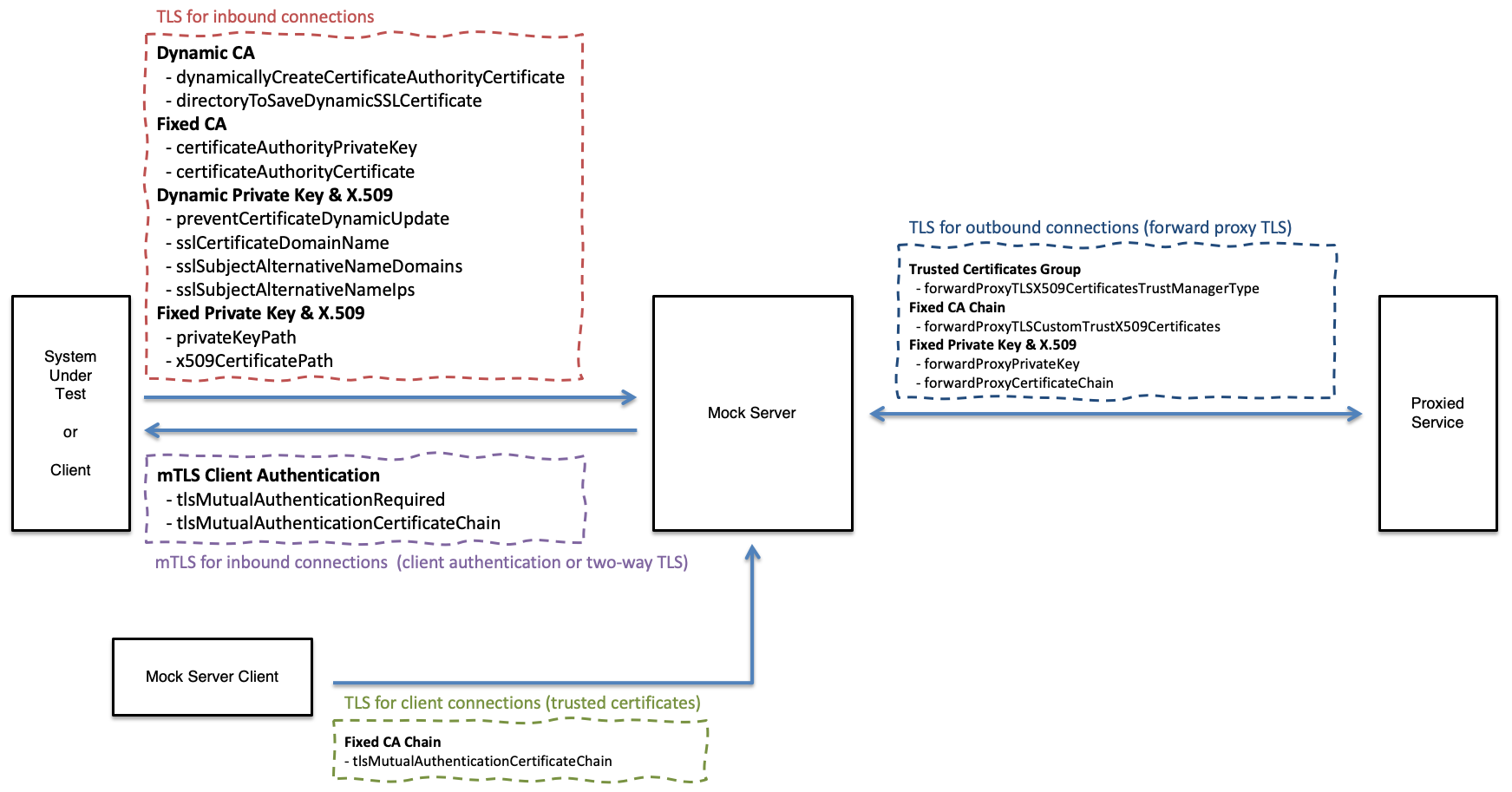
Inbound TLS (for Received Requests)
Dynamic Inbound Certificate Authority X.509 & Private Key
Enable dynamic creation of Certificate Authority X.509 Certificate and Private Key
Enable this property to increase the security of trusting the MockServer Certificate Authority X.509 by ensuring a local dynamic value is used instead of the public value in the MockServer git repo.
These PEM files will be created and saved in the directory specified with configuration property directoryToSaveDynamicSSLCertificate.
A Certificate Authority X.509 Certificate and Private Key will only be created if the files used to save them are not already present. Therefore, if MockServer is re-started multiple times with the same value for directoryToSaveDynamicSSLCertificate. the Certificate Authority X.509 Certificate and Private Key will only be created once.
Type: boolean Default: false
Java Code:
ConfigurationProperties.dynamicallyCreateCertificateAuthorityCertificate(boolean enable)System Property:
-Dmockserver.dynamicallyCreateCertificateAuthorityCertificate=...Environment Variable:
MOCKSERVER_DYNAMICALLY_CREATE_CERTIFICATE_AUTHORITY_CERTIFICATE=...Property File:
mockserver.dynamicallyCreateCertificateAuthorityCertificate=...Example:
-Dmockserver.dynamicallyCreateCertificateAuthorityCertificate="true"Directory used to save the dynamically generated Certificate Authority X.509 Certificate and Private Key.
This directory will only be used if MockServer is configured to create a dynamic Certificate Authority X.509 certificate and private key using dynamicallyCreateCertificateAuthorityCertificate.
By default the certificate and private key are written to the current working directory (.) of the MockServer process.
This setting is startup-only: set it before MockServer starts (system property, environment variable, property file or Configuration). A PUT /mockserver/configuration request cannot change it (a different value is ignored and a warning is logged), so a caller of the control plane cannot redirect where MockServer writes files.
Type: string Default: . (current working directory)
Java Code:
ConfigurationProperties.directoryToSaveDynamicSSLCertificate(String directoryToSaveDynamicSSLCertificate)System Property:
-Dmockserver.directoryToSaveDynamicSSLCertificate=...Environment Variable:
MOCKSERVER_CERTIFICATE_DIRECTORY_TO_SAVE_DYNAMIC_SSL_CERTIFICATE=...Property File:
mockserver.directoryToSaveDynamicSSLCertificate=...Example:
-Dmockserver.directoryToSaveDynamicSSLCertificate="/some/existing/path"Proactively initialise TLS during start to ensure that if dynamicallyCreateCertificateAuthorityCertificate is enabled the Certificate Authority X.509 Certificate and Private Key will be created during start up and not when the first TLS connection is received.
This setting will also ensure any configured private key and X.509 will be loaded during start up and not when the first TLS connection is received to give immediate feedback on any related TLS configuration errors.
Type: boolean Default: false
Java Code:
ConfigurationProperties.proactivelyInitialiseTLS(boolean enable)System Property:
-Dmockserver.proactivelyInitialiseTLS=...Environment Variable:
MOCKSERVER_PROACTIVELY_INITIALISE_TLS=...Property File:
mockserver.proactivelyInitialiseTLS=...Example:
-Dmockserver.proactivelyInitialiseTLS="true"TLS Protocol Versions
Comma separated list of TLS protocol versions to enable for both inbound and outbound TLS connections.
The default value is TLSv1.2,TLSv1.3. TLSv1 and TLSv1.1 are deprecated by RFC 8996 (they are vulnerable to the BEAST and POODLE attacks) and are no longer enabled by default, and TLSv1.3 is now enabled by default.
Breaking change: a client that can only negotiate TLSv1 or TLSv1.1 will no longer be able to complete a handshake with MockServer. If you genuinely need the legacy protocols for an old client, set tlsProtocols back to TLSv1,TLSv1.1,TLSv1.2 and set tlsAllowInsecureProtocols to true — both are required, because the insecure-protocol filter strips TLSv1/TLSv1.1 unless they are explicitly allowed.
Type: string Default: TLSv1.2,TLSv1.3
Java Code:
ConfigurationProperties.tlsProtocols("TLSv1.2,TLSv1.3")System Property:
-Dmockserver.tlsProtocols=...Environment Variable:
MOCKSERVER_TLS_PROTOCOLS=...Property File:
mockserver.tlsProtocols=...Example (enable TLS 1.2 and 1.3 only):
-Dmockserver.tlsProtocols="TLSv1.2,TLSv1.3"Example (Docker environment variable):
MOCKSERVER_TLS_PROTOCOLS="TLSv1.2,TLSv1.3"Whether to honour deprecated TLSv1 / TLSv1.1 entries that appear in tlsProtocols.
The default has been false since 8.0.0: any TLSv1 or TLSv1.1 entries in tlsProtocols are filtered out before the SSL context is built, and the tlsProtocols default is TLSv1.2,TLSv1.3. Set this to true only if a legacy client genuinely cannot negotiate TLSv1.2/TLSv1.3, together with adding the protocols back to tlsProtocols.
Type: boolean Default: false
Java Code:
ConfigurationProperties.tlsAllowInsecureProtocols(boolean allow)System Property:
-Dmockserver.tlsAllowInsecureProtocols=...Environment Variable:
MOCKSERVER_TLS_ALLOW_INSECURE_PROTOCOLS=...Property File:
mockserver.tlsAllowInsecureProtocols=...Example:
-Dmockserver.tlsAllowInsecureProtocols="true"Dynamic Inbound Private Key & X.509
MockServer dynamically updates the Subject Alternative Name (SAN) values for its TLS certificate to add domain names and IP addresses from request Host headers and Host headers in expectations, this configuration setting disables this automatic update and only uses SAN value provided in TLS Subject Alternative Name Domains and TLS Subject Alternative Name IPs configuration properties.
When this property is enabled the generated X.509 Certificate and Private Key pair are saved to the directoryToSaveDynamicSSLCertificate as Certificate.pem and PKCS8PrivateKey.pem
Type: boolean Default: false
Java Code:
ConfigurationProperties.preventCertificateDynamicUpdate(boolean prevent)System Property:
-Dmockserver.preventCertificateDynamicUpdate=...Environment Variable:
MOCKSERVER_PREVENT_CERTIFICATE_DYNAMIC_UPDATE=...Property File:
mockserver.preventCertificateDynamicUpdate=...Example:
-Dmockserver.preventCertificateDynamicUpdate="true"The Common Name (CN) MockServer puts on the auto-generated, dynamically-created inbound TLS certificate it presents to clients. It is also added as the first Subject Alternative Name (SAN) entry alongside any set via sslSubjectAlternativeNameDomains. Change it if your clients connect using a hostname other than localhost (for example a Docker Compose service name or an internal DNS name) and you want that name on the certificate without relying solely on dynamic SAN discovery.
Type: string Default: localhost
Java Code:
ConfigurationProperties.sslCertificateDomainName(String domainName)System Property:
-Dmockserver.sslCertificateDomainName=...Environment Variable:
MOCKSERVER_SSL_CERTIFICATE_DOMAIN_NAME=...Property File:
mockserver.sslCertificateDomainName=...Example:
-Dmockserver.sslCertificateDomainName="localhost"The Subject Alternative Name (SAN) domain names for auto-generate TLS certificates as a comma separated list
Type: string Default: localhost
Java Code:
ConfigurationProperties.sslSubjectAlternativeNameDomains(Set<String> sslSubjectAlternativeNameDomains)On a Configuration instance (per-server, e.g. via ClientAndServer.startClientAndServer(Configuration)), add or clear domains incrementally instead of replacing the whole set:
configuration.addSslSubjectAlternativeNameDomains(String... additionalSubjectAlternativeNameDomains)configuration.clearSslSubjectAlternativeNameDomains()System Property:
-Dmockserver.sslSubjectAlternativeNameDomains=...Environment Variable:
MOCKSERVER_SSL_SUBJECT_ALTERNATIVE_NAME_DOMAINS=...Property File:
mockserver.sslSubjectAlternativeNameDomains=...Example:
-Dmockserver.sslSubjectAlternativeNameDomains="localhost,www.foo.bar"The Subject Alternative Name (SAN) IP addresses for auto-generate TLS certificates as a comma separated list
Type: string Default: 127.0.0.1,0.0.0.0
Java Code:
ConfigurationProperties.sslSubjectAlternativeNameIps(Set<String> sslSubjectAlternativeNameIps)On a Configuration instance (per-server, e.g. via ClientAndServer.startClientAndServer(Configuration)), add or clear IPs incrementally instead of replacing the whole set:
configuration.addSslSubjectAlternativeNameIps(String... additionalSubjectAlternativeNameIps)configuration.clearSslSubjectAlternativeNameIps()System Property:
-Dmockserver.sslSubjectAlternativeNameIps=...Environment Variable:
MOCKSERVER_SSL_SUBJECT_ALTERNATIVE_NAME_IPS=...Property File:
mockserver.sslSubjectAlternativeNameIps=...Example:
-Dmockserver.sslSubjectAlternativeNameIps="127.0.0.1,0.0.0.0"The maximum number of dynamically-discovered Subject Alternative Names (SANs) the auto-generated server certificate will accumulate. MockServer adds a SAN for each new hostname it observes via SNI or the Host header and regenerates the leaf certificate each time. Without a cap, a client sending many distinct hostnames could grow the SAN list without bound, causing unbounded memory and CPU use and eventually producing a certificate too large to complete a TLS handshake.
When the cap is reached, the oldest dynamically-discovered entry is evicted and a warning is logged. Explicitly configured names — including the default localhost and any names set via sslSubjectAlternativeNameDomains or sslSubjectAlternativeNameIps — are never evicted.
Raise this value if you are proxying more than 100 distinct hostnames in a single MockServer instance and are seeing eviction warnings or intermittent certificate name-mismatch errors for hosts used earlier in a long-running session.
Type: integer Default: 100
Java Code:
ConfigurationProperties.maxSubjectAlternativeNames(int maxSubjectAlternativeNames)System Property:
-Dmockserver.maxSubjectAlternativeNames=...Environment Variable:
MOCKSERVER_MAX_SUBJECT_ALTERNATIVE_NAMES=...Property File:
mockserver.maxSubjectAlternativeNames=...Example:
-Dmockserver.maxSubjectAlternativeNames=200Number of days the auto-generated server (leaf) TLS certificate is valid for. The default of 397 keeps the certificate inside Apple's 825-day maximum for TLS server certificates (iOS 13 / macOS 10.15); the previous 10-year certificate exceeded this limit and can cause TLS handshakes to fail on Apple platforms. MockServer automatically regenerates the certificate well before it expires, so a long-running server never serves an expired certificate.
Raise this (for example to 3650) only if you depend on the previous long-lived certificate. A non-positive value falls back to the default. The dynamically generated Certificate Authority is unaffected and keeps its long (10 year) life.
Type: integer Default: 397
Java Code:
ConfigurationProperties.sslCertificateLeafValidityInDays(int sslCertificateLeafValidityInDays)System Property:
-Dmockserver.sslCertificateLeafValidityInDays=...Environment Variable:
MOCKSERVER_SSL_CERTIFICATE_LEAF_VALIDITY_IN_DAYS=...Property File:
mockserver.sslCertificateLeafValidityInDays=...Example:
-Dmockserver.sslCertificateLeafValidityInDays=3650Fixed (i.e. Custom) Inbound Certificate Authority X.509 & Private Key
Location of custom file for Certificate Authority for TLS, the private key must be a PKCS#8 or PKCS#1 PEM file and must match the TLS Certificate Authority X.509 Certificate.
To convert a PKCS#1 PEM file (i.e. default for Bouncy Castle) to a PKCS#8 PEM file the following command can be used: openssl pkcs8 -topk8 -inform PEM -in private_key_PKCS_1.pem -out private_key_PKCS_8.pem -nocrypt
Type: string Default: the built-in MockServer CA private key (org/mockserver/socket/PKCS8CertificateAuthorityPrivateKey.pem on the classpath)
Java Code:
ConfigurationProperties.certificateAuthorityPrivateKey(String certificateAuthorityPrivateKey)System Property:
-Dmockserver.certificateAuthorityPrivateKey=...Environment Variable:
MOCKSERVER_CERTIFICATE_AUTHORITY_PRIVATE_KEY=...Property File:
mockserver.certificateAuthorityPrivateKey=...Example:
-Dmockserver.certificateAuthorityPrivateKey="/some/existing/path"Location of custom file for Certificate Authority for TLS, the certificate must be a X.509 PEM file and must match the TLS Certificate Authority Private Key.
Type: string Default: the built-in MockServer CA certificate (org/mockserver/socket/CertificateAuthorityCertificate.pem on the classpath)
Java Code:
ConfigurationProperties.certificateAuthorityCertificate(String certificateAuthorityCertificate)System Property:
-Dmockserver.certificateAuthorityCertificate=...Environment Variable:
MOCKSERVER_CERTIFICATE_AUTHORITY_X509_CERTIFICATE=...Property File:
mockserver.certificateAuthorityCertificate=...Example:
-Dmockserver.certificateAuthorityCertificate="/some/existing/path"Fixed (i.e. Custom) Inbound Private Key & X.509
File system path or classpath location of a fixed custom private key for TLS connections into MockServer.
The private key must be a PKCS#8 or PKCS#1 PEM file and must be the private key corresponding to the x509CertificatePath X.509 (public key) configuration.
The certificateAuthorityCertificate configuration must be the Certificate Authority for the corresponding X.509 certificate (i.e. able to valid its signature), see: x509CertificatePath.
To convert a PKCS#1 (i.e. default for Bouncy Castle) to a PKCS#8 the following command can be used: openssl pkcs8 -topk8 -inform PEM -in private_key_PKCS_1.pem -out private_key_PKCS_8.pem -nocrypt
This configuration will be ignored unless x509CertificatePath is also set.
Type: string Default: null
Java Code:
ConfigurationProperties.privateKeyPath(String privateKeyPath)System Property:
-Dmockserver.privateKeyPath=...Environment Variable:
MOCKSERVER_TLS_PRIVATE_KEY_PATH=...Property File:
mockserver.privateKeyPath=...Example:
-Dmockserver.privateKeyPath="/some/existing/path"File system path or classpath location of a fixed custom X.509 Certificate for TLS connections into MockServer
The certificate must be a X.509 PEM file and must be the public key corresponding to the privateKeyPath private key configuration.
The certificateAuthorityCertificate configuration must be the Certificate Authority for this certificate (i.e. able to valid its signature).
This configuration will be ignored unless privateKeyPath is also set.
Type: string Default: null
Java Code:
ConfigurationProperties.x509CertificatePath(String x509CertificatePath)System Property:
-Dmockserver.x509CertificatePath=...Environment Variable:
MOCKSERVER_TLS_X509_CERTIFICATE_PATH=...Property File:
mockserver.x509CertificatePath=...Example:
-Dmockserver.x509CertificatePath="/some/existing/path"Inbound mTLS Client Authentication (for Received Requests)
Require mTLS (also called client authentication and two-way TLS) for all TLS connections / HTTPS requests to MockServer
Client certificates must be signed by a CA in tlsMutualAuthenticationCertificateChain or by MockServer's own CA, but never by the default CA bundled with MockServer, whose private key is published. MockServer refuses to start if mTLS would trust only the bundled CA; see tlsMutualAuthenticationAllowBundledCa for the fixes.
In a WAR deployment the servlet container terminates TLS and verifies the client certificate against its own trust store, and MockServer requires a verified client certificate on every mocked request; see Data Plane Authentication Configuration.
Type: boolean Default: false
Java Code:
ConfigurationProperties.tlsMutualAuthenticationRequired(boolean enable)System Property:
-Dmockserver.tlsMutualAuthenticationRequired=...Environment Variable:
MOCKSERVER_TLS_MUTUAL_AUTHENTICATION_REQUIRED=...Property File:
mockserver.tlsMutualAuthenticationRequired=...Example:
-Dmockserver.tlsMutualAuthenticationRequired="true"File system path or classpath location of custom mTLS (TLS client authentication) X.509 Certificate Chain for Trusting (i.e. signature verification of) Client X.509 Certificates, the certificate chain must be a X.509 PEM file.
This certificate chain will be used if MockServer performs mTLS (client authentication) for inbound TLS connections because tlsMutualAuthenticationRequired is enabled
This configuration property is also used for MockServerClient to trust outbound TLS X.509 certificates i.e. TLS connections to MockServer
Type: string Default: null
Java Code:
ConfigurationProperties.tlsMutualAuthenticationCertificateChain(String certificateChain)System Property:
-Dmockserver.tlsMutualAuthenticationCertificateChain=...Environment Variable:
MOCKSERVER_TLS_MUTUAL_AUTHENTICATION_CERTIFICATE_CHAIN=...Property File:
mockserver.tlsMutualAuthenticationCertificateChain=...Example:
-Dmockserver.tlsMutualAuthenticationCertificateChain="/some/existing/path"Let inbound mTLS (tlsMutualAuthenticationRequired or tlsMutualAuthenticationCertificateChain) trust client certificates signed by the default CA bundled with MockServer.
That CA's private key is published in the MockServer jar, so with this set anyone can create a client certificate MockServer accepts, with any name, which also satisfies any client certificate condition in your expectations. Only use it for throwaway local tests. While it is set, a warning is logged whenever the bundled CA becomes trusted (at startup, when a configuration change makes it trusted, and each time the TLS context is rebuilt to trust it).
Without it, MockServer refuses to start, and PUT /mockserver/configuration answers 400, when mTLS would trust the bundled CA. Instead, give MockServer its own CA with certificateAuthorityCertificate and certificateAuthorityPrivateKey, set dynamicallyCreateCertificateAuthorityCertificate to true, or set tlsMutualAuthenticationCertificateChain to the CA that signs your client certificates. See HTTPS & TLS.
It can only be set at startup; PUT /mockserver/configuration cannot change it.
Type: boolean Default: false
Java Code:
ConfigurationProperties.tlsMutualAuthenticationAllowBundledCa(boolean allow)System Property:
-Dmockserver.tlsMutualAuthenticationAllowBundledCa=...Environment Variable:
MOCKSERVER_TLS_MUTUAL_AUTHENTICATION_ALLOW_BUNDLED_CA=...Property File:
mockserver.tlsMutualAuthenticationAllowBundledCa=...Example:
-Dmockserver.tlsMutualAuthenticationAllowBundledCa="true"Outbound Client TLS/mTLS (for Forwarded or Proxied Requests)
Configure trusted set of certificates for forwarded or proxied requests (i.e. TLS connections out of MockServer).
MockServer will only be able to establish a TLS connection to endpoints that have a trusted X.509 certificate according to the trust manager type, as follows:
- ANY - Insecure, trusts all X.509 certificates and does not perform host name verification (the default).
- JVM - Trusts all X.509 certificates trusted by the JVM, and verifies the upstream host name against the certificate (unless forwardProxyTLSHostnameVerificationEnabled is set to false).
- CUSTOM - Trusts all X.509 certificates specified in forwardProxyTLSCustomTrustX509Certificates configuration value, and verifies the upstream host name against the certificate (unless forwardProxyTLSHostnameVerificationEnabled is set to false).
When the TLS connection to the upstream cannot be established — for example its certificate is not trusted, is for another host name, the upstream does not speak TLS, the upstream closes the connection during the handshake, or the handshake takes longer than socketConnectionTimeout — MockServer answers the request with a 502 Bad Gateway whose body says why, such as TLS with the upstream failed: SSLHandshakeException: PKIX path building failed: ..., and logs the failure as an error with the request. An upstream that closes the connection during the handshake, which is also how some servers refuse a TLS version or cipher they do not support, gives TLS with the upstream failed: SSLHandshakeException: upstream closed the connection during the TLS handshake.
Type: string Default: ANY
Java Code:
ConfigurationProperties.forwardProxyTLSX509CertificatesTrustManagerType(ForwardProxyTLSX509CertificatesTrustManager trustManagerType)The parameter is the org.mockserver.socket.tls.ForwardProxyTLSX509CertificatesTrustManager enum (ANY, JVM, or CUSTOM), not a plain string — e.g. ConfigurationProperties.forwardProxyTLSX509CertificatesTrustManagerType(ForwardProxyTLSX509CertificatesTrustManager.CUSTOM).
System Property:
-Dmockserver.forwardProxyTLSX509CertificatesTrustManagerType=...Environment Variable:
MOCKSERVER_FORWARD_PROXY_TLS_X509_CERTIFICATES_TRUST_MANAGER_TYPE=...Property File:
mockserver.forwardProxyTLSX509CertificatesTrustManagerType=...Example:
-Dmockserver.forwardProxyTLSX509CertificatesTrustManagerType="CUSTOM"Whether to verify the upstream host name against its certificate when MockServer forwards or proxies over TLS with a validating trust manager (forwardProxyTLSX509CertificatesTrustManagerType of JVM or CUSTOM).
The default is true. Without host name verification, any certificate signed by a trusted CA — for any host name — would be accepted, which would leave MockServer open to a man-in-the-middle it believes it is protected from. So when you opt into real upstream validation (JVM or CUSTOM) the upstream host name is verified against the certificate as well.
This has no effect for the ANY trust manager type (the default), which deliberately trusts everything and performs no host name verification. Set this to false when you legitimately need to connect to an upstream whose certificate host name does not match the address you connect to (a common testing scenario) while still validating the certificate chain.
Type: boolean Default: true
Java Code:
ConfigurationProperties.forwardProxyTLSHostnameVerificationEnabled(false)System Property:
-Dmockserver.forwardProxyTLSHostnameVerificationEnabled=...Environment Variable:
MOCKSERVER_FORWARD_PROXY_TLS_HOSTNAME_VERIFICATION_ENABLED=...Property File:
mockserver.forwardProxyTLSHostnameVerificationEnabled=...Example:
-Dmockserver.forwardProxyTLSHostnameVerificationEnabled="false"Fixed (i.e. Custom) Outbound CA X.509, Private Key & X.509
File system path or classpath location of custom file for trusted X.509 Certificate Authority roots for forwarded or proxied requests (i.e. TLS connections out of MockServer), the certificate chain must be a X.509 PEM file.
MockServer will only be able to establish a TLS connection to endpoints that have an X.509 certificate chain that is signed by one of the provided custom certificates, i.e. where a path can be established from the endpoints X.509 certificate to one or more of the custom X.509 certificates provided.
This configuration only take effect if forwardProxyTLSX509CertificatesTrustManagerType is configured as CUSTOM otherwise this value is ignored.
Type: string Default: null
Java Code:
ConfigurationProperties.forwardProxyTLSCustomTrustX509Certificates(String customX509Certificates)System Property:
-Dmockserver.forwardProxyTLSCustomTrustX509Certificates=...Environment Variable:
MOCKSERVER_FORWARD_PROXY_TLS_CUSTOM_TRUST_X509_CERTIFICATES=...Property File:
mockserver.forwardProxyTLSCustomTrustX509Certificates=...Example:
-Dmockserver.forwardProxyTLSCustomTrustX509Certificates="/some/existing/path"File system path or classpath location of custom Private Key for forwarded or proxied requests (i.e. TLS connections out of MockServer), the private key must be a PKCS#8 or PKCS#1 PEM file
To convert a PKCS#1 (i.e. default for Bouncy Castle) to a PKCS#8 the following command can be used: openssl pkcs8 -topk8 -inform PEM -in private_key_PKCS_1.pem -out private_key_PKCS_8.pem -nocrypt
This private key will be used if MockServer needs to perform mTLS (client authentication) for outbound TLS connections.
If this file, or the certificate chain, is not valid PEM, every forward over TLS is answered with a 502 Bad Gateway whose body is connection to the upstream could not be set up: RuntimeException: Exception creating SSL context for client, and the error is logged with its cause. Such a forward is not retried and does not count against the forward circuit breaker, because the upstream was never reached.
Type: string Default: null
Java Code:
ConfigurationProperties.forwardProxyPrivateKey(String privateKey)System Property:
-Dmockserver.forwardProxyPrivateKey=...Environment Variable:
MOCKSERVER_FORWARD_PROXY_TLS_PRIVATE_KEY=...Property File:
mockserver.forwardProxyPrivateKey=...Example:
-Dmockserver.forwardProxyPrivateKey="/some/existing/path"File system path or classpath location of custom X.509 Certificate Chain for forwarded or proxied requests (i.e. TLS connections out of MockServer), the certificates must be a X.509 PEM file
This certificate chain will be used if MockServer needs to perform mTLS (client authentication) for outbound TLS connections.
Type: string Default: null
Java Code:
ConfigurationProperties.forwardProxyCertificateChain(String certificateChain)System Property:
-Dmockserver.forwardProxyCertificateChain=...Environment Variable:
MOCKSERVER_FORWARD_PROXY_TLS_X509_CERTIFICATE_CHAIN=...Property File:
mockserver.forwardProxyCertificateChain=...Example:
-Dmockserver.forwardProxyCertificateChain="/some/existing/path"Present a different client certificate and key for outbound mTLS depending on which upstream host MockServer is connecting to. By default the fixed outbound client key/certificate above are used for every upstream; this property lets you override them per host.
The value is a comma-separated list of host=certificateChainPath;privateKeyPath entries. When MockServer opens a TLS connection to a matching upstream host (matched case-insensitively), it presents that host's certificate/key pair; any host that is not listed falls back to the fixed outbound client key/certificate (or, if those are not set, MockServer's own generated certificate). Each certificate chain is an X.509 PEM file and each private key a PKCS#8 or PKCS#1 PEM file.
Type: string Default: null
Java Code:
ConfigurationProperties.forwardProxyClientCertificatesByHost(String clientCertificatesByHost)System Property:
-Dmockserver.forwardProxyClientCertificatesByHost=...Environment Variable:
MOCKSERVER_FORWARD_PROXY_CLIENT_CERTIFICATES_BY_HOST=...Property File:
mockserver.forwardProxyClientCertificatesByHost=...Example:
-Dmockserver.forwardProxyClientCertificatesByHost="api.internal=/certs/api-chain.pem;/certs/api-key.pem,billing.internal=/certs/billing-chain.pem;/certs/billing-key.pem"MockServer Client
File system path or classpath location of custom mTLS (TLS client authentication) X.509 Certificate Chain for Trusting (i.e. signature verification of) MockServer X.509 Certificates, the certificate chain must be a X.509 PEM file. This certificate chain will only be used if MockServerClient performs TLS to calls to MockServer.
This settings is particularly used when connecting to MockServer via a load-balancer or other TLS terminating network infrastructure with its own X.509 Certificate.
This configuration property is also used for MockServer to trust inbound mTLS client authentication X.509 certificates
Type: string Default: null
Java Code:
ConfigurationProperties.tlsMutualAuthenticationCertificateChain(String certificateChain)System Property:
-Dmockserver.tlsMutualAuthenticationCertificateChain=...Environment Variable:
MOCKSERVER_TLS_MUTUAL_AUTHENTICATION_CERTIFICATE_CHAIN=...Property File:
mockserver.tlsMutualAuthenticationCertificateChain=...Example:
-Dmockserver.tlsMutualAuthenticationCertificateChain="/some/existing/path"